Business Bank Statements a Practical Guide
Learn what business bank statements contain, why they matter for bookkeeping and lending, and how to prepare them for accurate automated extraction.
The PDF arrives at month-end, usually with a filename that tells us little about what's inside. Someone needs to turn its rows into ledger entries, match the closing balance to the books, and explain any difference before the close can move on. That routine looks simple until a scanned page, a locked file, a shifted column, or one misread digit turns a clean import into a reconciliation problem.
A business bank statement is more than a list of transactions. It's a structured record with recurring fields, layout variations, and an arithmetic relationship we can test. Once we treat it that way, statement conversion stops being guesswork. The result is either reconciled or flagged, and reviewers can focus their time on exceptions.
Table of Contents
- What a Business Bank Statement Actually Is
- The Fields That Appear on Every Statement
- Common Statement Variations You Will Encounter
- Why These Statements Matter Across the Business
- Preparing Statements for Automated Extraction
- Accuracy Checks and a Repeatable Workflow
- Key Takeaways and Common Questions
What a Business Bank Statement Actually Is
A business bank statement is a periodic record issued by a bank for a business account. It covers a defined statement period and records deposits, withdrawals, fees, and the balances that result from those movements. Most business statements are issued monthly, although a business may also obtain quarterly statements or generate an on-demand export through its banking portal.
At month-end, the practical job is to move from the bank's document to the accounting system without changing what the bank reported. The statement might arrive as a downloadable PDF, a mailed paper document, or a file produced through a banking or accounting workflow. Major banks commonly allow customers to view or download statement PDFs online, and some provide recent or historic access going back up to 7 years, which can matter when we're supporting audits, tax work, lending applications, or old reconciliation questions. Autobankstatement's overview of business bank statements provides a useful visual reference for the document itself.
What the statement is, and what it isn't
A transaction confirmation proves that a particular payment was processed. An account summary may show a balance without showing every movement. A treasurer's report is an internal management document assembled from several sources. The bank statement is different because it's the bank's dated record of activity for that account and period.
Three properties matter downstream:
- Dated: Each statement has a period, and each transaction has a transaction or posting date.
- Sequential: The rows show movements in an order that leads from the opening balance to the closing balance.
- Internally testable: The opening balance, credits, debits, and closing balance should agree mathematically.
A PDF doesn't become reliable data merely because its text can be copied. We still need to preserve the statement period, account identity, row order, descriptions, and balance fields. If those elements are lost during conversion, the spreadsheet may look tidy while no longer representing the bank's record accurately.
The Fields That Appear on Every Statement
Start at the top of the page, not in the transaction table. The header usually identifies the account holder, the account number or a masked equivalent, the statement period, the opening balance, and the closing balance. These fields establish which account we're reviewing and the exact slice of activity represented by the document.
The transaction table then carries the operational detail. Common columns include the date, transaction description or narration, cheque or reference number, debit, credit, and the running balance after each row. Banks don't use identical labels. One may call an outgoing amount a Withdrawal, while another calls it a Debit. Likewise, Deposit and Credit can describe the same underlying direction of movement.
The running balance and closing balance deserve special attention. A parser can extract a date, description, and amount while still putting a debit into the credit column or dropping a row. The balance columns give us a way to test whether the extracted rows still describe the account's movement.
A practical scan from header to footer
At the bottom, look for totals for debits and credits, transaction counts, interest earned, fees charged, and notices about disputed items. Some statements also include service messages, payment cut-off notes, or information about pending or returned activity. Those footer details may not become ledger rows, but they can explain why a total differs from a simple visual count.
| Zone | Field | Typical Purpose |
|---|---|---|
| Header | Account holder and account identifier | Confirms the business and account under review |
| Header | Statement period | Defines the dates covered by the file |
| Header | Opening balance | Establishes the starting point for reconciliation |
| Transaction table | Date and narration | Identifies when activity occurred and what it represents |
| Transaction table | Reference, cheque, debit, and credit | Supports classification, tracing, and posting |
| Transaction table | Running balance | Shows the balance after each movement |
| Footer | Closing balance and totals | Confirms the period result and supports arithmetic checks |
| Footer | Fees, interest, and notices | Captures charges or context that may need separate treatment |
Practical rule: Never validate extracted transactions using the closing balance alone. Use the opening balance, all credits, and all debits together.
Microsoft's description of built-in finance reporting in Business Central follows the same basic logic, showing an opening balance, transactions during the period, and a closing balance grouped by general-ledger account. The labels and presentation vary, but the underlying control remains familiar.
Common Statement Variations You Will Encounter
Two PDFs can report the same kind of account activity and still require different handling. A native digital PDF contains a text layer, so we can often select the transaction rows and extract their characters directly. A scanned statement is an image of a page. It requires OCR, and OCR may misread characters, merge columns, or lose the relationship between a description and its amount.
Password protection creates a separate issue. Some banks wrap monthly exports in a customer-specific password, so an automated workflow must access the file before it can parse the page. A batch process that expects every file to share one password can stall when passwords vary by account or statement.
The formats that cause the most confusion
| Variation | What It Looks Like | Impact on Extraction |
|---|---|---|
| Native digital PDF | Selectable text and searchable rows | Usually permits direct text parsing |
| Scanned statement | Image-based page with no selectable transaction text | Requires OCR and closer visual review |
| Password-protected PDF | The bank requests a password before displaying content | Password handling must happen before parsing |
| Multi-account statement | Several accounts bundled into one document | Pages may need to be split by account before processing |
| Business statement | Detailed references, payroll batches, card settlements, or merchant clues | More fields may need normalization and classification |
| Personal statement | Often simpler descriptions and fewer business-specific references | Business coding rules may not transfer cleanly |
A consolidated PDF covering several accounts creates a page-level problem before it becomes a transaction-level problem. If we mix checking, savings, or card settlement pages into one output, the opening and closing balances may no longer describe one account.
Business statements also tend to carry richer reference information than personal statements. Batched payroll, card settlement lines, and merchant-related descriptions can help a reviewer understand the source of funds or the purpose of an outgoing payment. That information can disappear if we reduce every row to only a date and amount.
The practical lesson is straightforward. A rigid template works only when the bank, account type, and layout remain stable. A conformant extraction process should first identify the document structure, then map the visible fields into consistent output columns. It shouldn't assume that the fifth column is always a debit because it was a debit in last month's file.
Why These Statements Matter Across the Business
The same statement supports different decisions for different teams. A bookkeeper needs dates, descriptions, references, and amounts to post activity to the general ledger. A reconciler needs the opening balance, running balance, closing balance, and information about cleared or uncleared activity to determine whether the ledger agrees with the bank's record.
Lenders and underwriters use a different subset of the document. Business bank statements are commonly reviewed over 3, 6, or 12 months to derive measures such as income stability, monthly cash flow, average daily balance, recurring debt obligations, and NSF or overdraft frequency. Terra Insight's explanation of bank statement analysis in credit underwriting describes how those features support repayment-capacity assessment and fraud-risk review.
The fields depend on the question
Tax support and audit defence require a traceable history of deposits and withdrawals tied to gross figures. A reviewer may need to move from a reported total to the original row, then from the row to the source statement. A clean spreadsheet helps, but it doesn't replace the original PDF or the arithmetic evidence that the extracted rows reconcile.
| Business Use | Key Statement Fields |
|---|---|
| Bookkeeping | Date, narration, reference, debit, credit |
| Bank reconciliation | Opening balance, transactions, running balance, closing balance |
| Lending review | Inflows, outflows, average daily balance, recurring obligations, overdraft indicators |
| Tax support | Deposit and withdrawal history, fees, interest, statement period |
| Audit response | Account identity, dated source document, row-level detail, totals, balance trail |
| Cash-flow monitoring | Recurring inflows, scheduled debits, balance movement, fees |
For proof of income, we shouldn't cite a balance without explaining the period and the nature of the supporting entries. The guide to using bank statements as proof of income is relevant when a lender, landlord, or other reviewer asks for evidence rather than an internal estimate.
Open banking adds another route for sharing financial data, but it hasn't removed PDF statements from SME workflows. One industry estimate says more than 80% of SMEs still rely on traditional methods for sharing financial data, while PDF statements remain the primary data source for loan applications. The same market snapshot estimated 13.3 million active open banking users in March 2025, illustrating coexistence rather than complete replacement. Atlys' discussion of bank statements for visa and financial verification contains that market snapshot.
Preparing Statements for Automated Extraction
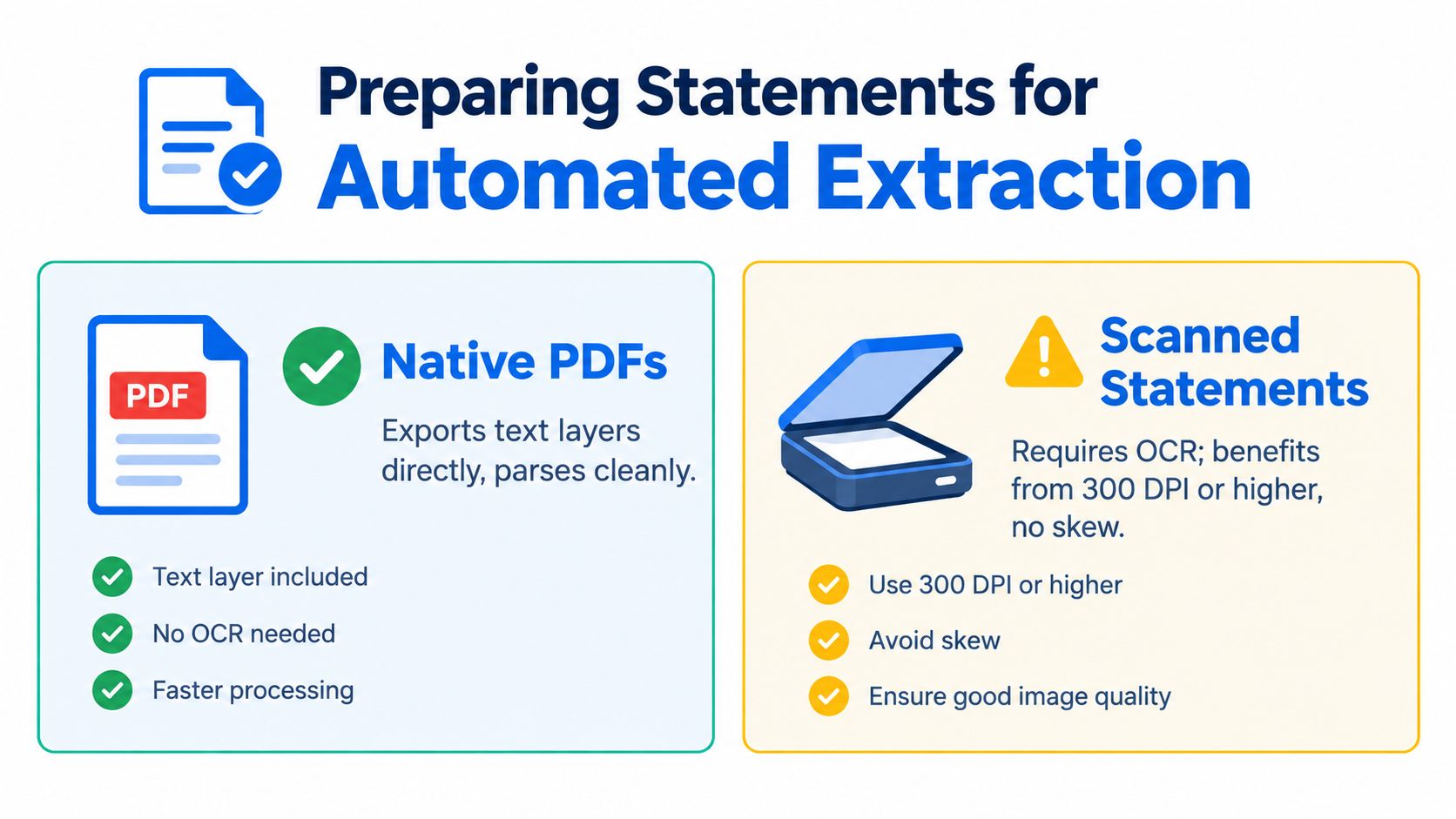
Conversion quality starts before upload. First determine whether the file is a native PDF or a scan. Native PDFs export their text layers directly and generally parse more cleanly. Scanned statements require OCR, and image quality affects whether the system can distinguish a digit, decimal point, date, or column boundary.
If we control the scan, use 300 DPI or higher and keep pages straight. Skewed pages make row alignment harder, especially where the bank places debit, credit, and balance figures close together. Preserve the original digital file whenever the bank provides one. Printing a native PDF and scanning it again removes useful text structure for no accounting benefit.
Prepare the batch, not just the first file
Password-protected PDFs should be accompanied by the correct password for each file. A shared convention can work where the bank uses one predictable rule, but random per-file passwords can interrupt a bulk run if nobody has recorded them. Test one representative statement before adding the rest of the period.
Keep very large combined documents under control by splitting them by account or period before upload. Autobankstatement accepts files up to 25 MB each and supports bulk upload, so a sensible batch structure can reduce confusion without forcing unrelated accounts into one output. It converts digital, scanned through OCR, and password-protected PDF statements into CSV or Excel/XLSX files, with a free guest preview available before payment. Use automatic data extraction for bank statements when the work requires repeatable conversion rather than manual copy-paste.
Before any extracted rows reach the general ledger, run the core integrity test:
Opening balance + total credits − total debits = closing balance
If the equation fails, flag the statement. Don't repair a suspicious row by intuition and continue. Isolate the file, compare the extracted table with the source PDF, and determine whether the issue came from OCR, column assignment, a missing transaction, a duplicated row, or a bank-specific presentation.
A lender-focused OCR and bank statement extraction example also describes balance reconciliation for digital, password-protected, and scanned statements, including a tolerance check when the equation doesn't match. The control is valuable because it tests the document as a complete object, not just as a collection of plausible-looking cells.
Accuracy Checks and a Repeatable Workflow
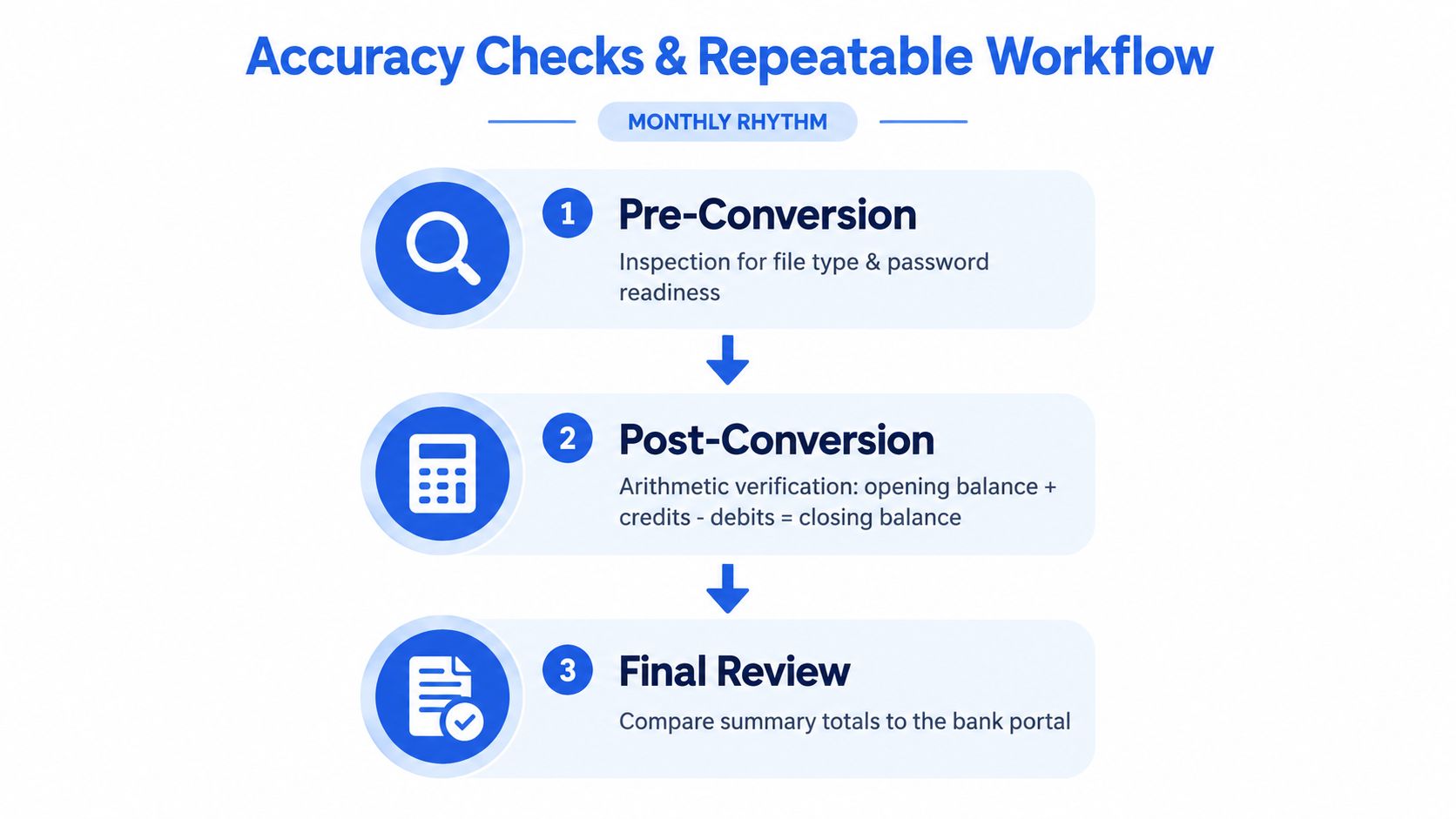
A reliable monthly process has three checkpoints. The first happens before conversion, when we confirm the file type, statement period, account, page count, and password readiness. The second happens after conversion, when we test the balance equation. The third happens during final review, when we compare selected rows and summary totals with the source PDF or bank portal.
The monthly operating rhythm
- Pre-conversion inspection: Confirm the account and period, identify scans, and make sure each locked file has its password.
- Post-conversion verification: Check opening balance + credits − debits = closing balance. Any failure becomes an exception, not an import.
- Final review: Spot-check a small selection of transactions against the source and compare the converted summary totals with the bank record.
Retain the original PDFs in a dated folder structure and store the converted CSV or XLSX files alongside them. Keep flagged statements in a separate exception folder or log, with a short note explaining what failed and who is resolving it. This gives the next reviewer a clear trail without requiring them to reconstruct the month from email attachments.
For variable workloads, a credit-based service can be more practical than a fixed-seat arrangement because processing follows statement volume rather than headcount. Autobankstatement offers Starter at $15 per month for 400 pages, Professional at $30 per month for 1,000 pages, and Business at $50 per month for 4,000 pages, with annual discounts and custom enterprise limits. It converts PDF statements to CSV or XLSX, supports bulk upload, offers registered users 24-hour download access, and automatically deletes uploads within 24 hours. Use those options only if they fit the team's review controls and retention policy. They don't remove the need for arithmetic verification.
Key Takeaways and Common Questions
Treat every business bank statement as structured data, not as a picture to copy. Preserve the native digital file when available, match each output file to its statement period, and run opening balance + credits − debits = closing balance before trusting extracted rows.
What should we do with a combined multi-account PDF? Split it by account or period first, then reconcile each output separately. One combined balance test can hide an error in an individual account.
How should we handle a password-locked PDF? Record the password with the correct file and open it before parsing. If the password is wrong or missing, flag the file rather than treating an empty extraction as a zero-transaction period.
Do monthly and quarterly statements use different fields? The presentation may change, but both generally contain account identification, a statement period, transaction detail, and opening and closing balances.
Which figures should we give a lender as proof of balances? Provide the statement period, account identification, opening balance, closing balance, and relevant transaction detail. If the question concerns income or repayment capacity, include the supporting inflow and recurring-obligation history rather than citing a balance alone.
For teams converting business bank statements, autobankstatement turns digital, scanned, and password-protected PDFs into CSV or Excel/XLSX files, with bulk upload, a free guest preview, and temporary file handling that deletes uploads within 24 hours. Visit autobankstatement to preview a statement conversion workflow and build the arithmetic checks into your monthly reconciliation process.
Convert your next statement in minutes
Upload a bank statement PDF — digital, scanned, or password-protected — preview the extracted table, and download clean CSV or Excel.