AR & AP Explained: A Practical Guide for Finance Teams
Learn what AR & AP are, how their workflows differ, and best practices for reconciliation, statement parsing, and cashflow analysis. A clear guide
At month-end, AR and AP rarely feel like separate topics. We're usually staring at one bank statement that mixes customer receipts, vendor payments, payroll, fees, interest, and the odd line that nobody can identify on first pass.
That's why AR & AP make more sense as two halves of the same cashflow story. One side asks whether incoming cash was applied to the right customer balance. The other asks whether outgoing cash matched an approved bill, the right vendor, and the right timing. If either side is loose, the close can look tidy in the general ledger while the bank activity still tells a different story.
Table of Contents
- Why AR and AP Matter at Month-End
- What AR and AP Actually Mean
- How AR and AP Workflows Differ
- Parsing the Bank Statement That Links Both
- Reconciliation as an Arithmetic Control
- Reading AR and AP Together for Cashflow
- Why Automation Has Not Finished the Job
- A Practical AR and AP Checklist
Why AR and AP Matter at Month-End
By the last two days of close, the pressure usually lands on the same screen. Someone has a PDF bank statement open, the cash account needs to reconcile, and half the lines are too vague to post with confidence. A customer payment may match three open invoices. A vendor debit may clear for the right amount but on the wrong supplier record. Until those lines are parsed, checked, and tied back to support, AR and AP remain unfinished work, not settled balances.
That is why AR and AP matter so much at month-end. They are the two sides of the same cash movement. Every receipt affects receivables quality. Every payment affects payables accuracy. If either side is weak, cash may be right in total while the subledgers are wrong in the details, which is exactly how teams end up closing the month and reopening questions a few days later.
Where the process typically fails
The failure point is rarely the headline cash balance. It is the step before reconciliation is signed off. Teams extract statement data, skim line descriptions, and make judgment calls under time pressure. Some of those calls are fine. Some create cleanup work that rolls into the next month.
Three problems show up over and over:
- Unapplied receipts leave customer balances overstated even though the money has already hit the bank.
- Mismatched or duplicate disbursements reduce cash correctly but leave AP open, distort vendor aging, or trigger avoidable supplier disputes.
- Poorly described bank lines force manual validation because the posting cannot be trusted without checking remittance details, invoice support, or prior payment history.
I tell teams to treat bank-line review as an accounting control, not clerical cleanup.
A clean close depends on whether each inflow and outflow can be traced to a credible source document and posted to the right party, period, and balance. That is why PDF statement parsing and extracted-data validation matter in the AR/AP process. The faster a team can turn raw bank text into reviewed transactions, the faster it can spot unapplied cash, misposted payments, and timing differences before they harden into reconciliation items. For a practical walkthrough, see this guide on how bank reconciliations work in practice.
What AR and AP Actually Mean
AR and AP are simple in concept, but teams often talk about them in ways that make them sound more abstract than they are.
Accounts receivable (AR) is money customers owe us. It's an asset. It usually starts with an invoice and is supported by sales records, contracts, delivery evidence, and remittance details.
Accounts payable (AP) is money we owe vendors or suppliers. It's a liability. It usually starts with a vendor invoice and is supported by purchase orders, receipts, service confirmation, and payment terms.
The easiest way to think about it
AR is the IOU pile on our desk. AP is the bill stack waiting to be paid.
The direction of money is the cleanest distinction:
- AR points to future cash coming in
- AP points to future cash going out
Ownership also differs in most organizations. AR often sits with billing, collections, or a finance team working closely with sales. AP usually sits with procurement support, an AP clerk, or shared finance operations.
AR vs AP at a Glance
| Dimension | Accounts Receivable (AR) | Accounts Payable (AP) |
|---|---|---|
| Basic meaning | Money owed to the business | Money the business owes |
| Ledger type | Asset | Liability |
| Cash direction | Inflow expected | Outflow expected |
| Common support | Customer invoice, contract, remittance advice | Vendor invoice, purchase order, receipt, terms |
| Typical owner | Billing, collections, finance | AP clerk, procurement support, finance |
| Main concern | Will we collect it correctly and on time? | Will we pay it correctly and on time? |
| Endpoint | Customer payment on bank statement | Vendor payment on bank statement |
Both sides land in the same general ledger. Both sides end up against the same bank activity. That's where the distinction becomes practical instead of academic.
AR and AP don't stay separate for long. By the time cash moves, both have to survive the same reconciliation test against the bank record.
That shared endpoint matters because the bank statement is often the only place where cash movement is visible in one sequence. The receivable might look fine in the subledger. The payable might look approved in the ERP. But until the statement shows the right amount, date, and counterparty behavior, we still haven't finished the accounting work.
How AR and AP Workflows Differ
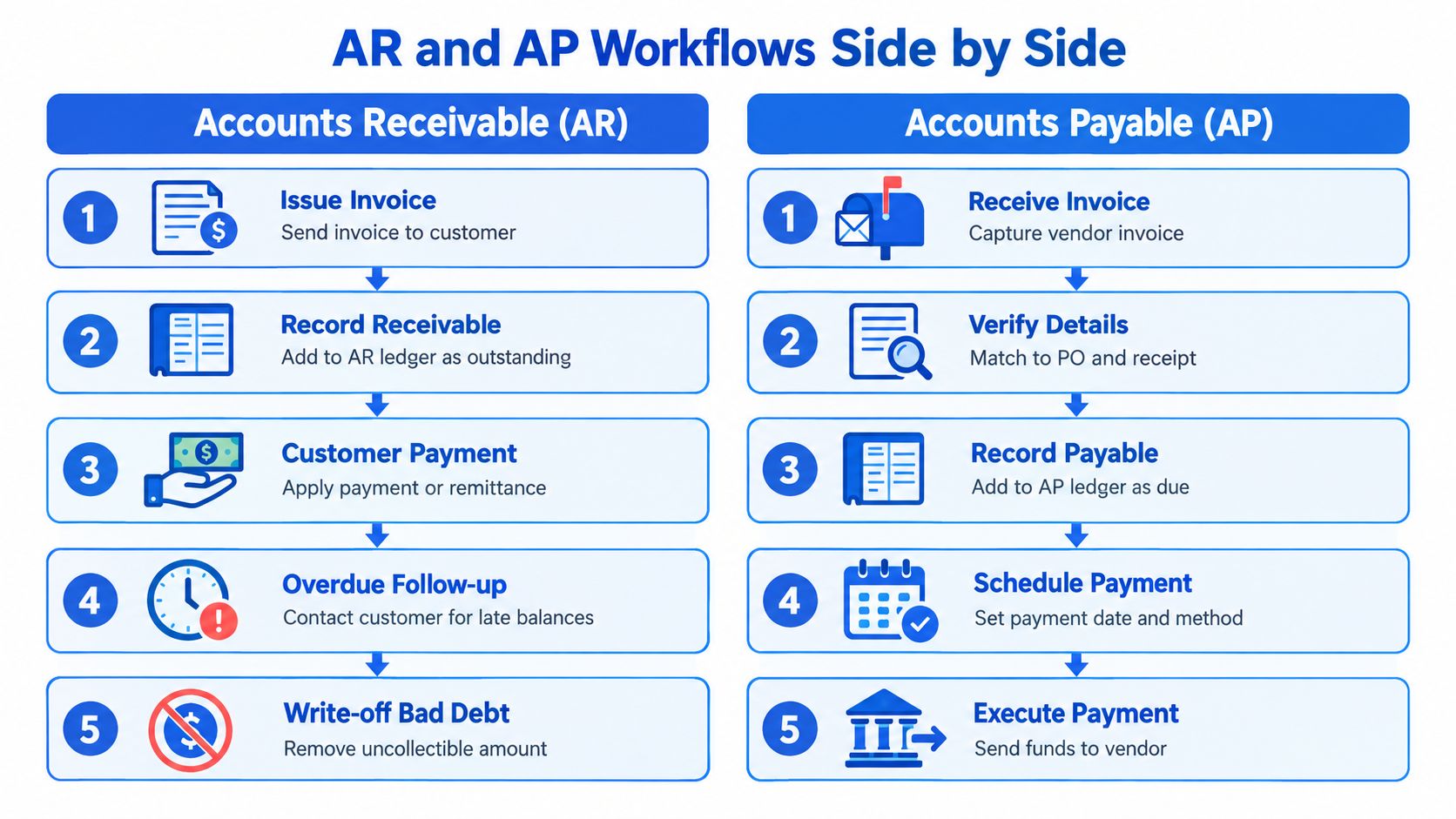
AR and AP are parallel workflows, but they don't fail in the same places. AR is built around billing and collection. AP is built around validation and controlled payment.
The AR path
A standard AR flow usually follows this pattern:
- Issue the invoice after goods or services are delivered.
- Record the receivable in the customer ledger.
- Wait for payment or remittance and apply the cash to the open item.
- Follow up on overdue balances when payment terms are missed.
- Write off bad debt if needed when collection is no longer likely.
The timing risk in AR is outside our control more often than finance teams like to admit. Customers pay early, on time, late, partially, or with short-paid deductions that have to be researched.
The AP path
AP has a different rhythm:
- Receive the vendor invoice
- Match it to the PO and receipt, if those exist
- Record the payable
- Schedule payment
- Execute the payment and clear the item
The biggest AP failures aren't usually about waiting. They're about paying the wrong thing, paying twice, or paying without proper support. That's why three-way matching and disciplined invoice capture matter more than speed alone. A useful companion topic is why accounting data entry still shapes control quality.
Where the risk diverges
AR and AP also create different review habits:
- AR risk centers on collection, unapplied cash, disputed invoices, and bad debt.
- AP risk centers on duplicates, unauthorized disbursements, missed credits, and fraud exposure.
- Both workflows eventually rely on the bank statement to prove that cash moved.
A customer payment with a vague reference can delay AR clearing even when the cash has arrived. A vendor payment with a changed name format can delay AP clearing even when treasury sent the money exactly as planned. In both cases, the subledger problem isn't solved until the bank line is matched and explained.
That's why AR and AP teams benefit from looking at the same downstream artifact. Separate workflows upstream. Shared proof of cash downstream.
Parsing the Bank Statement That Links Both
Most of the hard work in AR & AP isn't the theory. It's getting a messy statement into rows that someone can review. A bank PDF isn't useful until dates, amounts, descriptions, balances, and counterparties are extracted in a consistent format.
From document to structured rows
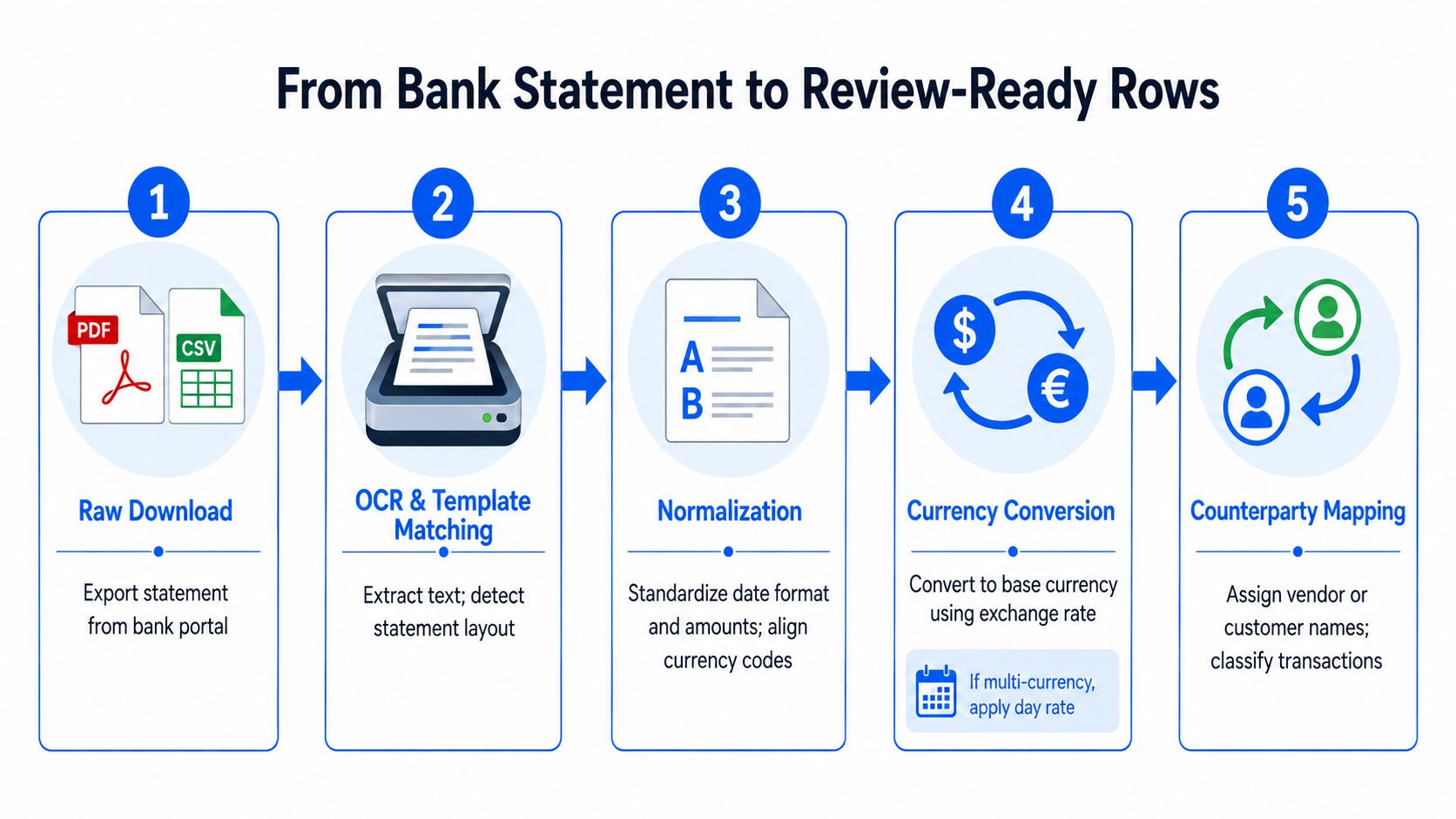
The process usually follows a practical sequence:
- Capture the file. The statement may be a text PDF, a scanned PDF that needs OCR, or a locked file that needs password handling.
- Detect layout and extract text. OCR and template matching do most of the heavy lifting.
- Normalize fields. Dates need one format. Debits and credits need one sign logic. Descriptions need line breaks and noise removed.
- Handle currency issues if needed. Multi-currency statements often need base-currency treatment for review consistency.
- Map counterparties and references. That's where the same row becomes useful to AR or AP.
The core idea behind data parsing in accounting workflows is simple. We take an unstructured document and turn it into columns that support review instead of copy-paste.
Which fields matter most
For AR review, the highest-value fields are usually:
- Customer name or payer name
- Reference or invoice number
- Inbound credit amount
- Value date
- Running balance for reasonableness
For AP review, the focus shifts:
- Vendor name or payee
- Bill or payment reference
- Outbound debit amount
- Payment date
- Bank description that confirms method or batch
A single parsed row can serve both sides differently. A credit from an unfamiliar legal entity might be valid AR cash if it matches a parent-company remittance. The same ambiguity on the debit side might trigger AP review because a vendor name changed, a payment batch was combined, or a refund offset hit the account unexpectedly.
Layout drift is real. When a bank changes spacing, headings, or transaction descriptions, yesterday's parser assumptions can stop being safe.
That's why extracted data always needs retesting when statement layouts change. Trust is earned at the arithmetic and line-description level, not assumed because the bank logo looks familiar.
Reconciliation as an Arithmetic Control
Month-end usually gets messy in one predictable way. AR says cash came in. AP says cash went out. The bank statement is the only shared record that proves which entries cleared, and reconciliation starts with arithmetic before anyone starts explaining variances.
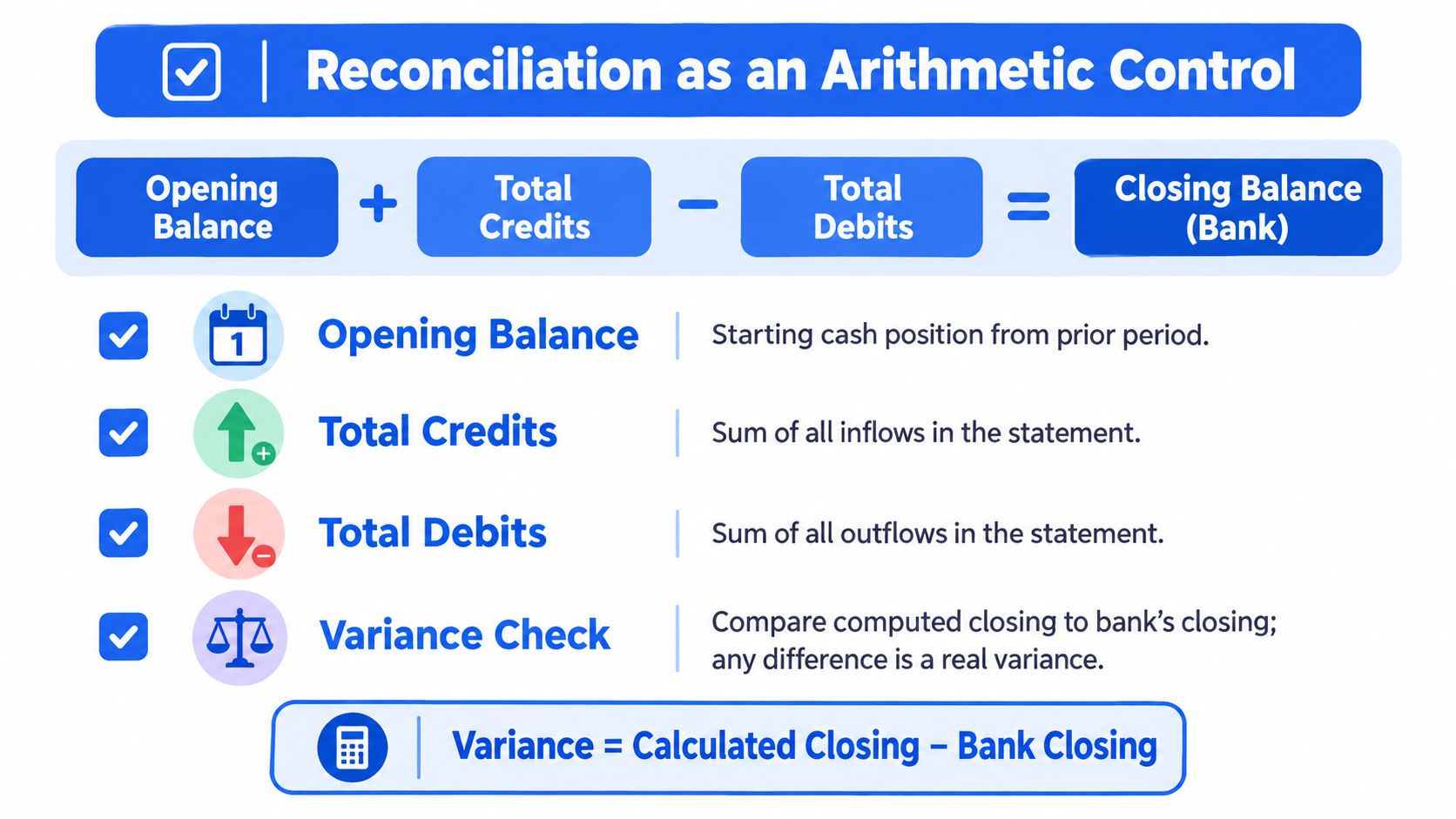
The first test is simple: opening balance + credits - debits = closing balance. If the parsed statement does not satisfy that identity, stop there. Do not match customer receipts. Do not clear vendor payments. Fix the extraction, the sign logic, or the missing rows first.
That check lines up with standard bank reconciliation practice described by CPA Ireland, which explains that reconciliation works by comparing the cash book and bank statement, then identifying timing differences and items recorded on only one side in its bank reconciliation guidance. In practice, that means the opening balance has to tie to the prior period, the transaction totals have to foot, and each difference needs a reason you can document.
What the arithmetic catches
When the equation fails, the break is usually operational, not abstract. Common causes include:
- A dropped or duplicated line in the PDF extraction
- Reversed signs on debits or credits
- Bank fees, interest, or direct debits posted by the bank before the books catch up
- Cutoff differences such as deposits in transit or payments issued but not yet cleared
- FX translation or rounding issues where statement currency and ledger currency do not match
- Misapplied cash or payment mapping errors where the amount is real but attached to the wrong customer or vendor
AR and AP stop looking like separate ledgers and start acting like one cashflow system. A customer receipt that does not reconcile cleanly leaves AR overstated or unapplied. A vendor payment that clears without a clean match leaves AP misstated or masks duplicate payment risk. Both problems begin on the same bank line.
Teams often want automation to jump straight to matching logic. In practice, arithmetic control earns that right. If the statement parser misses one row on page two, or splits a batch payment description badly enough to distort the amount field, every downstream match can look plausible while still being wrong.
If a bank line cannot be matched to the books, it stays on an exceptions list until someone proves what it is and whether AR, AP, or the cash book needs the correction.
That is the control objective. Reconciliation ties recorded cash to cleared cash, then isolates the differences that still need action. Speed matters, but only after the statement data is complete, the math holds, and the exception list is real enough for the team to work.
Reading AR and AP Together for Cashflow
A cash forecast built from only one side of the ledger isn't a forecast. It's a partial narrative. AR & AP have to be read together because both draw from the same cash pool.
Collected receivables lift available cash. Scheduled payables reduce it. If either side is stale, the forecast drifts fast.
Where the weekly cash view gets its inputs
The strongest short-term cash view usually combines aged receivables, approved payables, and reconciled bank activity in one working model.
| Cashflow Driver | Source Side | Forecast Impact | Manual Risk |
|---|---|---|---|
| Customer invoices coming due | AR | Indicates expected inflows | Old aging, disputed invoices, unapplied receipts |
| Customer cash already received | AR plus bank | Confirms realized inflows | Misapplied remittances, unidentified payer names |
| Vendor invoices approved for payment | AP | Indicates expected outflows | Missing credits, duplicate bills, wrong due dates |
| Payments already cleared | AP plus bank | Confirms realized outflows | Batch references that don't map cleanly to invoice detail |
| Bank fees, interest, and adjustments | Bank statement | Moves actual cash outside normal trade flows | Posted after close cut-off or missed in books |
Where manual gaps distort the picture
Three issues distort short-range forecasting more than teams expect:
- Unapplied receipts make AR look worse than cash reality.
- Late accrual postings make AP look lighter than the payment calendar suggests.
- Vendor statements that lag the bank create timing gaps between what cleared and what suppliers say is still open.
The practical answer isn't to separate AR and AP review more aggressively. It's the opposite. We get a more believable forecast when collections, payables, and reconciliation are reading from the same dated set of bank-cleared facts.
That shared view becomes especially important in businesses where customer receipts and vendor runs cluster around a few heavy days each month. In those environments, even a clean aging report can mislead if it isn't grounded in cleared bank movement.
Why Automation Has Not Finished the Job
Finance software has improved the mechanics of AR and AP, but it hasn't removed the review burden. The gap is still wide enough to matter operationally.
Industry benchmarks summarized by Autopayables report that manually processing an invoice costs about $12.88 to $19.83 and takes around 14.6 days, while automated processing can bring cost down to about $3 or less per invoice and cut cycle time by more than half. The same benchmarks also cite manual invoice error rates around 39% compared with under 0.1% for AI-based systems in this AP automation statistics summary.
Where automation does help
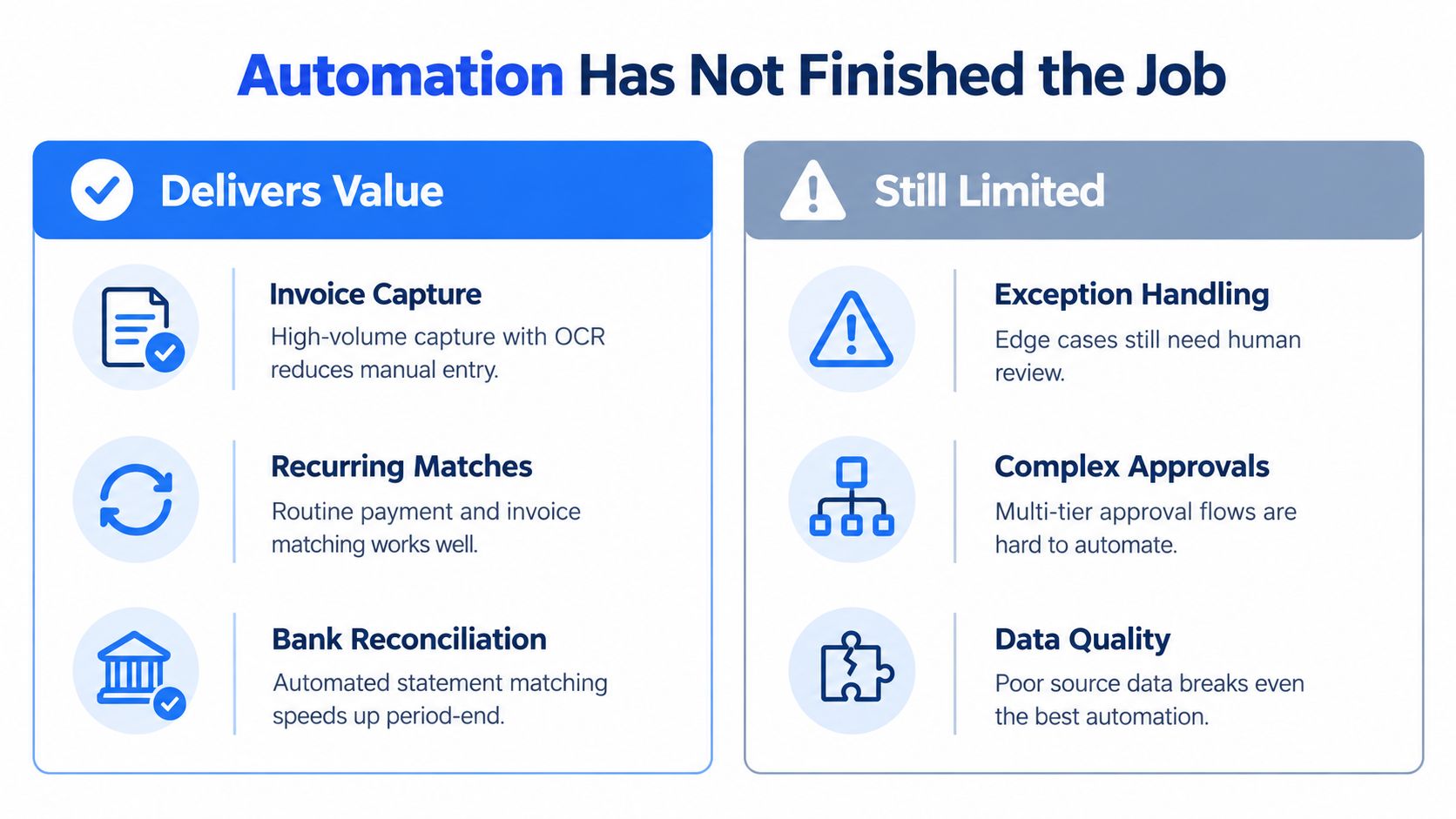
Automation earns its keep in repetitive, high-volume work:
- Invoice capture and extraction where fields are standard enough for reliable OCR
- Recurring payment matching where references repeat in a stable pattern
- Bank statement ingestion where teams need raw rows quickly for review
A 2025 LEK report says only 4.6% of AP processes and 5.1% of AR processes are fully automated, which shows how much of the workload still sits in hybrid review environments in LEK's AR/AP operations report.
Where humans still decide
Automation still struggles when the work depends on judgment:
- vendor names vary across entities
- one-off adjustments don't follow normal rules
- intercompany netting breaks straightforward matching
- disputes need context, not just pattern recognition
Independent AP research also found that 74% of teams were only partially automated, and that 19% of organizations already used AI in AP while another 30% planned adoption within 12 months, according to the IFOL and SAP Concur AP Automation Trends 2024 report.
The mistake is expecting end-to-end autonomy. What works better is using automation as a triage layer. It handles the predictable volume, then pushes exceptions to reviewers who understand vendors, customers, approvals, and cash application.
A Practical AR and AP Checklist
Teams don't need a new framework. They need a checklist that catches the failures that create rework.
AR review
- Check overdue balances and flag invoices that need collections follow-up.
- Review unapplied cash against remittance details and bank credits.
- Confirm disputed items aren't being carried as routine overdue AR.
- Spot-check customer references where payer names differ from invoice names.
AP review
- Scan open vendor balances for old items, duplicate invoices, and unapplied credits.
- Confirm payment runs cleared the bank as expected.
- Review exception payments that bypassed the normal schedule.
- Match vendor statements to open AP where suppliers report differences.
Bank reconciliation
- Tie the opening balance to the prior closing balance.
- Verify the arithmetic that opening balance plus credits minus debits equals closing balance.
- Post bank-only items such as fees, interest, or other statement adjustments.
- Carry forward true timing differences instead of forcing a match.
Statement parsing validation
- Spot-check extracted dates and signs on debits and credits.
- Compare line descriptions to the source PDF where names or references look incomplete.
- Test totals by statement section before using the file for ledger work.
- Retest when the layout changes because a parser that worked last month may not hold after a bank format update.
A checklist like this works because every item ties back to cashflow accuracy. It doesn't just help us close the month. It helps us trust the close.
If your team is spending too much time copying bank activity out of PDFs before AR and AP review even begins, autobankstatement can help. It converts digital, scanned via OCR, and password-protected PDF bank statements into CSV or Excel/XLSX, supports bulk upload for files up to 25 MB, and gives a free guest preview before payment. Registered users get 24-hour download access, uploads auto-delete within 24 hours, and the plans are straightforward: Starter is $15/mo for 400 pages, Professional is $30/mo for 1,000 pages, and Business is $50/mo for 4,000 pages, with annual discounts and custom enterprise limits.
Convert your next statement in minutes
Upload a bank statement PDF — digital, scanned, or password-protected — preview the extracted table, and download clean CSV or Excel.