Extracting Data from Images: A 2026 Guide for Finance
Learn how extracting data from images can streamline finance workflows, reduce manual entry, and improve accuracy. A practical guide for 2026.
Tuesday morning in a four-person accounting firm rarely starts with clean data. A bookkeeper is working through a 40-page stack of client bank statements, and several pages are phone photographs emailed as attachments. Two reconciliations refuse to close because deposits don't match the totals printed by the bank. The cause is small but consequential, a decimal point misread in an image of a scanned check.
That experience captures the problem with extracting data from images. Getting text into a spreadsheet isn't enough. The rows must preserve dates, amounts, debits, credits, and balances well enough to reconcile to the source statement. We need a workflow that treats preprocessing, engine selection, document quality, and verification as one connected control, not as separate technology decisions.
The practical question is simple: what does it take to make extracted rows match the numbers the bank printed, month after month, across many clients? The answer starts with how the pipeline works, then moves through engine trade-offs, failure patterns on real scans, preprocessing, and the checks that determine whether the output is ready for bookkeeping.
Table of Contents
- The Monthly Close That Hinges on a Scan
- How Image-to-Data Extraction Actually Works
- Choosing an OCR Engine for Statement Work
- Why Scanned Bank Statements Break OCR
- Preprocessing That Lifts Accuracy Before Extraction
- Verifying Extracted Rows Before You Trust Them
- A Repeatable Workflow for Finance Teams
- What to Take Away From the Pipeline
The Monthly Close That Hinges on a Scan
The bookkeeper first isolates the two problem statements. The PDF viewer shows the printed deposit total, while the spreadsheet contains transaction rows that look reasonable at a glance. One check image includes a faint decimal and a dark border from the original scan. OCR has interpreted the amount as a larger whole number, so the transaction list no longer agrees with the statement footer.
Teams lose time reviewing rows one by one, comparing figures against the image, and often finding that the visible text is mostly correct. The failure is concentrated in the fields that matter most to reconciliation, including decimal points, signs, dates, and column placement. A clean-looking export can still carry one wrong number that prevents the entire account from closing.
Practical rule: Treat every extracted row as unverified until it agrees with the source statement's printed totals.
The issue isn't limited to checks. Phone photos introduce perspective distortion, scanned pages can be faint or skewed, and multi-page statements may change layout between account periods. A system that performs well on a clean digital PDF can behave differently when the same information arrives as a compressed image.
The standard we use
For finance teams, the output isn't “text recognized.” The output is a spreadsheet where each transaction can withstand review. That means preserving the transaction grid, separating deposits from withdrawals, retaining running balances, and flagging uncertain fields instead of passing them downstream.
The rest of this guide follows that standard. We'll look at the extraction pipeline, compare open-source OCR, cloud services, and document-AI platforms, examine why difficult scans fail, and build a monthly process that ends with arithmetic reconciliation. The technology matters, but the control around it matters more.
How Image-to-Data Extraction Actually Works
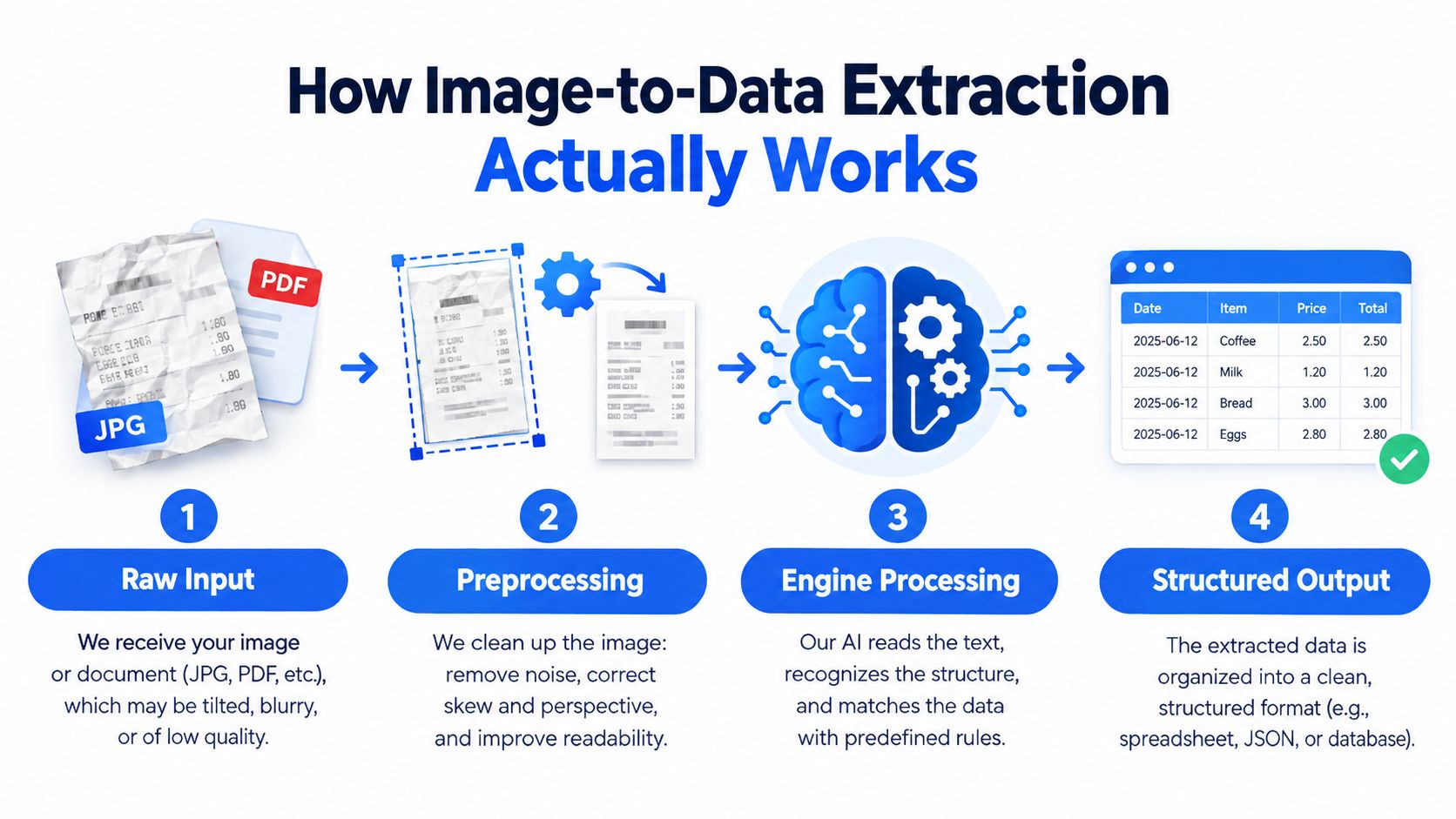
Image-to-data extraction is a pipeline, not a single recognition event. A raw JPG or scanned PDF must be prepared, interpreted, organized, and checked before it becomes a trustworthy spreadsheet row.
The input needs preparation
Preprocessing comes first. A crooked phone photograph may need deskewing so the text baseline is level. A faint scan may need denoising and contrast adjustment so characters separate from the background. If the page is rotated, folded, shadowed, or compressed, recognition starts with a damaged signal.
This stage doesn't create new information. It makes existing information easier for the engine to interpret. A weak preprocessing decision can affect every later field, including the amount, date, description, and balance.
Recognition reads more than characters
The OCR engine identifies characters and generally records their locations through bounding boxes. That location data matters because a bank statement isn't just a paragraph. It contains a transaction date beside a description, then debit or credit values and a running balance.
Layout analysis turns those individual tokens into meaningful groups. The system tries to distinguish lines, columns, tables, headers, and totals. If it reads every character correctly but assigns a debit amount to the adjacent credit column, the resulting data is still wrong.
Post-processing supplies the controls
The final stage converts recognized content into structured fields. Rules can use regular expressions to validate dates and currency formats, field anchors to locate recurring labels, and arithmetic to test whether balances make sense. These checks catch errors that raw OCR confidence alone may miss.
The important operating principle is dependency. Preprocessing affects recognition, recognition affects layout analysis, and layout analysis affects spreadsheet mapping. Post-processing then tests the complete result against known relationships. A finance team shouldn't ask only whether the engine “read” the page. It should ask whether the resulting rows preserve the document's structure and arithmetic.
Choosing an OCR Engine for Statement Work
The right engine depends on the documents, controls, and data-residency requirements. A finance lead usually evaluates three broad categories rather than one universal winner.
| Engine Category | Examples | Strength on Statement Work | Weakness on Statement Work | Typical Fit |
|---|---|---|---|---|
| Open source | Tesseract | Free, inspectable, and suitable for controlled environments | Table geometry and noisy scans require more engineering | Teams needing on-premise control and predictable formats |
| Cloud OCR | Google Document AI, Azure Document Intelligence | Fast, broadly trained, and easier to scale | Client documents leave the internal environment, subject to provider controls | Teams prioritizing managed infrastructure and rapid deployment |
| Document AI | Specialized statement extraction platforms | Returns structured fields and may preserve statement-specific layouts | Vendor schemas can limit flexibility and create dependency | High-volume finance workflows with recurring document types |
Open-source OCR offers control. Tesseract can run on infrastructure the team manages, which may matter for sensitive financial records or restricted connectivity. The trade-off is operational effort. Table detection, page segmentation, confidence handling, and exception routing become the team's responsibility, and noisy scans often need substantial tuning.
Cloud OCR reduces infrastructure work and typically handles printed text efficiently. The central question isn't only accuracy. We also need to assess whether sending client statements to an external service fits the firm's privacy policy, contractual obligations, and client expectations.
Document-AI platforms sit closer to the final workflow. They may return transaction fields instead of a block of recognized text, which reduces parsing work. That convenience can become a constraint when banks use unusual layouts, when the team needs a custom field, or when the vendor's schema doesn't match the ledger process.
For a deeper comparison of selection criteria, the guide to choosing OCR software is useful as a starting point. In practice, we test numeric confidence, row-column alignment, low-quality scan handling, processing latency, page-based cost, and data residency on representative statements. A polished demo on clean files tells us less than a difficult multi-page statement with tables, faint text, and irregular formatting.
Why Scanned Bank Statements Break OCR
Scanned statements fail in predictable places. The page may have inconsistent resolution, a slight tilt from the scanner feed, curvature from a page photographed on a desk, or faint text caused by a grayscale scan. Each defect changes the boundaries between characters and columns.
Real-world evidence shows why clean-document assumptions are unsafe. Clean digital PDFs can reach 99% or higher field-level extraction accuracy, while mixed production pipelines average roughly 91% to 96% before human review. Low-DPI scans, fax copies, and handwriting can fall into the 60% to 80% range, according to OCR accuracy data by document type.
Where the errors concentrate
The most damaging mistakes aren't always obvious. A description may lose a character without affecting the ledger, while a missing decimal point changes the transaction value. A slash in a date can disrupt parsing, and a column shift can turn a withdrawal into a deposit.
Bank statements are especially difficult because their tables combine small type, repeated numeric patterns, and strict positional meaning. A system can recognize the words on a page while failing to preserve which amount belongs to which transaction.
| Engine | Clean statement | Difficult scan | Main failure points |
|---|---|---|---|
| Specialized document system | Strong on structured fields | Varies with layout and image quality | Vendor-specific formats, table exceptions |
| PaddleOCR | Useful general recognition | Weaker when table geometry degrades | Row and column alignment |
| Tesseract 5.x | Effective for controlled, clean text | More vulnerable to noisy and complex pages | Tables, faint characters, layout structure |
A benchmark of multi-page bank-statement tables reported 91% accuracy for a specialized system, 79% for PaddleOCR, and 64% for Tesseract 5.x. The bank-statement OCR benchmark indicates that table preservation, not just plain character recognition, is often the decisive failure point.
This is why switching engines isn't always the first fix. If the source image is skewed, faint, compressed, or poorly framed, every engine receives a compromised input. Improving the scan and routing uncertain rows for review often produces a more dependable result than choosing a different recognizer in isolation.
Preprocessing That Lifts Accuracy Before Extraction
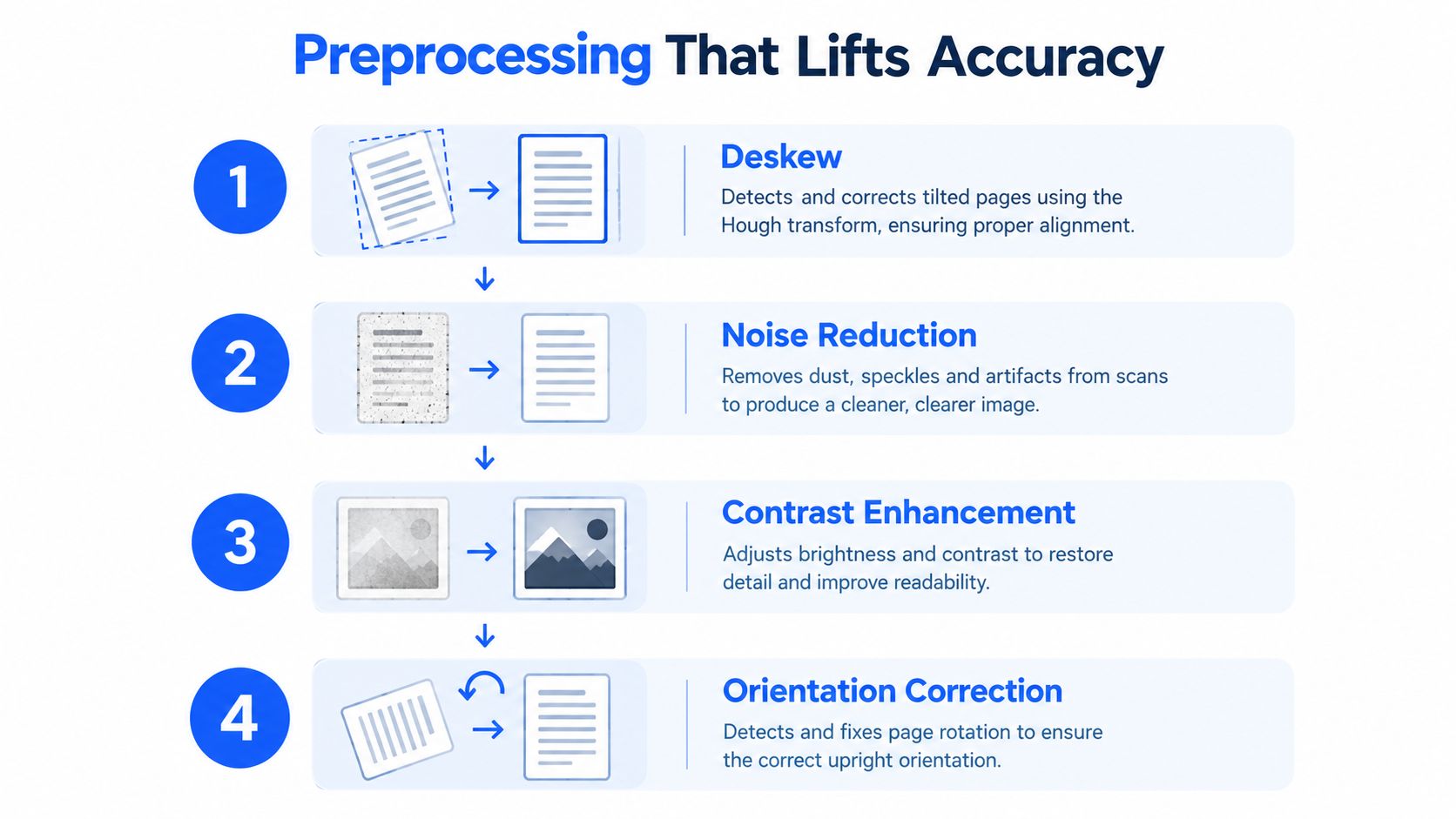
Preprocessing should happen before the OCR engine sees the page. The sequence below targets the defects that most often corrupt statement tables, but it isn't a promise of a fixed accuracy lift. The result depends on the original image, the scanner, the document layout, and the engine used afterward.
Straighten the page
Start with deskewing. A Hough transform or commercial imaging tool can detect dominant text lines and rotate the page until those lines run horizontally. Even a small tilt can cause table boundaries to drift across the page, especially when the statement has narrow numeric columns.
Deskewing is most useful when the scanner feed pulls the page at an angle or a phone camera captures one edge closer than the other. We check the page visually before extraction, then confirm that dates and amount columns remain vertically consistent.
Remove noise without erasing characters
Denoising targets speckles, dust, fax artifacts, and background texture. A Gaussian blur can reduce isolated noise, while non-local means filtering can suppress repeated patterns more selectively. Excessive smoothing is dangerous because it can soften decimal points and thin glyph edges.
The correct setting is the least aggressive one that makes the text cleaner. A finance team should compare a few representative amount fields after filtering, not judge the result only by how white the page appears.
Improve separation and scale
Adaptive thresholding separates faded text from a stained or uneven background more effectively than a single global threshold. It can help retain characters when lighting varies across a phone photograph.
If the image is below 250 DPI, upscaling it to 300 DPI before OCR can give the engine more pixels to work with, though upscaling can't restore detail that was never captured. Orientation correction belongs in the same pass. A sideways or upside-down page should be rotated before layout analysis begins.
The PDF-to-Excel extraction workflow provides useful context for preparing source files. The practical checklist is short:
- Deskew: Level the text lines and table boundaries.
- Denoise: Remove speckles while preserving decimal points and thin characters.
- Binarize: Separate faded text from uneven backgrounds.
- Resize and rotate: Normalize small images and correct page orientation.
Run these checks before blaming the OCR engine. A visibly improved page gives the recognizer a better chance, but the extracted rows still need arithmetic verification.
Verifying Extracted Rows Before You Trust Them
A spreadsheet is not ready for bookkeeping because every cell is populated. It becomes usable when the extracted transactions agree with the statement's own totals and balance logic.
The first arithmetic control is:
Opening balance + total credits − total debits = closing balance
This is the core bank reconciliation check described in bank-statement reconciliation guidance. If the equation fails, we don't assume the bank statement is wrong. We investigate missing rows, sign errors, duplicate pages, incorrect opening values, and misread amounts.
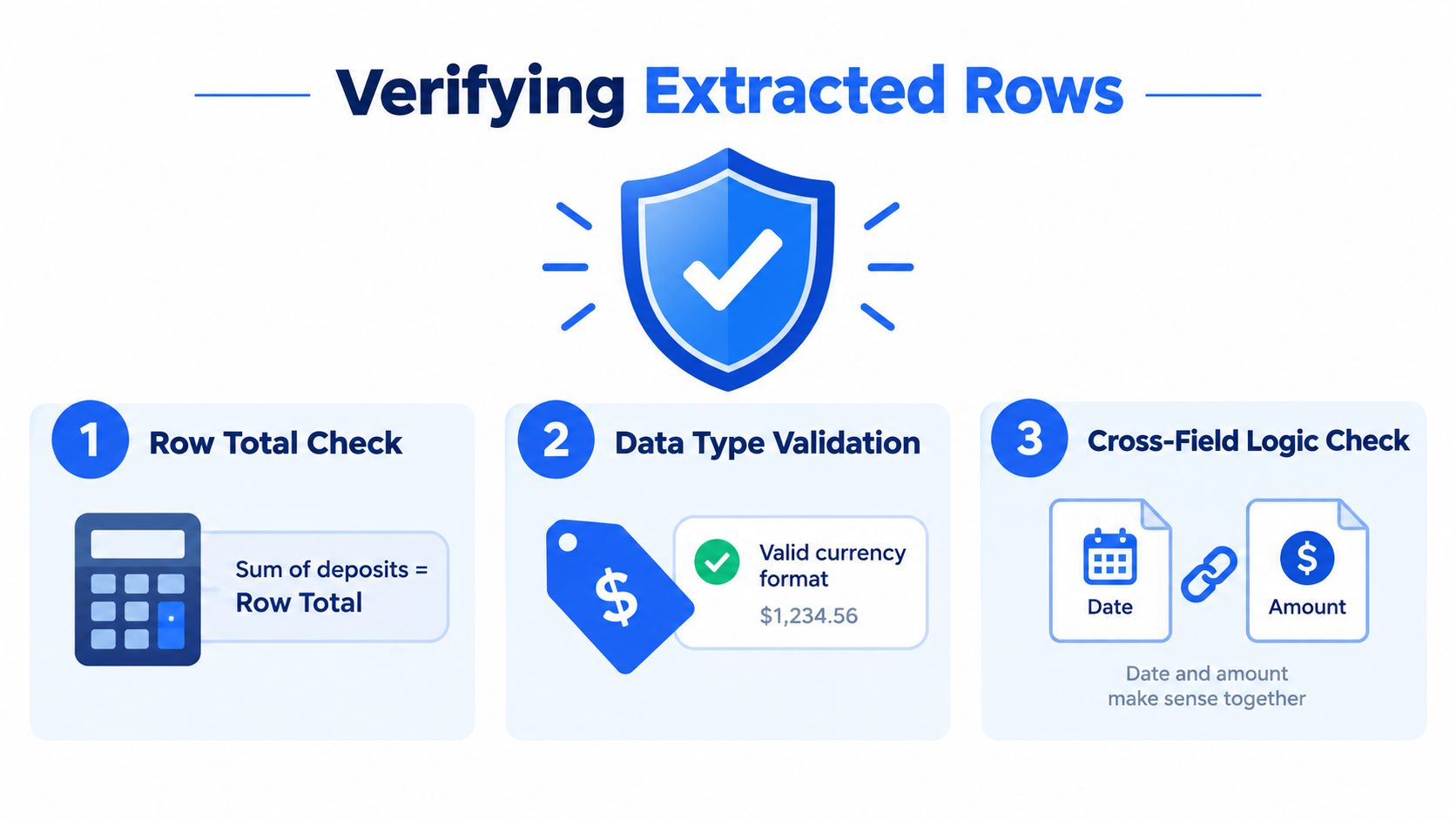
Three gates before downstream use
Check the row totals. Sum the deposit column and withdrawal column separately. Each should match the corresponding total printed in the statement footer. A mismatch tells us to inspect the values and the column mapping, not just rerun the export.
Check running-balance continuity. For each line, compare the prior balance with the transaction's net effect. The calculated result should equal the next printed running balance. Any break gets flagged, even when the individual amount looks plausible.
Re-key a targeted sample. Compare a sample of five to ten transactions against the scanned image, weighting the review toward the largest values and any row with an OCR confidence score below 95%. These thresholds are review controls, not proof that every remaining row is correct.
No extracted row enters the ledger until all three checks pass.
If a locked PDF needs to be processed, a workflow can accept the password during upload, show the extracted table in the browser, and allow CSV or XLSX export after balances are checked, as described in reconciling password-protected bank statements. A reviewer should retain the source page alongside the working file according to the firm's own records policy.
Teams that need to inspect or correct individual values can also use a bank statement editing workflow. Editing isn't a substitute for verification. It should create a visible exception that the reviewer resolves against the original image.
A Repeatable Workflow for Finance Teams
A dependable process assigns ownership at each handoff. Intake staff confirm that the statement is complete and readable. The person running extraction records the document type and any preprocessing changes. A reviewer owns reconciliation and exception approval.
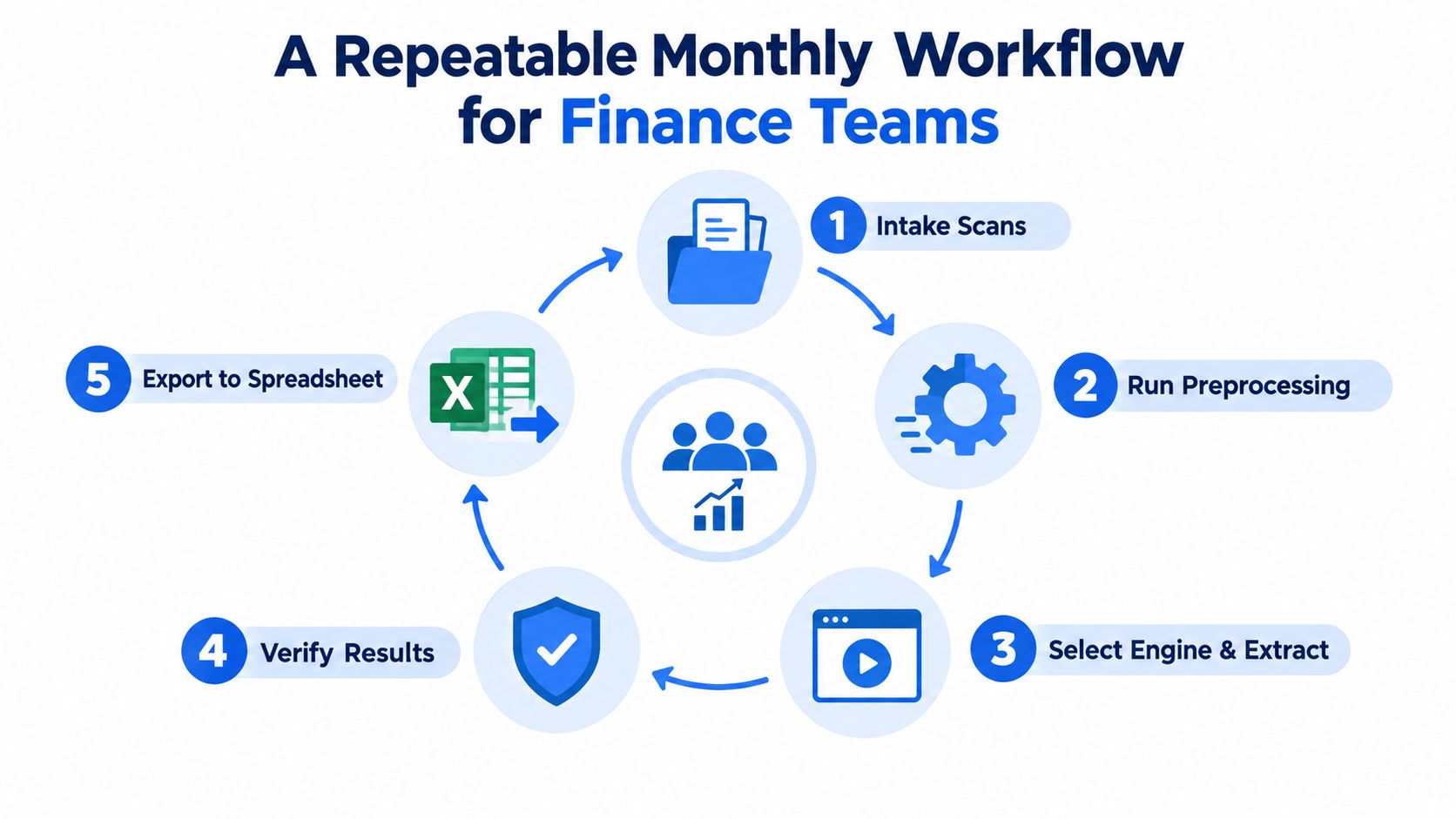
The monthly sequence
Start with intake. Keep the original PDF or image unchanged, check that all pages are present, and identify locked files, phone photographs, scanned pages, and digitally generated statements.
Next, run the preprocessing checks. Pages with skew, faint type, heavy shadows, or poor framing should be corrected or routed for manual handling. Don't let a low-quality page enter the same queue as a clean digital statement without a visible exception label.
Then select the extraction path. Consistent digital PDFs may suit a deterministic OCR process. Complex tables, scanned statements, and mixed layouts may need a specialized document system or additional review. The choice should reflect the document, not a generic claim about which engine is superior.
A control-friendly checklist
- Intake scans: Preserve the source and confirm page completeness.
- Run preprocessing: Correct skew, noise, contrast, scale, and orientation.
- Route by type: Separate clean PDFs, scanned pages, locked files, and unusual layouts.
- Extract rows: Capture dates, descriptions, debits, credits, and running balances.
- Verify results: Compare footer totals, balance continuity, and targeted samples.
- Export to spreadsheet: Release only approved rows to the bookkeeping workflow.
- Flag exceptions: Send rejected pages and low-confidence rows to a named reviewer.
For direct bank-statement conversion, autobankstatement accepts digital and scanned password-protected PDFs, supports bulk uploads and files up to 25 MB, and converts statements into CSV or Excel/XLSX outputs. It offers a free guest preview before payment, registered users receive 24-hour download access, and uploads auto-delete within 24 hours. Subscription options are Starter at $15 per month for 400 pages, Professional at $30 per month for 1,000 pages, and Business at $50 per month for 4,000 pages, with annual discounts and custom enterprise limits.
The process should remain understandable after staff changes. A new reviewer ought to know which source was used, which pages needed preprocessing, which engine handled the extraction, which checks passed, and why any exception was approved.
What to Take Away From the Pipeline
Upgrading the OCR engine alone won't solve a weak extraction process. The evidence points to a broader problem: clean digital PDFs can perform very well, while degraded scans, handwriting, fax copies, and complex tables create much lower and more variable results. Newer vision-language and document-AI approaches can outperform traditional OCR on difficult layouts in some comparisons, while traditional OCR remains attractive for speed and deterministic output on clean, consistent files, as discussed in real-world OCR benchmark comparisons.
The practical conclusions are straightforward:
- Prepare the source first. Deskew, denoise, improve contrast, and correct orientation before recognition.
- Choose by document type. A controlled, recurring statement format has different needs from a phone photograph with irregular tables.
- Protect table structure. Correct characters are not enough if amounts move into the wrong columns.
- Reconcile every output. Confirm opening balance plus credits minus debits equals closing balance, then review targeted rows against the source.
- Keep humans in the control loop. Low-confidence fields, broken arithmetic, handwriting, and unclear scans need review rather than silent acceptance.
Automation should remove repetitive re-keying, not remove accountability. The strongest finance workflows use OCR or document AI to produce a review-ready first pass, then use totals, balance continuity, and source comparison to decide what can safely reach the ledger.
If your team needs to convert digital, scanned, or password-protected bank statement PDFs into CSV or Excel/XLSX while keeping reconciliation checks in the process, visit autobankstatement. You can preview an extraction as a guest, process bulk files up to 25 MB each, and use the available subscription plans when monthly statement volume makes manual entry impractical.
Convert your next statement in minutes
Upload a bank statement PDF — digital, scanned, or password-protected — preview the extracted table, and download clean CSV or Excel.