
Track Expenses for Small Business: A Step-by-Step Guide
Learn how to track expenses for small business, from recording and categorizing to weekly review and monthly reconciliation, with steps and examples.
Your tax preparer asks what a $412 software charge from March was for. Nobody remembers. Someone opens three months of bank statements, searches email for an invoice, and guesses from the merchant name. That scramble isn't a memory problem. It's a timing and control problem, and it's exactly what a steady routine to track expenses for small business spending prevents.
Table of Contents
- Why Expense Tracking Matters for Tax and Cash
- Expense Categories and the Records Each Needs
- Record and Categorize Every Expense
- Reviewing Weekly and Reconciling Monthly
- Common Tracking Mistakes and How to Fix Them
- Turning Expense Records into a Weekly Cash Forecast
- Start Your Expense Tracking Routine This Week
Why Expense Tracking Matters for Tax and Cash
That March charge matters for two different reasons. For tax, the business needs to show what it bought, who it paid, and why. For cash, the business needs to know whether that charge repeats every month and whether anyone still uses the tool.

Expense tracking is a documentation requirement, not just a budgeting habit. The IRS recordkeeping guidance says a system must clearly show business income and expenses, with support identifying the payee, amount paid, proof of payment, date incurred, and description. Deductible costs must be "ordinary and necessary", and the owner carries the burden of proving expenses claimed on a return.
Why manual setups break
Many small teams still run this in a spreadsheet, and there's nothing wrong with that tool by itself. In OnPay's 2025 small-business survey, 18% of small-business employers reported using spreadsheets to keep track of their numbers. The break point is usually discipline, not software. Rows get pasted twice, receipts never get attached, and a personal purchase sits in office expenses until year end.
What good tracking buys you
- Deductions that survive review: Each claimed expense traces to a statement line and a receipt, invoice, or contract.
- A clear view of cash drain: Recurring subscriptions and vendor charges become visible by name and month, so you can cancel, renegotiate, or keep them on purpose.
- A faster month-end close: Categorized, reconciled transactions mean the tax file is mostly built before anyone asks for it.
The order we use is simple: record, categorize, review, reconcile, and retain. Record close to the transaction date, categorize once, review exceptions weekly, prove the ledger against the bank monthly, and keep the evidence. Skip a step and the next one gets harder and slower.
Expense Categories and the Records Each Needs
A short, fixed category list beats a long chart of accounts nobody uses consistently. Match each transaction to one category only, attach the proof named here, and let the review trigger decide what gets a second look. Our guide to expense account examples shows how these categories map to common ledger accounts.
| Category | Typical examples | Records to keep | Review trigger |
|---|---|---|---|
| Recurring operating | Software subscriptions, rent, insurance, internet | Invoice or contract, monthly statement | A price change or a new vendor |
| Variable operating | Office supplies, fuel, shipping, advertising, bank and card fees | Itemized receipt or fee line on statement | Any item without a receipt |
| Capital purchases | Computers, vehicles, machinery above your capitalization threshold | Purchase invoice and asset register entry | Capital item booked as a supply |
| Financing | Loan interest, loan principal | Loan statement | Principal recorded as an expense |
| Owner and personal | Owner draws, personal items paid by business card | Owner note on business purpose | Any personal-looking merchant |
| Sales tax remittances | Payments to the state for sales tax collected | Remittance confirmation | Tax paid recorded as an ordinary expense |
The three disputes that come up most
A phone bill that covers personal use. Split it by a documented, consistent method, such as a fixed business percentage, and keep the bill. Don't deduct the full amount in one month and half in another without a note explaining the change.
A client lunch with no attendees named. The receipt proves the amount, not the purpose. Add the names of attendees and what you discussed on the day, while you still remember. "Business lunch" alone won't answer a reviewer's question six months later.
One card used for business and home. This is the hardest habit to defend and the easiest to fix. Move business spending to a dedicated card. Until then, mark personal items as owner draws in the same week, not at year end from memory.
Working rule: A transaction belongs in one category only, and the records column tells you exactly what to keep with it.
Financing and sales tax rows deserve care because they reduce cash without being ordinary expenses. Loan principal repays a balance, and sales tax remitted to the state was collected from customers. Booking either as a deductible expense overstates costs and understates profit.
Record and Categorize Every Expense
Recording works when it happens close to the transaction, in small batches, with the same fields every time. The IRS guidance on recording business transactions favors recording expenses when they occur and generally favors daily recording over end-of-month reconstruction. Weekly is the practical minimum for most small teams.
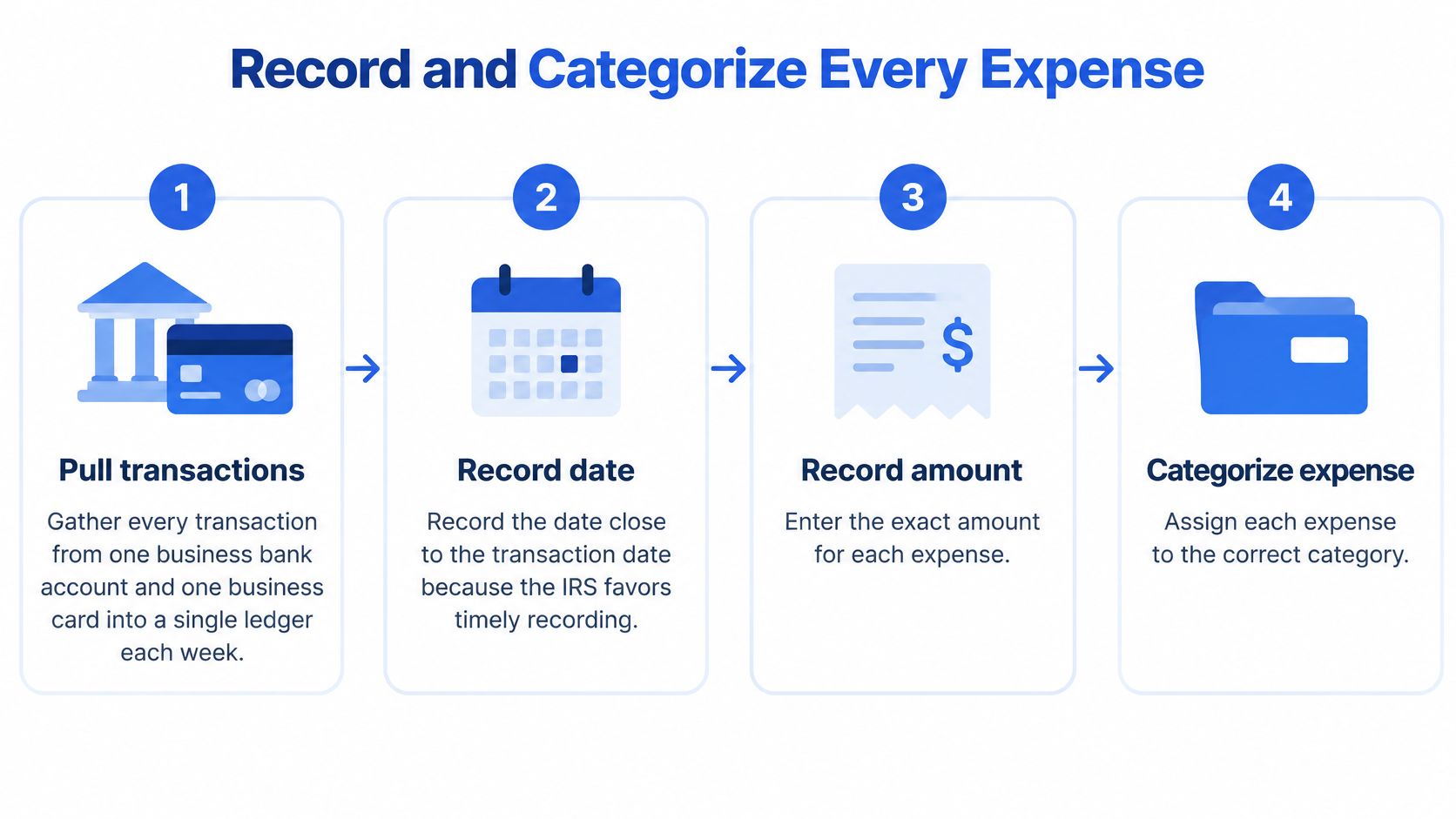
The recording steps
- Pull every transaction into one ledger. Gather activity from one business bank account and one business card each week. Two accounts are manageable. Five scattered cards guarantee missed lines.
- Record five fields on each line. Capture the date, vendor, amount, payment account, and business purpose, not just the category. Purpose is the field people skip, and it's the one reviewers ask about.
- Attach the proof the same day. Link the receipt, invoice, or statement reference now. Photograph paper receipts and name the file by date, vendor, and amount so it sorts and searches cleanly. Our notes on how to keep receipts organized cover a simple naming and storage pattern.
- Assign one account from the short list. Use the category table and resist adding accounts for single transactions. A list small enough that each account gets used every month stays consistent.
- Route exceptions instead of forcing them. Mark personal-looking items as owner draws or flag them for review. Send capital purchases, such as a $1,200 laptop on a business card, to asset review rather than office supplies.
- Write context while it's fresh. Add the business purpose to meal, travel, and gift lines the same day, including who was there and what it was for.
Habits that keep it repeatable
Keep a separate subscription list with vendor, amount, renewal date, and owner. When a statement line doesn't match the list, you've caught a price increase, a duplicate plan, or a tool nobody uses. That list takes ten minutes to build and pays for itself the first time a renewal jumps.
Set a fixed twenty-minute weekly slot to clear uncategorized items, and give any payment above $500 a second review before it posts. You don't need to inspect every line. You need the exception report to be short and read.
No uncategorized items should remain at the end of the week. A small backlog is a naming exercise. A three-month backlog is a reconstruction project.
Manual entry is where this routine usually dies, because typing statement lines into a spreadsheet is slow and error-prone. The time cost is real. In Xero's 2025 global survey of 373 small businesses, 4 in 5 small-business respondents using Xero said they saved 6 hours per month by eliminating manual data entry. Whether you import a bank feed or convert a statement into rows, the goal is the same: spend your twenty minutes categorizing and checking, not transcribing.
One caution applies to any import. A clean-looking row can still carry a wrong date, amount, or sign. Spot-check imported lines against the source statement before you categorize them, especially the largest items and anything that looks like a refund or reversal.
Reviewing Weekly and Reconciling Monthly
Categorized transactions feel finished. They aren't. A ledger can be perfectly categorized and still be missing a week of card activity. Reconciliation is the control that proves completeness, because it forces the ledger to agree with the bank.
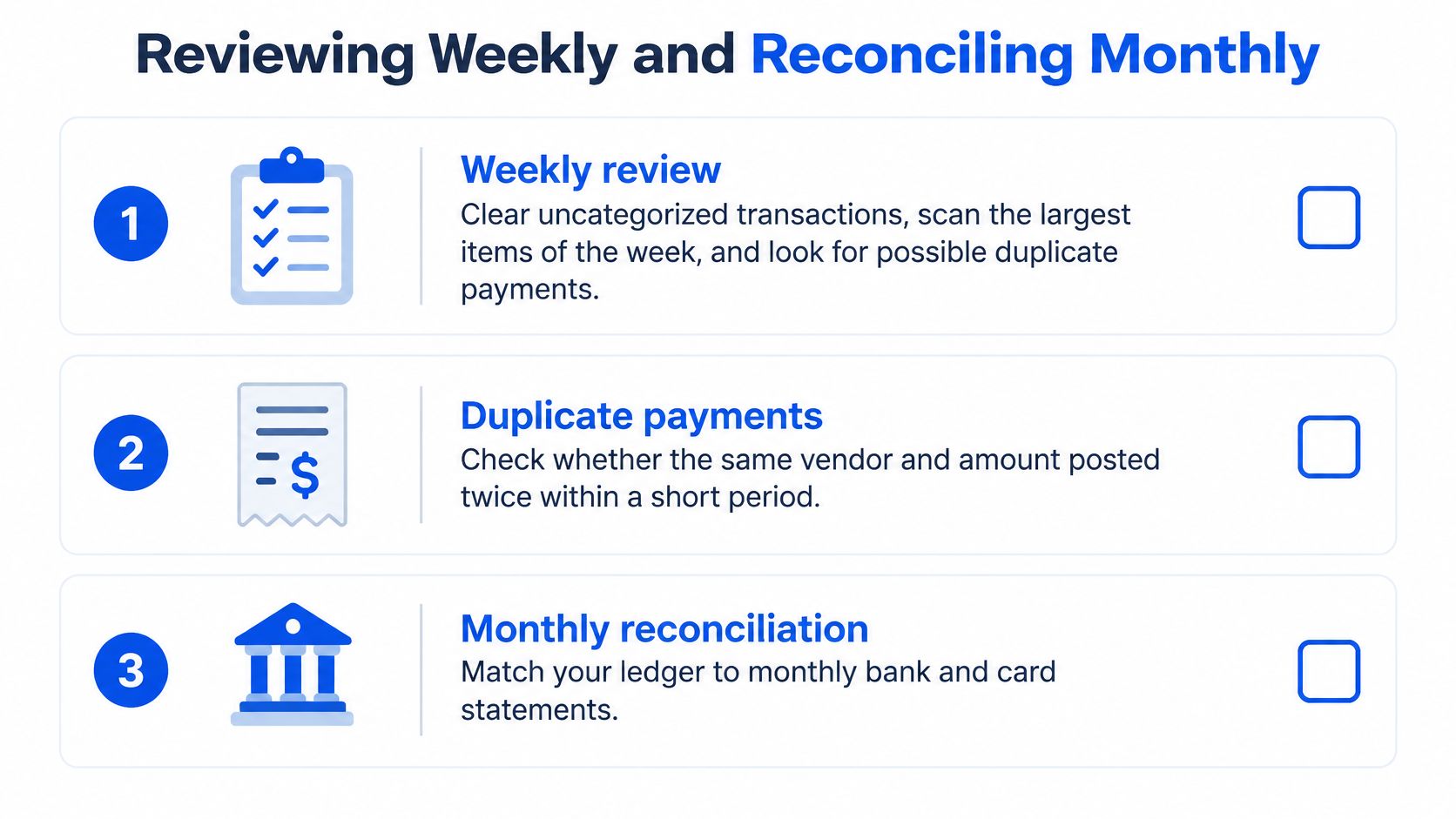
The weekly review
Keep it to three passes. First, clear every uncategorized transaction while the context is still findable. Second, scan the largest items of the week and confirm each one has a receipt or invoice attached. Third, look for possible duplicate payments, meaning the same vendor and amount posted twice within a few days. Some duplicates are legitimate, such as two identical subscription seats. Check anyway, because a vendor billing twice looks exactly the same in the ledger.
The monthly reconciliation
- Export or enter every bank and card transaction into the ledger for the month. After upload, transactions are pulled into clear rows, and users can review the table in their browser and make quick edits before downloading.
- Keep the source statement together with its receipts and invoices.
- Match each ledger line to the statement, one account at a time.
- List timing differences, such as outstanding payments and deposits in transit.
- Correct duplicates, omissions, and coding errors in the ledger.
- Have a second person approve the reconciliation. For a one-person team, document the owner's review of unusual items instead.
That sequence follows the control pattern in the accounting solutions manual on bank reconciliation, which notes that California's internal-control guidance holds reconciliations effective for detecting mistakes, errors, and embezzlement when prepared promptly, reviewed in detail, and approved by a second person. Small teams can't fully segregate cash handling, payment approval, bookkeeping, and reconciliation. Documented owner review is the compensating control that makes the process defensible anyway.
The two balance tests
Before sign-off, run both checks:
- Statement test: Verify that opening balance plus credits minus debits equals closing balance on the statement itself.
- Ledger test: Confirm the adjusted ledger balance equals the bank balance after timing differences.
The reconciliation is complete only when both tests pass. If statements were converted to CSV or Excel, sample amounts, dates, and negative signs against the original PDF before posting, especially OCR-derived values. Our walkthrough on how to reconcile bank statements works through the matching step in detail.
Close standard: If the balance tests don't pass, the month isn't closed, no matter how tidy the categories look.
Common Tracking Mistakes and How to Fix Them
The mistake that costs the most time is an uncategorized backlog. It looks harmless in October. By tax season it hides a missing receipt, a personal charge, and three subscriptions nobody can identify, and every one of them needs research you no longer have context for. Most other tracking problems announce themselves as a difference between the bank and the ledger. Read the symptom before you touch anything.
| Symptom | Likely cause | Fix |
|---|---|---|
| Bank and ledger differ by a few dollars | Duplicate entry or unrecorded bank fee | Compare line by line, delete the duplicate, record the fee |
| Ledger higher than bank by one payment | Outstanding check or uncleared payment | List it as a timing difference, with no correction |
| Ledger off by a whole transaction amount | Transaction never entered | Post the missing line from the statement |
| Deduction fails review despite correct totals | Personal spending in the business account | Reclassify to owner draw and document business purpose |
| Converted amount has the wrong sign | OCR misread of a minus sign | Check against the source PDF and correct the sign |
| Expense total jumps in one month | Card purchases and card payment both recorded | Record the purchases or the payment, not both |
| Large equipment fully deducted as supplies | Capital item booked as an expense | Move it to the asset register and review depreciation |
Reading the differences
A gap of a few dollars is almost never one big error. It's a duplicate entry sitting next to its twin, or a bank fee that appeared on the statement and never made it into the books. Compare line by line around the fee dates first. That search usually takes minutes.
A ledger that runs higher than the bank by exactly one payment is different. An outstanding check or an uncleared payment explains it, and that's a timing difference, not an error. List it on the reconciliation and leave the ledger alone. A gap equal to a whole transaction amount points the other way. That line was never entered, so post it from the statement.
Errors that balance but still fail
Two common mistakes produce books that reconcile and still misstate expenses. Personal spending in a business account keeps the totals right while creating a deduction that fails review. Move it to owner draw with a note. Card double counting is the other one. If individual card purchases are recorded as expenses and the monthly card payment is also booked as an expense, the same money counts twice. Record the purchases as expenses and treat the payment as a transfer to the card balance.
OCR sign errors deserve a specific check in converted statements. A refund read as a charge inflates expenses and breaks the balance test by twice the amount. Correct the sign against the source PDF.
Correct the cause in the ledger. Never force the ledger to match the bank balance with a plug entry.
Turning Expense Records into a Weekly Cash Forecast
A ledger tells you what the business spent. A weekly forecast shows whether the cash will be there when bills come due. Cash-flow pressure is common: a 2025 QuickBooks survey of small and midsize businesses found that 43% considered cash flow a problem and 74% said it had stayed the same or worsened over the prior year.
Building the forecast from the verified ledger
- Group the last twelve weeks of categorized expenses into recurring operating costs, variable operating costs, capital purchases, financing payments, and owner draws.
- Separate one-time expenses from monthly ones. The U.S. Small Business Administration's business-planning guidance recommends distinguishing one-time costs from monthly expenses when planning.
- Place recurring items in their expected payment weeks using subscription lists and loan statements. Add payroll, tax, and debt dates.
- Compare projected outflows with the current bank balance. Mark any week when the projected balance drops below a minimum cash buffer you set in advance.
Keeping it honest
Refresh the forecast each Friday, after the weekly review. Start with cleared, categorized transactions, then add upcoming payments that have not left the account yet. A correctly categorized expense can still create a cash shortfall if its payment date falls in a payroll week. Delaying a discretionary purchase by two weeks may change the answer.
Keep owner draws on their own forecast line. They reduce cash but are not taxable expenses, so including them in operating costs distorts both the forecast and the profit picture. When a week falls below your buffer, choose a response: delay a discretionary order, ask a vendor to adjust the payment date, or reduce a draw.
Start Your Expense Tracking Routine This Week
Start with a thirty-minute setup. Open or confirm a dedicated business account if you don't have one, adopt the category list from the table as your chart of accounts, and rebuild the most recent complete month as a test. One rebuilt month teaches you where receipts go missing faster than any policy document.
Keep records on a tax schedule, not a download schedule
The IRS answers to common recordkeeping questions say records supporting an item of income, deduction, or credit should generally be kept until the limitation period expires, generally three years from filing, and employment-tax records for at least four years. Store exported expense files together with their source statements and supporting documents under your own retention policy. A converter's 24-hour download window is a processing window, not a retention schedule.
A practical next step for statement-heavy teams
If your bottleneck is getting PDF statements into rows, that's where we built autobankstatement to help. Upload a PDF statement, including digital, scanned via OCR, or password-protected files up to 25 MB, with bulk upload for multiple statements. You get a free guest preview before payment, then download CSV or Excel as a clean spreadsheet for bookkeeping, taxes, reconciliation, or reporting. Registered users get 24-hour download access, and uploads auto-delete within 24 hours, so save your exports with your statements. Review the converted rows against the source statement before posting, and run the test after your first month: does the monthly balance check pass without manual rework?
Turn this month's PDF statements into categorized, reconciliation-ready rows instead of typing them line by line. Upload a statement, check the free preview, and download a clean CSV or Excel file your ledger can use today at autobankstatement.
Convert your next statement in minutes
Upload a bank statement PDF — digital, scanned, or password-protected — preview the extracted table, and download clean CSV or Excel.