Sample Bank of America Statement Field Guide
Annotated sample Bank of America statement: sections, account-type fields, and the balance check before you trust a CSV.
It's close day, and we're working with two screens open. One shows a Bank of America PDF, the other shows a spreadsheet that's almost ready to import, except the ending balance won't tie and one description has split into two rows. That's the moment a good Sample Bank of America Statement helps, not as a picture to copy, but as a map that tells us which numbers control the month and which lines should become rows.
Table of Contents
- What a Sample Statement Actually Contains
- Where Statements Live and How Long They Last
- Deposit Statement Fields Worth Parsing
- A Fictional Checking Month Annotated
- How Cards Loans and Business Accounts Differ
- Redact Before You Share a Sample
- Prove the Rows and Convert a Working Copy
What a Sample Statement Actually Contains
Say a client sends us the PDF they downloaded for March and asks why our spreadsheet total differs from theirs. We don't start by hunting for a familiar screenshot on the web. We start with the file in front of us, read in the order the bank printed it, and separate control totals from transaction detail. That habit catches most errors before we touch a converter.
A useful sample has four blocks. The first is the header, which carries the bank identity, account name, a masked account number, and the statement period. Those four items tell us which set of books the file belongs to and which month we're closing. If the period is wrong, nothing downstream matters, so we check the start and end dates before we look at a single amount.
The summary that controls the month
The second block is the account summary. On a deposit statement it typically lists beginning balance, deposits and other additions, withdrawals and other subtractions, checks, service fees, and ending balance. This block doesn't give us rows for the ledger. It gives us the test those rows must pass.
We copy those summary figures into a separate control area, never into the transaction list. That separation sounds basic, but it's where spreadsheets go wrong. A fee total pasted as a transaction, or a summary subtotal treated as a deposit, will double count money and still look tidy. Keeping controls apart lets us prove the detail later instead of trusting it.
Practical rule: If a number only summarises other numbers, keep it out of the transaction rows and use it only to test them.
The third block is the detail itself. Each posted item appears as a dated line with a description and an amount, grouped under headings such as deposits, withdrawals, and checks paid. This is the only block that should become spreadsheet rows, one row per posted item, with the date, full description, and signed amount preserved together.
Descriptions deserve care here. A long card purchase or ACH name often wraps onto a second printed line. On paper that's one transaction. In a careless extract it becomes two, one with an amount and one without, and the row count inflates. We join wrapped lines back into a single description cell before we import anything.
Pages that aren't transactions
The fourth block is everything after the detail, and it's the block samples often crop out. Later pages may hold check images, fee disclosures, or legal notices. None of those pages should produce a transaction row, but they do explain the file. A check image, for example, supports a check that already appears in the detail, so counting it again would duplicate the payment.
We use fictional amounts in any sample we share for training, so no customer data appears. We treat the sample as a map of blocks rather than a pixel copy of one live PDF. Layouts shift, product names change, and a checking summary doesn't define a credit card or a mortgage. The labels and the math are stable. The position of a box on last year's page isn't.
That distinction is the core value of a Sample Bank of America Statement. It shows a new team member where the controls live, where the rows live, and where the supporting pages live, so they can read an unfamiliar statement without guessing which number to trust first.
Where Statements Live and How Long They Last
The sample worth parsing is the PDF the account holder downloads, not a retyped lookalike. In Online and Mobile Banking, the path is Statements & Documents, where customers can view, print, and download electronic statements. We ask clients for that original file because it preserves the summary, the detail, and the page order we need to validate.
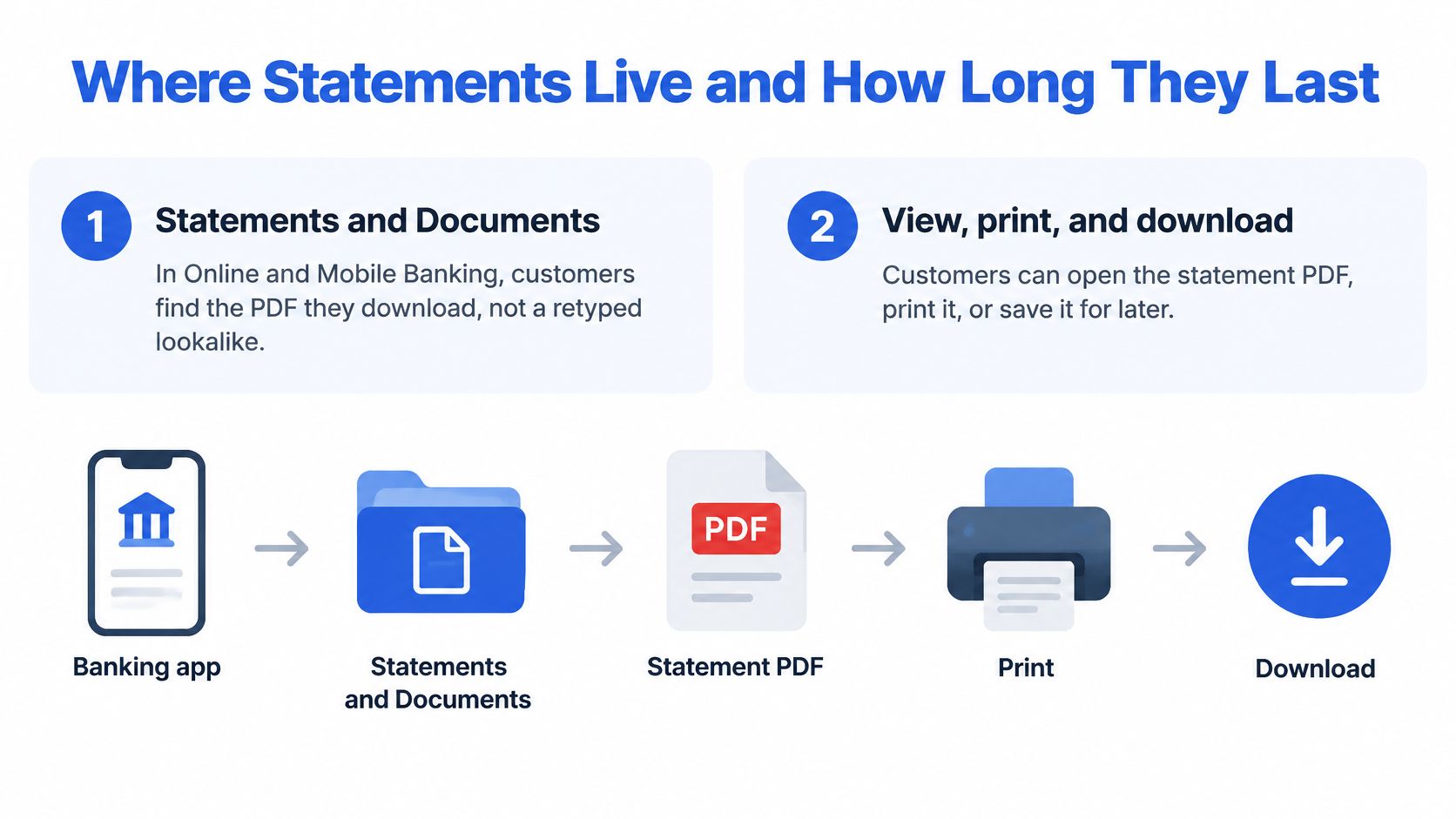
Bank of America's online and mobile banking features page describes access to as much as seven years of account statements for certain services, and says statements with check images may be available online for up to 18 months, while copies can be ordered for records going back as far as seven years. Those are two different windows, so we state which one we need before we promise a client a complete set.
Three routes, three expectations
- Standard list: Recent statement PDFs sit in Statements & Documents and can be downloaded straight away.
- Check images: The image window is shorter, so an old statement may arrive without the check pages a reviewer expected.
- Request Statements: When a closed month is missing from the default view, this request route is the way to ask for older copies, rather than assuming every year is visible at once.
Bank windows aren't a bookkeeping retention policy. Our own files follow the firm's schedule for accounting and tax records, and we cover that distinction when we discuss how long banks keep records with clients. Before any batch work, we collect every source PDF, note each statement period and page count, flag check image pages, and store the originals under our records policy. The bank file is the evidence. Anything we build from it is a working copy.
Deposit Statement Fields Worth Parsing
We put the field plan before the prose because a close runs on columns, not paragraphs. If we decide in advance how each label on a Sample Bank of America Statement will be stored, the extract either matches that plan or it doesn't, and we can fix it before import.
| Field | Typical label | What it controls | Parser treatment |
|---|---|---|---|
| Statement period | Statement period dates | Which month the rows belong to | Store start and end dates separately |
| Account identity | Account name, type, masked number | Which books receive the file | Keep last four digits only in working files |
| Opening balance | Beginning balance | Reconciliation start | One numeric field before any rows |
| Credits | Deposits and other additions | Inflows for the period | Positive credit column, plus a period total |
| Debits | Withdrawals and other subtractions | Outflows other than checks | Separate debit column |
| Checks | Checks paid | Cleared checks | One row per check with number and amount |
| Fees | Service fees | Charges, often also inside withdrawals | Do not subtract twice if already in debits |
| Closing balance | Ending balance | Reconciliation target | Must match the balance formula |
| Transaction line | Date, description, amount | Posted activity | One row; join wrapped description lines |
| Daily balance | Daily ending balance, when printed | Optional mid-period check | Not a substitute for ending balance |
| Pending or memo | Pending or informational text | Items that may be outside the close | Flag and exclude unless the statement includes them |
Start and finish are controls, not rows
Beginning balance is the control start and ending balance is the control finish. The FDIC educational material on checking accounts identifies the beginning and ending balances for the statement period and lists deposits, withdrawals, fees, and other account activity by date, and it explains that the ending balance is the amount recorded by the bank on the statement's closing date. We preserve both balances exactly as printed, even when the first transaction date falls a few days into the period.
That preservation matters when a statement opens. Say the first posted item is on the fifth. A parser that treats the first row's running figure as the opening balance will shift the whole month. Storing the beginning balance as its own field prevents that error and gives the reconciliation a fixed anchor.
Credits, debits, checks, and the fee trap
Deposits and other additions are credits, so they belong in a positive credit column with a period total we can compare to the summary. Withdrawals and other subtractions are debits other than checks, and checks paid get one row each with the check number retained, because the number is often the only description a reviewer has.
Fees are where double counting hides. A service fee may be summarised on its own summary line and also sit inside the withdrawal total and the withdrawal detail. If we subtract the summary fee and every detail row, we've charged the account twice. Our rule is simple. Count the fee once, in the detail, and use the summary fee line only as a check that the fee rows add up.
Count each fee once in the detail. Use the summary line to prove the fee rows, not as an extra debit.
The same discipline applies to interest on savings. Interest paid by the bank is a credit, even when it appears near fee wording. We classify by direction of money, not by which part of the page a line happens to occupy, and we keep credits and debits in separate columns so a sort or filter cannot flip a sign unnoticed.
Dates, descriptions, and checkpoint balances
Each posted line needs its own date, description, and amount kept together. When a description wraps, we join the second printed line into the same cell and delete the empty row the wrap created. A description fragment with no amount isn't a transaction, and leaving it in place breaks counts, duplicates checks in most import routines, and wastes review time.
A daily ending balance, when the statement prints one, is a useful mid-period checkpoint. If our rows tie at month end but drift mid-month, the daily figures show us where to look. They don't replace the ending balance, because only the closing figure is the bank's recorded balance for the period.
Pending or memo items stay flagged and outside the rows until we confirm the bank included them in the ending balance. A card hold that hasn't posted may be printed for information, and importing it as a debit makes a correct statement look wrong. When we're unsure, we exclude it, run the balance test, and let the math tell us whether the bank counted it.
That test closes the field plan. We verify opening balance + credits − debits = closing balance, with fees counted once and pending items handled as the statement handles them. If the equation fails by a round fee amount, we look for a double count. If it fails by one transaction amount, we look for a missing or duplicated row. The size of the difference usually names the error.
A Fictional Checking Month Annotated
One worked month teaches more than a field list. We annotate a made-up Advantage Checking statement, period 1 March 2026 through 31 March 2026, account ending 4321, every dollar fictional.
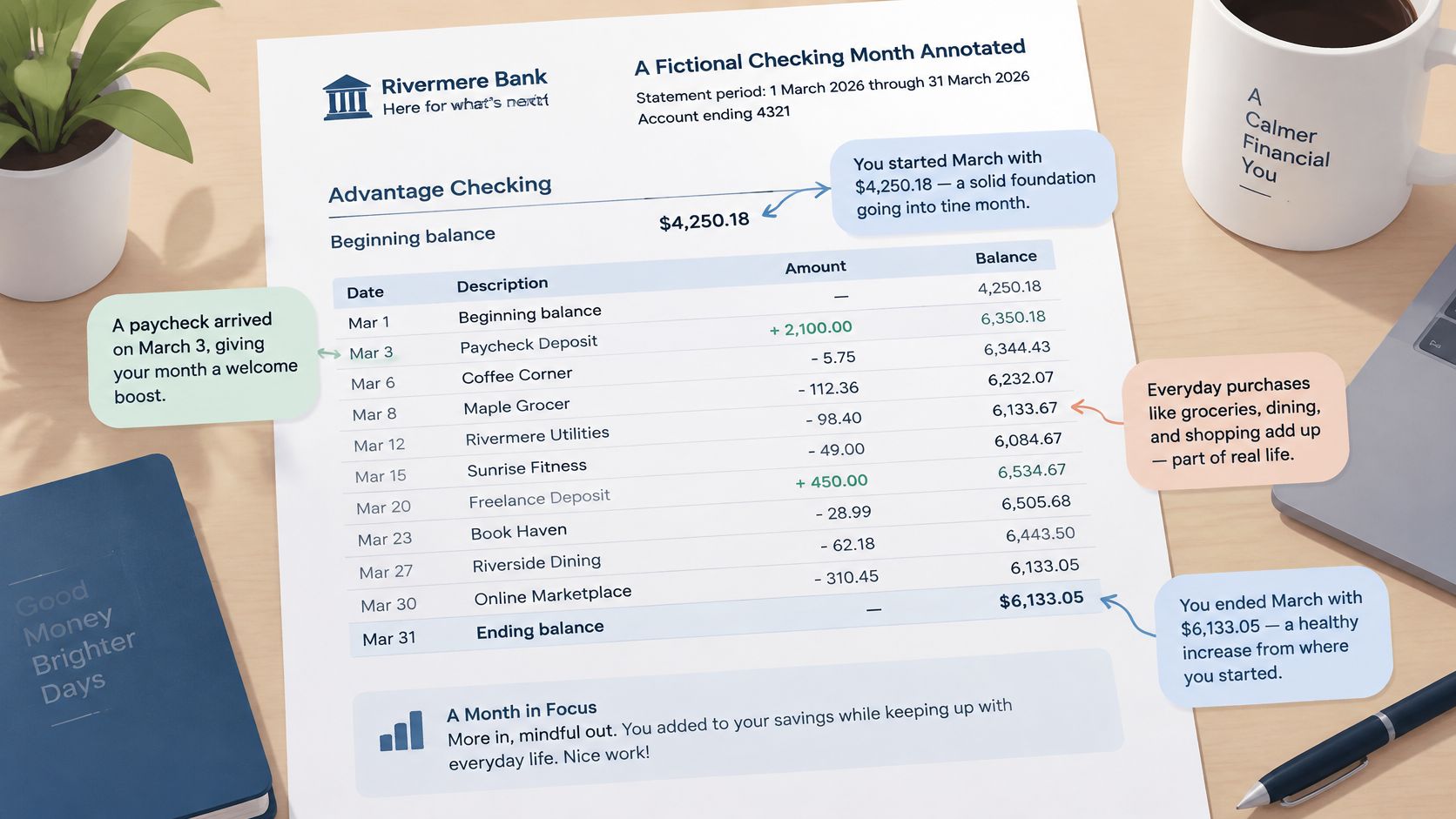
The month opens on a beginning balance of 4,250.18. Two credits arrive inside the period: a payroll credit of 4,800.00 on 3 March and a customer ACH of 1,300.00 on 18 March. The statement summarizes them as deposits and other additions of 6,100.00. That figure is posted inflow for the period, not today's available cash, and treating it as spendable money is how reviewers overstate a balance.
Outflows split into two groups. Withdrawals and other subtractions total 2,656.00: a rent debit of 1,900.00, a card purchase of 86.40 printed across two lines, a paper statement fee of 16.00, and smaller card lines totaling 653.60. Check the components against the summary before moving on: 1,900.00 + 86.40 + 16.00 + 653.60 = 2,656.00. Separately, check number 214 clears for 450.00 and prints in its own checks-paid block, which is why it earns its own row below instead of inflating the withdrawal total.
| Line | Note |
|---|---|
| Beginning balance | 4,250.18, start of period |
| Deposits and other additions | 6,100.00, payroll 4,800.00 plus customer ACH 1,300.00 |
| Withdrawals and other subtractions | 2,656.00, includes the 16.00 fee, counted once |
| Checks paid | 450.00, check number 214 |
| Ending balance | 7,244.18, 4,250.18 + 6,100.00 − 2,656.00 − 450.00 |
| Pending card hold | 42.00, memo only, excluded from ending balance |
Two details carry the lesson. The 16.00 fee already sits inside the 2,656.00 withdrawal total, so subtracting it again throws the equation off by exactly that amount. The 42.00 pending hold prints as a memo and stays out of the math. Page two carries the check image for 214. It supports the cleared check, and importing it as a transaction would duplicate the 450.00.
How Cards Loans and Business Accounts Differ
The costliest misread is treating a credit card's payment due as cash in the bank. It's money owed, not money held, and importing it as a deposit balance overstates cash while hiding a liability. A single Sample Bank of America Statement can't prevent that error if readers assume every product closes like checking.
Bank of America's statement guide distinguishes among deposit accounts, credit cards, loans, and other products, with different fields such as ending balance, account number, payment due date, APR, principal balance, fees, and transaction details, and notes the actual statement can vary with account status and other factors. We read that as a warning to identify the product first, then look for the fields that product should have, and treat missing deposit fields on a card statement as absent by design rather than as a parsing failure.
| Product | Balance that matters | Fields present by design | Easy misread |
|---|---|---|---|
| Checking | Ending balance | Beginning balance, deposits, withdrawals, checks, fees | Available balance is not the statement ending balance |
| Savings | Ending balance | Same deposit math, interest credit, few or no checks | Interest is a credit, not a fee |
| Credit card | New balance | Previous balance, payments, purchases, fees, APR, minimum payment, due date | Payment due is not cash in a deposit account |
| Mortgage or loan | Principal balance | Payment due, interest, escrow, fees | Remaining principal is not spendable cash |
| Small business deposit | Ending balance | Deposit totals plus analysis and service charges | A fee inside withdrawals must not be counted twice |
Deposit accounts close to cash
Checking and savings are cash records. They open with a beginning balance, add credits, subtract debits and fees, and close to an ending balance the bank recorded on the closing date. Savings follows the same math, usually with an interest credit and few or no checks, so a short transaction list is normal and doesn't signal missing pages.
A small business deposit statement keeps that deposit math but often adds analysis charges and more service fee lines. The risk isn't a new equation. It's volume and fee density, which make double counting easier. We total fee rows separately and compare them to the summary before we trust the debit column.
The figure deposit reviewers must not substitute is available balance. That's a live portal figure that reflects holds and pending items at the moment someone looks. The statement ending balance is fixed at the period close. Using the portal number in a March reconciliation imports April activity and pending holds into a closed month.
Cards and loans close to amounts owed
A credit card statement replaces the cash close with previous balance, payments and credits, purchases, fees and interest, and a new balance, alongside a minimum payment, payment due date, and APR. Payments reduce what is owed, so their direction feels reversed compared with a checking credit. We explain that reversal whenever we train staff on what a credit card statement shows, because sign errors here are common and quiet.
A mortgage or loan statement centres on principal balance, the payment due, and its split between principal, interest, escrow, and fees. The principal balance is the amount still owed on the loan. It is not spendable cash, it doesn't belong in an operating account, and a period payment total must not be read as a bank balance.
Ask what the balance represents before asking whether it's correct. Cash held, amount owed, and principal remaining are three different answers.
Stable concepts survive redesigns across all five families. Statement period, posted date, description, money in, money out, and the balance that product closes to will be there under some label. Page position, product names, and supplemental notices change. We build our checks on the stable concepts, so a refreshed layout requires relabelling, not a new reconciliation method.
Redact Before You Share a Sample
A sample used for format testing is still sensitive financial data if it came from a live account. Names, addresses, full account numbers, routing numbers, balances, check images, and transaction descriptions can identify a customer and show how they spend, even when the person sharing the file only wanted help with a column heading.
We don't redact by drawing boxes over a real PDF and hoping the text underneath is gone. The safer method is to build the sample from fictional values that keep the same structure. We show a masked account number with only the last four digits, invent payees, and use round amounts like those in the March example. Reviewers can then check labels, page order, wrapped descriptions, and the balance equation without touching live data.
Two rules for shared files
- Never post a real statement: Don't place a live PDF in a shared folder, ticket, or chat thread to ask a layout question.
- Describe or rebuild instead: Name the field in words, or share a fictional copy that preserves the format and removes the person.
Check images need the same treatment as numbers. A cleared check can show a signature, address, and account details in one page, so we exclude check image pages from training samples entirely rather than blurring parts of them. Keeping the sample clean protects the customer, and it also protects the reviewer, who never has to hold data they don't need.
Prove the Rows and Convert a Working Copy
A converted file counts as evidence only when it agrees with the PDF. We classify pages first, so posted transactions and summary controls are what reach extraction.
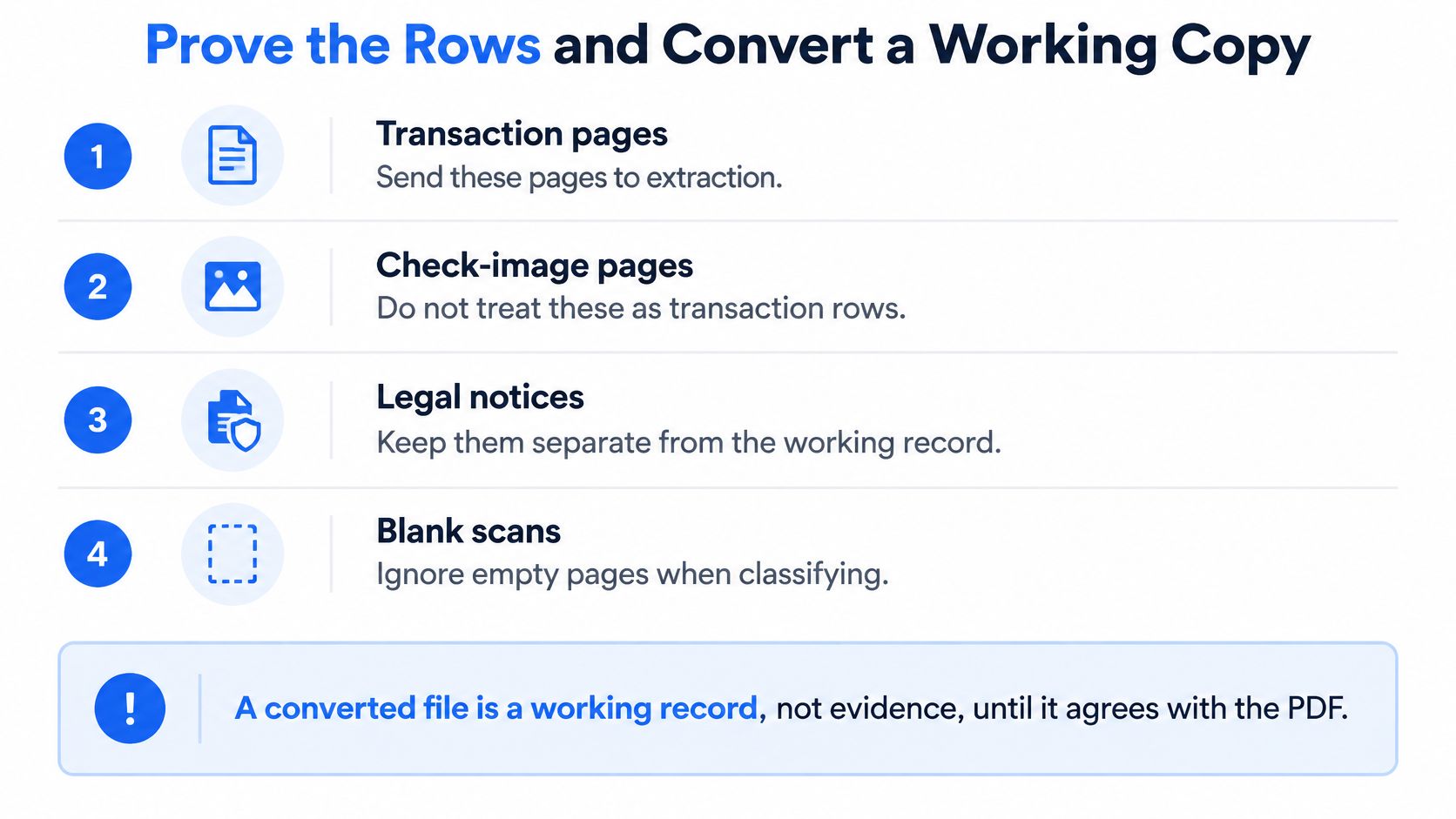
- Transaction pages: Send these to extraction.
- Check image pages: Keep them as support, never as rows.
- Legal notices and disclosures: File them with the source, outside the spreadsheet.
- Blank or unreadable scans: Flag them for review so a missing page isn't mistaken for a quiet month.
Then we run the acceptance test on the fictional March file. 4,250.18 plus 6,100.00 in deposits, minus 2,656.00 of withdrawals, minus the 450.00 check, equals 7,244.18. If that closing figure is off by a cent, we trace the difference to a specific row before anything leaves the folder. We also spot check the dates, the joined wrapped description, and the fee line against the PDF, and we fix bad rows at the table instead of journaling around them after import.
The IRS small business recordkeeping guidance requires electronic records to provide a complete and accurate record of the data and to stay accessible to the IRS. So the original PDF stays filed beside the spreadsheet and corrections get documented, because a finished conversion on its own is not proof.
For the working copy, we convert digital, scanned, and password-protected PDFs into CSV or Excel/XLSX, with bulk uploads for files up to 25 MB each and typical turnaround under two minutes per statement. A locked file only needs its password entered at upload, and the password is used for that conversion alone. Rows come back in a browser preview where quick edits happen before download, the guest option shows the table before payment, and registered accounts keep results available for 24 hours. The original upload is deleted within 10 seconds once processing completes, and subscriptions fit teams running regular bookkeeping, tax prep, or larger monthly batches. Once the balance check passes, we import the spreadsheet following the same discipline we'd apply to any bank statement to CSV workflow.
Bring the original Bank of America PDF from Statements & Documents, run it through the balance test, and convert the working copy once the rows prove out. At autobankstatement you can preview a statement as CSV or Excel for free, check opening balance plus credits minus debits against the closing balance in the browser, and download a clean file your close can use.
Convert your next statement in minutes
Upload a bank statement PDF — digital, scanned, or password-protected — preview the extracted table, and download clean CSV or Excel.