Whats a Credit Card Statement and How to Read It
Learn whats a credit card statement, what every field means, how billing cycles work, and how to use the statement for bookkeeping and on-time payment.
A credit card statement is the issuer's end-of-cycle accounting record, usually covering a billing cycle of 28 to 31 days, that lists posted transactions, fees, interest, the statement balance, the minimum payment, and the payment due date. It's the official monthly snapshot we use for reconciliation, while the online account is a live view that can change after the statement closes.
A finance team member often opens the monthly PDF expecting a simple bill and finds something closer to a compact ledger. The document groups activity into one completed period, shows what the cardholder owed at the close, and sets the deadline for payment. For bookkeeping, that fixed snapshot is more useful than a balance that changes every time a new charge or credit posts.
The practical question behind “what's a credit card statement” is not just what the document contains. We also need to know which balance belongs in the books, which amount should be paid, when a transaction belongs to a particular period, and how long the record should be retained. We'll work through those decisions in the same order we'd use when reviewing a real statement.
Table of Contents
- What a Credit Card Statement Actually Is
- How the Billing Cycle Shapes the Statement
- The Key Fields on Every Statement
- Statement Balance vs Current Balance and Minimum Payment
- Reading a Statement for Bookkeeping and Reconciliation
- Statements as Records for Disputes Taxes and Reviews
- Common Mistakes and a Quick Monthly Checklist
What a Credit Card Statement Actually Is
Open a monthly statement PDF and start with the document's role, not with the individual merchant names. The issuer has created an official record of account activity for a completed billing cycle. It normally shows the statement period, posted purchases, payments, credits, fees, interest charges, statement balance, minimum payment, and due date.
That makes the statement both a payment notice and a closed-period accounting record. It tells the cardholder how much is owed for that period, but it also gives a bookkeeper a stable set of transactions to compare with the ledger. Issuers generally generate a statement at the end of each cycle and deliver it by mail or electronically. In U.S. consumer credit law, periodic statements must be delivered when an account has a balance greater than $1 or a finance charge has been imposed, and the due date shown must be at least 21 days after the statement is sent (Chase's explanation of credit card billing cycles).
The statement is not the live account
The online account view behaves like a working file. It can include activity posted after the closing date, and it may also show pending authorizations that haven't become part of the completed statement. The statement, by contrast, freezes the account's posted activity at the closing date.
That distinction is similar to the difference between a bank statement and a transaction feed. A feed helps us monitor activity during the month. The statement provides the period-end evidence we use to reconcile what posted. Our guide to what bank account statements look like covers the same idea from the deposit-account side.
Practical rule: Use the statement to establish the closed-period balance. Use the online account to investigate activity that happened afterward.
A statement also provides a record for checking unfamiliar charges, reviewing fees, and supporting a billing-error dispute. It's more than a request for payment. It's the issuer's formal summary of what it says happened during that billing window.
How the Billing Cycle Shapes the Statement
Think of the billing cycle as a calendar window. The first day opens the window, each posted transaction enters that window, and the closing date shuts it. The issuer then produces the statement using the activity that posted before the cutoff.
A typical cycle lasts 28 to 31 days (Chase explains the standard billing-cycle range). The closing date and payment due date aren't the same date. The closing date ends the period, while the due date arrives later and gives the cardholder time to pay. The statement itself should show both dates, and exact timing can vary by issuer (CIBC's guide to statement dates).
Use the closing date as the cutoff
Suppose the cycle begins on the first day shown on the statement. A charge posted on day five belongs to that cycle unless it remains pending until after the cutoff. A charge posted on day twenty-eight may also belong to it if the closing date falls that day. A transaction posted after the closing date belongs to the next statement, even if the cardholder remembers making the purchase before the PDF arrived.
The word posted matters. An authorization can appear in the live account before the issuer finalizes it. For reconciliation, we follow the posted transaction on the statement rather than assuming every pending item belongs to the same period.
The payment date creates a second calendar point. U.S. periodic statements must provide at least 21 days between delivery and the payment due date, a timing requirement reflected in Regulation Z and CFPB guidance (Consumer Financial Protection Bureau Regulation Z). That period is commonly called the grace period, although interest treatment depends on whether the account is already revolving and on the card's terms.
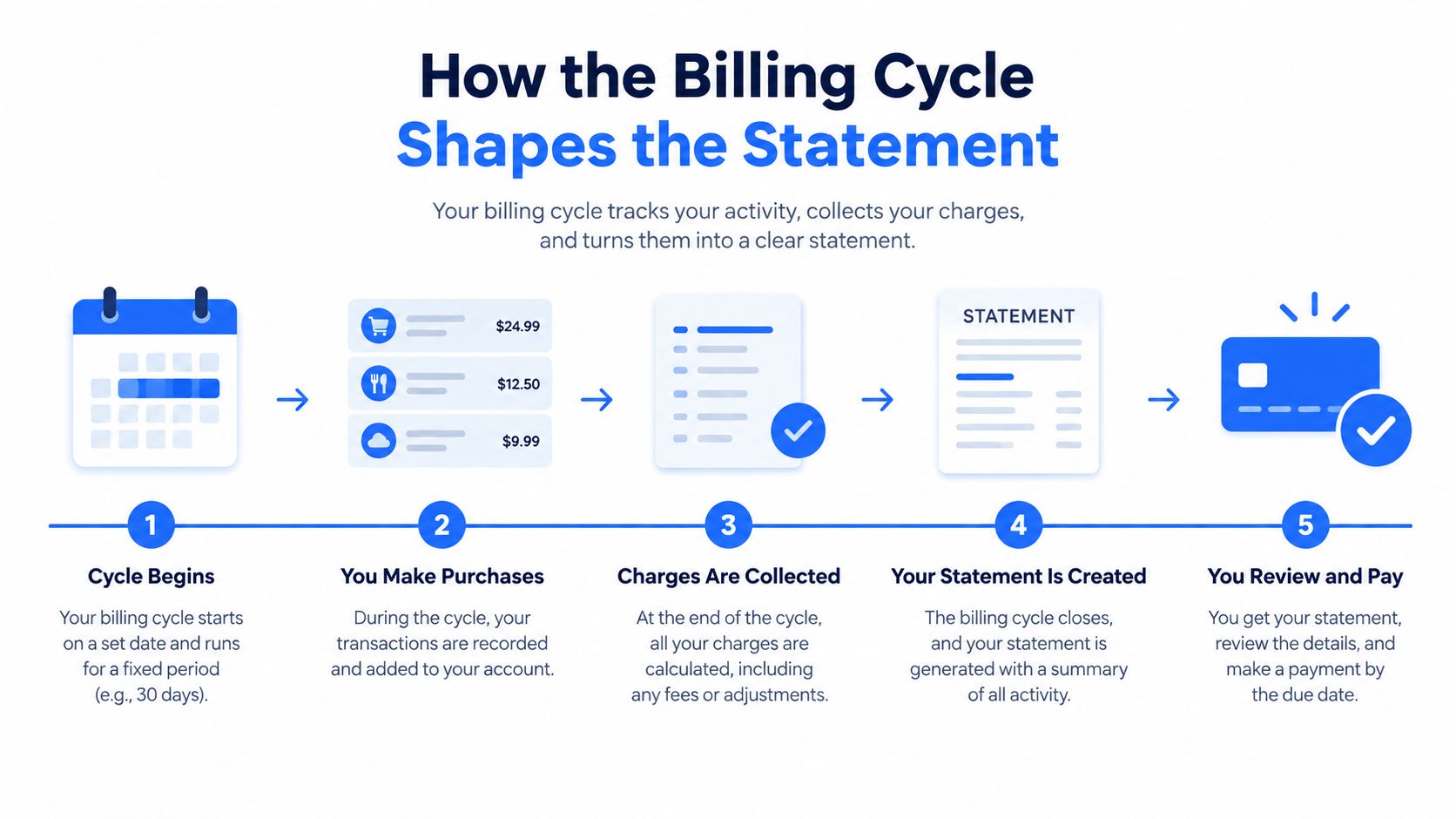
When we need to predict where a charge will appear, we check three things: the transaction date, the posting date, and the statement closing date. The statement period printed near the top is the final authority for that document.
The Key Fields on Every Statement
A real statement can look dense, but most sections answer a small set of questions: what period does this cover, what changed, what do we owe, and when must we pay? We can read it in that order.
Use this fictional statement for orientation. A cardholder named Jordan opens a statement covering a completed monthly period. The account summary shows a previous balance, new purchases, a payment, a credit, fees or interest, and a resulting statement balance.
Start with the account and payment blocks
The statement period gives the opening and closing dates. The account summary then explains how the closing amount was built. A previous balance is the amount carried into the period. New purchases are posted charges during the period. Payments and credits reduce the amount owed, while fees and interest increase it.
The statement balance is the amount owed when the cycle closed. It's the fixed figure that belongs to that statement. The minimum payment due is the smallest amount the issuer requires by the due date to keep the account current. Paying only that amount doesn't eliminate the remaining revolving balance or necessarily prevent interest from accruing (Chase's explanation of statement balance and minimum payment).
The payment due date is the deadline for at least the required payment. Don't confuse it with the closing date. One ends the accounting period. The other controls payment timing.
| Field | What It Means |
|---|---|
| Statement period | The dates covered by the completed billing cycle |
| Previous balance | The amount carried into the period |
| New purchases | Posted purchases added during the period |
| Payments and credits | Amounts that reduce what is owed |
| Fees and interest | Charges added under the card's terms |
| Statement balance | The total posted amount owed at the closing date |
| Minimum payment due | The smallest required payment for the period |
| Payment due date | The deadline for the required payment |
| Transactions | The detailed list of posted activity |
| Rewards summary | Points, cash back, or other rewards activity when applicable |
| Interest charge detail | The rate and calculation information supplied by the issuer |
| Customer service and disclosures | Contact details, dispute instructions, and account terms |
Read the transaction and disclosure detail
The transactions list usually includes the merchant name, transaction or posting date, and amount. We compare each line with receipts, expense reports, and the card feed. A merchant descriptor may differ from the storefront name, so an unfamiliar description deserves investigation rather than immediate approval or rejection.
The interest charge detail explains how the issuer calculated finance charges and may show the applicable APR. The issuer's disclosure section can also describe fees, payment allocation, and dispute rights. The rewards summary records earned, redeemed, or adjusted rewards when the card offers them.
Customer service contact information usually appears near the payment instructions or on the back of the statement. Keep those details available when a transaction needs clarification or a billing error requires written notice.
Statement Balance vs Current Balance and Minimum Payment
These three figures answer different questions, so we shouldn't treat them as interchangeable.
The statement balance is the total of activity posted through the closing date. Once the cycle closes, that figure is fixed. The current balance is the running account total, so later purchases, payments, credits, and fees can change it. The minimum payment is the required amount due by the deadline, not a measure of the total debt.
Consider a statement balance of $1,200. Paying the full $1,200 by the due date generally preserves the purchase grace period and avoids finance charges on eligible purchases. Paying only the minimum keeps the account in good standing, but the unpaid portion carries forward and interest can accrue. Paying the current balance may include newer activity that wasn't part of the statement, but paying it after the due date doesn't cure a missed required payment for the closed statement.
Interest timing depends on the account terms. When a cardholder doesn't pay the statement balance in full, the unpaid amount can revolve into the next cycle, and interest may be calculated using a daily periodic rate derived from the APR (Chase explains when credit card interest starts to accrue).
Which figure belongs in the books
For month-end reconciliation, we record the statement balance at the closing date. It represents the issuer's completed period and can be supported by the transaction detail on the PDF. The current balance is useful for cash planning, but it's unreliable as a period-end figure because it can include activity after the cutoff and pending items that later change.
For a personal payment decision, the goal matters. Someone trying to avoid interest generally looks first at the statement balance and due date. Someone trying to reduce the account immediately may pay the current balance, but should still confirm that the statement's required payment is satisfied by its deadline.
| Action | Result on Account | Interest Charged | Bookkeeper Records |
|---|---|---|---|
| Pay the statement balance by the due date | Closed-period amount is paid | Eligible purchase interest is generally avoided | Statement balance and posted activity |
| Pay only the minimum | Account remains current, with unpaid balance carried forward | Interest may accrue on the revolving amount | Statement balance, payment, and finance charge |
| Pay the current balance | Later posted activity is also paid | Depends on payment timing and account terms | Closed statement, not the changing live total |
A bookkeeper's task is not to choose the payment amount for the owner. It's to record the closed-period liability accurately and make the payment choice visible in the cash-planning process. For a broader document-handling perspective, compare this with what bank statements look like.
Reading a Statement for Bookkeeping and Reconciliation
A clean reconciliation starts with the prior statement's closing balance. We carry that amount forward as the new opening balance, then account for activity posted during the current statement period. The control equation is simple:
Opening balance + credits − debits = closing balance
For a credit card ledger, the labels may feel inverted because purchases increase the liability while payments reduce it. We still use the issuer's presentation and the ledger's sign convention consistently. The important check is that the opening balance, credits, and debits reproduce the closing balance to the cent.
A practical close workflow
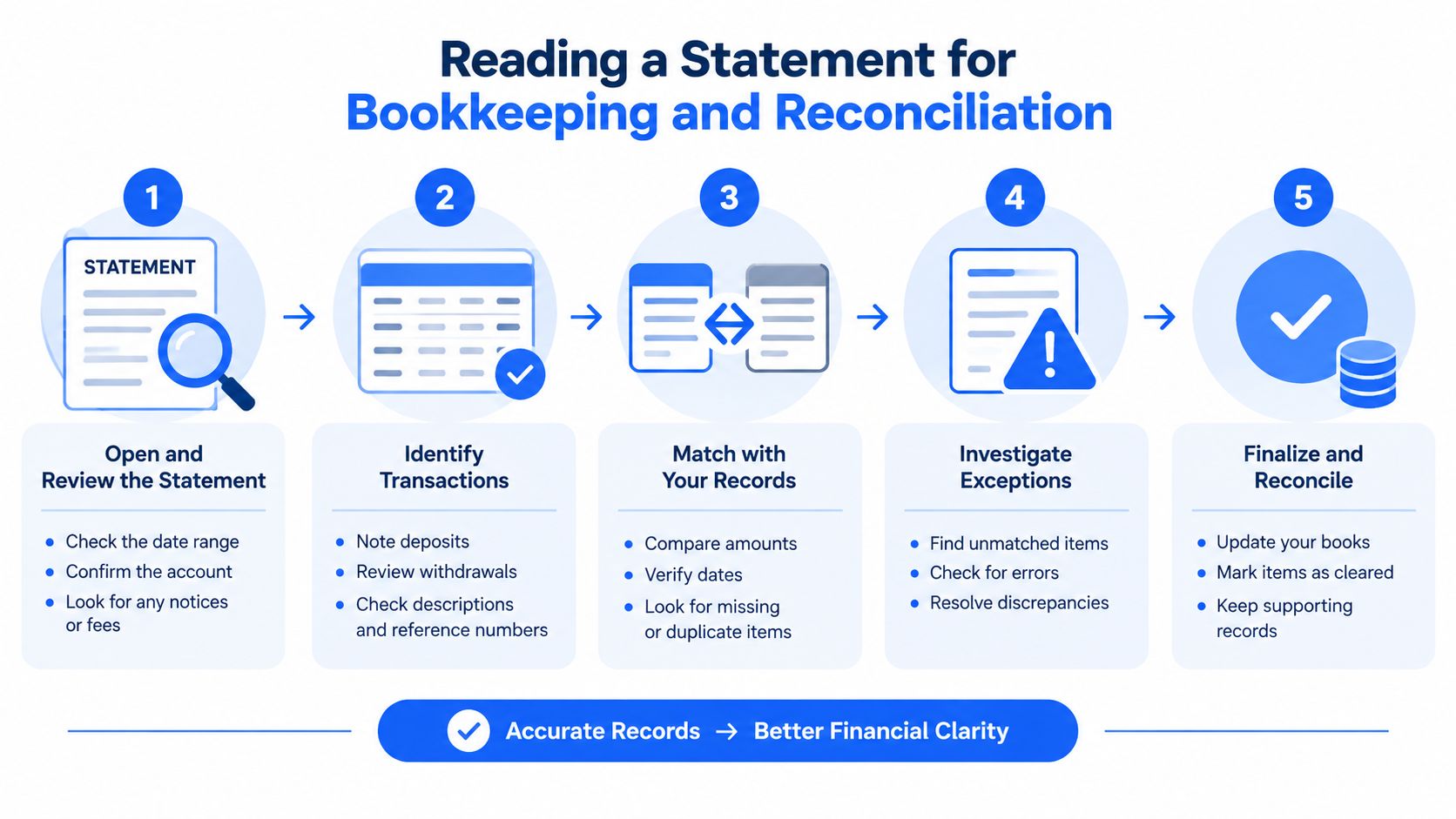
Start by matching the previous statement's closing balance to the current statement's opening or previous balance. Then classify every current-period line as a purchase, payment, credit, fee, interest charge, reward adjustment, or other issuer activity.
Returned payments deserve special attention. A payment may appear to reduce the balance and then be reversed with a returned-payment fee. Foreign transaction adjustments can post separately from the original purchase. Cash-back rewards may appear as a credit rather than as a reduction to the original expense. Finance charges may also appear on the statement even when the live bank feed hasn't presented them clearly.
Reconciliation rule: The statement is the source of truth for the closed period. The online feed is a working draft until the issuer closes and posts the cycle.
Next, compare the statement total with the general ledger. If the card closed before month-end, the statement may end before the accounting period does. We then identify post-closing transactions that belong in an accrual or subsequent-period review instead of forcing them into the closed statement reconciliation.
Finish with independent checks
A useful worked process looks like this:
- Carry forward the opening balance. Agree it to the prior statement's closing balance.
- Post current activity. Record purchases, payments, credits, fees, interest, and rewards according to the ledger policy.
- Run the balance check. Verify that opening balance plus credits minus debits equals the issuer's closing balance.
- Investigate differences. Look for posting-date shifts, returned payments, duplicate entries, and items still pending in the feed.
- Spot-check evidence. Compare three random statement line items with the bank feed, receipts, or expense support before signing off.
If the PDF is difficult to work with, our guide to reconciling bank statements provides a related workflow. We should still inspect the source statement, because extraction doesn't replace review.
Statements as Records for Disputes Taxes and Reviews
Treat the statement as a primary source document, not just an invoice. It identifies the transaction that needs attention and supplies the account context around it.
For a billing-error dispute, gather the transaction description, posted date, amount, merchant name, and written explanation of the error. The statement helps establish these details, while receipts, contracts, and correspondence provide supporting evidence. Consumer guidance also makes the timing important. A written notice generally needs to be sent within 60 days of the statement date for the billing error protections described in the applicable guidance (TD's guide to reading a credit card statement).
Use the document beyond payment processing
Business card statements can support expense classification, sales-tax review, and deductible-expense documentation when paired with receipts and a clear business purpose. They can also help finance teams answer questions during an audit or lending review, because the statement shows the account's posted activity and payment history for that period.
Don't rely on the statement alone for tax substantiation. A merchant line may prove that a charge occurred, but it may not explain who attended a meal, what business purpose applied, or whether an expense was deductible. Pair it with the receipt and the organization's accounting policy.
Retention needs a written policy. Keep statements for at least seven years when they support IRS audit records, and retain them longer if a dispute, examination, lending review, or unresolved reconciliation remains open. Issuers vary in how long older statements remain downloadable, so export and archive the records your team needs before they disappear from the portal.
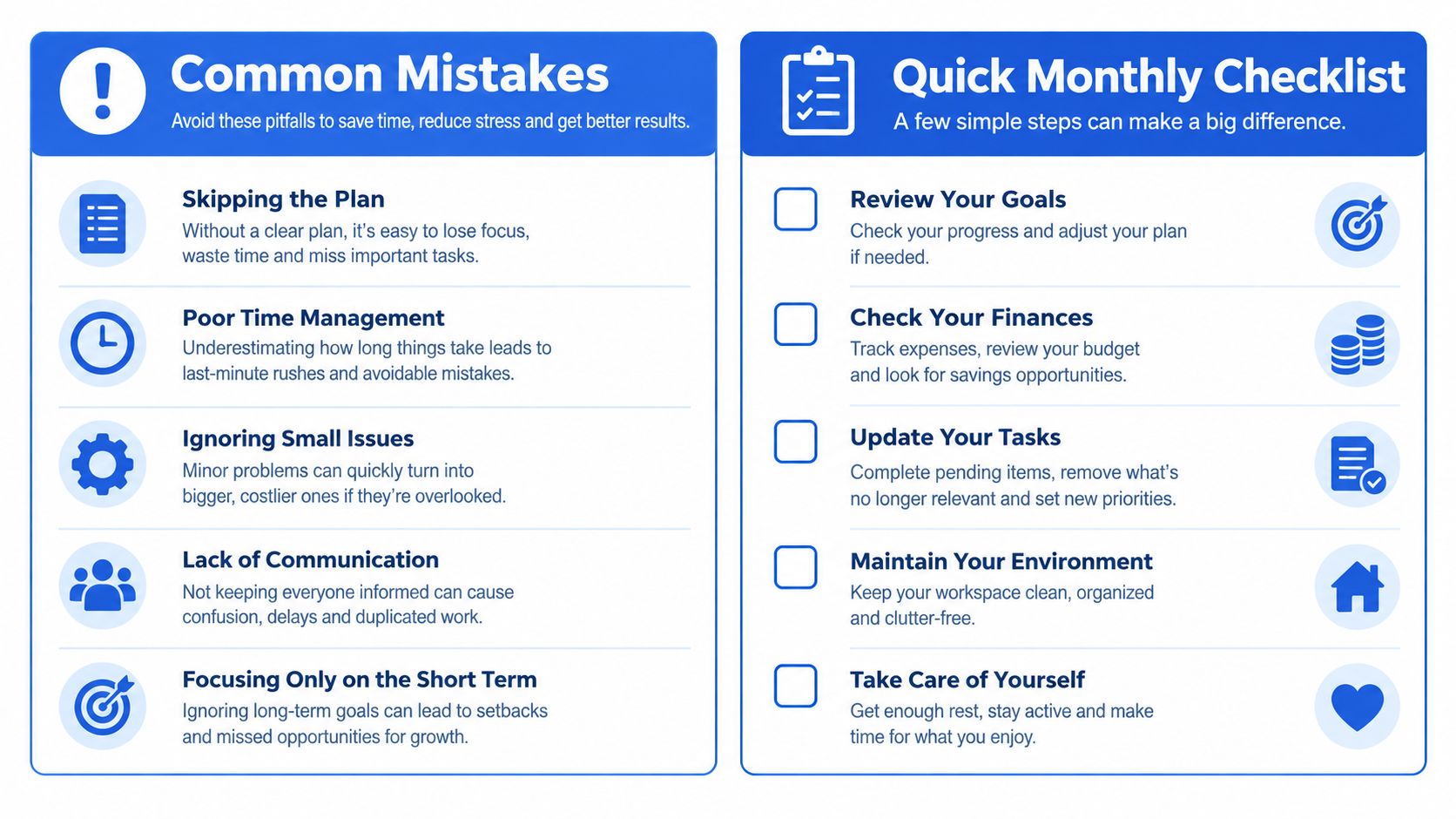
Common Mistakes and a Quick Monthly Checklist
The most expensive errors usually come from treating similar dates and balances as if they meant the same thing. Paying the current balance isn't wrong, but it can obscure the amount that belonged to the closed statement. Missing the due date because it was confused with the closing date creates a separate problem.
Small fees and interest charges also deserve review. A duplicate merchant charge, an unfamiliar transaction, a returned payment, or a foreign transaction adjustment can remain hidden when we approve only the headline balance. Throwing away statements too early creates an evidence gap when a tax question or billing dispute appears later.
A repeatable monthly routine
- Open the PDF promptly: Review it when the statement arrives.
- Match the statement balance: Agree the closing balance to the ledger.
- Verify line items: Compare transactions with receipts, expense reports, and the feed.
- Choose the payment objective: Confirm whether the owner intends to pay the full statement balance or only the required minimum.
- Schedule payment early: Set payment at least two days before the due date to allow for processing.
- Review rewards: Record relevant rewards, credits, or adjustments.
- Archive the record: File the statement in the dated retention folder.
For teams handling many PDFs, autobankstatement converts digital, scanned via OCR, and password-protected bank statements into CSV or Excel/XLSX files, supports bulk uploads with files up to 25 MB, offers a free guest preview before payment, provides registered users with 24-hour download access, and automatically deletes uploads within 24 hours. Plans include Starter at $15 per month for 400 pages, Professional at $30 per month for 1,000 pages, and Business at $50 per month for 4,000 pages, with annual discounts and custom enterprise limits. Accuracy still requires the same control check: verify opening balance + credits − debits = closing balance.
If your team spends time rekeying PDF statement activity before reconciliation, try autobankstatement to preview extracted tables and convert eligible files into CSV or Excel/XLSX. Use the resulting rows as a review aid, then confirm balances and supporting documents before posting the period-end reconciliation.
Convert your next statement in minutes
Upload a bank statement PDF — digital, scanned, or password-protected — preview the extracted table, and download clean CSV or Excel.