OCR Handwritten Text: A Practical Guide for Finance Teams
Learn how OCR handwritten text works, why accuracy varies, and the best workflows to turn handwritten bank notes into clean, reconciled data.
The month-end deadline is close, and a stack of scanned bank statements is sitting beside the keyboard. Some pages are clean exports, others are faded scans, and a few contain handwritten notes, deposit references, or cursive amounts that look obvious to a person but uncertain to software. The main worry isn't getting text off the page. It's whether the converted transactions will tie to the closing balance after they reach the spreadsheet.
That's where OCR handwritten text becomes a finance control issue, not just a document-processing task. We need to understand what the recognition system can read, where it tends to fail, and which checks catch errors before they affect reconciliation. Clean benchmark results can help us compare tools, but a bookkeeper needs a workflow that survives stained paper, mixed layouts, unclear digits, and missing characters.
Table of Contents
- The Moment a Stack of Handwritten Statements Lands on Your Desk
- What Handwriting OCR and ICR Actually Are
- Why Accuracy on Handwritten Pages Is So Uneven
- The Gap Between Benchmark Scores and Real Documents
- Improving Capture Quality Before You Upload
- Choosing the Right Path to Structured Data
- Verifying a Converted Statement Before You Trust It
- An End-to-End Workflow You Can Run This Month
The Moment a Stack of Handwritten Statements Lands on Your Desk
A junior bookkeeper may start by opening every PDF and copying each transaction into a spreadsheet. That feels safe because a human is looking directly at the source. In practice, long account numbers, dates, decimal values, and repeated descriptions create their own risks, especially when the source is a faded scan and the deadline leaves little time for a second pass.
A typical batch might contain a printed statement with handwritten annotations, a scanned deposit slip, and ledger pages written by different people. One writer uses careful block letters. Another joins characters together. Ink may be faint near the page edge, while a coffee mark or fold crosses the amount column. Printed OCR can often handle the machine-generated sections, but handwritten text recognition must interpret the writer's individual strokes.
The important question isn't whether the software produces text that looks plausible. A misread description may be inconvenient. A misread debit or credit can change the balance and send the reconciliation in the wrong direction.
Practical rule: Treat every converted amount as a proposed transaction until the source image and balance equation support it.
We start with three questions:
- What kind of page is this? Separate clean digital PDFs, scanned pages, handwritten ledgers, and mixed printed-and-handwritten forms.
- What must the output contain? For reconciliation, dates, descriptions, debit or credit values, and balances matter more than a perfect transcription of every note.
- What will prove the result is sound? The opening balance plus credits minus debits should equal the closing balance after legitimate timing differences, fees, and other reconciling items are considered. This is the practical purpose of bank reconciliation, as described in QuickBooks' bank reconciliation process.
OCR can reduce repetitive entry, but it doesn't remove responsibility for checking the result. We use it to create a structured starting point, then apply accounting controls to decide whether that starting point is reliable.
What Handwriting OCR and ICR Actually Are
Optical character recognition, or OCR, converts visible text in an image or PDF into machine-readable text. Traditional OCR was built mainly for printed characters, where the same letter tends to have a consistent shape. Handwriting OCR, also called handwritten text recognition, must interpret text whose shape changes from writer to writer and even from one line to the next.
Intelligent character recognition, or ICR, is the more specific idea of recognizing handwritten characters. The distinction matters because handwriting isn't just printed text with a different font. A handwritten “8” may be open at the top, a “3” may resemble a “B,” and joined cursive letters may not have clear boundaries. The system has to infer where one character ends and the next begins.
The technology developed in stages. In the 1980s, Hidden Markov Models were introduced for OCR, helping systems model sequences instead of relying only on fixed visual rules. During the 1990s, neural networks were applied to recognition, moving the field further from hand-built rules toward systems that learn patterns from examples. A 2024 survey of OCR development describes the broader movement from hardware-based implementations to software-based solutions between the 1980s and 2000.
What changed for finance teams
Rule-based systems ask, “Which stored character shape does this mark resemble?” Statistical systems ask, “Which sequence is most likely given the marks around it?” Neural and newer vision-based systems use broader visual and contextual patterns, which can help with joined letters, inconsistent spacing, and page structure.
That doesn't make the output automatically correct. It changes the type of tool we should select. A system trained for printed OCR may recognize the typed headings on a statement while failing on the handwritten transaction reference underneath. We need a model designed for handwriting, plus a workflow that understands statement fields and supports verification.
For a practical explanation of how learned recognition systems work in document workflows, see machine learning text recognition. The finance test remains simple: can the tool produce rows we can inspect and reconcile, or does it only produce a block of text that still requires manual mapping?
Why Accuracy on Handwritten Pages Is So Uneven
Handwriting OCR accuracy changes sharply from one page to another because the input changes in several ways at once. A purpose-built handwriting system can perform very differently from a generic printed-text engine on the same image. In a 2026 evaluation using a 100-word handwritten English prose sample, word error rate ranged from 0.9% for a purpose-built handwriting OCR system to 95.4% for Tesseract, while mainstream cloud OCR and vision models fell in the 8.67% to 23.3% WER range (evaluation details). The result isn't a promise for bank statements. It shows why model selection matters.
| Factor | What It Does to Accuracy | What to Look For on the Page |
|---|---|---|
| Scan quality | Blur, shadows, compression, and faint ink remove the visual clues the model needs | Soft edges, grey background, folded corners, glare, or missing strokes |
| Handwriting style | Joined cursive and inconsistent letter shapes make segmentation harder | Connected letters, changing letter size, overwritten digits, rushed writing |
| Language and script | A model trained mainly on one script may misread unfamiliar characters or mixed-language content | Multiple scripts, abbreviations, accented characters, or regional formats |
| Page layout | Tables, stamps, logos, rotation, and columns can disrupt reading order | Narrow amount columns, handwritten notes across printed fields, rotated pages |
The four production variables
Scan quality affects the raw evidence. A sharp, evenly lit scan preserves the difference between a “1” and a “7.” A phone photo taken at an angle may stretch one side of the page and compress the other.
Writing style affects segmentation. Carefully separated block writing gives the system clearer character boundaries. Cursive joins can make several characters look like one continuous mark.
Language and script affect the model's vocabulary and visual expectations. A 2025 survey describes a shift toward paragraph- and document-level handwriting challenges, while research on lower-resource languages such as Hindi and Urdu shows that results can remain uneven across scripts and datasets (survey and research overview).
Layout affects ordering. A statement may contain a transaction table, a balance summary, a stamp, and notes in the margin. If the system reads the page in the wrong order, it may assign a value to the wrong row even when it recognizes the individual digits.
That's why we inspect the page before trusting the extracted row. The question isn't only, “Did it read the character?” It's also, “Did it attach the character to the correct date, amount, and transaction?”
The Gap Between Benchmark Scores and Real Documents
A benchmark can isolate a clean line of handwriting and compare the transcription with a known answer. That's useful for measuring model behavior under controlled conditions. It doesn't reproduce a statement with faded ink, several columns, signatures, stamps, handwritten corrections, and page-level reading order problems.
The IAM English handwriting database, for example, contains 13,353 text lines from 657 writers, and surveys report 2.1% to 3.4% character error rates for state-of-the-art character recognition on IAM (benchmark history. Those results show that modern systems can perform strongly on standardized research material. They don't establish that every field on a real financial form will be captured correctly.
Neutral reporting highlights the production gap. General-purpose models can reach about 1.75% character error rate on clean handwritten lines, while the best systems read only about 85% of fields correctly on real handwritten forms (handwriting OCR ranking analysis). Line-level recognition and field-level extraction are different tasks.
A clean demo may show a convincing transcription because the input is carefully selected. A production batch exposes the exceptions that a demo avoids. For finance teams, those exceptions matter more than the average line score because one missing digit in a debit column can prevent the statement from balancing.
A benchmark answers, “How did the system perform on this test set?” Reconciliation asks, “Can we prove this file agrees with the source?”
We should therefore evaluate OCR with representative pages from our own work. Include faded scans, mixed writing styles, different scripts where relevant, and pages with the layouts we typically receive. Then measure not only text recognition, but also whether the extracted rows pass the balance check and sample review.
Improving Capture Quality Before You Upload
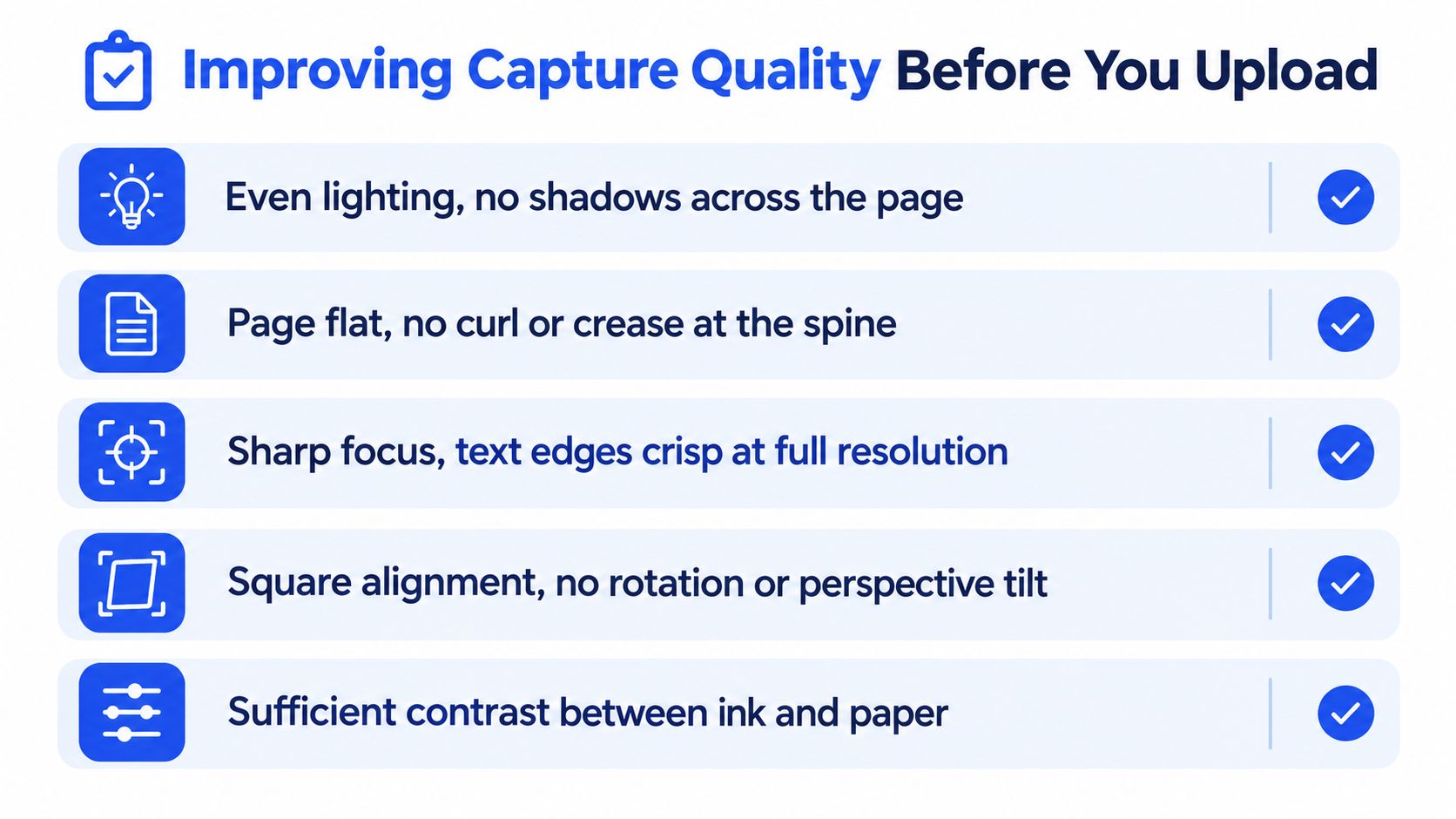
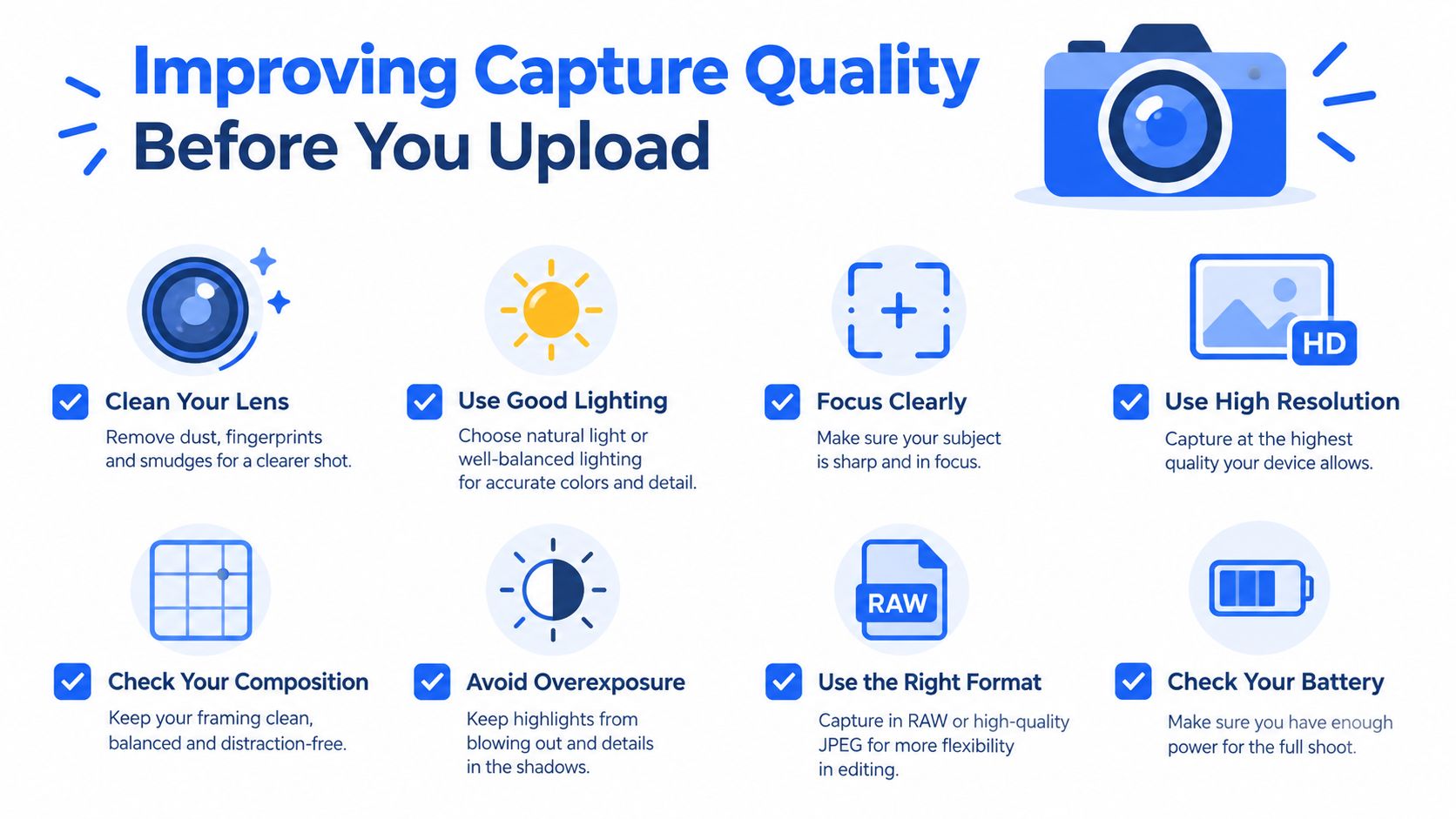
The image is the first control point. Recognition software can't recover a character that the scan has erased, blurred, or hidden under a shadow. Before uploading, we should spend a few seconds checking whether a person can clearly distinguish the dates and amounts at normal viewing size.
A flat scanner usually gives the engine a cleaner page than a phone photo. If we use a camera, the page should be square to the lens, evenly lit, and sharply focused. A guide to extracting data from images can help teams think about the capture stage as part of extraction, not as a separate administrative task.
A practical pre-upload routine
- Use an appropriate scan setting: Use a high-resolution scan, commonly 300 DPI for handwriting work, and choose grayscale or high-contrast black and white when that preserves the ink.
- Flatten the page: Remove curls, folds, and creases where possible. A crease crossing a decimal point can change the amount.
- Align the sheet: Feed pages straight and correct rotation or perspective before processing.
- Clear obstructions: Remove staples and sticky notes, and check whether highlighter marks cover digits or transaction lines.
- Separate the batch logically: Keep one statement or transaction set together so the opening and closing balances belong to the same reconciliation period.
- Review the edges: Look for cut-off columns, folded corners, faint ink, and shadows before upload.
The exact setting should follow the source. A high-contrast mode can improve dark ink on light paper, but it can also erase thin strokes if the contrast is too aggressive. We should compare the processed image with the original and choose the version that preserves the characters a human needs to verify.
Capture quality doesn't guarantee correct output. It does remove avoidable ambiguity, which leaves us with a cleaner test of the recognition system and a smaller review queue.
Choosing the Right Path to Structured Data
There are three practical routes from a handwritten or scanned statement to a spreadsheet. The correct choice depends on page volume, source quality, and how much manual cleanup the team can absorb.
Manual entry gives us direct control. It works for a small number of pages, particularly when the writing is irregular or the page contains unusual notes. Its weakness is repetition. Long strings of digits and similar transaction rows invite typing errors, and a second person may still need to check the work.
Generic OCR with handwriting support costs less effort at the capture stage, but it often returns text rather than accounting-ready rows. We may need to map dates, descriptions, debits, credits, and balances ourselves, then repair reading order and ambiguous characters. It can be useful for exploratory work or documents that don't follow a statement pattern.
A purpose-built statement converter is designed around the structure finance teams need. It can turn digital, scanned, and password-protected PDF bank statements into CSV or Excel/XLSX output, including structured transaction rows. That doesn't eliminate verification, especially when handwriting is involved, but it can reduce the work of rebuilding columns manually.
| Path | Monthly volume fit | File condition tolerance | Manual cleanup | Best for |
|---|---|---|---|---|
| Manual entry | Small batches | Highest tolerance when a person can inspect every mark | High, but visible | Unusual pages, unreadable handwriting, isolated exceptions |
| Generic OCR | Variable, if the team can map fields | Moderate, depends on layout and language | Medium to high | Text extraction, experiments, mixed document types |
| Statement converter | Steady batches and bulk processing | Good for digital and scanned PDFs, with review for difficult handwriting | Lower for structured statements, still required for exceptions | Reconciliation-ready CSV or XLSX preparation |
For a finance team, the deciding question isn't “Which tool has the highest demo score?” Ask instead:
- Can it accept the files we receive? Check support for scanned PDFs, digital PDFs, password-protected statements, and the file-size limit.
- Does it preserve the fields we reconcile? We need dates, descriptions, debits, credits, and balances in inspectable rows.
- Can we preview before committing? A preview lets us catch a poor scan or wrong layout before using the output.
- What happens to exceptions? Any uncertain amount should have a clear route to source review or manual entry.
Autobankstatement converts digital, scanned via OCR, and password-protected PDF bank statements into CSV or Excel/XLSX files. It supports bulk uploads and files up to 25 MB, offers a free guest preview before payment, provides registered users with 24-hour download access, and auto-deletes uploads within 24 hours. Its plans are Starter at $15 per month for 400 pages, Professional at $30 per month for 1,000 pages, and Business at $50 per month for 4,000 pages, with annual discounts and custom enterprise limits. Those details fit a team comparing repeatable statement conversion with manual re-entry, but the accounting checks still belong to us.
Verifying a Converted Statement Before You Trust It
A converted file isn't ready for posting because it opens cleanly in Excel. We need three separate checks, and each one catches a different class of OCR failure.
Start with the balance equation
Take the statement's opening balance. Add all credits, subtract all debits, and compare the result with the closing balance:
Opening balance + credits − debits = closing balance
The figures should reconcile once legitimate timing differences, fees, and other reconciling items are accounted for. If they don't, don't search randomly through the spreadsheet. Compare the totals by page or transaction group, then inspect the rows containing unusual amounts, missing signs, or unclear handwriting.
Sample the source, not just the output
Open the original page beside the converted file. Check the first and last five transactions, then check every amount that could materially affect the account under your team's review policy. Look at the entire row, not only the number. A correct amount attached to the wrong date or description is still a reconciliation error.
Dates and references deserve focused attention. OCR may confuse similar digits such as 3, 8, and 0, or misread month abbreviations. Confirm that every date falls within the expected statement period and that reference numbers and counterparties match the source.
Use pass or fail gates
- Balance gate: Pass only when the balance equation agrees or documented reconciling items explain the difference.
- Source sample gate: Pass only when sampled rows match the image, including sign, date, amount, and description.
- Period and reference gate: Pass only when dates and identifiers fit the statement period and expected account activity.
A failed gate sends the file back for better preprocessing, a second OCR attempt, or manual review. For a broader treatment of turning PDF content into spreadsheet rows, see how to convert a PDF to CSV. The output is useful only after the controls show that it represents the source faithfully.
An End-to-End Workflow You Can Run This Month
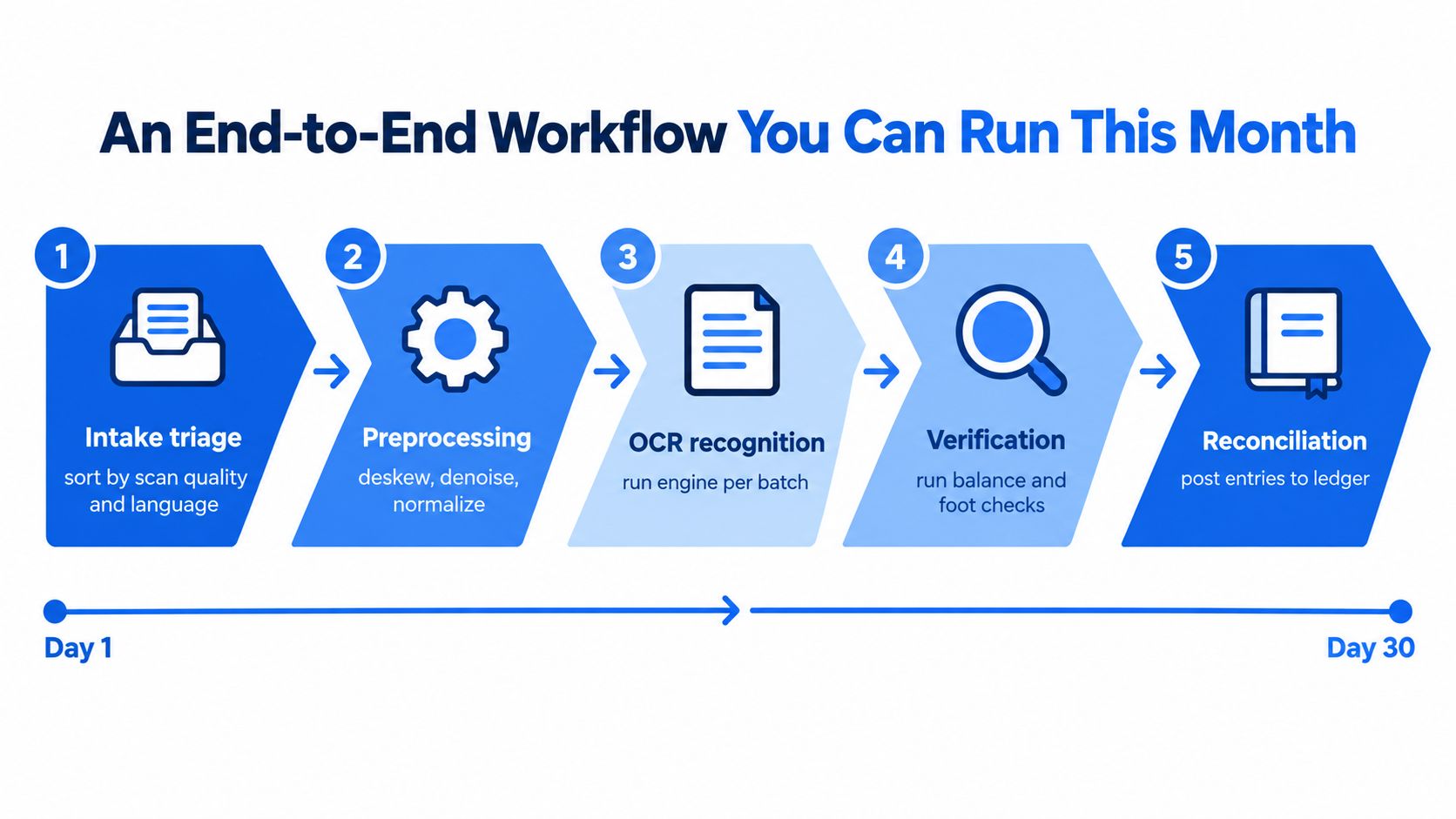
A repeatable process starts before OCR and ends after the ledger agrees. We begin by sorting incoming statements according to scan quality, language or script, and document type. Clean digital pages can follow the normal conversion route. Faded, rotated, or mixed handwritten pages need preprocessing or a manual exception flag.
Intake and capture
Assign each file to a batch with a clear statement period. Check that the PDF opens, identify password protection, and confirm that the page size is within the upload limit. For locked statements, use the password rule supplied by the bank or delivery message. There isn't a universal password format, as explained in guidance on password-protected bank statement PDFs.
Next, improve the source image. Deskew rotated pages, reduce visible noise, normalize contrast, and separate unreadable pages for manual keying. Don't force a poor image through OCR just because the batch is due.
Recognition and verification
Run the appropriate recognition path for each batch. Keep the original PDF available, and preserve the converted file as a review copy until the balance, sample, date, and reference checks pass.
A workable exception policy can include:
- Balance mismatch: Stop posting and inspect the affected page or amount column.
- Unclear high-value row: Require source review rather than guessing the digit.
- Mixed or unsupported script: Route the page to a compatible recognition process or manual entry.
- Layout failure: Reprocess the page after deskewing or crop correction.
- Unreadable source: Key the transaction manually and record that decision.
Export and reconcile
After verification, export the structured rows to CSV or Excel/XLSX and map them into the team's bookkeeping process. Match converted transactions against the books, investigate timing differences, and document any manual corrections. Keep the review focused on exceptions, but don't skip the balance equation because the file appears complete.
The best workflow isn't the one that promises no manual review. It's the one that identifies uncertain rows early, gives reviewers the source image, and prevents an unchecked number from reaching reconciliation. Visit autobankstatement to convert digital, scanned, and password-protected PDF bank statements into CSV or Excel/XLSX files, with bulk uploads, a free guest preview, and temporary 24-hour file handling. Use the preview on a representative statement, then apply the balance and source checks before relying on the output for month-end work.
Convert your next statement in minutes
Upload a bank statement PDF — digital, scanned, or password-protected — preview the extracted table, and download clean CSV or Excel.