Bank Account Statement: What It Is and How to Read It
Learn what a bank account statement is, its key components, formats, and how to read and use statements for accurate reconciliation and bookkeeping.
At month-end, we often have several bank accounts open across different portals, a folder of PDF statements, and a reconciliation that still needs clean transaction data. One file may contain selectable text, another may be a scan, and a third may arrive locked with a password. The work involves more than reading each bank account statement. We need to confirm that every line is complete, understandable, and usable in the ledger.
A bank account statement becomes valuable when we treat it as evidence, not decoration. It tells us what the bank recorded during a statement cycle, while the reconciliation process tells us whether that record agrees with our books.
Table of Contents
- Why Bank Statements Still Matter for Finance Teams
- What a Bank Account Statement Actually Is
- Key Components You Need to Read Correctly
- Common Formats and How Access Varies Across Banks
- How to Use Statements for Reconciliation and Bookkeeping
- Turning Statements into Usable Data Safely
Why Bank Statements Still Matter for Finance Teams
A month-end close can start with a simple task: download the latest statements. In practice, the finance team may be handling operating accounts, savings accounts, loans, and client records from several institutions. The files don't always use the same column names or transaction descriptions, so a document that looks straightforward on screen can create avoidable work once we need to compare it with the ledger.
Banks moved from periodic paper reporting toward monthly summaries of account activity, and the monthly statement remains the formal record many institutions use today. It records deposits, withdrawals, transfers, fees, and balances for a defined period. Online banking has changed how we retrieve those records, but it hasn't removed the need to preserve and review them. TD Bank's explanation of bank statements describes the statement as an official record and notes that electronic archives can extend well beyond the paper era.
Practical rule: Treat the statement as the bank's source document and the ledger as our accounting record. Reconciliation tests whether the two agree.
Why the monthly cycle helps
The recurring statement cycle gives us a stable control point. We can identify the opening balance, review activity during the period, and confirm the closing balance before posting adjustments. That sequence supports cash reconciliation, tax preparation, lending reviews, and dispute resolution.
The move to paperless delivery wasn't immediate. A Forrester study of U.S. bank account holders found that 24% had given up paper statements in 2010, while 37% of those still receiving paper said they would never abandon it. The historical point matters because digital access expanded gradually, and finance teams still encounter records shaped by both paper-era layouts and newer electronic systems.
A good data capture solution for bank statements should therefore preserve the original document while making its transaction rows easier to review. The statement is both a historical record and an active control file. Losing either function creates risk.
What a Bank Account Statement Actually Is
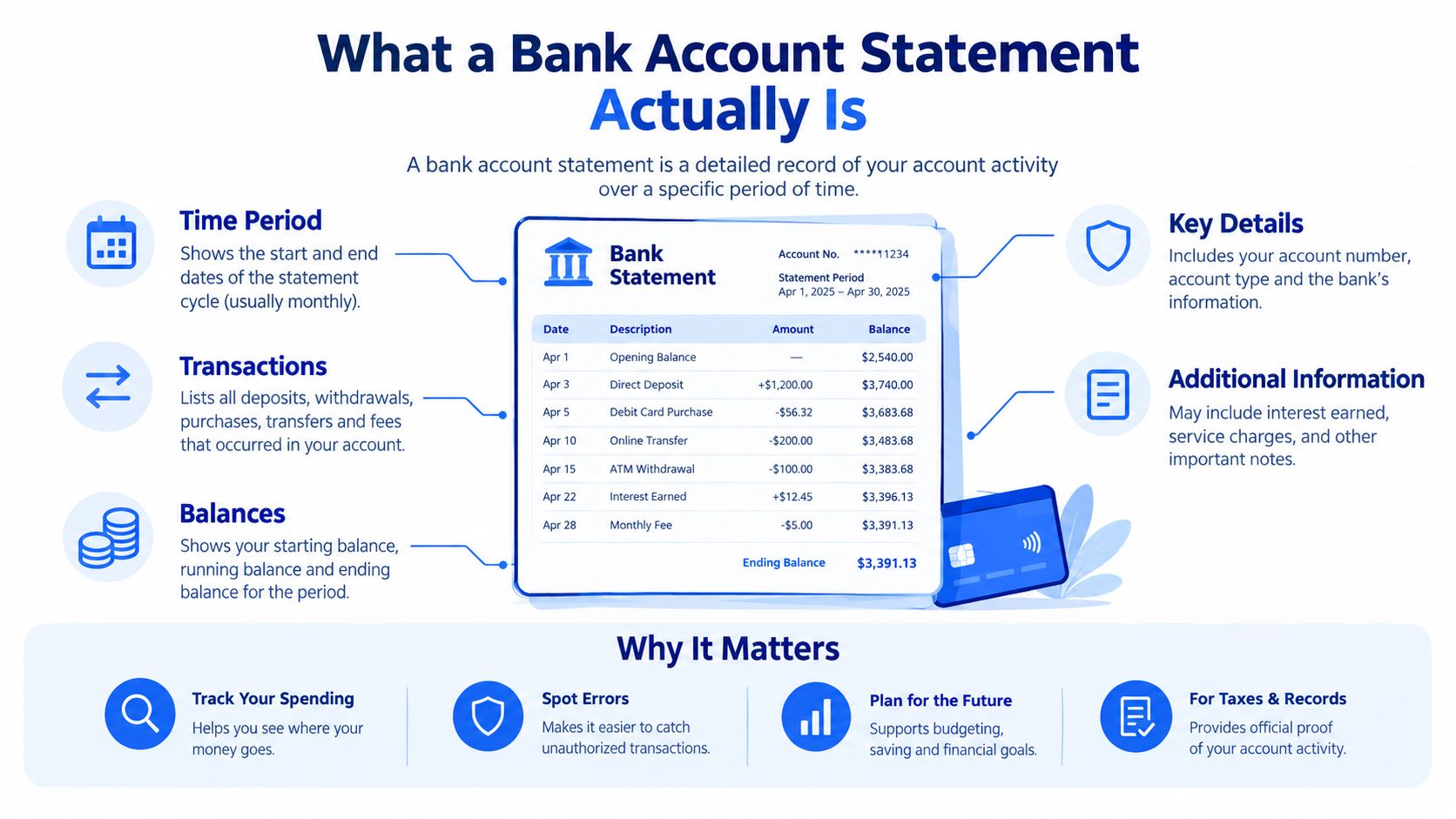
A bank account statement is an official record of activity over a defined statement period. It normally includes the opening balance, deposits or other credits, withdrawals or debits, transfers, fees, transaction descriptions, and the closing balance. The format may be a paper document, an electronic statement, or a downloadable file from online banking.
That definition is more useful than calling it a simple monthly summary. A statement contains a sequence of transaction-level records, and those records are what our bookkeeping systems need for matching. Microsoft explains the reconciliation logic in its bank account reconciliation documentation, where imported statement entries can be matched, identified as new, or sent for review when no ledger match exists.
The control document behind the report
For a finance team, each transaction line should be matchable using fields such as transaction date, amount, currency, and reference. If one payment is missing, shifted, duplicated, or assigned the wrong date, automated matching can fail even when the printed opening and closing balances appear correct.
That is why a PDF shouldn't be treated as the final working format when the objective is reconciliation. The PDF preserves the bank's presentation, but the accounting workflow needs rows that can be sorted, filtered, compared, and investigated.
The paper-to-digital shift improved access to older records, but it didn't change the underlying control requirement. We still need a complete trail from the bank's record to the ledger entry. A statement that sits untouched in an archive may support an audit later, but a statement converted into structured, validated rows can also support today's close.
Key Components You Need to Read Correctly
Start at the top of the statement, not in the middle of the transaction list. The opening balance is the amount carried into the statement period. It should connect to the prior period's closing balance, subject to any clearly identified bank adjustments.
The transaction section then shows activity during the period. Common fields include:
- Date: Check whether the bank uses the transaction date, posting date, or both.
- Description: Read the merchant, payee, transfer note, or bank reference rather than relying only on a shortened label.
- Debit: Identify withdrawals, payments, fees, and other reductions.
- Credit: Identify deposits, refunds, transfers in, and other increases.
- Running balance: Use it as a line-by-line reasonableness check, but don't assume it replaces full reconciliation.
At the end, the closing balance represents the account balance after the listed activity. The practical equation is:
Opening balance + credits − debits = closing balance
For example, if a statement begins with an opening balance of $5,000, lists credits of $2,000, and lists debits of $1,250, the expected closing balance is $5,750. That arithmetic isn't a substitute for matching every transaction, but it can reveal a missing row, a sign error, or an extraction problem before the data reaches the ledger.
A repeatable reading checklist
Use the same sequence each month:
- Confirm the account name and statement period.
- Compare the opening balance with the prior statement's closing balance.
- Scan the transaction dates for unusual gaps or duplicated entries.
- Separate credits from debits, especially when the bank uses a single amount column.
- Recalculate the closing balance using the statement totals.
- Investigate any mismatch before importing or posting data.
The bank statement reading guidance from InvoiceDataExtraction also identifies the opening balance, credits, debits, and closing balance as core fields. For lending, tax, and bookkeeping work, structural integrity matters as much as legibility.
Common Formats and How Access Varies Across Banks
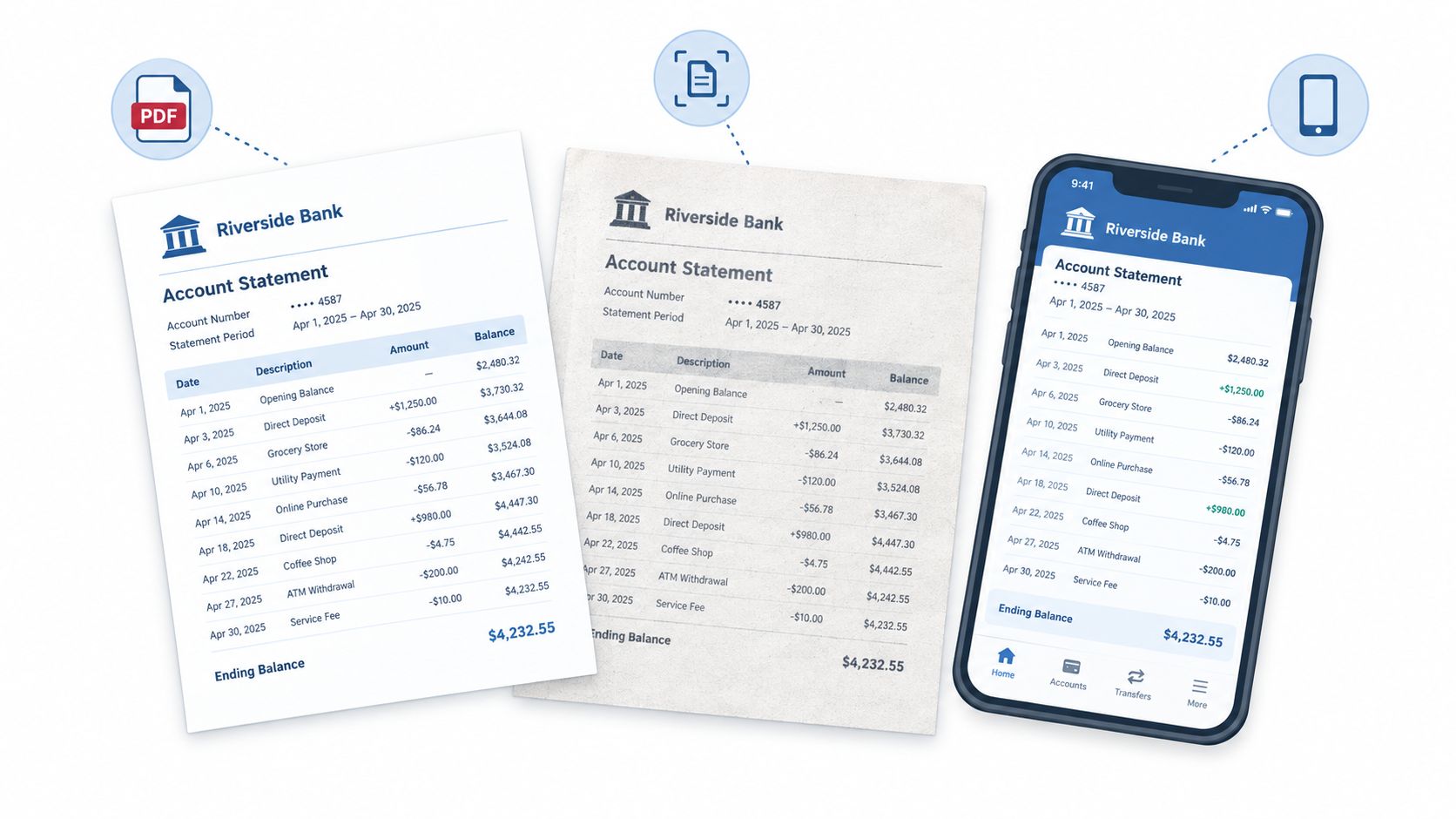
The same bank account statement may arrive in several forms. A native-text PDF contains selectable characters, so software can often read dates, descriptions, and amounts directly. A scanned or photographed statement is different. It contains an image of the characters, not usable text, so OCR must recognize the page before transaction rows can be reconstructed.
The quality gap is material. Guidance on extracting bank statement data with OCR indicates that native-text PDFs can reach about 99% or higher accuracy, while scanned or photographed statements often fall in the mid-90s, depending on skew, resolution, and print quality. The same guidance places OCR with layout and validation logic in a 95% to 99% field-level accuracy range, while warning that errors in dates and amounts can affect reconciliation and lending decisions.
Match the preprocessing to the file
A locked PDF requires a different first step. The correct password must be entered before the document can be parsed, and banks commonly provide it in the delivery message or download screen. There isn't a universal password standard, as explained in this guide to extracting transactions from password-protected PDFs.
Mixed files need a mixed workflow. Text-based pages can be parsed directly, while image-only pages need OCR first, as described in this overview of password-protected and scanned bank statements. CSV exports, where a bank provides them, can be easier to analyze because they already contain rows and fields, but they may not include the same presentation or historical context as the formal monthly statement.
Access also varies. Customers may retrieve statements through online banking portals, mobile apps, branches, mail, or ATM mini statements. In the United States, the Office of the Comptroller of the Currency explains statement and record access, including the requirement for at least monthly statements when electronic fund transfers are possible. We should document the retrieval path and preserve the original file regardless of format.
How to Use Statements for Reconciliation and Bookkeeping
Reconciliation works best when we separate document preservation from transaction processing. Keep the original statement unchanged, then create a working copy or structured export for sorting, matching, and review. A PDF is useful evidence, but a spreadsheet is usually easier for row-level checking.
A practical monthly sequence looks like this:
- Download the complete statement and record the account and period in the filename.
- Preserve the original in a controlled folder.
- Extract or enter the transaction rows into CSV or Excel.
- Match each row to the ledger using date, amount, currency, and reference.
- Flag unmatched entries instead of forcing a match.
- Review the balance equation before finalizing the reconciliation.
Use names such as Operating-Account-2026-09-Statement.pdf and Operating-Account-2026-09-Transactions.xlsx. Consistent naming prevents duplicate processing and helps another team member trace the spreadsheet back to the bank document.
Validate before posting
Suppose the opening balance is $8,400, credits total $3,100, and debits total $2,750. The calculated closing balance is $8,750. If the extracted table produces a different result, stop and inspect the rows. A debit may have been read as a credit, a digit may have been lost during OCR, or a transaction may have been omitted.
The bank statement reconciliation workflow should always include this balance check. It catches defects that a visual scan can miss, but it doesn't replace transaction matching. A correct total can still conceal a duplicated credit and an omitted debit of the same amount, so we need both arithmetic validation and ledger-level review.
Turning Statements into Usable Data Safely
Manual entry still has a place for a small, clear statement. It lets us inspect every row directly, and it may be sensible when the document contains only a few transactions. The trade-off is that repeated copy-paste introduces transcription risk and consumes close time, especially when several accounts use different layouts.
Automated extraction is more useful when statements arrive in batches or contain scanned pages. A workflow can convert digital PDFs directly, apply OCR to image-based pages, and handle password-protected files after the correct password is supplied. We still need a review step because extraction quality depends on layout, image clarity, date formats, signs, and the placement of totals.
Compare the workflow choices
| Approach | Where it works | Where it falls short |
|---|---|---|
| Manual entry | A short, clean statement with unusual details | Slow for recurring volume and vulnerable to typing errors |
| Spreadsheet import | Structured rows that need sorting and matching | Requires reliable extraction and consistent columns |
| Automated PDF processing | Multiple digital, scanned, or locked statements | Needs balance checks and exception review |
| Hybrid review | High-volume work with selected exceptions | Requires clear ownership of the final checks |
For teams comparing tools, extracting data from PDF to Excel is most effective when the output preserves transaction rows and balances rather than producing a visually neat but incomplete table. We should also consider privacy controls. Temporary access, automatic cleanup, and short download windows reduce the amount of time sensitive files remain exposed.
One option is autobankstatement, which converts PDF bank statements, including digital, scanned through OCR, and password-protected files, into CSV or Excel/XLSX. It supports bulk uploads and files up to 25 MB, offers a free guest preview before payment, gives registered users 24-hour download access, and auto-deletes uploads within 24 hours. Its plans are Starter at $15 per month for 400 pages, Professional at $30 per month for 1,000 pages, and Business at $50 per month for 4,000 pages, with annual discounts and custom enterprise limits.
The right choice depends on volume and control requirements. Whatever process we use, retain the original statement, validate opening balance plus credits minus debits equals closing balance, and investigate exceptions before the data enters the books.
autobankstatement converts digital, scanned, and password-protected PDF bank statements into reviewable CSV or Excel/XLSX tables for reconciliation, with bulk processing and temporary file handling. Visit autobankstatement to preview a statement workflow and choose an option that fits your monthly bookkeeping volume.
Convert your next statement in minutes
Upload a bank statement PDF — digital, scanned, or password-protected — preview the extracted table, and download clean CSV or Excel.