Data Capture Solution: The Finance Team's Guide
Learn how a data capture solution transforms manual bank reconciliation into fast, accurate workflows. See features, benefits, and practical use cases
Month-end closes have a way of turning simple bank statements into a slog. Someone opens a PDF, another person starts copying transactions into a spreadsheet, and the team ends up checking the same numbers twice because one tired keystroke can throw off the whole reconciliation.
That's why a data capture solution matters in finance work. It takes the parts we keep doing by hand, opening files, reading line items, moving balances into CSV or Excel, and turns them into a review step instead of a typing exercise.
Table of Contents
- The Month-End Pain Every Finance Team Knows
- What Is a Data Capture Solution
- How Data Capture Accuracy Varies by Document Type
- Core Features Finance Teams Should Evaluate
- Real-World Use Cases Across Finance Roles
- Privacy, Compliance, and Workflow Integration
The Month-End Pain Every Finance Team Knows
By the last few days of the month, the work usually looks the same. A pile of statements lands in shared folders, some are clean PDFs, some are scans, and one or two are password-protected because a bank decided convenience was optional. Someone has to pull the figures out, match them to the ledger, and pray the closing balance lines up.
That manual routine is where the damage starts. Every copied amount, date, and description creates another chance for error, and every error creates another round of checking before the books can close. What feels like “just admin” quickly becomes the bottleneck that keeps everyone from moving on to actual analysis.
Practical rule: if the statement has already arrived as a PDF, we should not be retyping it into a spreadsheet unless there's no other choice.
A proper data capture solution changes that workflow from entry to review. Instead of transcribing transactions, we upload the file, extract the rows, and spend our time checking exceptions, not typing every line. That matters most when the closing calendar is tight and the finance team doesn't have room for avoidable rework.
The market context backs up that shift. The global automatic identification and data capture market was valued at USD 69.81 billion in 2024 and is projected to reach USD 136.86 billion by 2030, with a 11.7% CAGR from 2025 to 2030 Grand View Research. That growth makes sense when we look at how many teams are trying to pull structured data out of messy documents faster than ever.
What Is a Data Capture Solution
A data capture solution is software that reads documents and converts the useful parts into structured output, usually CSV, Excel, or another format a finance team can work with. In practice, that means turning a statement PDF or scanned image into rows, balances, and fields we can inspect without rebuilding the document by hand.
The old version of this idea was mostly scanning and OCR. That still matters, but modern tools go further, because finance documents aren't just pictures of text, they're layouts with relationships between fields, totals, and line items. The distinction matters when a bank statement needs the opening balance, transaction rows, and closing balance kept in the right order.
What the tool actually does
A finance-focused capture tool usually does four things well.
- Reads multiple file types: clean PDFs, scanned images, and locked statements that need a password at upload.
- Structures the output: instead of leaving us with a flat image, it builds rows that can be checked and exported.
- Preserves the working format: CSV and Excel/XLSX are the outputs that matter for reconciliation teams.
- Keeps the process short-lived: temporary handling is useful when the file itself is sensitive.
That last point is often missed in generic software discussions. A tool can be technically capable and still be a poor fit for finance if it makes the team keep sensitive statements around longer than needed.
For readers who want the OCR side broken down separately, this OCR guide is the cleaner companion piece.
How Data Capture Accuracy Varies by Document Type
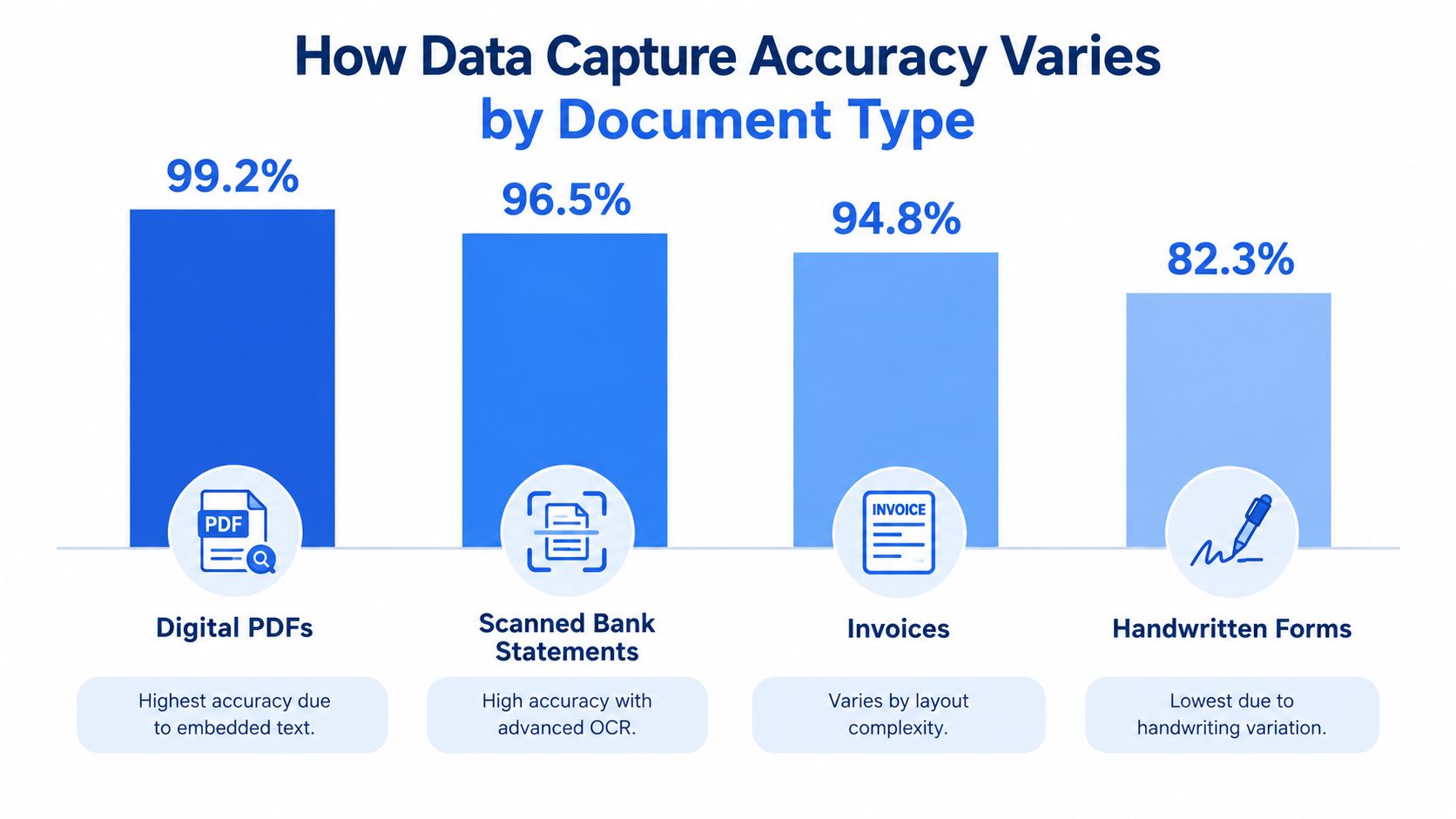
Not every statement behaves the same way once software touches it. Clean, text-based PDFs are the easiest, while scans, invoices, and receipts introduce more noise, more layout variation, and more places for a parser to stumble. That's why the document mix matters more than the marketing copy.
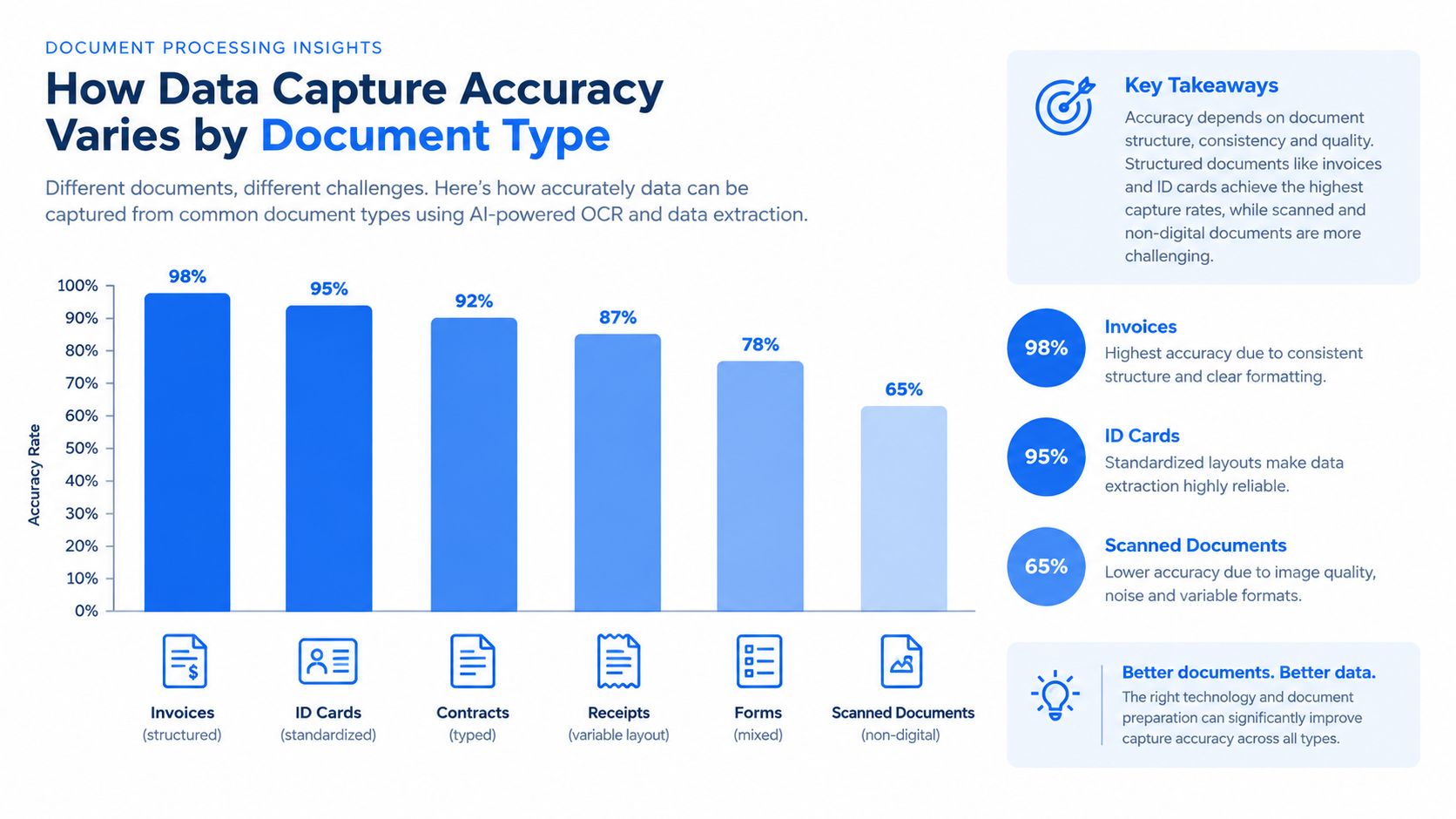
The benchmark data is clear about the spread. A 2026 summary reports digital PDFs at 97-99.5% accuracy, bank statements at 95-99%, invoices at 91-97%, and receipts at 80-93%, which shows how much layout regularity and print quality affect capture reliability Digiparser. That's why a good result on one file type doesn't guarantee the same result on another.
Why structure beats brute force
OCR alone is only part of the answer. A 2025 benchmark summary found that OCR-only systems typically reached 85-95% extraction accuracy, while multimodal document AI models reached 96.50% on clean digitally generated invoices and 92.71% on scanned invoices in testing Parseur. The point isn't that one approach wins everywhere, it's that better layout understanding matters when the document stops looking like a perfect template.
For bank-statement-style work, that means adaptable parsers are safer than rigid templates. If a statement layout changes, a brittle system can miss rows, misread headers, or scramble the balance fields. For scanned files and images, this guide to extracting data from images is the right background reading.
The cleaner the input, the less the team spends on correction. The messier the input, the more the workflow needs a parser that understands structure, not just text.
Core Features Finance Teams Should Evaluate
A finance team choosing a data capture solution should ignore the polished demos and look at what happens on a bad day. Can it handle password-protected statements without turning the upload process into a support ticket? Can it bulk-process a stack of files instead of forcing one-by-one uploads? Can it export into formats that the team already uses?
The practical checklist
| Feature | Why It Matters | What To Look For |
|---|---|---|
| Password-protected file support | Bank files often arrive locked, and we can't afford manual workarounds | Password entry at upload, with the password used only for that conversion |
| Scanned document handling | Many finance teams still receive scans, not clean native PDFs | OCR support that can read visible transaction rows reliably |
| Bulk upload | Month-end rarely means one statement | Multiple files in a single session, not a repetitive upload loop |
| Output to CSV or Excel/XLSX | Reconciliation lives in spreadsheets | Clean rows, preserved balances, and easy download |
| Temporary file handling | Sensitive statements shouldn't hang around forever | Short retention, automatic deletion, and clear expiry rules |
| Verification checks | Extraction is useless if the numbers don't tie out | A simple reconciliation check using opening balance + credits − debits = closing balance |
That reconciliation formula should be essential. If the extracted totals don't satisfy opening balance + total credits − total debits = closing balance, the file needs review before anyone posts it onward. Bank statements also group activity into summary fields such as opening balance, total credits, total debits, fees and service charges, and closing balance, which makes the check practical rather than abstract How to Read a Bank Statement Bank Statement Guide.
A useful example is autobankstatement, which converts PDF bank statements, including digital, scanned via OCR, and password-protected files, into CSV or Excel/XLSX. It supports files up to 25 MB, bulk upload, a free guest preview before payment, 24-hour download access for registered users, and auto-deletes uploads within 24 hours. That combination is what makes the workflow manageable, because the team can review the output without keeping the file around longer than needed.
Real-World Use Cases Across Finance Roles
Different finance roles use the same capture workflow for different reasons, and that's where the value becomes obvious. An accounting firm cares about moving client statements into a reviewable format quickly. An in-house finance team cares about getting through close without sending the same file to three different people.
Loan officers and lending teams also benefit when applicants submit statements in inconsistent formats. A data capture solution lets them turn those PDFs into structured records they can review against the rest of the application, rather than reading every page manually. For tax preparers and freelancers, the value is simpler, because fewer manual steps mean fewer missing transactions at deadline time.
Where the workflow changes
- Accounting firms: client reconciliations become a review task, not a copy-paste exercise.
- SME finance teams: monthly close runs cleaner when the bank data lands in spreadsheet form early.
- Small business owners: records for bookkeeping or tax prep stop piling up in inboxes and folders.
- Outsourced bookkeepers: handling multiple clients gets less chaotic when the statement format is consistent.
- Loan and lending teams: applicant statements are easier to inspect when transaction rows are already structured.
One pattern shows up everywhere. When the statements arrive in readable rows, the team stops hunting for totals and starts checking whether the numbers make sense. That's the gain, not the automation buzzword itself.
If a tool saves time but makes the reviewer re-open every file to confirm the ending balance, the workflow is still broken.
For teams that manage receivables and payables together, the AR and AP guide shows how statement data connects to the rest of the close process.
Privacy, Compliance, and Workflow Integration
Finance teams don't get to treat privacy as an optional extra. Bank statements carry account details, transaction descriptions, and other sensitive data, so retention rules, deletion timing, and handling procedures matter as much as extraction quality.

The privacy question is bigger than storage. A useful workflow keeps uploads temporary, limits exposure, and makes it clear what happens to the file after the output is delivered. That's why automatic deletion windows matter so much for finance teams that don't want sensitive documents sitting around after the job is done.
Independent market coverage says compliance pressure is a major adoption driver, with IDP growth fueled by stricter auditability requirements and persistent manual processing costs, and it also estimates that BFSI will account for 32.7% of the IDP market in 2026 Research and Markets. That tracks with what finance teams already know, the tool has to fit the process, not just the file.
What to ask before adoption
A sensible evaluation usually comes down to three questions.
- How long is the file kept? Temporary handling is better than permanent storage for many statement workflows.
- How is the password treated? The team should know whether it is only used for the conversion, not stored as a working credential.
- What does the reviewer see? A good process gives the team a preview or output they can verify before anything is finalized.
That's where the workflow orchestration gap shows up. OCR is only one piece. The work is making password-protected files, scanned pages, bulk uploads, review steps, and short-lived storage all behave like one controlled process instead of five disconnected ones.
If we want the close to stay sane, we need a tool that helps us move from file intake to clean output without leaving sensitive data behind. autobankstatement converts PDF bank statements into CSV or Excel/XLSX, supports scanned and password-protected files, and deletes uploads automatically within 24 hours, which makes it a practical fit for teams that want faster reconciliation without keeping statements around longer than needed.
Convert your next statement in minutes
Upload a bank statement PDF — digital, scanned, or password-protected — preview the extracted table, and download clean CSV or Excel.