Proof of Purchase Abbr: What POP Means and When to Use It
Proof of purchase abbr explained: what POP means, how it differs from POS and POD, and which records prove a purchase for accounting.
POP is the standard abbreviation for proof of purchase, but the same letters also stand for point of purchase and, in some banking settings, proof of payment, so the surrounding context decides the meaning. If the letters are that flexible, why do we treat a single label as if it settles what evidence a retailer, auditor or manufacturer should accept?
That gap matters in daily finance work. We can name a file correctly and still hold the wrong document for the claim we're making. A bank debit may confirm money left an account without showing what was bought, while a receipt may show the item without proving how it was paid for.
We need to separate two questions. The first asks what POP means in a particular document. The second, harder question asks which record, or combination of records, proves the purchase for our specific purpose.
Table of Contents
- Abbreviations for Proof of Purchase at a Glance
- How to Decide Which POP Meaning Applies
- Records That Prove a Purchase and What Each Use Case Needs
- Regional Rules and Usage Across Markets
- Quick Examples for Receipts and Documentation
- Recording POP Status in Bookkeeping Records
- When Proof of Purchase Is Missing
- Confirm Each POP Entry Before You Rely on It
Abbreviations for Proof of Purchase at a Glance
The direct answer is POP for proof of purchase. That's the standard meaning in warranty, returns and expense documentation. It isn't the only expansion finance readers meet, though, and treating every POP as identical creates filing errors.
Use this lookup to separate the labels before you code a transaction or answer a claim.
| Abbreviation | Expansion | Where You See It | Note |
|---|---|---|---|
| POP | Proof of purchase | Warranty claims, returns, expense files | Standard meaning for the evidence category |
| POP | Point of purchase | Retail displays, in-store marketing | Same letters, different meaning, no evidence implied |
| POP | Proof of payment | Bank transfers, payment disputes | Used in some banking settings, particularly in parts of Africa |
| POS | Point of sale | Checkout systems, card terminals | Describes where a sale occurs, not a proof document |
| POD | Proof of delivery | Shipping and logistics | Confirms delivery, not the purchase |
How We Use the Table
The table is a lookup, not a ruling. The same letters can mean different things in different documents, so we don't infer evidence from an abbreviation alone.
Working convention: write the full phrase the first time in any external document, and use the abbreviation internally only after a legend defines it.
That habit costs a few words. It saves a later reader from guessing whether POP meant purchase evidence, a payment confirmation or a retail display. It's especially useful when files move between operations, accounting and customer service, where each team uses its own shorthand.
How to Decide Which POP Meaning Applies
A bare POP label is ambiguous. Its meaning comes from the document that carries it, not from the letters themselves.
We apply three checks in order before we assign a meaning in an index or ledger note.
- Read the document type: a receipt, invoice or warranty form points to proof of purchase. A shelf plan or display brief points to point of purchase. A transfer confirmation or payment dispute file points to proof of payment.
- Check the amount and counterparty: a seller's invoice with an item price and supplier name is almost certainly proof of purchase. A bank transfer with a recipient and payment reference points instead to proof of payment, even when both documents relate to the same sale.
- Look for a legend: search the document, system export or file index for a definition. If none exists, don't assign a meaning. Record the label as unclear and ask the author or source system.
What We Write Down
In external documents, we write proof of purchase or proof of payment in full. We also record the meaning chosen in the file notes, with a short reason such as the document type or counterparty, so later readers can follow the decision.
One document can carry several labels. An invoice may include a payment reference, while a statement may include a POS descriptor. Our check should identify which meaning the document's own author intended for each label, rather than forcing one meaning across the whole file.
Records That Prove a Purchase and What Each Use Case Needs
Proof of purchase is evidence that a specific item or service was bought from a specific seller, on a specific date, for a specific price. A receipt is the most common form, but proof of purchase is the wider evidence category.
The IRS guidance on business records says supporting documentation should identify the payee, amount paid, proof of payment, date incurred and a description showing the expenditure was a purchase, and multiple documents may be needed. Claimlane's warranty proof guide likewise reflects that required detail depends on use, with warranty review commonly needing purchase date, authorized seller and identifiable product.
| Document | What It Shows | Typical Gap |
|---|---|---|
| Sales receipt | Seller, date, item and amount paid | May not identify buyer or payment method |
| Paid invoice | Seller, buyer, itemized goods or services, price, date | Needs a payment record to show settlement |
| Card statement entry | Merchant, date, amount charged | Usually doesn't describe the item purchased |
| Canceled check | Payee, amount, date, bank endorsement | Says nothing about what was bought |
| Electronic transfer record | Sender, recipient, amount, reference, date | Shows payment, not goods or services |
| Order confirmation or warranty registration | Item, order number, purchase date | Relies on seller or manufacturer records |
| Supplier database record | Account, order history, purchase date | Often needs supplier confirmation |
Matching Evidence to the Claim
For a warranty claim, the purchase date can set when coverage begins, so the product and seller must be identifiable. For a return, a retailer may accept a receipt, gift receipt or order number under its own policy.
For tax or expense substantiation, a bank debit alone doesn't supply an item description or business purpose. For lending or audit review, we match the statement line to an invoice.
Proof isn't binary. We use POP as the general label, then pair payment evidence with purchase detail when independent verification matters.
Regional Rules and Usage Across Markets
The letters POP identify a label, not a universal evidence rule. What counts as acceptable proof depends on the country, the purpose, and the reviewer's requirements.
In Australia, businesses must provide a receipt for purchases over A$75. For purchases under A$75, a consumer may request a receipt, which the business must provide within 7 days, according to the Australian Competition and Consumer Commission's receipt guidance.
What the Australian Receipt Must Show
The receipt rule does not mean every retailer must accept the same documents for a return. Retailers set their own proof requirements for returns and other remedies, so check the relevant policy before relying on a particular record.
A tax invoice, digital receipt, or other transaction record may help demonstrate a purchase, but acceptance depends on the retailer's requirements.
A receipt is one kind of purchase evidence, not the whole category.
The abbreviation also changes with context. In payment work, POP may mean proof of payment. In retail and marketing, it commonly means point of purchase.
For cross-border finance records, write out the intended phrase and state the applicable rule. The letters alone cannot tell a reader which documents will be accepted or what details they need to contain.
Quick Examples for Receipts and Documentation
Say we hold five records for separate purchases. Each carries a familiar label, but they don't prove the same thing.
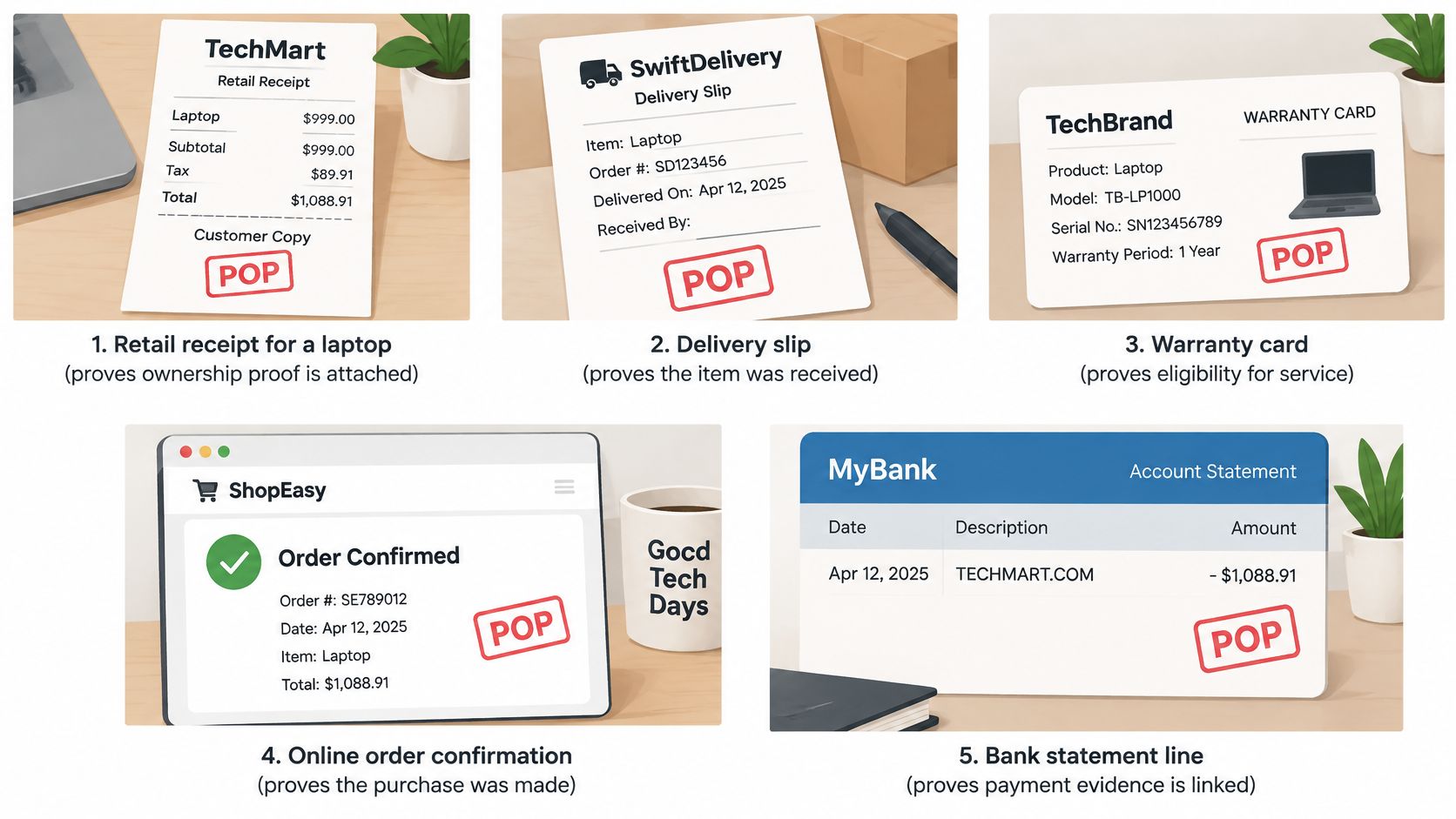
Example one shows a retail laptop receipt. We label it POP receipt in the customer's file. It shows seller, date, item and amount paid, so it supports a warranty claim if the date falls within coverage.
Example two shows a card statement line reading POS PURCHASE at a hardware store. POS describes the terminal type, meaning point of sale. It shows merchant and amount, but not the item, so it needs the receipt to become purchase proof.
When One File Covers More
Example three shows a consultancy invoice marked POP with a payment reference. It proves both purchase and payment when the description names the service. Our comparison of a sales receipt versus an invoice explains why those documents still play different roles.
Example four shows a bank transfer labeled proof of payment for a supplier deposit. It shows amount and recipient, but not the goods. We attach the supplier invoice before treating the purchase as verified.
Example five shows a canceled check in an older archive. It shows payee, amount and date, with no item description. It supports payment and needs a second document for purchase detail.
Name each file by what it proves, such as POP receipt or POS debit, rather than by abbreviation alone.
Recording POP Status in Bookkeeping Records
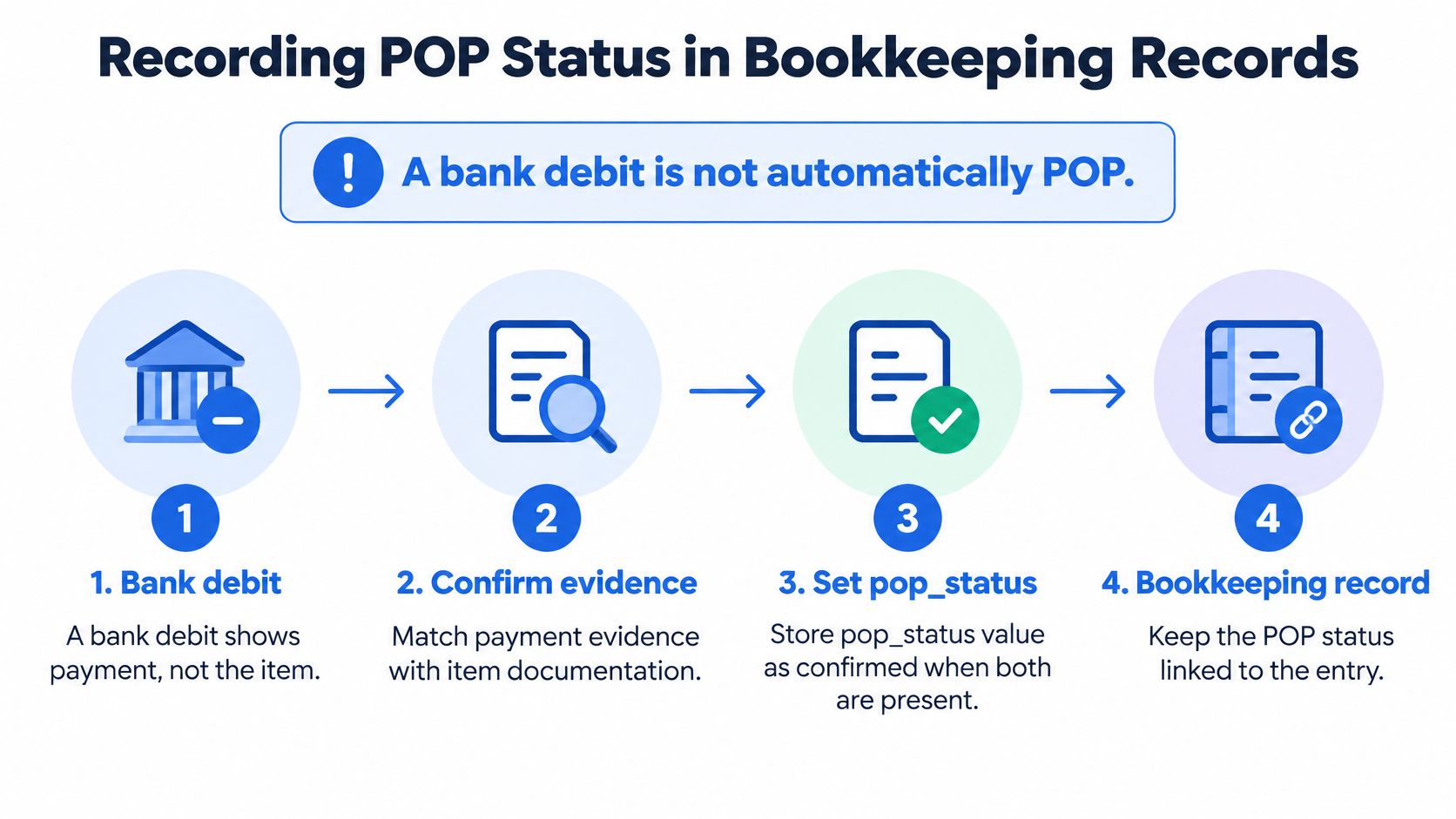
Record payment evidence and purchase details separately. A bank debit can confirm that money left an account, but it may not identify what was bought.
Set pop_status to confirmed when both payment evidence and purchase-detail evidence are linked to the transaction. Use partial when only one type is linked, and not_found when neither is available.
Alongside the status, store the transaction date, gross amount, currency, counterparty, payment method and document type. Keep a stable link to the source file or row, the statement page reference and extraction confidence. HMRC says business records such as invoices and receipts must be kept for a set period after the relevant tax year, with the exact period depending on the tax and business type, as explained in its business record-keeping guidance.
Our Recording Procedure
- Convert the statement: retain the source page reference for each transaction row.
- Assign a document type: classify each linked file as a receipt, invoice, card statement, canceled check or transfer confirmation.
- Link payment evidence: attach each relevant payment record to its debit.
- Link purchase details: attach the receipt or invoice to the same transaction.
- Set pop_status: base the status on the linked evidence and note the reason.
- Protect filenames: use opaque identifiers and keep receipt contents out of exported filenames.
Consistent file naming helps reviewers distinguish purchase details from payment evidence. Follow a simple receipt organization system, and make each filename indicate what the document supports.
When Proof of Purchase Is Missing
We start with rows marked partial or not_found. Those rows aren't failures yet, but the purchase isn't verified and we shouldn't present them as complete proof.
We work through the likely sources in order, using the bank row to supply date and amount when we ask for help.
- Ask the seller: request a duplicate or reissued receipt or invoice, quoting the transaction date and amount.
- Pull the order record: check the order confirmation or supplier account history for item and purchase date.
- Check warranty records: for covered goods, look for the warranty registration and manufacturer purchase date.
- Pair the payment record: use the bank transfer or card statement to confirm payment, then link it with the seller record to reach confirmed status.
- Record any remaining gap: keep the row as partial, name the missing element in notes and don't present it as proof of purchase in a tax or warranty file.
A Useful Starting Point in Australia
For an Australian purchase under the receipt threshold discussed earlier, a consumer request can be the basis for obtaining the document. We still check that the reissued record identifies the seller, item, date and price before we change the status.
Don't force the result: never edit amounts or invent item descriptions to turn a partial row into a confirmed one.
A transparent gap is easier to resolve later than a polished record that hides missing evidence.
Confirm Each POP Entry Before You Rely on It
A proof-of-purchase record and a balanced statement answer different questions. The receipt or invoice supports what was bought; a balance check helps confirm that statement transactions were captured accurately.
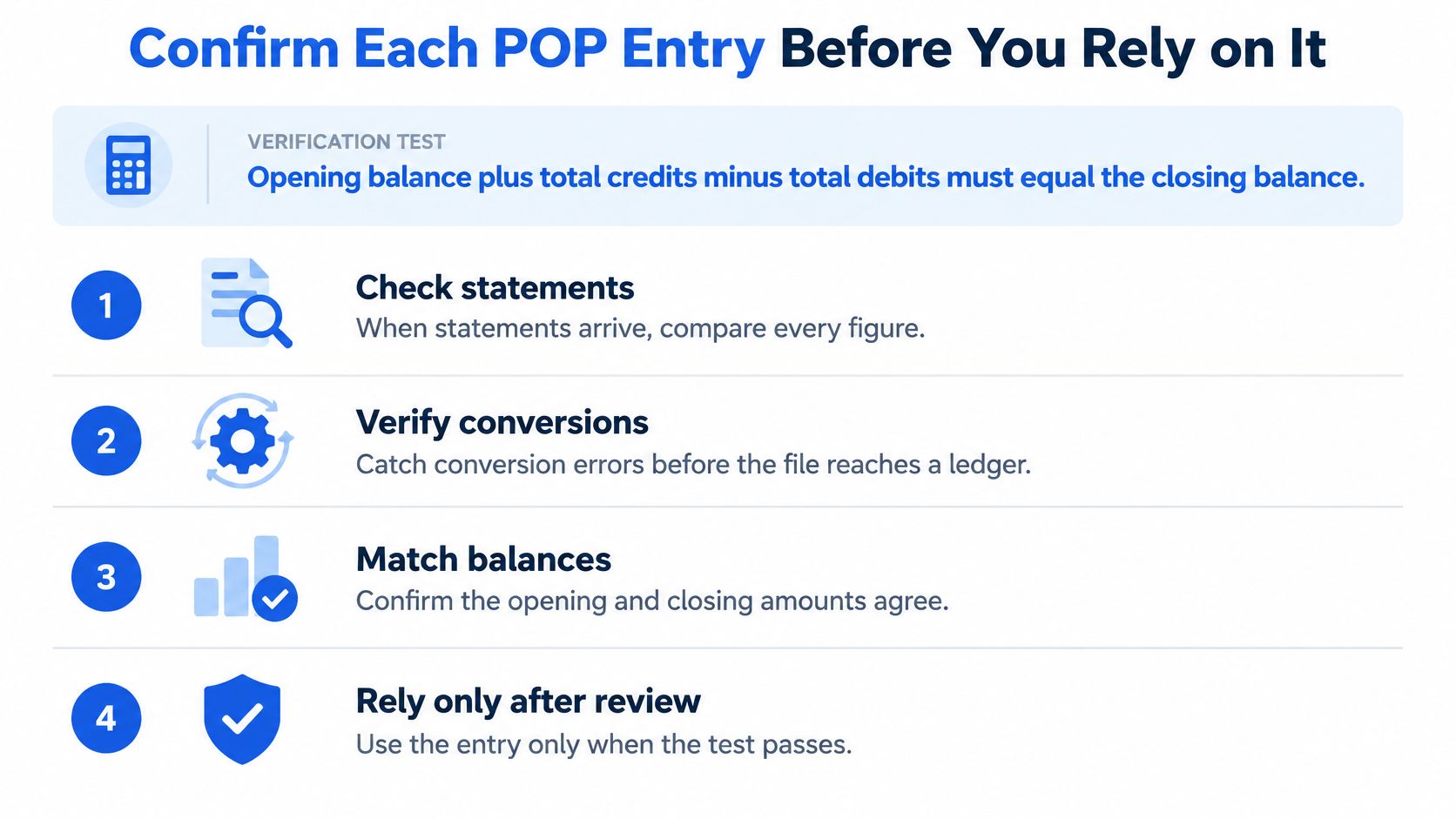
Use the statement's opening balance, credits, debits and closing balance as a simple completeness check. For consecutive statements, compare one period's closing balance with the next period's opening balance.
Verification Steps
- Confirm continuity: match the opening balance to the prior statement's closing balance.
- Total both sides: add the credits and debits shown in the converted file.
- Apply the formula: opening balance plus credits minus debits equals the expected closing balance.
- Compare the result: check the calculated figure against the statement's closing balance.
- Check completeness: compare the extracted transaction rows with the statement pages.
- Match POP debits: connect each relevant debit with its receipt or invoice.
- Flag exceptions: record unmatched items for follow-up rather than changing amounts.
A balance check tests whether statement figures and extracted transactions agree. Reconciliation against bookkeeping records is separate work. It may involve timing differences, such as unpresented checks, and can form part of an accounting three-way match.
Autobankstatement converts digital, scanned or password-protected PDF statements into CSV or Excel files. Users can upload a locked statement with its password, preview the extracted rows in a browser and make quick edits before downloading. The service accepts files up to 25 MB and supports multiple uploads in one session. A free guest preview lets users review the table before paying.
Registered users have 24-hour download access. Download and save the reviewed table within that window, then run the balance check. Uploads are deleted automatically within 24 hours.
Convert a PDF bank statement into spreadsheet-ready rows, review the transactions, and check the balances before assigning POP status. Visit autobankstatement to try the free guest preview and prepare statement lines for matching with receipts and invoices.
Convert your next statement in minutes
Upload a bank statement PDF — digital, scanned, or password-protected — preview the extracted table, and download clean CSV or Excel.