
Checking Bank Statements for a Clean Month-End
A practical routine for checking bank statements: reconcile to the books, separate errors from fraud, and prove the closing balance before you file.
It's day three of the close, the portal won't export March, a client has sent a scanned PDF sideways, and the cash account is off by an amount that doesn't match any single transaction. We could start matching lines and hope the difference resolves itself. It won't. Checking bank statements properly means we prove the statement first, reconcile it to the books second, classify every leftover item, and then throw away working copies while we keep the original. That sequence is slower for the first ten minutes and faster for the rest of the month.
Table of Contents
- What Every Statement Review Must Prove
- How to Reconcile Each Statement to the Books
- Errors, Timing Differences and Possible Fraud
- Getting Transactions Out of Messy PDFs
- Keep the Original and Limit Extra Copies
- Close This Month With the Balance Check
What Every Statement Review Must Prove
We start with the statement, not the ledger. Before we match a single book line, we lift eight items onto a cover sheet, statement period, account identifier, opening balance, credits, debits, fees and interest, closing balance, and the proof. If that page doesn't roll forward, matching it to the books only spreads the error.
The habit used to be monthly because the record arrived monthly. The Consumer Financial Protection Bureau note on changing access to financial records explains that every deposit, withdrawal, and payment creates a financial record maintained by a bank or credit union, and that by 2016 institutions had largely shifted from paper statements toward digital account histories customers could inspect in online banking. The control objective hasn't changed, confirming recorded activity matches authorized activity, but we can now check throughout the cycle instead of waiting for an envelope.
The cover sheet in five moves
- Confirm period and account: Read the start and end dates and the account name and last digits on the PDF or portal page. Reject a file that mixes in another month or a closed account.
- Record the opening balance: Take the printed figure and compare it with last period's reconciled close. A mismatch here means we're missing a prior adjustment or holding the wrong file.
- Total credits and debits: Put fees, interest, and reversals inside those totals, not beside them. A fee left outside the debits will break the proof every time.
- Run the test: Opening balance + credits − debits = closing balance. The residual must be zero.
- Stop if it fails: Re-add the columns and confirm account and month again before we touch the ledger. Fixing the books to fit a broken statement is how small errors become permanent.
| Field | What to record | Fail signal |
|---|---|---|
| Statement period | Start and end dates on the PDF or portal | Activity from another month is mixed in |
| Account identifier | Account name and last digits | Wrong account, or a closed account |
| Opening balance | Printed opening figure | Does not equal last period's reconciled close |
| Credits | Deposits, incoming transfers and interest | Portal or column total disagrees |
| Debits | Withdrawals, checks, card spend and fees | A fee or reversal left out of the total |
| Closing balance | Printed ending figure | Equation does not land on this figure |
| Proof equation | Opening balance + credits − debits | Any residual other than zero |
A statement that ties proves only that the page is internally consistent. It doesn't prove the transactions are ours, authorized, or posted to the right account.
That distinction matters because a statement covers more than checks. It documents checking, savings, prepaid card, and credit card activity, so the cover sheet has to work for card spend and transfers as well as deposits. Once the proof lands on zero, we have a reliable target for the book match. Until then, we don't.
How to Reconcile Each Statement to the Books
A visual scan isn't a reconciliation. The Washington State Auditor guidance on bank reconciliations specifies that a complete reconciliation must cover both the ending cash balance and cash activity, identify reconciling items, and leave no unexplained difference after adjustment. Monthly is the baseline, while daily or more frequent review suits high-volume or higher-fraud-risk accounts.
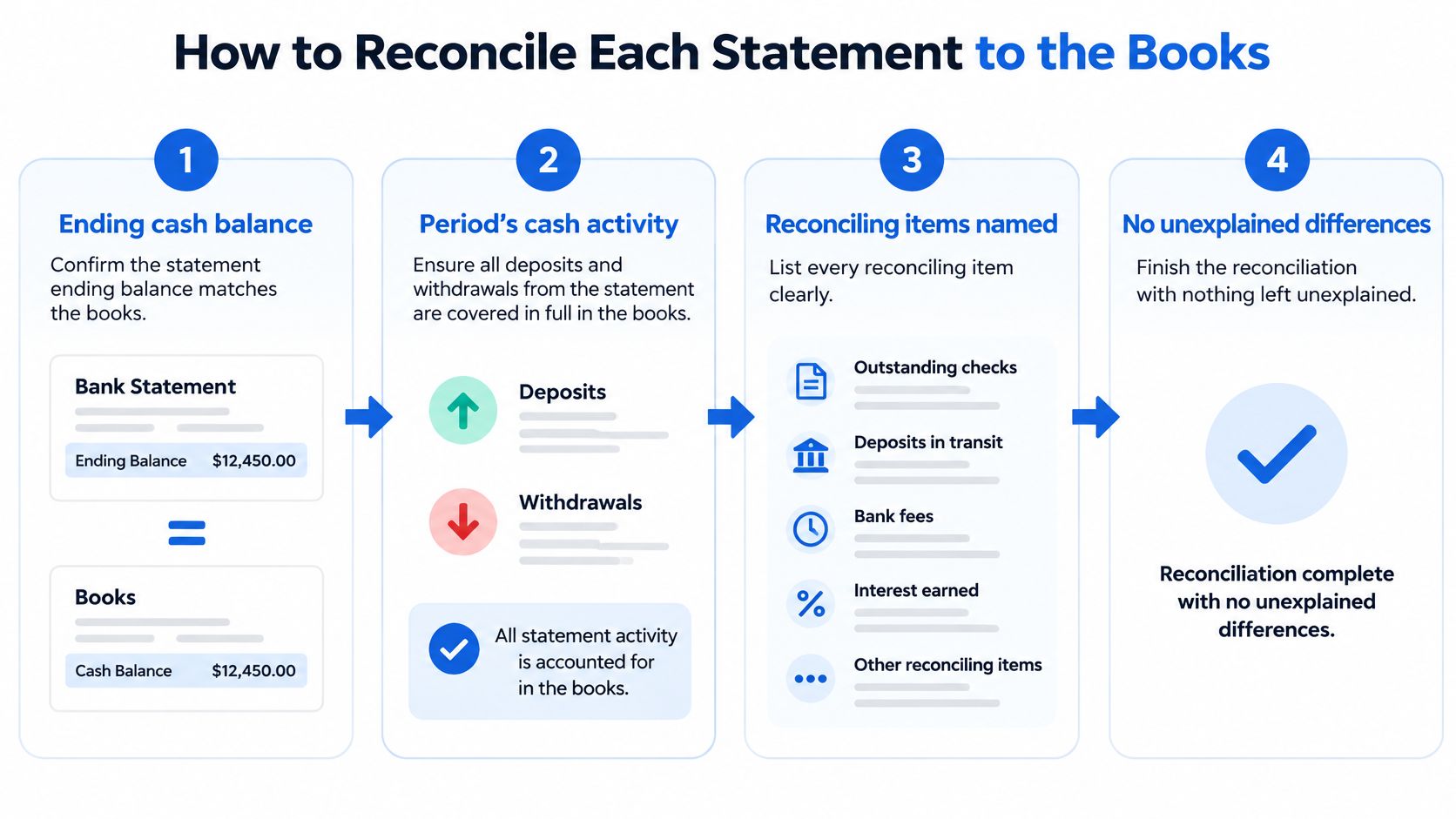
We work in a fixed order so a reviewer can follow the file without asking us what we did.
The five moves in order
- Lock the cover sheet: Period, account, opening, closing, deposits, withdrawals, fees, and interest come from the statement alone. Nobody edits these figures to make the books fit.
- Pull the right book activity: Extract cash activity from the accounting system for that same period and that same account only. A year-to-date dump buries the current month and invites false matches.
- Match on five fields: Date, amount, reference, payee, and cleared status where the bank provides it. Amount alone isn't enough, because rent, subscriptions, and payroll repeat the same figure legitimately.
- Build the exception list: Park every unmatched item and label it timing, bank error, book posting error, duplicate, omission, or unauthorized. Outstanding checks and deposits in transit are timing items, and they stay listed until they clear in a later period.
- Investigate and evidence each residual: Post the adjustment and keep the proof next to it, a portal screenshot, invoice, deposit slip, or journal reference. An adjustment without a document is just a plug.
A reusable layout helps us keep that order consistent across clients and months, which is why we keep a bank statement reconciliation template with the cover sheet and exception list on the same page. The format matters less than the discipline, but a standard sheet stops each preparer inventing a new one.
Who prepares and who reviews
A second person reviews material adjustments, so the preparer isn't also the reviewer. Segregating those roles reduces the risk that one person can create and conceal an error or fraud. In a small team that separation feels awkward, but it can be as simple as the owner or controller initialing the exception list and agreeing the adjusted book balance to the statement close.
Practical rule: The books are reconciled only when the adjusted book balance equals the statement close and the exception list sums to the difference between them.
We also mark items as cleared in the register as they appear on the statement. That habit sounds old-fashioned, but it gives the next month a clean starting point and makes stale outstanding items obvious. An outstanding check that's still sitting there after several cycles isn't a timing difference anymore. It's a question we need to ask, about a lost check, a duplicate payment, or a supplier who never cashed it.
Frequency follows risk, not habit. A low-volume savings account can wait for month-end. An operating account with daily card settlements, multiple cardholders, and same-day transfers deserves a shorter cycle, because a week's worth of exceptions is easier to clear while people still remember what they bought. Whatever cycle we choose, we write it down and stick to it, so a skipped month shows up as a gap rather than becoming the new normal.
Errors, Timing Differences and Possible Fraud
Unrecognized isn't the same as unauthorized, and confusing the two wastes bank calls and misses real fraud. The FTC Consumer Sentinel annual data book records that in an identity-theft survey, 19% of identity-theft victims reported an existing checking or savings account had been misused and 85% said at least one existing account had been misused, with an average loss of $4,800 per victim whose personal information was misused. Misuse shows up as unfamiliar checks, debit card transactions, withdrawals, transfers, or newly opened accounts, which is exactly why exceptions need triage before anyone uses the word fraud.
Triage before escalation
- Compare transaction date with posting date: A weekend purchase can post days later, so the date in the books and the date on the statement won't always agree.
- Group recurring merchants and subscriptions: Payment processors often present under a legal name nobody in the office uses. Grouping three months of the same descriptor usually resolves the mystery.
- Ask who else can spend: Check whether a joint holder, authorized card user, or another department started the payment. Plenty of exceptions die at this question.
- Look for patterns, not just strangers: Duplicates, reversals, round amounts, late-period deposits, overdraft fees, and transfers between related accounts all deserve a second look even when the payee looks familiar.
Suspicious activity also includes withdrawals someone was tricked into authorizing, not only stolen card purchases. That's why our test is authorization, not recognition. If a staff member was induced to send money, they'll recognize the transfer and still need to escalate it.
| Difference | Usual signs | Next action |
|---|---|---|
| Timing item | On the books but not this statement, or the reverse, such as an outstanding check or a deposit in transit | Leave it on the exception list and clear it when it posts |
| Bank fee or interest | On the statement and missing from the books | Post it, then rerun opening + credits − debits |
| Duplicate | Same date, amount and payee twice on the extract or the statement | Confirm on the portal before dropping a row |
| Omission | On a source document or the portal, absent from the books or the extract | Add the line and note who found it |
| Book posting error | Amount, account or sign differs from the statement | Correct the journal; do not force the bank total |
| Unauthorized item | Payee, card or transfer nobody on the account authorized | Keep the original statement and notify the bank inside the agreement window |
The notification deadline and its limits
Deadlines make slow review expensive. The FDIC educational guidance on checking accounts says that, to be fully protected after identifying a bank error, customers need to notify the bank no later than 60 days after the statement date. We treat that as a hard diary date from the statement date, not from whenever we got around to opening the file.
That 60-day figure comes from consumer checking guidance, so we don't generalize it to every business account, institution, or contract. We read the deposit agreement for the account in front of us and calendar whatever window it sets. When we do notify the bank, we go in with the original statement in hand. Our spreadsheet speeds up the comparison, but it isn't the evidence we send.
Getting Transactions Out of Messy PDFs
A scanned, locked, or awkwardly laid out PDF has no transaction rows until we create them, and copy-paste is where columns collapse, balances merge into descriptions, and minus signs vanish. We sort the file by type first, because each type fails in a different way.
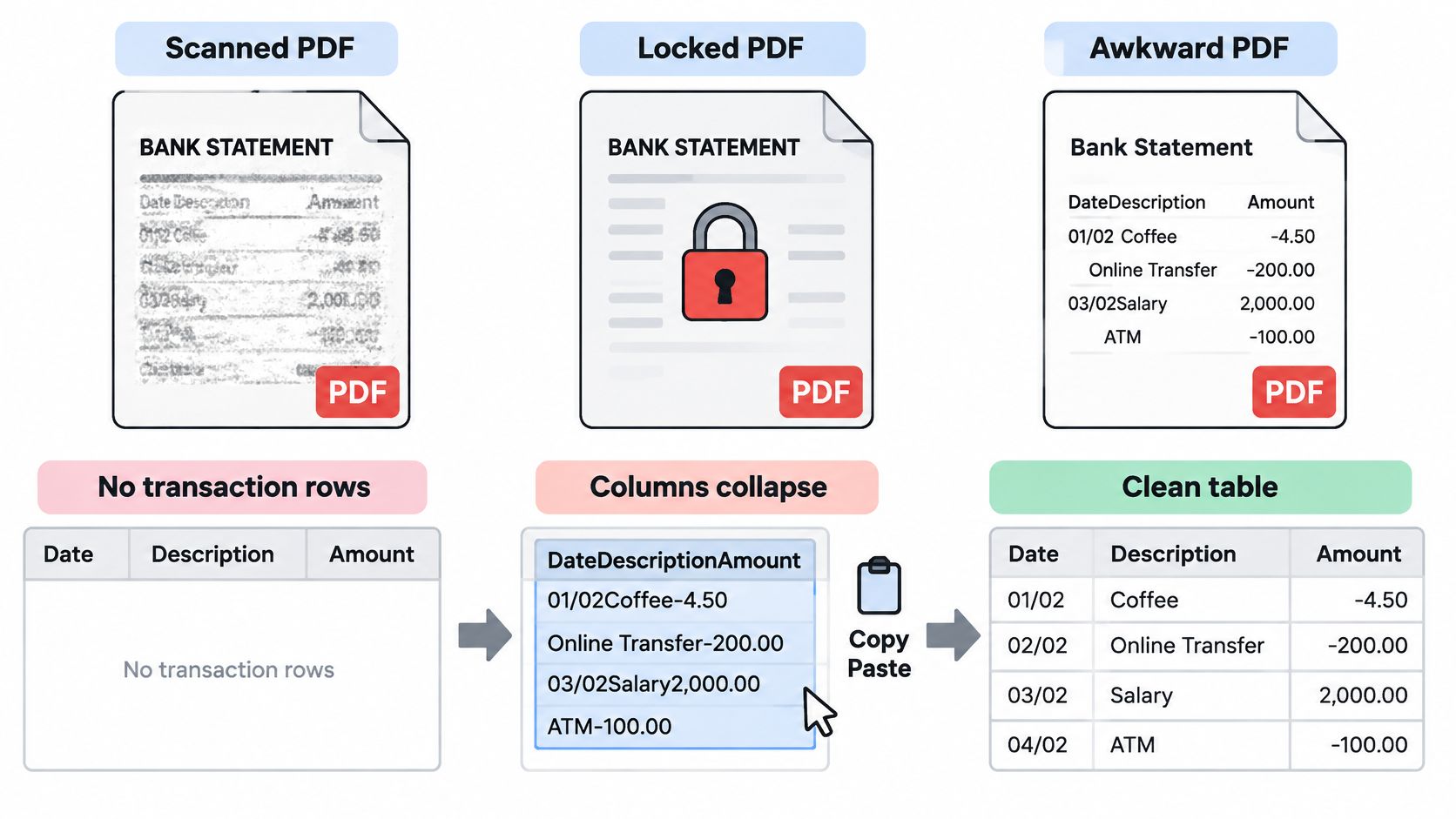
| File type | How it behaves | Handling step |
|---|---|---|
| Digital statement | Selectable text, converts cleanly | Run the balance equation on the converted rows |
| Scanned statement | Image of text, needs OCR | Check splits, dropped minus signs and merged lines against the PDF |
| Password-protected statement | Locked until a password opens it | Enter the password at upload for that file only and never send it with the PDF |
Converters built for statement layouts, autobankstatement among them, take the password at upload and use it only for that conversion, then handle scanned pages through OCR. The uploaded file itself serves the conversion and nothing else, which is why we still work from a copy and keep the original under our own retention rules.
From file to reviewable rows
- Keep the original untouched: Record the date we retrieved it from the portal or received it from the client, then work from a copy.
- Convert, then prove: After conversion to CSV or Excel, rerun opening balance + credits − debits = closing balance on the extracted rows themselves, not on a total we remember from the PDF.
- Chase a failed proof methodically: Look for an omitted line, a duplicated row, a sign flip, a fee or interest entry left out, a pending item, or last month's close used as this month's opening.
- Sample back to source: Compare a handful of payees, references, and amounts against the PDF page, including at least one fee and one large deposit.
The mechanics of converting a PDF bank statement to a CSV file are the easy part. The control point sits after the export. OCR can split one transaction across two lines, merge two close lines into one, or read a bracketed negative as a positive, and none of those errors announces itself. The balance equation catches most of them, and the page sample catches what the equation tolerates.
When a tidy PDF is not proof
A statement can be edited and still roll forward. The Association of Certified Fraud Examiners resource on fraud red flags describes cases in which transaction descriptions, payment amounts, deposits, and balances were altered so the statement still appeared to roll forward correctly. Financial statement fraud is relatively uncommon, yet it tends to cause large losses per case, which is exactly why an internally consistent file proves so little on its own.
So for lending, acquisitions, and high-value closes, we go further. We obtain the statement from the bank portal or a trusted channel rather than accepting a forwarded file, confirm material items to portal detail, invoices, or deposit slips, and inspect the page itself for round dollar entries, late-period deposits, repeated descriptions, altered fonts or alignment, missing pages, and unexplained balance jumps. A mathematically consistent PDF is a starting point. Independent confirmation is what turns it into evidence.
Keep the Original and Limit Extra Copies
A stray statement file carries account numbers, addresses, balances, and counterparties with it. The exposure usually sits in the second copy: the version forwarded to a client folder, saved to a laptop, or left in an inbox long after the review is done. The Identity Theft Resource Center first half 2025 data breach analysis recorded 1,732 data compromises affecting 165,745,452 individuals in the first half of 2025. Every extra copy is one more place that data can sit unnoticed.
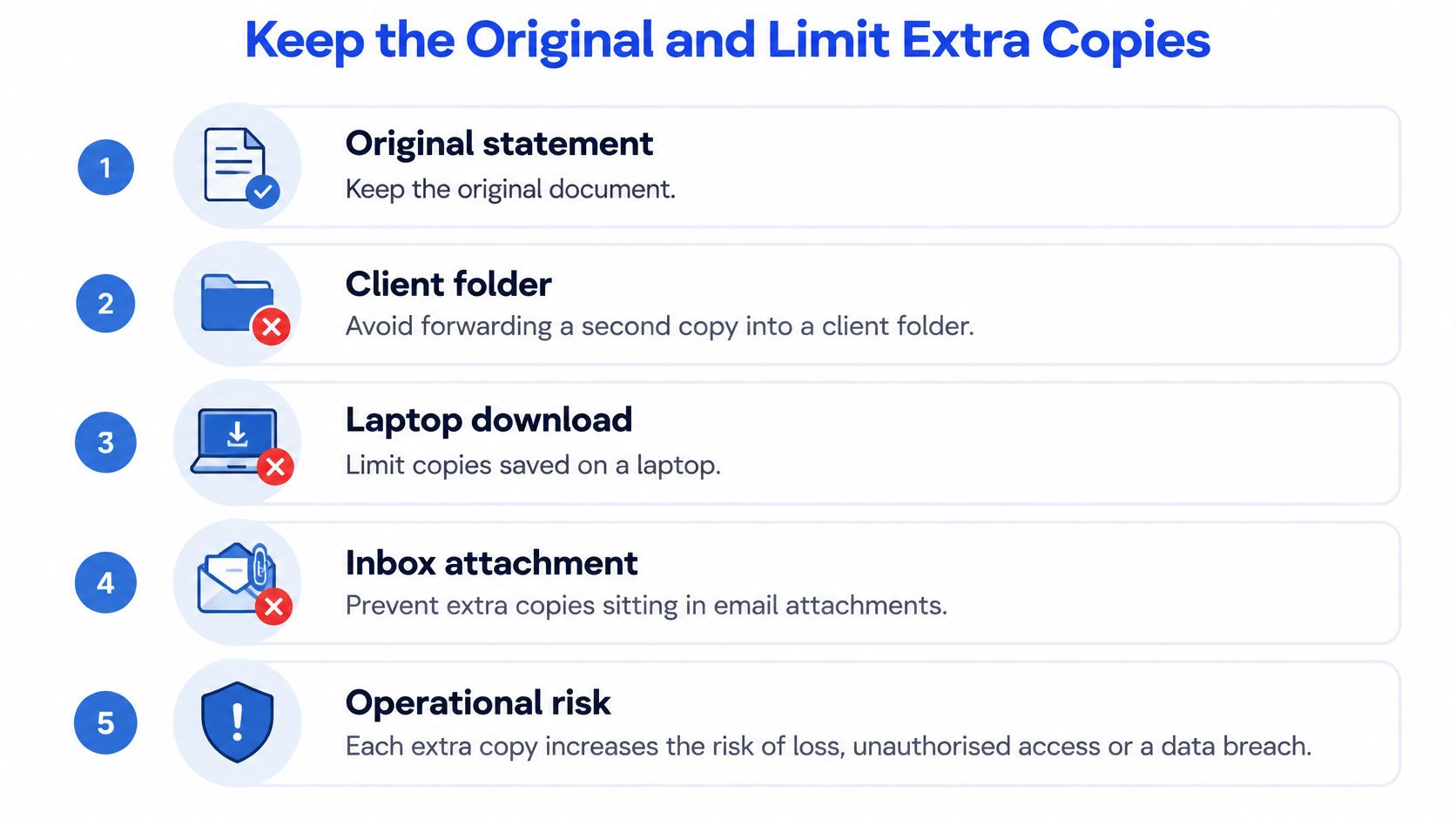
A minimum disclosure workflow
- Pull from a trusted source: Get the file from the bank portal or a known sender, not a forwarded thread we can't verify. A statement that arrives second-hand starts the review with a question mark over it.
- File the original once: Store it in the firm's approved repository, with access limited to the people who need it and a name that identifies the account and period.
- Redact before sharing: Remove identifiers the reviewer doesn't need before the statement leaves that repository. A lender reviewing cash flow rarely needs a full account number.
- Confirm the recipient: Check the name and address before every send. Autocomplete is a common cause of statements reaching the wrong recipient.
- Use short-lived working copies: Convert and review from a temporary copy, then delete it when the reconciliation is signed. A shared drive full of statement copies is a liability, not an archive.
Password protection doesn't rescue a sloppy workflow. If the password travels in the same email thread as the PDF, whoever gets the thread gets both. We send the password through a separate channel or enter it directly at conversion, and we never rename the file to include it.
Retention still belongs to us
Deleting working copies doesn't delete our retention duty. Bank statements support tax and audit records, and the periods differ by record type, so we confirm the current requirement rather than relying on memory. Our overview of how long banks keep records is a useful prompt for that conversation, while the firm's own retention policy and current IRS guidance decide the date. Bank availability is not our archive either. Portal history can run shorter than the period we must retain, and a statement the bank no longer shows is still a statement we have to produce.
Temporary processing is a handling control, not a records system. Download what we need, file the original ourselves, and let the working copy expire.
We also note any manual correction we make after OCR or automated parsing, with the reason and the person who made it. Six months later, an unexplained edit to an extracted row looks exactly like a manipulated statement. A one-line note in the reconciliation file prevents that argument.
The statement counts as checked when the balance ties, every leftover is classified, the original is filed in the repository, and the working copy is gone. Anything less leaves loose ends.
Close This Month With the Balance Check
We don't need a backlog project. We pick the accounts closing this week and run one clean pass: cover sheet and balance proof, ledger match, classification of every leftover, second-person review, and any bank notice sent inside the agreement window with the original PDF attached. If that sequence holds for one month, repeating it is easy.
Where the blocker is the file itself, a scan, a password lock, or a year of statements in layouts no portal will export, we use autobankstatement to turn the PDF into CSV or Excel/XLSX rows we can review in the browser and edit quickly before downloading. It handles digital text, scanned files through OCR, and locked files when we enter the password at upload. Files can be up to 25 MB each, several statements can go up in one bulk upload, and a free guest preview lets us check the output before paying. A typical statement converts in under two minutes, and text-based files often finish in seconds. Registered accounts keep recent results and downloads available for 24 hours, while the uploaded statement itself is deleted within 10 seconds after processing completes, so our own repository must hold the original.
For ongoing work, the subscription option suits regular bookkeeping, tax prep, and larger batches of statements. The spreadsheet stays the review layer. Once opening balance + credits − debits = closing balance holds on the converted rows, we key or import only the adjustments the books still need, file the PDF where the retention policy says it lives, and delete the working copy.
That discipline is the whole point of checking bank statements. A statement counts as checked when the balance proof ties to zero, every exception carries a label and a document, a second person has reviewed the material adjustments, and the only copy left standing is the original in the right place.
Upload one statement that's blocking this month's close and preview the extracted rows before you pay, then run the opening balance + credits − debits = closing balance check on the downloaded CSV or Excel file. Visit autobankstatement to convert a digital, scanned, or password-protected PDF into a clean spreadsheet your reconciliation can use.
Convert your next statement in minutes
Upload a bank statement PDF — digital, scanned, or password-protected — preview the extracted table, and download clean CSV or Excel.