
What Does a Bank Statement Show: A Line-by-Line Guide
What Does a Bank Statement Show? Balances, deposits, withdrawals and fees explained, plus how to check the totals before you rely on them.
If a bank statement shows your closing balance, why can't we treat that figure as proof of what you can spend today, or as proof of why every payment was made? That gap is where most reconciliation mistakes start. A statement is strong evidence that money moved, and it gives us an arithmetic test we can run on every page. It isn't a live balance, and it doesn't explain business purpose on its own.
We read statements the same way we'd teach a new team member to read them, in page order, checking each figure against the lines beneath it. Once we know what does a bank statement show, and what it leaves out, the document becomes much easier to use for month end close, tax records, and lending files.
Table of Contents
- Bank Statement Sections at a Glance
- Opening, Closing and Running Balances Explained
- Deposits, Withdrawals and Transfers Line by Line
- Fees, Interest and Charges on the Statement
- What a Bank Statement Leaves Out
- Check the Statement and Decide What to Use
Bank Statement Sections at a Glance
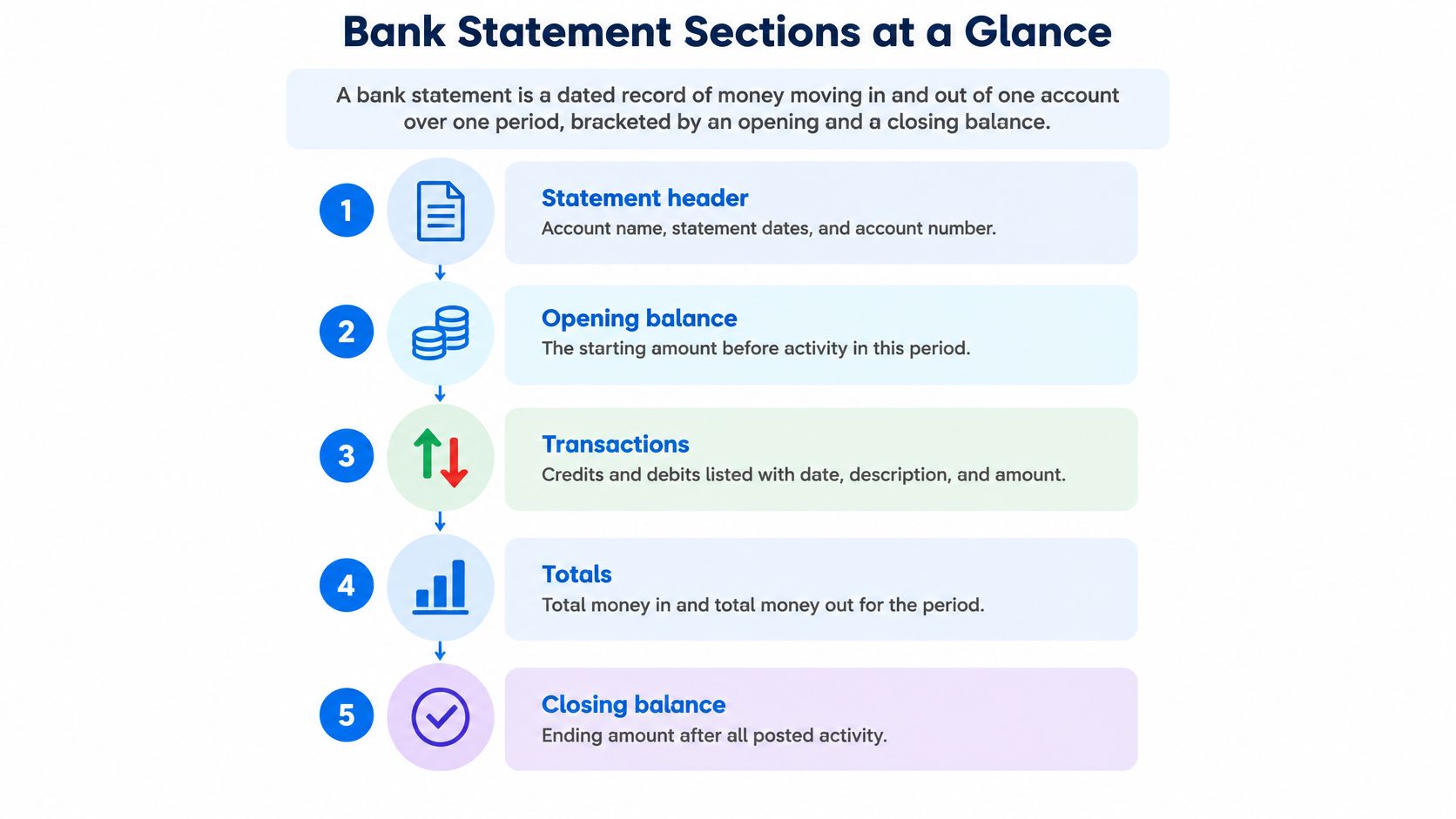
A bank statement is a dated record of money moving in and out of one account over one period, bracketed by an opening and a closing balance. Whatever the delivery format, paper statement, online banking, mobile banking, or a passbook, each transaction line typically shows the date, amount, and reference. Those three details turn a list of figures into an auditable timeline we can match line by line.
Reading the page in order
Start at the top. Account identification names the bank, the account holder, and a partly masked account number, so we know whose record we're holding. The statement period sits alongside it, giving start and end dates. Every figure that follows belongs inside those boundaries. A payment that posts on the last day of the period belongs to this statement; the same kind of payment posting two days later belongs to the next one.
The opening balance is the figure the period starts from. Below it, transaction lines list one row per posted entry: deposits, withdrawals, transfers, card payments, and direct debits. Where the bank prints it, a running balance shows the balance after each line, so the page reads like a cumulative tally we can audit rather than a single static total. Toward the end come fees and interest, then summary totals for credits and debits, then the closing balance the next statement has to start from.
| Part | What it shows |
|---|---|
| Account identification | Bank, holder and masked account number, for example Rivermere Bank, account ending 4821 |
| Statement period | Dates the record covers, for example 1 March to 31 March |
| Opening balance | Balance at the start of the period, for example 4,250.00 |
| Transaction lines | Each posted deposit, withdrawal or transfer with date, reference, and amount |
| Running balance | Balance after each posted line |
| Fees and interest | Charges and interest posted in the period |
| Summary totals | Total credits and total debits for the period |
| Closing balance | Balance at the end of the period, for example 3,707.90 |
Laid out this way, the page is an evidence trail with a built-in test. The totals at the bottom have to reconcile with the lines above them, or something is missing.
The date, amount, and reference on each line let us match it to an invoice, receipt, payroll payment, tax item, loan payment, or bank fee. Without the reference, we'd have an amount and a guess. With it, we have evidence we can trace.
Before reading further, pull up a recent statement and mark each of the eight parts in the table. If we can't find one, that's our first question for the bank or the client, because a missing total or balance makes the later checks harder.
Opening, Closing and Running Balances Explained
Balances form a chain, not a set of isolated numbers. The opening balance on this statement should equal the closing balance on the one before it, for the same account and currency. Between those two points, the running balance moves after every posted line, up for a credit and down for a debit.
A statement balances when opening balance + credits − debits = closing balance.
Run that test before anything reaches the books. The chain works because statements arrive on a fixed schedule: Regulation E in the electronic fund transfer rules requires a periodic statement for any monthly cycle in which an electronic fund transfer occurs, and at least quarterly when no transfer occurs. Each statement hands its closing balance to the next statement's opening balance, so a gap in that hand-off is the first place to look when figures disagree.
Working the figures
Take a March statement as a worked example. The opening balance is 4,250.00, credits for the period total 6,800,00, and debits total 7,342.10. Add the credits, subtract the debits, and the expected closing balance is 3,707.90. If the printed figure agrees, the statement passes its own arithmetic. If it does not, the difference has to be found before any line in the period is trusted.
| Check item | Role in the check |
|---|---|
| Opening balance | Starting point; equals the prior statement's closing balance, 4,250.00 in this example |
| Credits for the period | Added to the opening balance, 6,800.00 in this example |
| Debits for the period | Subtracted from the opening balance, 7,342.10 in this example |
| Expected closing balance | 4,250.00 + 6,800.00 − 7,342.10 = 3,707.90 |
| Closing balance on statement | Must match the calculated result |
When the chain breaks
The continuity check between consecutive statements catches a different problem. If February closed at 4,250.00 and March opens at a different figure, something went wrong before we even total the lines. When the check fails, the cause usually traces to one of four sources.
- Missing page or period: A page didn't get scanned, or a whole statement is absent from the file.
- Imported duplicate: The same lines were loaded twice, inflating one side of the calculation.
- Bank correction: The bank reversed or adjusted an entry, and that adjustment hasn't been recorded yet.
- Balance confusion: A booked balance was compared with an available balance, which aren't the same figure.
Omitted pages, duplicated transactions, sign errors, or misread amounts can all produce a ledger that looks plausible and is still wrong. When a figure doesn't agree, stop and find the difference before posting anything. A statement with an unexplained balance difference isn't reconciled, no matter how tidy the spreadsheet looks.
One limit is worth keeping in mind. The arithmetic test confirms the bank's own numbers are internally consistent; it cannot reveal a payment that never reached the account or a deposit still in transit. The closing balance is evidence of what posted during the period, not proof of everything that should have.
Deposits, Withdrawals and Transfers Line by Line
One transaction line carries more fields than most readers notice. Working across the columns, we typically find a transaction date, a posting or value date where the bank shows one, description or merchant text, a reference, the amount, a debit or credit direction, and the running balance. The U.S. Department of Justice bank reconciliation guidance defines the statement as a record of transactions posted during a specific period, usually about 30 days, and recommends matching recorded deposits and payments against statement entries, then adjusting for deposits in transit, outstanding checks, bank errors, interest, charges, and overdraft fees.
Keeping the signs straight
Direction matters as much as amount. Some statements print withdrawals as negative numbers. Others use separate debit and credit columns, so every amount looks positive and the column heading carries the meaning. A converted file has to preserve that distinction. If we treat every amount as positive, our totals will add money out as if it were money in, and the balance test will fail for a reason we created ourselves.
We also keep the currency, the value date where it's available, and the original statement order. Sorting lines by amount or alphabetically before we've checked them destroys the running balance sequence, which is one of our best error detectors.
Sorting lines by type
Deposits include customer payments, payroll credits from an employer, cash or check deposits, and transfers in. Withdrawals include card purchases, direct debits, standing orders, cash withdrawals, and cleared checks. Understanding what counts as a transaction in banking helps here, because each type leaves a slightly different trail on the page.
Transfers between the holder's own accounts need special care. The same movement appears once as an outflow on one statement and once as an inflow on another. If we count the inflow as income and the outflow as an expense, we've invented both. We code both sides as transfers and let them cancel out in reporting.
Card lines cause the most confusion because the merchant descriptor is often abbreviated. A line might show a short code followed by a shortened supplier name that doesn't match the supplier's trading name at all. That doesn't make it fraudulent. It means we match on date and amount first, then confirm the supplier from the receipt.
We store reference text as its own column, separate from description and amount. Separate columns support duplicate detection, exception review, and audit traceability later, when someone asks why a line was coded the way it was.
Fees, Interest and Charges on the Statement
Fees and interest usually sit in their own part of the statement or carry clear labels within the transaction list. They're often the least understood lines on the page, partly because the business didn't initiate them and partly because the labels are short. The table below covers the items we meet most often.
| Item | How it appears | How to treat it |
|---|---|---|
| Monthly account or service fee | Debit line, often dated near period end | Record as a bank charge; check against the fee schedule |
| Overdraft fee | Debit line dated while the balance is negative | Record as a bank charge or interest, per your policy |
| Returned or failed payment fee | Debit paired with a returned item | Reverse or reclassify the original payment as well |
| Foreign transaction fee | Debit following a card line in another currency | Record alongside the card purchase |
| Interest earned | Credit line | Record as interest income |
| Interest charged | Debit line on a loan or overdrawn account | Record as interest expense |
Why these lines break reconciliations
Unrecorded bank fees are a standard reconciliation difference for a simple reason. The business learns about them only from the statement. Nobody raised a bill, nobody approved a payment, and the amount never entered the cash ledger. Until we post it, our book balance stays higher than the bank's figure by exactly that amount.
Interest works the same way in the opposite direction. Interest earned arrives as a credit we didn't invoice for, and interest charged leaves as a debit we didn't schedule. Both belong in the books in the period the bank posted them, not the period we noticed them.
Practical rule: Every fee and interest line on the statement needs a matching entry in the books, or a written reason why it doesn't.
Returned payment fees deserve a second look because they signal a bigger problem. The fee itself is small, but the original payment bounced, which means a supplier wasn't paid or a customer's payment didn't clear. We reverse or reclassify the original entry and follow up with the other party, rather than absorbing the charge.
Fee amounts and conditions vary by bank and account type, so we don't assume a figure from another client's statement. We check the bank's published fee schedule and the account terms. For an unexpected charge, our test is straightforward. Compare it with the schedule and terms first. If it still doesn't make sense, ask the bank to explain it in writing, and keep that explanation with the statement.
What a Bank Statement Leaves Out
A statement is a snapshot taken at a cutoff, not a live view of the account. Treating the PDF as a real time record leads to false alarms about missing money and, occasionally, to real errors being waved away. Chase's guide to what a bank statement is covers the standard contents, including beginning and ending balances, transfers, and applicable fees, but the reader still has to separate what's posted from what's merely pending.
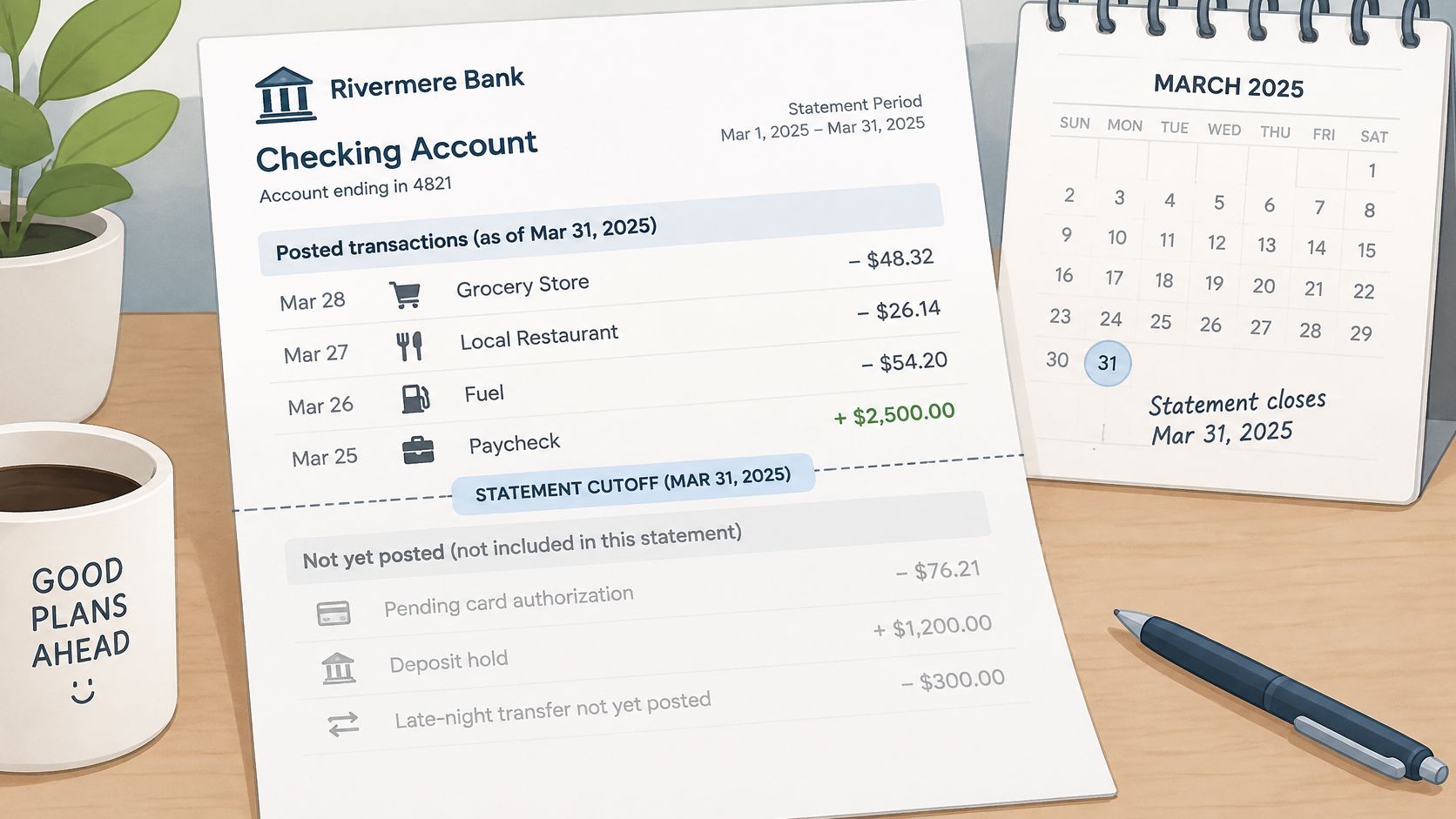
Items that may be missing include pending card authorizations, holds on deposits, transactions posted after the cutoff, and entries still processing. A card purchase made on the last day of the period might be authorized but not yet posted, so it won't appear until the next statement. Its absence isn't evidence of an error.
Three balances get confused constantly, so we name them precisely.
- Posted balance: The result of everything that has fully posted to the account.
- Available balance: What the bank will let the holder spend now, after holds and pending authorizations.
- Statement balance: The closing figure printed for the statement period, frozen at the cutoff.
The figure on the PDF can differ from what the banking app shows today, and both can be correct. They're answering different questions at different moments.
An unfamiliar abbreviation or merchant descriptor may also be a legitimate payment, because banks can use transaction identification codes when accompanying explanations are provided. We don't conclude fraud from a strange label. We check date, amount, and supporting documents first.
The deeper limit is about proof. A statement shows that money moved and when it moved. It doesn't show the business purpose of the payment. That evidence comes from invoices, approvals, and knowing what is a receipt and what it needs to record.
So we compare the PDF with the live transaction history before concluding anything. In any conversion workflow, we flag ambiguous rows rather than marking every row as settled.
Check the Statement and Decide What to Use
We run the same checks in the same order on every statement, whether it's two pages or forty. Consistency is the point. A check we skip when we're busy is the one that would have caught the missing page.
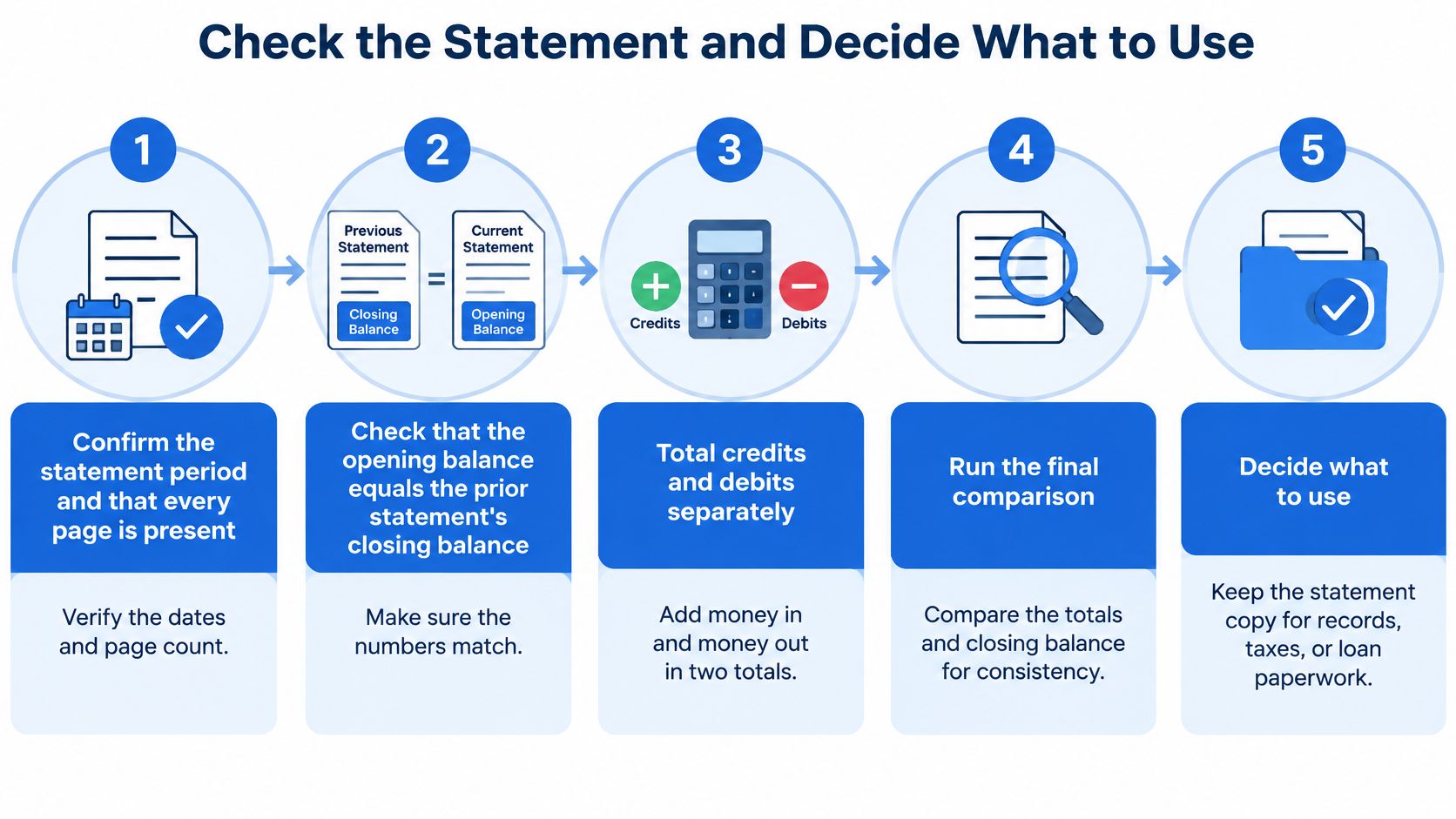
- Confirm the period and pages: Verify the start and end dates and that every page is present, including continuation pages.
- Check continuity: Confirm the opening balance equals the prior statement's closing balance.
- Total each side: Add credits and debits separately, in two totals.
- Run the balance test: Opening balance plus credits minus debits must equal the closing balance.
- Validate the details: Confirm signs, currency, and that every date falls within the period.
- Separate pending items: Keep pending entries apart from posted ones so they don't distort totals.
- Match to source documents: Tie each deposit and payment to an invoice, receipt, or payroll record.
- Investigate differences: Work through deposits in transit, outstanding checks, bank fees, interest, and bank errors.
The IRS guidance in Publication 583 recommends reconciling business accounts and provides a worked bank reconciliation example that begins with a closing balance shown on the bank statement of $1,458.12. The mechanic is the one we use. Compare the statement's closing balance with the internal cash ledger after accounting for outstanding checks, deposits in transit, bank fees, interest, and other timing or recording differences, and check the account for errors through reconciliation. Following a disciplined routine for checking bank statements keeps that comparison repeatable month after month.
Deciding what the verified figures are for
Once the checks pass, we decide what we're using the statement for, because the purpose sets the standard of evidence. A reconciled period for month end close needs every difference explained. A clean record for tax preparation needs deposits and expenses matched to supporting documents. A verified statement for a lending file needs complete pages and unbroken continuity across periods.
We keep the source PDF beside the extracted data and note the date and the checks performed. That way, anyone reviewing the file later can see what we tested and what we found.
Conversion saves transcription time, but it doesn't replace review. We built autobankstatement to convert common statement PDFs, including password protected and scanned files, into CSV or Excel output, and the balance test and line review still remain our responsibility and yours. Run the test on the next statement that crosses your desk, record the result, and resolve any difference before posting.
When the checking is done and the typing is what's slowing the close, we can turn your statement PDFs into clean CSV or Excel files you can review before downloading. Upload a digital, scanned, or password protected statement, verify the extracted balances against the test above, and keep the original PDF as your source. Visit autobankstatement to try a free guest preview on your next statement.
Convert your next statement in minutes
Upload a bank statement PDF — digital, scanned, or password-protected — preview the extracted table, and download clean CSV or Excel.