
Self Employed Bookkeeping: A Monthly Routine That Works
Self employed bookkeeping step by step: track income and expenses, reconcile every month, keep records that hold up, and prepare cleanly for taxes.
It's April, a deadline's close, and you're staring at a charge from last March that could be software, travel, or something personal you shouldn't claim at all. You search email, guess, then move on because there's a year of statements still waiting. That guesswork is where self employed bookkeeping usually breaks down, not in the tax form itself. When we run a monthly close, we don't start by chasing deductions. We start by turning every statement into rows we can sort, check, and explain while the month is still fresh.
Table of Contents
- Why Self Employed Bookkeeping Pays Off Every Month
- The Monthly Bookkeeping Routine, Step by Step
- Separating Business From Personal Spending
- What to Capture for Every Transaction
- Reconciling Each Statement to the Penny
- Tax Season Readiness and Pre-Filing Checklist
Why Self Employed Bookkeeping Pays Off Every Month
Say a freelancer opens a March statement in April and finds a $240 charge with a cryptic description. She can't recall the vendor, can't find a receipt, and spends a weekend matching rows to memory instead of doing paid work. By the time she gives up, that one line has cost her more time than a full month of routine bookkeeping would have taken.

Self-employed people run their own finance function. There's no finance team reconciling accounts, chasing receipts, or flagging duplicate charges behind the scenes. That's why bank and card statements are often the most complete record of money in and out, even when invoices and receipts are scattered.
The scale is not niche. The OECD Society at a Glance report notes that in 2017, self-employed people accounted for 16% of all workers across the OECD on average, covering freelancers, sole proprietors, and small business owners. Most of them track revenue, costs, equipment, travel, contractor payments, taxes, and owner withdrawals without corporate accounting infrastructure.
What a monthly habit changes
A monthly habit turns each PDF statement into rows that can be sorted, summed, and checked, instead of a once a year scramble through receipts. You catch a forgotten subscription while you can still cancel it. You spot a client payment that never arrived while the invoice is still current.
The work ahead breaks into five parts:
- The monthly routine: a fixed appointment in the first week of each month
- Separation: sorting business spending from personal spending, account by account
- Transaction fields: capturing enough detail for each row to stand on its own
- Reconciliation: proving each statement agrees to its closing balance
- Tax season readiness: confirming records are complete before filing
Tax rules differ by country, and we won't pretend otherwise. The record control practices in this article apply anywhere, because every tax authority asks the same basic questions about what was paid, when, and why.
The payoff is concrete. You get a repeatable 30 minute routine and a pre filing checklist that confirms the records are ready before filing, rather than a hopeful pile of PDFs.
The Monthly Bookkeeping Routine, Step by Step
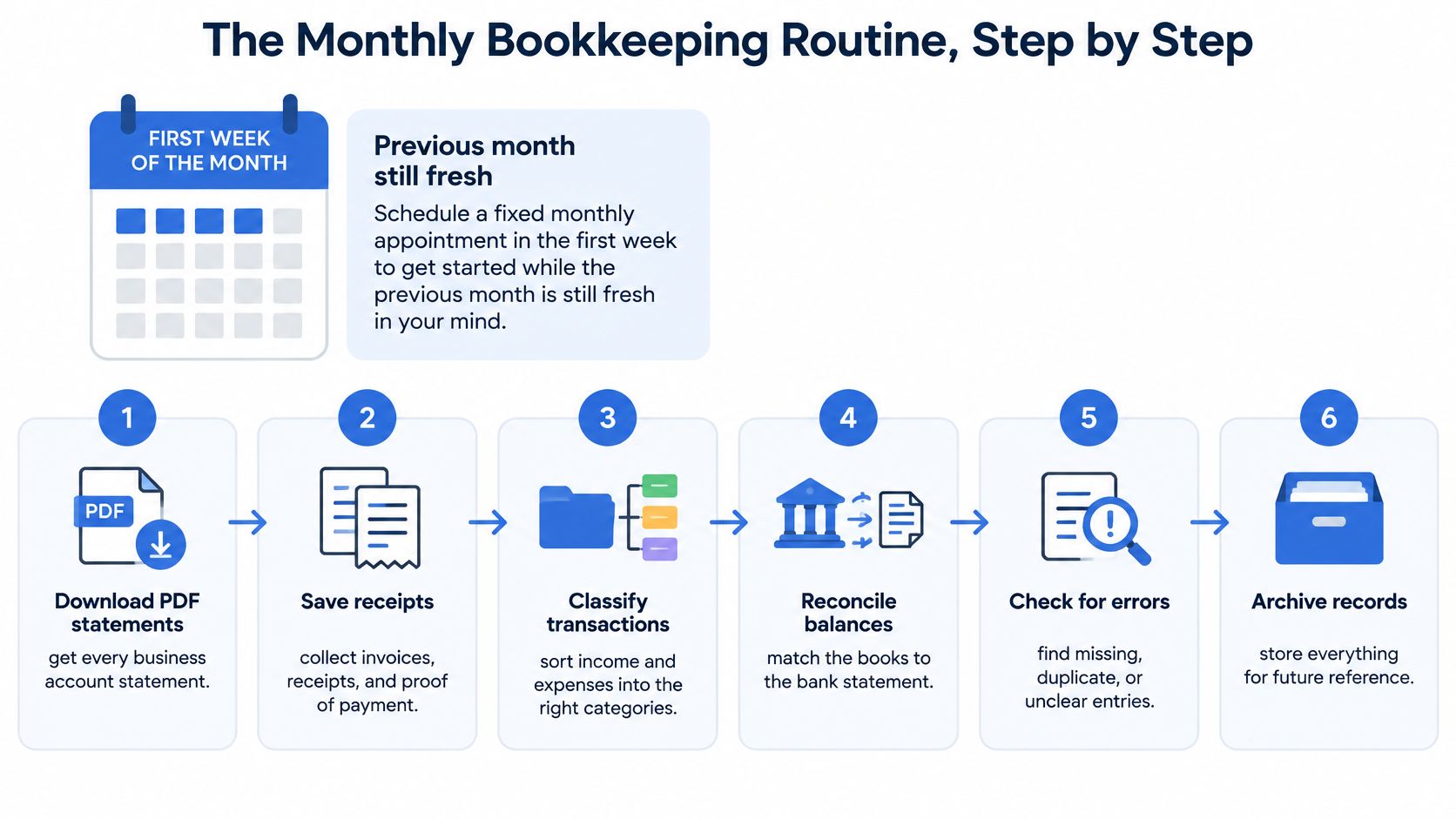
Treat this as a fixed 30 minute appointment in the first week of each month, while the previous month is still fresh. Memory is the cheapest bookkeeping tool you have, and it expires fast. A charge you recognize instantly on the 5th becomes a research project by tax season.
The seven steps
Download every statement. Pull the PDF statements for every account used for work, the business bank account, the business credit card, and any personal card you occasionally put business expenses on. If an account carried even one work charge, it belongs in the review. Missing accounts are the main reason legitimate expenses never get claimed.
Convert each PDF to a spreadsheet. Convert each statement to CSV or Excel/XLSX so rows can be sorted and totaled. Digital, scanned statements read through OCR, and password protected statements are all supported, and users can upload a bank statement and add a password if the file is locked. Users can download a clean spreadsheet for bookkeeping, taxes, reconciliation, or reporting once the preview looks right.
Pass one, tag business or personal. Go row by row and tag every transaction as business or personal before you think about categories. This pass is fast because you're only answering one question. It also stops personal spending from drifting into business totals by default.
Pass two, assign a category. Give each business transaction a category such as software, travel, supplies, or subcontractors. Keep the list short and consistent month to month, because category totals are what you'll hand to a tax professional and what you'll use to judge profitability. Our guide on how to track expenses for a small business covers category design in more depth.
Pass three, flag the unknowns. Flag anything you don't recognize and look it up now, not in April. Search your email for the amount, check the vendor name online, or ask the client if it was a project cost. An unrecognized charge can also be fraud or a duplicate, and both are easier to dispute within weeks than within a year.
Run the balance check. Verify that opening balance + credits − debits = closing balance on the statement before you close the month. If the numbers don't agree, a row was missed, duplicated, or misread during conversion or entry. Catching that here takes minutes, while catching it during year end reconciliation means reopening twelve months.
File both versions. Save the original PDF and the CSV into a Year then Month folder in cloud storage. The PDF is your source document, and the spreadsheet is your working record with tags and categories. Keeping both means anyone reviewing the month can trace every adjusted row back to the statement it came from.
Done monthly, this takes about half an hour. Left until tax season, it's a lost weekend spent asking what each charge was.
The trade off is plain. Thirty minutes monthly feels like overhead when work is busy, but it buys you accurate category totals at any point in the year, not just at filing time. You can answer what you spent on subcontractors this quarter without a special project. That visibility is worth more than the time it costs.
Separating Business From Personal Spending
The costliest error we see isn't dramatic. It's legitimate business expenses sitting on a personal card that never get claimed, so the deduction disappears at tax time. Someone pays for software, a client lunch, or a flight on whichever card is in hand, and because that statement is treated as personal, nobody reviews it.
The reverse error gets more attention, personal spending claimed as business, and it does create audit exposure. But under claiming is quieter and more common, and nobody catches it for you. The fix costs nothing except reviewing every account you spend from.
Why separation still matters
The IRS guidance on business income and expenses recommends keeping business and personal accounts separate because separation makes records easier to maintain. Personal, living, and family expenses generally are not deductible, and mixed use costs such as vehicle expenses must be divided between business and personal use.
Separation at the bank doesn't solve everything, because real spending leaks across cards. It does shrink the sorting job. When a business account is mostly business, pass one takes minutes, and the personal card review becomes a targeted search for stray work charges instead of a full classification exercise.
How common transactions are classified
| Transaction type | Typical example | Treatment | Evidence to keep |
|---|---|---|---|
| Business software subscription | Project tool billed to a personal card | Business, claim the cost | Invoice or subscription receipt |
| Client lunch | Meal with a prospect or client | Business, check local meal deduction rules | Receipt with attendee names and business purpose |
| Client travel | Flight for a client project booked on a personal card | Business travel when the trip is for work | Itinerary and client invoice or project record |
| Mixed use phone or vehicle | Phone plan or car used for work and personal trips | Split by documented business percentage | Usage log or allocation note |
| Owner transfer | Transfer from business account to personal account | Owner draw, not an expense | Transfer record on both statements |
| Personal purchase | Groceries charged to the card used for work | Personal, exclude from business records | Tag as personal in pass one |
Two rows deserve care. An owner transfer is not income or an expense, it's you paying yourself, and counting it both ways inflates your totals. A mixed use cost needs a documented percentage based on actual use, not a round number invented in April.
That's why every account used for work must be converted and reviewed, not only the official business account. Flag personal card transactions for documented allocation rather than treating the whole account as business activity. The goal is a complete business record with personal items visibly excluded, which is far more defensible than a partial record that happens to look tidy.
What to Capture for Every Transaction
Each transaction row must stand on its own months later, when you've forgotten the context and someone else may be reviewing it. A row that only shows an amount and a cryptic description can't be proven or classified with confidence. The fields below are the minimum that make a row useful.
What evidence actually proves
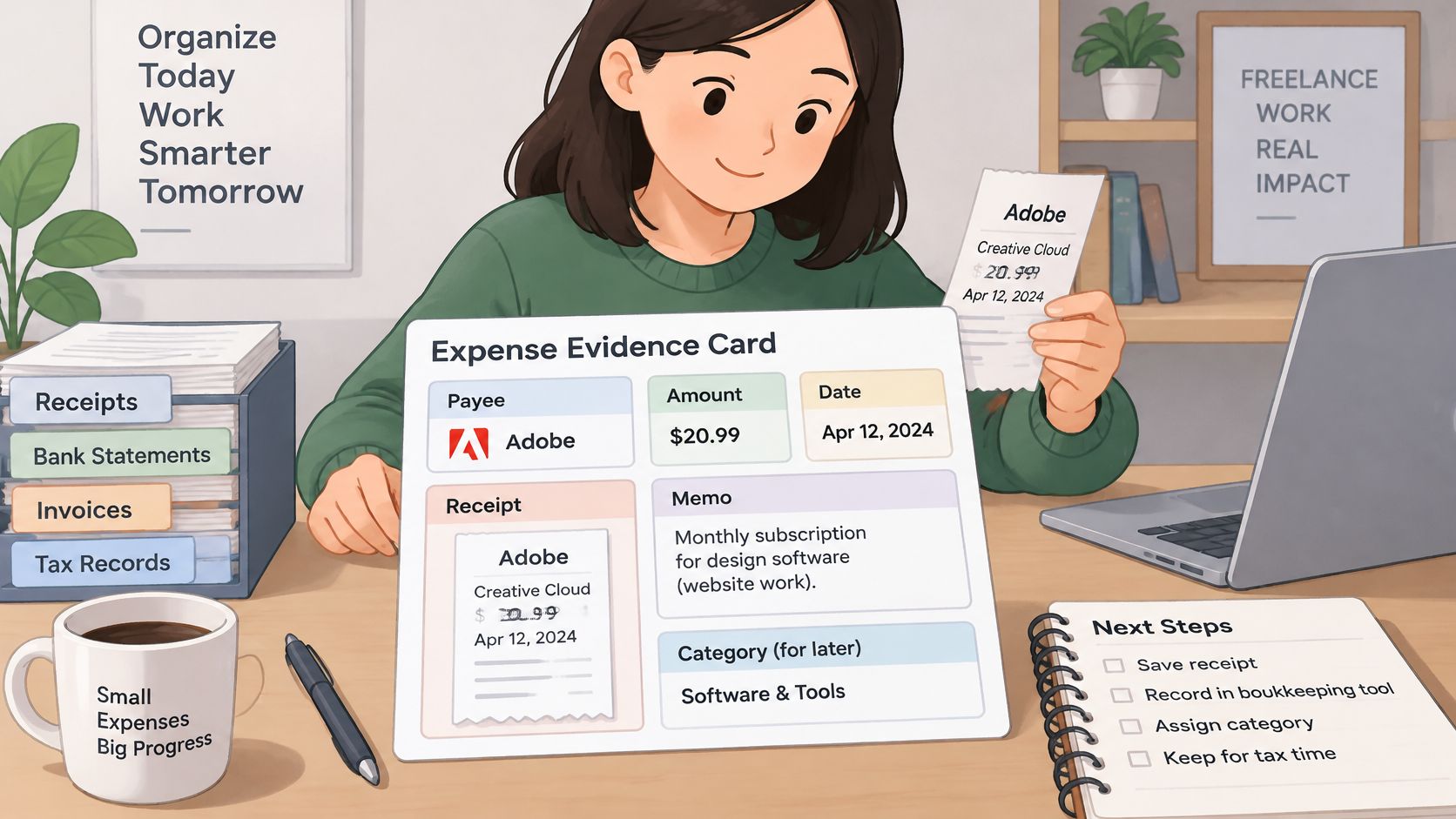
The IRS guidance on what records to keep says records should summarize gross income, deductions, and credits, while expense evidence should identify the payee, amount, payment proof, date incurred, and business purpose. That last item is where most self employed bookkeeping falls short.
Bank statements alone don't prove deductibility. They show that money moved, which is payment evidence, but they rarely show why. Invoices, receipts, contracts, and mileage or usage logs establish business purpose, so a statement row plus its supporting document is the complete record, not either one alone.
Fields to keep for each transaction
| Field | What to capture | Why it matters |
|---|---|---|
| Transaction date | Date the charge or payment happened | Places the expense in the correct tax year |
| Posting date | Date the bank recorded it, where shown | Explains differences between statements and books |
| Signed amount | Amount with currency and direction, in or out | Keeps income and expenses separate in totals |
| Counterparty or description | Payee name as it appears on the statement | Identifies who was paid for what |
| Account identifier | Which account or card the row came from | Shows which account a charge belongs to |
| Classification status | Income, deductible expense, transfer, owner draw, personal, or review | Prevents personal spending from silently becoming a deduction |
| Category and document link | Software, travel, supplies, subcontractors, plus the invoice or receipt | Supports the business purpose if questioned |
Work in sequence. First normalize the rows and preserve the original balance order, then classify each row, then attach its supporting document. Keeping extraction separate from judgment means a conversion mistake gets spotted as a data problem, not buried inside a category total.
Practical rule: if a row can't answer who was paid, how much, when, and why, it isn't finished, whatever category it sits in.
The classification status field does the heaviest lifting. Forcing every row into income, deductible expense, transfer, owner draw, personal, or review stops personal spending from becoming a deduction through inaction. Rows marked review become your follow up list for the month.
Electronic records are acceptable when they're complete, accurate, and accessible for examination, so a well kept spreadsheet with linked documents carries real weight. Our guide on how to keep receipts organized shows a filing method that keeps those links intact.
Reconciling Each Statement to the Penny
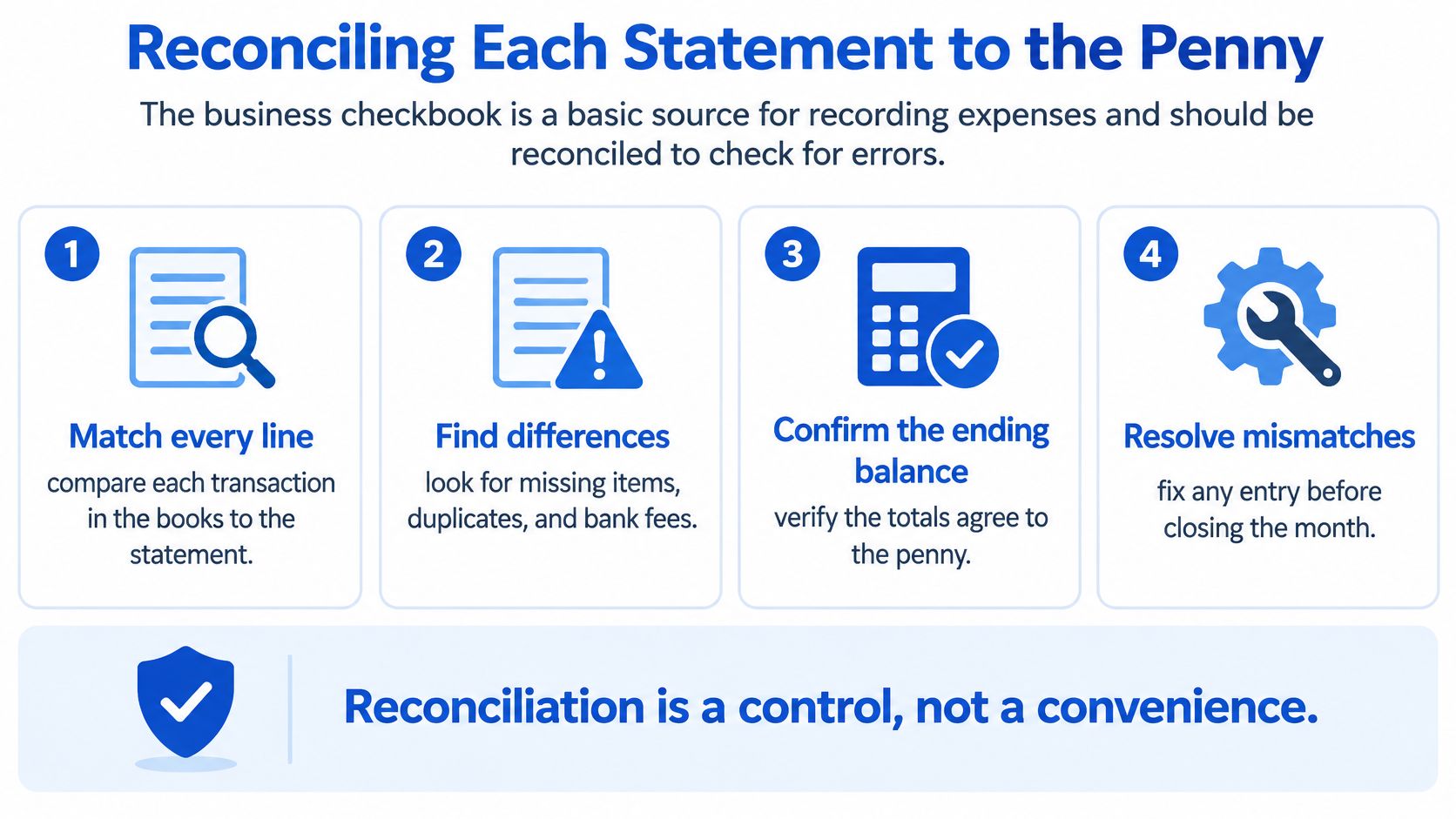
Reconciliation is a control. It's the step that proves your spreadsheet matches what the bank recorded, rather than what you hope it recorded. Skip it, and every total downstream, profit, category spend, tax estimate, inherits whatever errors crept in.
The formula and a worked example
The IRS Publication 583 guide for starting a business identifies the business checkbook as a basic source for recording expenses and recommends checking the account for errors by reconciling it. The formula is simple, opening balance + cleared deposits − cleared payments +/− adjustments = closing balance.
Work through an example. Say a statement opens at $4,210.55, with credits of $6,800.00 and debits of $3,912.40. The expected closing balance is $7,098.15, because 4,210.55 plus 6,800.00 minus 3,912.40 equals 7,098.15.
If the statement closes at $7,088.15, you have a $10.00 difference to explain. That's likely a bank fee recorded on the statement but missing from your sheet, or a small debit dropped during conversion. Either way, you now know exactly what to hunt for, a single ten dollar item, instead of rechecking the whole month.
Common reconciliation differences and fixes
| Difference found | Likely cause | Action |
|---|---|---|
| Exact amount, dated later | Timing item, such as a payment that cleared next period | Note it and confirm it clears next month |
| Small recurring amount | Monthly service or currency conversion fee | Record it as a bank expense |
| Same amount and description twice | Duplicate conversion or double entered row | Compare against the PDF and remove the duplicate |
| Amount missing from the sheet | Row omitted during extraction or entry | Compare row count against the statement and re-convert if needed |
| Matching credit reversing a debit | Refund or chargeback | Record the reversal and link it to the original charge |
| Unexplained residual | Misread or mixed row | Flag it and resolve before closing the month |
Break every difference into timing items, bank fees, interest, duplicates, omitted transactions, reversals, and extraction errors rather than writing it off as a generic adjustment. A written off difference hides the same error next month. A named difference usually points straight at its fix, as our explanation of what bank statement reconciliation is sets out.
A difference you can't name is a difference you haven't found yet.
The exception report
Close each month with a short exception report covering four items, unmatched transaction count, amount difference, oldest unresolved item, and duplicate date amount description combinations. The oldest unresolved item matters most, because stale items stop being researchable. Duplicate rows with identical date, amount, and description are a frequent conversion error and the easiest to test for with a sort.
Reconciliation also catches the costliest self employed bookkeeping error, legitimate business expenses left on personal cards. Those charges never appear on the business statement, so they never get reconciled and disappear from your deductions. Add a line to the exception report for business spend you remember putting on a personal card, then pull that card's statement and record each item with its own receipt.
This control matters more when one account holds business, personal, tax, and transfer activity, because unexplained residuals distort both profit and cash flow forecasts. Retain the statement and reconciliation output with the period's books. UK and U.S. rules both require business records, bank statements included, to be kept for several years after filing, so treat each month's reconciliation output as part of the permanent record.
Tax Season Readiness and Pre-Filing Checklist
Tax guides for the self-employed usually stop at how to record income and expenses. They skip the question that matters in March: how do you know your records are complete and defensible before filing? Categorized transactions are not the same as filing ready records.
The confidence gap is wide. Only 26% of surveyed U.S. small business owners and freelancers said they felt completely confident about their tax submissions in 2025, according to a survey covered by Yahoo Finance. Their leading problems were organizing receipts at 35%, understanding tax rules at 33%, and identifying deductions at 32%.
Why keep receipts is not a system
That advice is too vague to act on. It doesn't say how to link a receipt to a transaction, how to document mixed personal and business spending, or what to do when a source document never arrives. A folder of unlinked receipts and a spreadsheet of unlinked rows are two halves that never meet.
The costliest version of that gap is the legitimate business expense left on a personal card. It never enters the business account feed, so it escapes categorization entirely, and by March the charge is unrecognizable. Catching those strays is what the routine below is built around.
Use a monthly evidence protocol:
- Match each transaction: link every bank row to an invoice, receipt, or written business rationale
- Flag unmatched items: keep them visible on a review list rather than forcing them into a category
- Record purpose and allocation: note the business purpose and any business use percentage for mixed costs
- Preserve corrections: keep an audit trail showing what changed, so a reviewer sees reasoning rather than silent edits
More deductions don't mean better bookkeeping.
That point runs against popular advice, but it holds up in practice. Aggressive categorization without reliable documentation increases review risk and lowers your own confidence in the return. A smaller, well evidenced set of deductions beats a larger set you can't support if questioned. Converted bank data is a review queue, not a finished return, and treating it that way surfaces missing receipts, duplicates, transfers, and personal withdrawals while there's still time to fix them.
The ten minute pre filing check
Run this before you file or hand anything to an accountant:
- All accounts, all year: every work account converted for all twelve months, including personal cards used for business spending
- Every month reconciled: each month passed the balance check, opening balance + credits − debits = closing balance
- No silent gaps: the unresolved list is empty, or every remaining item carries a documented reason
- Spot check evidence: ten business transactions chosen at random each trace to a receipt or invoice
- Folders complete: Year then Month folders hold the original PDF and the CSV side by side
The first item deserves a second pass on its own. Pull your personal card statements for the year and scan them for business charges that never reached the books, because a deduction left off the return costs you directly rather than showing up as an error anyone will flag. If the spot check fails, don't file yet. Ten random rows failing to trace means the evidence linking broke down somewhere, and finding that break now is cheaper than explaining it later. If they all trace cleanly, you have reasonable confidence the rest will too.
What to hand a tax professional
Give them finished work, not raw material:
- Annual income summary: total income by source for the year
- Category totals: business spending summed by your consistent categories
- Signed off reconciliations: monthly outputs showing each statement agreed to its closing balance
- Resolved flag list: the review items and how each was settled
- Folder structure: the Year then Month folders so any figure can be traced to its statement
A tax professional working from that package spends their time on judgment, allowances, elections, timing, instead of data entry you're paying professional rates for. You'll also get better questions back, because clean records make anomalies stand out.
The conversion step
For the statement to spreadsheet step itself, we built our tool around this monthly workflow. It converts digital, scanned, and password protected PDF statements into CSV or Excel/XLSX, handles files up to 25 MB with bulk uploads, offers a free guest preview before payment, gives registered users 24 hour download access, and auto deletes uploads within 24 hours.
The Subscribe option suits regular bookkeeping, tax prep, and larger batches of statements. Whichever tool you use, run the balance check on the converted file before trusting it with a close or a filing.
Convert this month's statements while you still recognize every charge, run the balance check, and file the PDF and spreadsheet together so tax season becomes a review instead of a reconstruction. Visit autobankstatement to turn your digital, scanned, or password protected PDF statements into clean CSV or Excel files with a free guest preview before you pay.
Convert your next statement in minutes
Upload a bank statement PDF — digital, scanned, or password-protected — preview the extracted table, and download clean CSV or Excel.