What Is on an Invoice: Core Elements
Learn exactly what is on an invoice, from required tax fields to payment security controls, and how to extract this data for accurate bookkeeping.
The month-end close is almost complete when an accounts-payable reviewer finds an invoice with a total, a supplier logo, and a bank account, but no invoice number or tax breakdown. The payment may be legitimate, yet the document doesn't give the ledger enough information to match the expense, support a tax claim, or explain the transaction during review.
That's why the question what is on an invoice needs a more useful answer than a visual checklist. An invoice is a commercial record, a tax document, a bookkeeping input, and a payment-security control. Its fields must identify who sold what to whom, when the transaction occurred, how the price was calculated, what tax applies, and which payment should be matched to the record.
Table of Contents
- The Real Purpose of Invoice Fields
- Standard Header and Line Item Elements
- Jurisdictional Tax and Compliance Variations
- Invoices as Payment Security Controls
- The Shift to Structured E-Invoicing Data
- Extracting and Verifying Financial Records
- Building a Complete Document Checklist
The Real Purpose of Invoice Fields
An invoice becomes valuable when it connects separate accounting facts into one traceable record. The supplier's legal identity connects to the customer, the invoice number connects to the transaction, the line items connect to the amount, and the tax fields connect the commercial event to the relevant reporting obligation. The European Commission's invoicing guidance reflects this structure by requiring core information such as the issue date, unique sequential number, supplier and customer details, descriptions, quantities, prices, and VAT calculations for a full invoice under EU VAT rules.
Consider a routine software-services invoice. The document might show a monthly subscription, an implementation charge, a discount, VAT, and a total payable. If the description only says “services,” the bookkeeper may be unable to determine whether the charge belongs to software, consulting, or a reimbursable expense. If the customer's legal name is missing, the accounts-payable team may struggle to match the document to the vendor master. If the tax amount is absent, the finance team may need to hold the entry until the supplier confirms the treatment.
Every field has a job
We can usually assign invoice fields to one of four functions:
- Identity: The invoice number, issue date, supplier, and customer identify the document and the parties.
- Commercial meaning: Descriptions, quantities, unit prices, discounts, and payment terms explain what was sold and how the amount arose.
- Tax support: Tax registration numbers, rates, amounts, exemptions, and reverse-charge references support the applicable tax treatment.
- Workflow control: Purchase-order references, due dates, payment status, and adjustment references help the team approve, post, reconcile, and archive the record.
A visually polished PDF doesn't compensate for missing structured information. An invoice can look complete to a human reader while remaining difficult for accounting software to classify or for an auditor to test.
Controller's rule: If a field can't help us identify, calculate, classify, approve, reconcile, or defend the transaction, we should question why it appears on the template. If a required field serves one of those purposes, it shouldn't be treated as decoration.
The same principle applies when we move from invoices to other financial documents. A useful data-entry workflow for accounting treats source documents as information that must be captured consistently, checked, and connected to ledger activity. That mindset reduces the risk of transcribing a total while losing the evidence behind it.
Standard Header and Line Item Elements
Most commercial invoices begin with a recognizable structure, even though legal requirements differ by location. We should build the template around the information the ledger and reviewer need, then adapt it for the relevant tax jurisdiction and transaction type.
Start with document identity
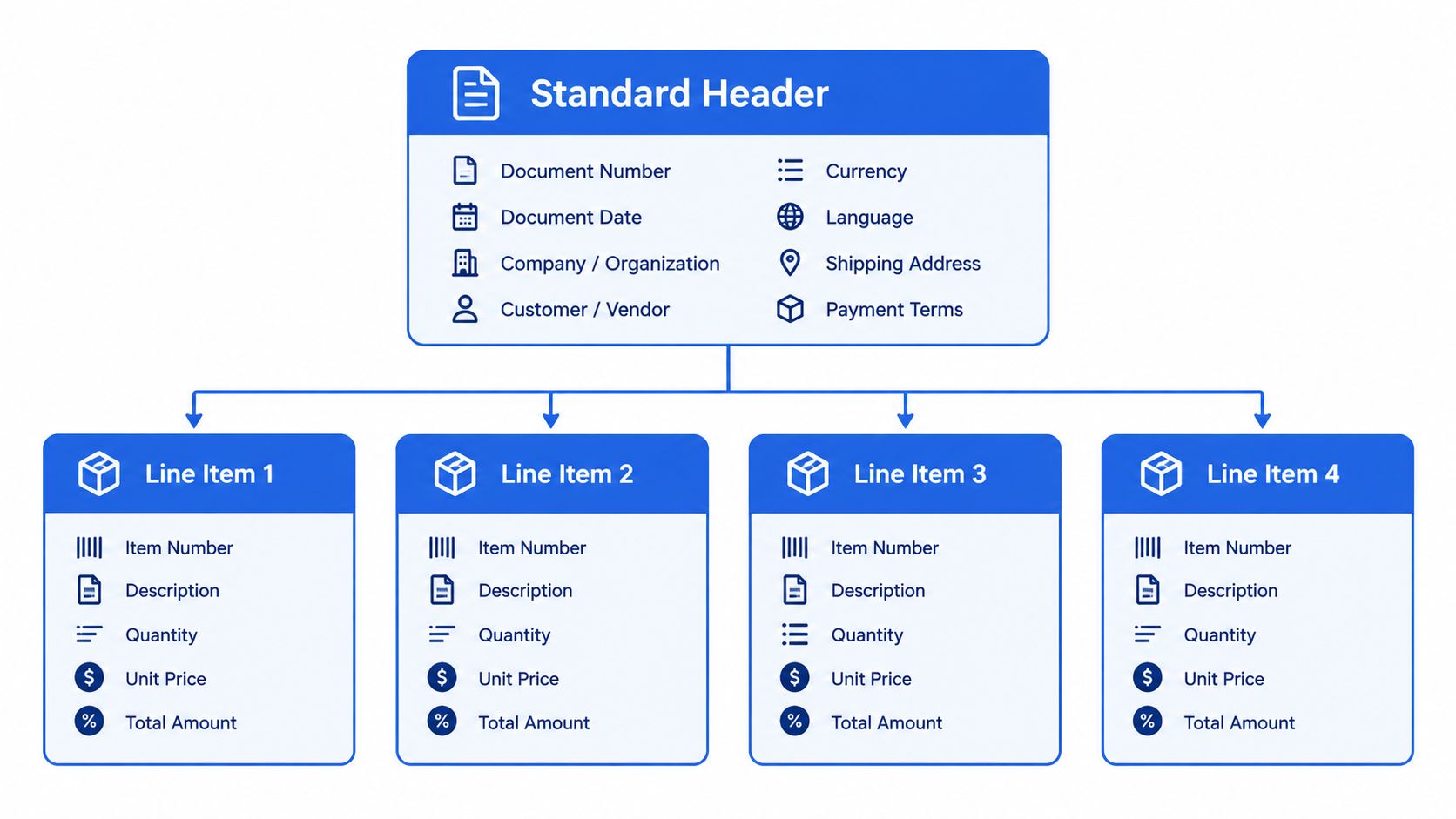
The header should make the document distinguishable from every other invoice in the sequence.
- Invoice number: Use a unique, traceable identifier. A sequential numbering approach makes duplicate detection and payment matching more reliable.
- Issue date: Record when the invoice was created. This date often drives posting, reporting, and document-aging workflows.
- Time of supply: Include the date the goods or services were supplied when it differs from the issue date or when the jurisdiction requires it.
- Purchase-order or contract reference: Where the customer uses approval controls, connect the invoice to the authorized commitment.
- Payment terms and due date: State when payment is expected and explain any applicable discount or late-payment treatment.
A due date is operationally useful, but it doesn't replace the invoice date or time of supply. Those dates answer different questions, and combining them in one ambiguous field creates avoidable reconciliation problems.
Identify both parties precisely
The seller section should contain the legal business name, address, and applicable tax registration number. The customer section should use the legal name and address that match the account, contract, or tax record. A trading name may help the recipient recognize the supplier, but it shouldn't replace the identity needed for accounting and tax purposes.
The exact tax identifier depends on the jurisdiction. EU VAT rules can require the customer's VAT identification number when relevant, while Australia's Taxation Office requires a tax invoice to identify the seller and include the seller's Australian Business Number. These details aren't interchangeable, so the template should use labels that match the applicable regime.
Make every charge identifiable
Line items should let a reviewer understand the transaction without opening an email chain or asking the supplier to explain a vague total. Each line should generally show:
- Description: Name the product, service, period, project, or deliverable clearly.
- Quantity or extent: Show units, hours, seats, milestones, or another meaningful measure.
- Unit price: State the price before tax and identify the currency where needed.
- Discount or adjustment: Show reductions separately rather than hiding them in an unexplained net figure.
- Line amount: Make the calculation visible and consistent with the quantity and unit price.
The subtotal, tax calculation, and total payable should reconcile mathematically. Where relevant, the invoice should also state treatment such as a cash discount, margin scheme, or reverse charge. Those references affect how the recipient records the transaction, not just how the document looks.
Jurisdictional Tax and Compliance Variations
There isn't one universal invoice template that works for every sale. Requirements change with the jurisdiction, VAT or GST registration status, buyer type, location of supply, exemption, reverse-charge treatment, and whether the document is an original invoice, credit note, or amendment.
The practical approach is to keep a common commercial core and add conditional fields. The comparison below shows why a finance team should maintain a jurisdiction-and-scenario checklist rather than rely on a generic online template.
Invoice Field Requirements by Jurisdiction
| Jurisdiction | Unique Identifiers | Tax & Classification Data | Special Conditions |
|---|---|---|---|
| European Union | Unique sequential invoice number, supplier and customer details, relevant VAT identification numbers | Taxable amount, VAT rate and amount, rate or exemption breakdown | Include the transaction or payment date when different, exemption references where applicable, and amendment references for credit notes |
| United Kingdom | Unique sequential invoice number, issue date, time of supply, supplier legal name, address, VAT registration number, customer name and address | Price excluding VAT, applicable VAT rate, total excluding VAT, total VAT charged | Add relevant references for cash discounts, margin schemes, and reverse-charge treatment |
| India | Invoice date, recipient details, GSTIN or UIN where applicable, supplier identity | HSN code for goods or accounting code for services, descriptions, quantities, taxable value, applicable central, state, integrated, union-territory tax or cess rates and amounts | Interstate supplies require place of supply and state, a different delivery address must be shown where relevant, reverse charge must be indicated, and supplier or authorized representative signature or digital signature is required |
| United States | Payee identity, transaction date, amount, and a document that identifies the purchase or service | The record should describe the business expense and support the amount claimed | IRS recordkeeping focuses on sufficient supporting documentation and payment evidence rather than one universal invoice layout |
For the EU, the European Commission's VAT invoicing requirements make tax-rate breakdowns, exemption treatment, and transaction timing important. A template designed only for domestic standard-rated sales may fail for an exempt or cross-border transaction.
The UK example is equally practical. HMRC's VAT records manual identifies the particulars required for a full VAT invoice, including the invoice number, dates, parties, line details, prices excluding VAT, VAT rate, and VAT totals.
Transaction type changes the checklist
India demonstrates why geographic classification matters. The Central Board of Indirect Taxes and Customs invoice rules require information such as HSN or service accounting codes, place of supply, and tax components that depend on the transaction.
For U.S. bookkeeping, the question is often whether the records substantiate the business expense. The IRS recordkeeping guidance identifies the payee, amount, proof of payment, date incurred, and description of the item or service as important supporting details. We should retain the invoice with payment evidence when available, because a document showing a total alone may not establish the business purpose.
Invoices as Payment Security Controls
A complete invoice isn't automatically an authentic invoice. It may contain every expected field and still direct payment to an account controlled by someone impersonating the supplier.
Invoice fraud often relies on a change that looks minor during a busy payment run. The supplier name, invoice number, service description, and total may all be correct, while the bank details have been replaced. The UK National Crime Agency and NatWest reported that invoice-fraud victims lost £3,908,086 across 83 cases in September 2025, with an average loss of more than £47,000 per case, and that invoice fraud represented 85% of payment-diversion-fraud losses that month. These figures are reported in the National Crime Agency's invoice-fraud campaign announcement.
Separate charge validation from payment validation
Accounts payable should perform two different tests.
First, validate the charge. Confirm that the supplier, invoice number, goods or services, quantities, prices, tax treatment, and approval reference agree with the purchase order, contract, receipt, or service confirmation.
Second, validate the destination. Confirm that the bank account belongs to the supplier and that any change was authorized. A bank account printed on a familiar-looking PDF isn't proof of ownership.
A reply to the invoice email isn't an independent verification channel. If an invoice announces new payment details, we should contact a known supplier representative using a phone number or email address already held in the vendor master or contract records. The team should document who confirmed the change, when they confirmed it, and which trusted contact method they used.
Payment-control principle: Invoice completeness proves that a document contains expected information. It doesn't prove that the payment instructions are genuine.
A strong invoice-control policy should therefore require a unique reference tied to an approved purchase order or contract, a clear supplier tax identity, itemized charges, payment terms, and a recorded process for bank-detail changes. Finance teams handling PDFs should be particularly cautious because altered account details may not be obvious during a routine visual review.
The Shift to Structured E-Invoicing Data
The move from paper and unstructured PDFs toward electronic invoicing changes what “complete” means. A PDF can preserve a readable visual presentation, but an electronic invoice must also represent important values in predictable fields that software can validate, transmit, and process.
European Union Directive 2014/55/EU established a major step in that direction. Since April 2020, EU public administrations have been required to accept compliant electronic invoices for covered procurement transactions under the European standard EN 16931, as described in the European Commission's e-invoicing documentation. The required dataset includes machine-relevant information such as sequential invoice numbers, supplier and customer identifiers, taxable amounts, VAT rates, VAT amounts, payment information, and references to amended invoices or credit notes where applicable.
The visual document is only one layer
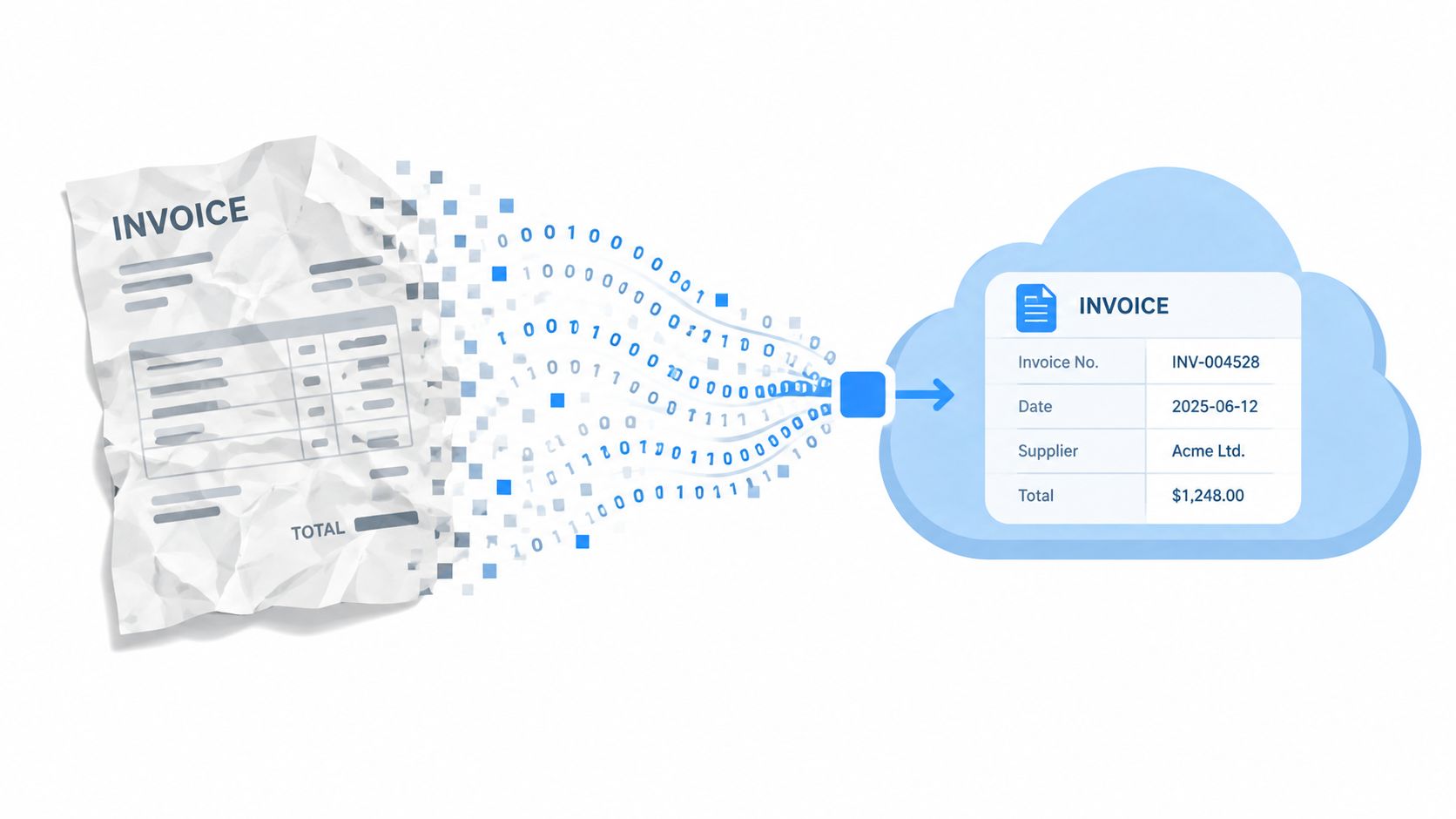
A structured invoice separates presentation from data. The human-readable view may show a company logo, aligned columns, and a prominent total. The underlying payload must preserve the values themselves, including dates, identifiers, currency amounts, tax categories, and adjustment references.
That distinction affects template design. A field that is visually obvious but stored as an unstructured image may still require manual interpretation. A field mapped to a defined data element can be checked against validation rules, routed for approval, and used in reconciliation.
The EU e-invoicing standard information is useful for understanding this broader shift from reading documents to interpreting structured fields. Finance teams should ask whether their process preserves the underlying values, not only whether someone can read the PDF.
Map fields before mandates arrive
The EU country factsheet program covers all 27 EU Member States and four additional European Economic Area countries, illustrating the breadth of the interoperability effort documented by the European Commission. Separately, the verified compliance overview notes that more than 80 countries reportedly have e-invoicing mandates and about 50 more are planning additional mandates, as summarized in the UK government's invoice-content guidance.
The operational lesson is straightforward. Preserve exact invoice dates, supplier and customer identifiers, line descriptions, quantities, tax categories, currency amounts, payment information, and credit-note references in fields that can be exported or validated. Visual polish still matters for human review, but accurate field mapping matters more for automated reconciliation and audit trails.
Extracting and Verifying Financial Records
Invoices rarely stand alone at month-end. We match them to purchase orders, approvals, ledger entries, receipts, and bank-statement transactions. That matching becomes harder when source files are scanned, password-protected, or formatted for visual reading rather than structured import.
The first step is to capture the invoice number, supplier, invoice date, due date, line descriptions, tax, total, currency, and payment reference. For a scanned document, OCR can provide a starting point, but it shouldn't be treated as final. Review numbers that commonly produce extraction errors, especially invoice identifiers, decimal amounts, dates, and tax values.
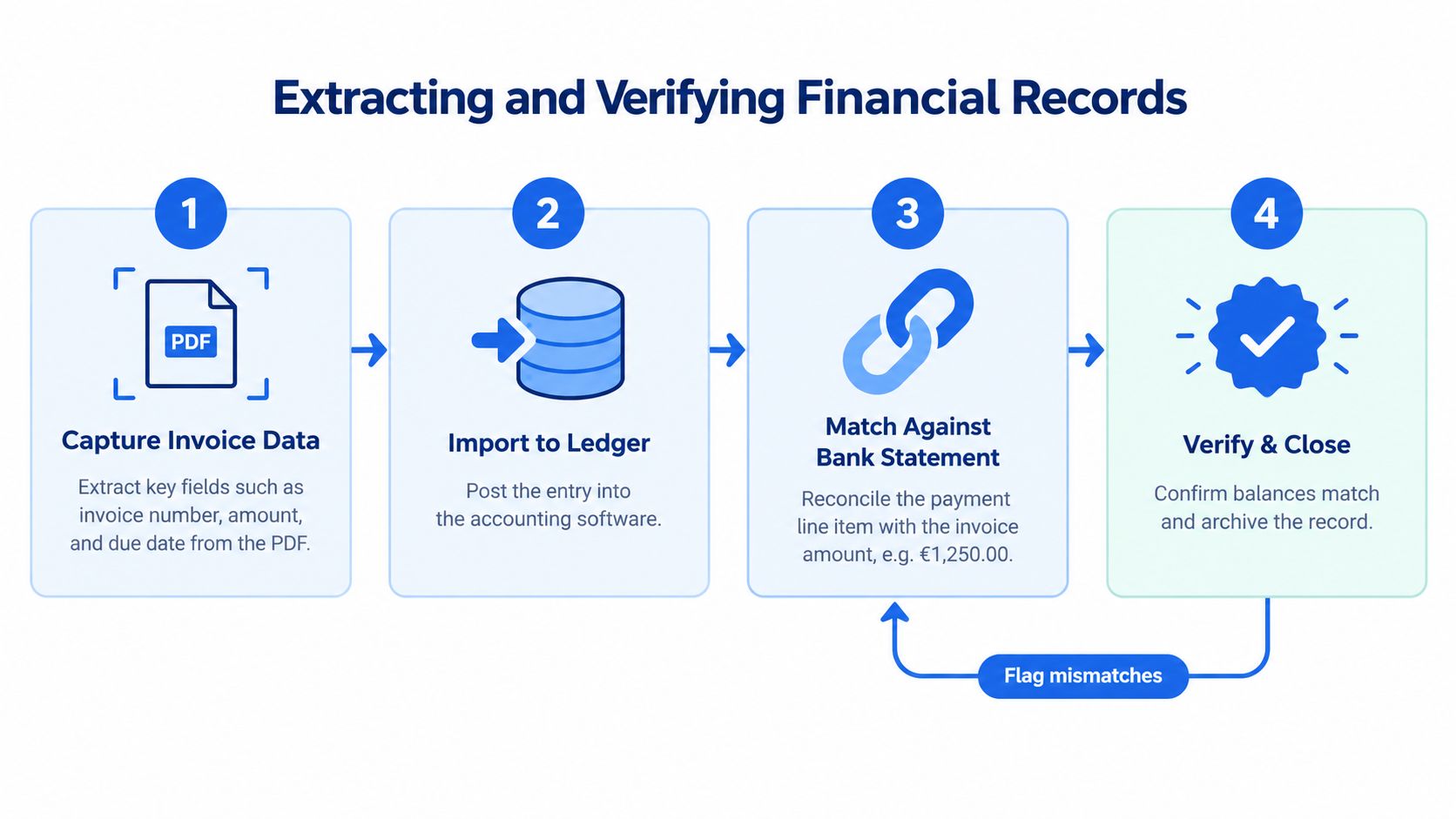
Use a controlled matching sequence
- Capture: Extract the fields and preserve the original document beside the working data.
- Post: Create or update the payable entry using the approved supplier and accounting classification.
- Match: Connect the bank-statement payment to the invoice number, supplier, amount, and payment date.
- Investigate: Resolve differences caused by discounts, taxes, partial payments, fees, currency conversion, or duplicate entries.
A spreadsheet-ready bank statement can support this process when the source is a digital, scanned, or password-protected PDF. The data still needs review. Check that the opening balance plus credits minus debits equals the closing balance before relying on extracted transactions for reconciliation.
The process of extracting data from a PDF should therefore include validation, not just conversion. If the balance equation fails, pause the import and inspect omitted pages, duplicated rows, sign conventions, OCR mistakes, and date or amount shifts.
Review standard: Automation should reduce repetitive entry, but the finance team remains responsible for confirming that the extracted record agrees with the source and the ledger.
Building a Complete Document Checklist
A reliable invoice checklist combines statutory completeness with operational control. Before approving or posting an invoice, we should confirm the document can answer four questions: who issued it, what was supplied, how the amount and tax were calculated, and whether the payment instructions are trustworthy.
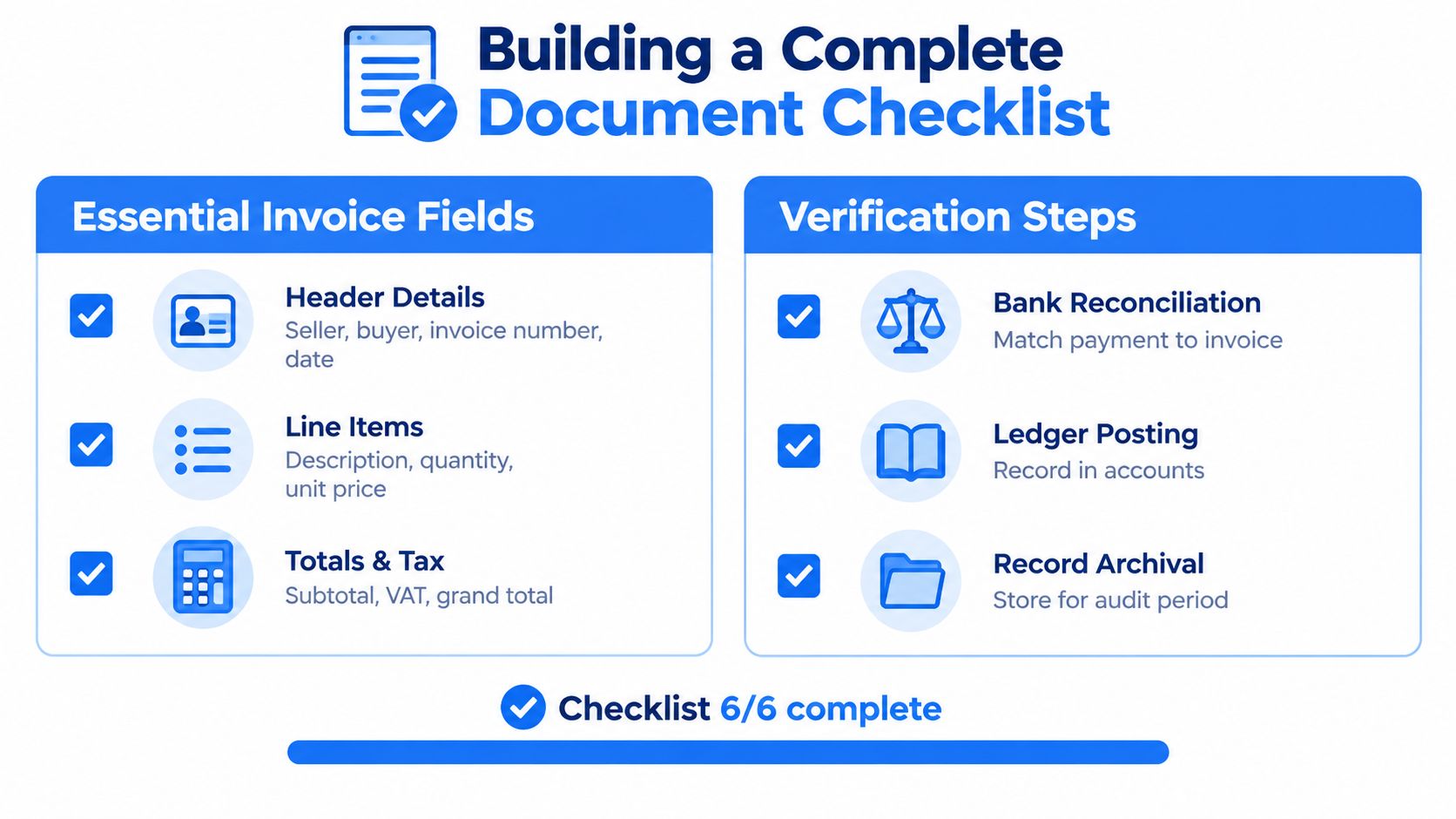
The core review list
- Header details: Check the supplier, customer, invoice number, issue date, time of supply where relevant, payment terms, and purchase-order or contract reference.
- Line items: Confirm descriptions, quantities or extent supplied, unit prices, discounts, and line totals.
- Totals and tax: Recalculate the subtotal, applicable tax, exemptions or reverse-charge treatment, and grand total.
- Jurisdiction fields: Apply the correct VAT, GST, or other tax checklist for the location and transaction type.
- Payment verification: Match the charge to approval evidence and independently verify new or changed bank details.
- Ledger and archive: Post the entry, match the payment, retain supporting evidence, and preserve the amendment trail for credit notes or corrections.
The invoice should also remain connected to the broader recordkeeping system. IRS guidance explains that business records need enough information to determine gross receipts, expenses, and the purchase price of business assets, and that invoices are among the supporting documents used for those records. A complete document is therefore one that can be traced from source, to ledger, to payment, and back again.
For teams that need to reconcile invoice records against statements, autobankstatement converts digital, scanned, and password-protected PDF bank statements into CSV or Excel/XLSX files, with bulk uploads and files up to 25 MB. We can preview the output as a guest before payment, registered users receive 24-hour download access, and uploads are automatically deleted within 24 hours.
Convert your next statement in minutes
Upload a bank statement PDF — digital, scanned, or password-protected — preview the extracted table, and download clean CSV or Excel.