Extracting Data from a PDF: A Finance Team's Guide
Learn best practices for extracting data from a PDF in 2026. This guide helps finance teams automate workflows, reduce errors, and save time.
A bank statement PDF is open on one screen, the bookkeeping spreadsheet is open on another, and the month-end deadline is getting closer. We select a transaction, copy what looks like the date, adjust the amount, move to the next row, then stop to investigate why a debit appears in the credit column. The spreadsheet isn't the difficult part. The difficult part is turning a document designed for visual reading into records we can reconcile and defend.
That distinction matters whenever we're extracting data from a PDF. A clean digital statement, a scanned image, and a hybrid file may all carry the .pdf extension, but they need different treatment. Reliable work starts with identifying the document structure, selecting an extraction method that fits it, and treating the output as unverified until the balances and transactions agree.
Table of Contents
- The Moment Every Finance Team Recognises
- Why PDFs Resist Simple Extraction
- The Main Extraction Approaches Compared
- How OCR and Table Reconstruction Work Together
- Verifying the Output Before You Trust It
- Privacy, Security, and Operational Controls
- Choosing the Right Method for Your Workflow
The Moment Every Finance Team Recognises
The familiar bottleneck usually appears late in the close. A bookkeeper has downloaded a statement, opened it beside the general ledger, and started retyping transaction rows into a spreadsheet. The first page goes smoothly. Then the statement introduces a wrapped description, a balance column that sits farther to the right, or a transaction whose decimal separator is easy to misread.
One misplaced digit can send the reviewer looking in the wrong account. A copied date can shift the transaction into the wrong period. A row pasted without its continuation line can leave the counterparty name incomplete, making a later query harder. The work feels simple because the visible information is familiar, but the conversion from page layout to structured data is where the risk sits.
Teams often describe this as a spreadsheet problem. It isn't. A spreadsheet can sort, filter, calculate, and flag exceptions once the rows are correct. The bottleneck is the gap between the visual document and a dataset with stable fields for date, description, debit, credit, and balance. Guidance on handling business bank statements reflects the practical reality that statements need to support bookkeeping and review, not just be readable on screen.
Why manual copying feels safer than it is
Manual entry gives us the impression of control because we can see every row as we type it. In practice, fatigue makes repeated work less reliable. Misaligned decimal columns, negative signs, page breaks, and transactions that span multiple lines all create opportunities for a plausible-looking error.
Copy and paste also hides what hasn't been captured. A missing row may not produce an obvious spreadsheet warning, especially when the closing balance is checked only after the full statement has been entered. By then, finding the omission means comparing two different representations of the same document from the beginning.
Practical rule: The extracted file is a working hypothesis until its totals, balances, and representative rows have been checked against the original PDF.
The right question at month-end isn't whether we can get text out of a PDF. It's whether we can produce rows that preserve the relationships in the source document. That means choosing the extraction path deliberately instead of relying on copy-paste muscle memory.
Why PDFs Resist Simple Extraction
A PDF can look like a table while storing something closer to a set of positioned marks. It preserves the page's appearance, but it does not naturally define a row, column, cell, or transaction. Text may be stored as individual glyphs with coordinates, leaving extraction software to infer which characters belong together and how they should be ordered.
That design creates familiar failures in finance workflows. On a multi-column statement, a parser may read a date from the left side, jump to a balance on the right, then return to the transaction description. A wrapped description may become a separate row or attach itself to the next transaction. The output can remain readable while the relationships needed for reconciliation are wrong.
PDFs therefore sit in the space of semi-structured data. They contain repeatable visual patterns, but those patterns are not always encoded as database-style fields. A closer explanation of how semi-structured data behaves in PDFs helps clarify the problem: coordinates and text are stored as separate objects rather than as rows and columns. Extraction must reconstruct those relationships before the result can be trusted.
The format's history also explains its durability. Adobe began PDF as Project Camelot in 1990 and released Acrobat 1.0 with PDF on June 15, 1993. Adobe gave away Acrobat Reader in 1994, expanding access to PDF files, and PDF 1.7 became the ISO open standard ISO 32000-1 in 2008, according to Adobe's PDF timeline. These milestones helped PDF remain consistent across business, government, and finance workflows, but they did not turn a rendered page into semantic data.
Identify the document before selecting the method
Begin with a simple test: select and copy a transaction's text, then compare the result with the visible row.
- Born-digital PDF: The statement has a text layer. Direct extraction can recover characters quickly, but the software may still need to rebuild the layout and column relationships.
- Image-only PDF: Each page is effectively a picture. OCR must recognize the characters before the system can create usable fields.
- Hybrid PDF: Some pages or regions contain text while others contain images, shapes, or rasterized content. One extraction path may leave part of the document untreated.
A scanned statement needs OCR because its transactions are not directly machine-readable. A digital statement can often bypass OCR, preserving cleaner characters and avoiding unnecessary recognition errors. The distinction between these paths is also covered in bank statement OCR guidance, which separates selectable-text PDFs from image-based statements.
Why hybrid documents deserve extra attention
A file may appear digital while containing pages that behave like scans. A bank can export a cover page as text, embed statement pages as images, and use shapes for a footer or balance summary. Testing only the first page can therefore lead to the wrong method after the output has already entered a reconciliation workflow.
Sample the first, middle, and final pages. Check for selectable characters, consistent column order, repeated headers, and pages where selection suddenly stops. This intake check identifies documents that need OCR and layout analysis instead of a fast text parser.
The Main Extraction Approaches Compared
A finance team can choose a fast parser and still receive unusable transactions. The right method depends on whether the PDF contains a reliable text layer, a stable layout, or only page images. Speed matters, but so do row integrity, exception handling, and the amount of reconciliation work left after extraction.
| Method | Best for | Weakness | Typical accuracy |
|---|---|---|---|
| Direct text extraction | Clean, born-digital statements with selectable text | Can lose relationships between positioned characters and columns | Near-perfect character capture on clean text, but row-level structure is not guaranteed |
| Rule-based parsing | Repeating issuer templates with stable column positions | Breaks when the bank changes spacing, headers, or column order | Strong on a known template, brittle outside it |
| OCR | Scanned or image-only statements | Can misread characters, decimals, and signs | Strong systems report 98% to 99% text-recognition accuracy in industry guidance, but poor scans remain difficult (DigiParser's OCR overview) |
| AI-assisted extraction | Mixed layouts, variable templates, and schema-based fields | Requires controls for inconsistent interpretation and verification | Depends on document quality, schema design, and review |
Direct extraction is the right first test
A clean text layer should be tested before OCR. Direct extraction preserves the original characters and avoids recognition errors, while usually running faster. Its weakness is ordering. A parser may return a page's words correctly but place a transaction description beside the wrong amount or separate a row across unrelated lines.
Check whether dates, descriptions, debits, credits, and balances remain associated. A result that contains every word can still fail reconciliation if the columns have shifted.
Rule-based parsing adds structure through known headers, positions, date patterns, and amount formats. It performs well when an issuer repeats the same template month after month. It becomes costly to maintain after a bank inserts a field, changes column order, moves a balance line, or alters spacing. Use it where template stability is proven, not assumed.
OCR is necessary, not magical
A scan has no usable text layer, so OCR is the practical route to machine-readable content. Recognition quality depends on resolution, skew, noise, contrast, compression, and typography. A clean statement may produce clear characters. A faint fax, photographed page, or crowded currency column can create errors that appear plausible in a spreadsheet.
OCR also supplies character locations, which later processing can use to rebuild rows and columns. That makes OCR a first stage, not a complete extraction method. Treat every recognized amount as provisional until it passes field checks and reconciliation.
AI-assisted extraction helps with variable templates and mixed layouts, particularly when the team defines a fixed schema and expected relationships. It can classify fields and handle formats that would require many issuer-specific rules. It may also infer a plausible transaction when the page is ambiguous. Set confidence thresholds, route uncertain rows for review, and compare extracted totals with the statement's opening, closing, debit, and credit figures. The method is valuable when it reduces manual sorting without weakening the controls finance teams must defend.
How OCR and Table Reconstruction Work Together
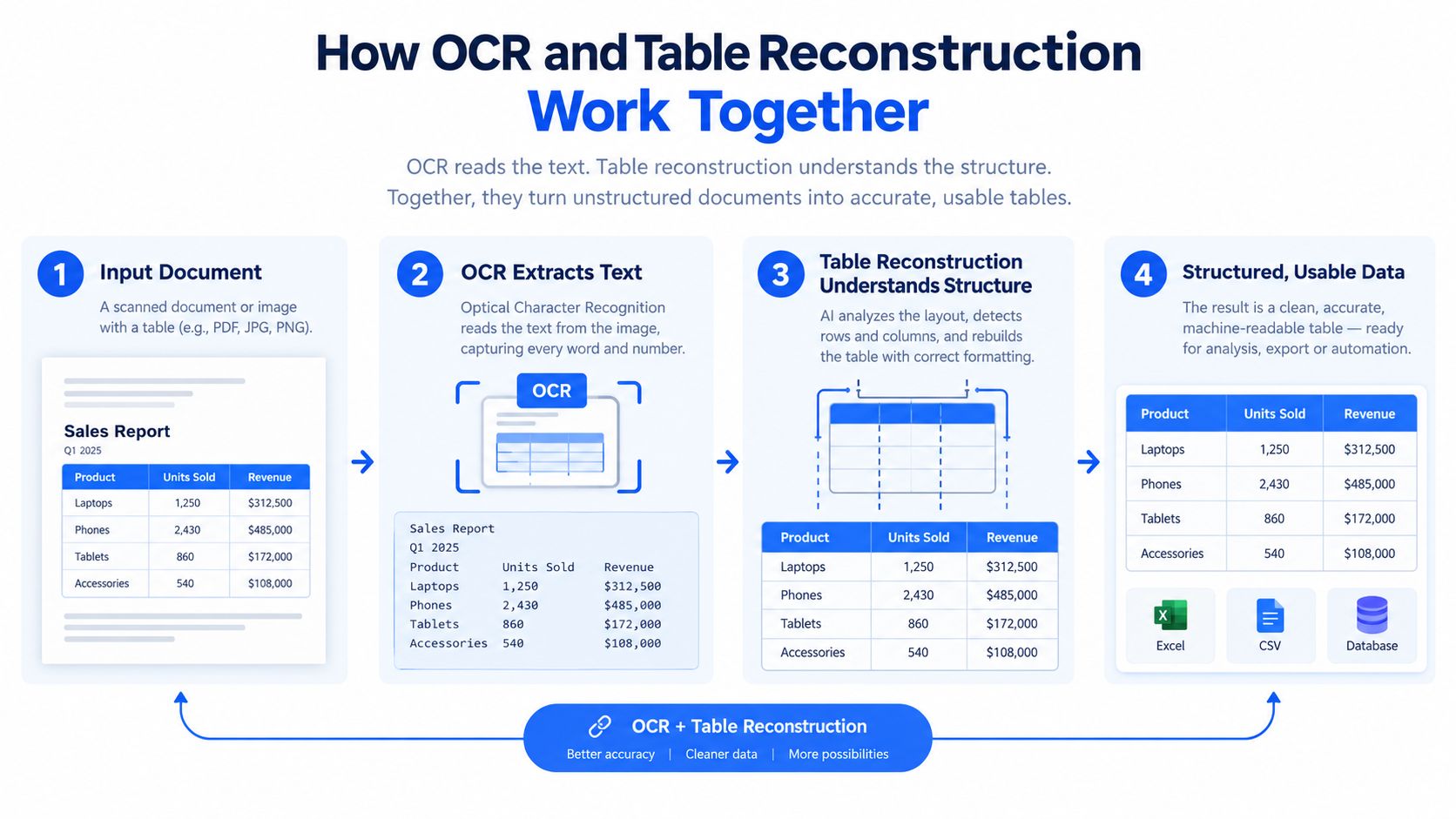
OCR and table reconstruction solve different problems. OCR turns pixels into characters. Table reconstruction decides how those characters relate to one another as headers, rows, columns, and transaction fields.
A practical bank statement pipeline starts with image preparation. The system may deskew a page, remove noise, improve contrast, and binarize the image. The OCR engine then identifies characters and their bounding boxes. Those locations give the next layer evidence about which characters sit on the same line and which belong to the debit, credit, or balance column.
The reconstruction stage carries the finance risk
A layout model groups recognized characters into rows and columns, identifies the header block, and tries to preserve transaction continuity across pages. Many finance-specific failures appear at this stage:
- Decimal placement: A currency amount can lose or gain a decimal point, especially in a noisy scan.
- Column drift: A header or amount column can move slightly between pages, causing values to shift fields.
- Merged cells: A long description may be split into what looks like two transactions.
- Multi-line descriptions: The second line may be truncated, detached, or attached to the next row.
- Page stitching: A transaction or table header may continue across a page boundary without a clear visual signal for the parser.
Table extraction remains difficult even for mature tools. In a multi-task benchmark covering academic PDFs, the strongest table extractor achieved an F1 score of 0.47, while several widely used tools scored near or below 0.30, as reported in the table extraction benchmark overview. The document type differs from a bank statement, but the lesson transfers directly. Irregular layouts need post-processing and human review.
Choose deterministic or adaptive reconstruction
A rule-based parser is usually faster when the issuer's template is stable. We can define the expected header positions, date format, amount columns, and continuation rules, then flag rows that deviate. The weakness is brittleness. A small template change can invalidate assumptions without producing an obvious failure.
Machine-learning-based table reconstruction is slower and more flexible when columns shift or pages vary. It can use spatial relationships and context rather than relying only on fixed coordinates. That flexibility doesn't eliminate review, particularly for large amounts, unusual rows, or account boundaries.
A useful decision rule is simple. If the statement comes from a known issuer and the layout is stable, start with a deterministic parser. If the layout varies or the input is scanned, use OCR with table reconstruction and budget for human spot-checks. The practical guidance on PDF extraction and document structure makes the same broader point: successful extraction depends on preserving relationships across pages, not just recognizing characters.
For a deeper explanation of the recognition layer, see what OCR means in document processing. OCR is one component of the workflow, not the definition of a usable financial dataset.
Verifying the Output Before You Trust It
An extracted spreadsheet should stay in a review state until it passes reconciliation. We don't need to inspect every character manually, but we do need controls that expose missing rows, shifted fields, and arithmetic inconsistencies.
The anchor is the balance identity:
Opening balance + credits − debits = closing balance
For a statement that follows from an earlier period, the previous statement's closing balance should also match the new statement's opening balance. There shouldn't be unexplained rounding drift. If the identity fails, we should assume the output is incomplete or misclassified until the source PDF proves otherwise.
| Check | What it proves | Common failure it catches |
|---|---|---|
| Opening balance plus credits minus debits equals closing balance | The extracted transaction amounts and signs support the statement's own arithmetic | Missing transaction, incorrect debit or credit classification, misread decimal |
| Previous closing balance equals new opening balance | The statement period connects correctly to the prior period | Wrong account, omitted opening entry, page or period mix-up |
| Extracted row count compared with a visual count | The table appears to contain the expected number of transaction rows | Dropped row, duplicate row, continuation line treated as a transaction |
| Sum of debits and credits reviewed separately | Each side of the transaction logic is represented | Amount shifted between debit and credit columns |
| Sample of ten transactions checked for date, amount, and counterparty | Individual fields match the source, not just the totals | OCR character error, wrong date, truncated description |
| Low-confidence scanned rows compared at high zoom | The most uncertain recognition results receive direct source review | Faint digit, missing decimal, unclear sign, or page-edge distortion |
Weight the review instead of sampling randomly
A sample of ten transactions should cover different pages and different visual conditions. Include large amounts, rows near the edge of the page, multi-line descriptions, and transactions close to a page break. These cases are more informative than ten clean rows from the middle of the first page.
For scanned input, compare the extracted text against the image at high zoom whenever the OCR engine reports confidence below its threshold. Confidence isn't proof of correctness, but it helps us direct limited review time toward fields that deserve attention.
Record discrepancies as part of the control
When a reviewer changes a date, amount, counterparty, or transaction type, record the original extracted value and the correction. Keep the reason concise, such as “decimal misread” or “continuation line joined to next row.” This makes the process defensible and gives us evidence about recurring problems with a specific issuer or document type.
A failed balance check shouldn't be repaired by adjusting an unexplained number until the totals happen to agree. Trace the discrepancy back to the PDF, identify the row or classification error, and then rerun the reconciliation. Arithmetic is a control, not a target to manipulate.
Privacy, Security, and Operational Controls
A bank statement contains more than transaction amounts. It may expose account identifiers, counterparties, addresses, payment references, and a detailed financial history. Uploading that document to an unexamined web tool can create a governance problem even when the extracted spreadsheet looks correct.
A production workflow should define what happens before, during, and after processing. At minimum, ask where files are processed, how they travel, how long they remain available, and who can access them. TLS 1.2 or higher should protect data in transit, while encrypted storage and a defined retention window should protect files at rest.
Questions for a vendor or internal platform
Before handing over sensitive statements, get direct answers to these questions:
- Processing location: Where are the PDF bytes processed, and which subprocessors can access them?
- Training use: Is customer content used to train or improve a model, and can that use be disabled?
- Retention: How long do the original files, extracted results, previews, and backups remain available?
- Deletion: Can an operator delete a file on request, and is the deletion process documented?
- Access control: Can access be limited to named operators with least-privilege permissions?
- Auditability: Are uploads, downloads, corrections, and exports recorded in an audit log?
- Reproducibility: Can we identify the extraction method and input that produced a particular output?
Security guidance for sensitive document extraction highlights the need for encryption, controlled processing, and careful handling where third-party cloud or AI services are involved. It also explains why scale changes the operational question: even a small share of an organization's PDFs can create more pages than teams can review through ad-hoc scripts or manual spot checks, as discussed in privacy considerations for AI PDF data extraction.
Match controls to the actual workflow
A public upload page with no clear retention policy gives the finance team little control after submission. A managed pipeline should make processing reproducible, access revocable, and temporary files disposable after reconciliation. Automatic deletion is useful, but it doesn't replace access controls or a documented record of what happened.
If we can't name where the bytes sit and who has read them, the extraction isn't ready for production finance work.
Privacy also affects method choice. A local deterministic parser may be appropriate for clean digital statements where sensitive data must stay inside an established environment. A hosted OCR or AI service may be practical for difficult scans, but only after its processing, retention, and training terms meet the team's requirements.
Choosing the Right Method for Your Workflow
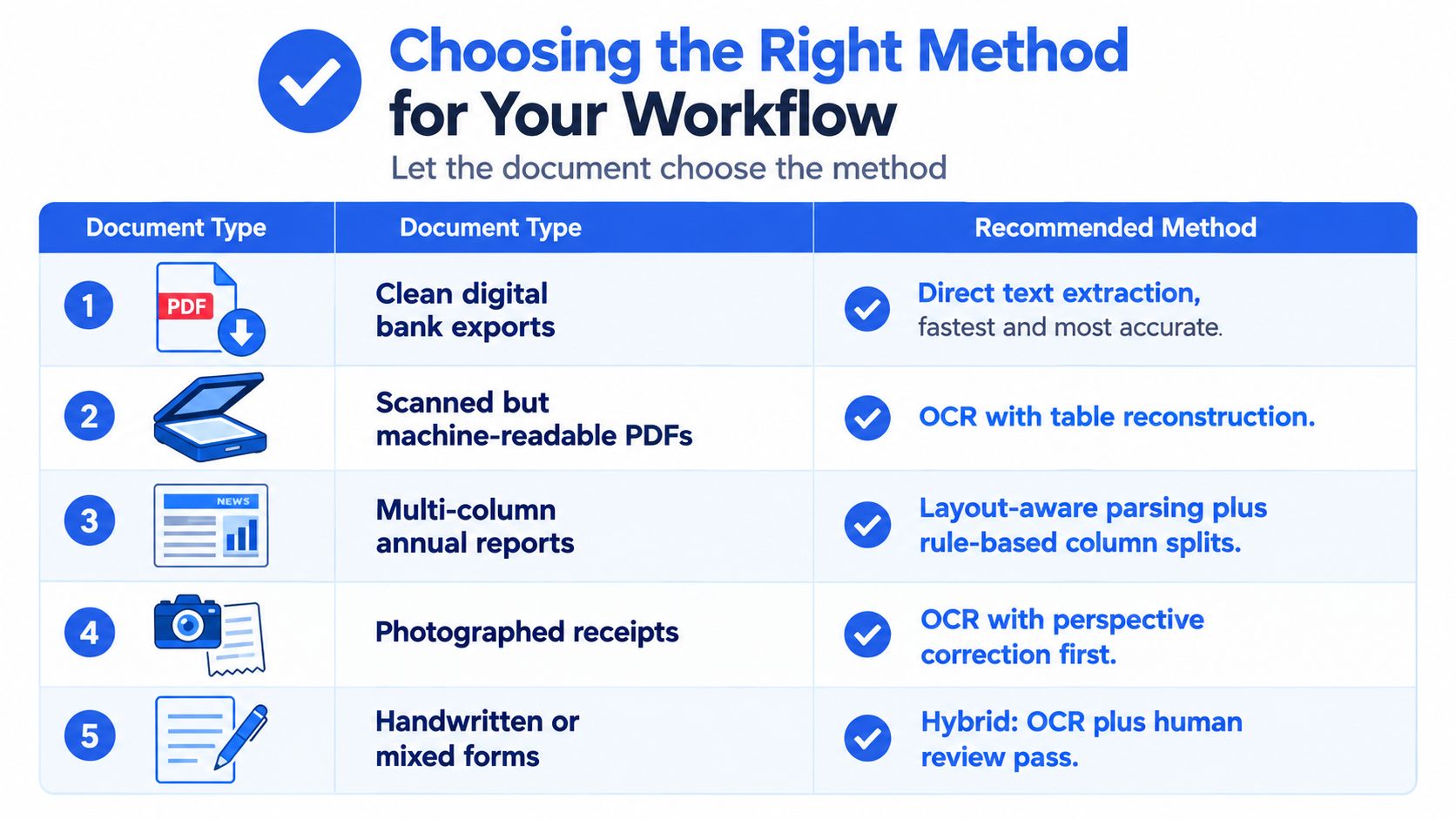
The best workflow follows the document, not the other way around. A clean digital bank export with a repeated layout calls for direct text extraction or a deterministic parser. A scanned statement needs OCR and table reconstruction. A photographed receipt needs image correction before recognition, while a mixed form needs an explicit human review path.

Use the document's characteristics as the decision tree
For clean digital bank statements, test direct extraction first. If the issuer repeats the same template, a rule-based parser can provide predictable columns and fast exception handling. Keep the balance reconciliation in place because even a text layer doesn't guarantee correct row grouping.
For scanned statements, OCR is unavoidable, but OCR alone isn't enough. Add table reconstruction so the system can preserve dates, descriptions, debit and credit fields, and balances across page boundaries. The review queue should prioritize low-confidence fields and transactions with financial significance.
For multi-column annual reports, use layout-aware parsing with explicit column rules. Reading order is the central risk, especially when footnotes, sidebars, and tables share a page.
For photographed receipts, correct perspective and image quality before OCR. A receipt tilted toward the camera can place characters at inconsistent angles, making recognition and line grouping harder.
For handwritten or mixed forms, use a hybrid process. Automated recognition can reduce the initial workload, but a human review pass remains necessary where handwriting, stamps, annotations, or overlapping fields affect interpretation.
Evaluate the workflow, not just the extraction demo
A vendor demonstration often uses a clean sample. Finance teams should test representative files, including a scan, a multi-page statement, a statement with a password, and a document from each major issuer. Then ask:
- What is the accuracy baseline? Is it measured at character, field, row, or reconciled-document level?
- How are exceptions reported? Can reviewers see confidence by field and identify rows that need attention?
- What happens at page breaks? Does the system preserve repeated headers, continued descriptions, and transaction boundaries?
- How are files handled? Are transport, storage, retention, deletion, and operator access documented?
- Can we reproduce a correction? Does the workflow preserve the original input and explain how the output was generated?
- Can the result be reconciled? Does the exported structure retain enough information to check balances and investigate discrepancies?
For teams that need a hosted bank-statement workflow, autobankstatement converts digital, scanned through OCR, and password-protected PDF bank statements into CSV or Excel/XLSX, supports bulk uploads for files up to 25 MB, and provides a free guest preview before payment. Registered users receive 24-hour download access, and uploads are automatically deleted within 24 hours. Its plans are Starter at $15 per month for 400 pages, Professional at $30 per month for 1,000 pages, and Business at $50 per month for 4,000 pages, with annual discounts and custom enterprise limits.
The defensible method is the one we can explain quickly: identify the document type, choose the extraction path, reconcile the balances, review exceptions, and document corrections. Price matters, but it shouldn't be the first question. The first question is whether the workflow produces records we can trust and controls we can demonstrate.
If your team is still retyping statement rows, visit autobankstatement to preview its PDF-to-CSV and Excel/XLSX workflow for digital, scanned, and password-protected bank statements. Use the extracted rows as a review-ready starting point, then apply the opening balance plus credits minus debits equals closing balance check before posting them to your books.
Convert your next statement in minutes
Upload a bank statement PDF — digital, scanned, or password-protected — preview the extracted table, and download clean CSV or Excel.