Parsing a File
Learn how parsing a file transforms bank statement PDFs into spreadsheet-ready data. Covers formats, tools, accuracy checks, and best practices
97.44% word accuracy on original documents can still mean about 25 errors per 1,000 words, while 95.05% on copied documents means roughly 50 errors per 1,000 words. Parsing a file means extracting structured transactions from PDFs designed for human reading, and reliable results depend on validation, not automation alone.
The problem usually appears at month-end. We receive a bank statement, upload it, and get a spreadsheet that looks clean enough to post. Dates line up, columns have headings, and the file opens without warnings. Yet one misplaced decimal, a missing transaction, or a debit placed in the credit column can distort the reconciliation while leaving the workbook visually convincing.
That's the risk finance teams need to manage. A tidy spreadsheet isn't the same as verified financial data. Parsing identifies and organizes content. Validation determines whether the organized content still agrees with the original statement and the account's arithmetic.
Table of Contents
- Understanding What File Parsing Actually Means
- Why Bank Statement PDFs Are Harder Than You Think
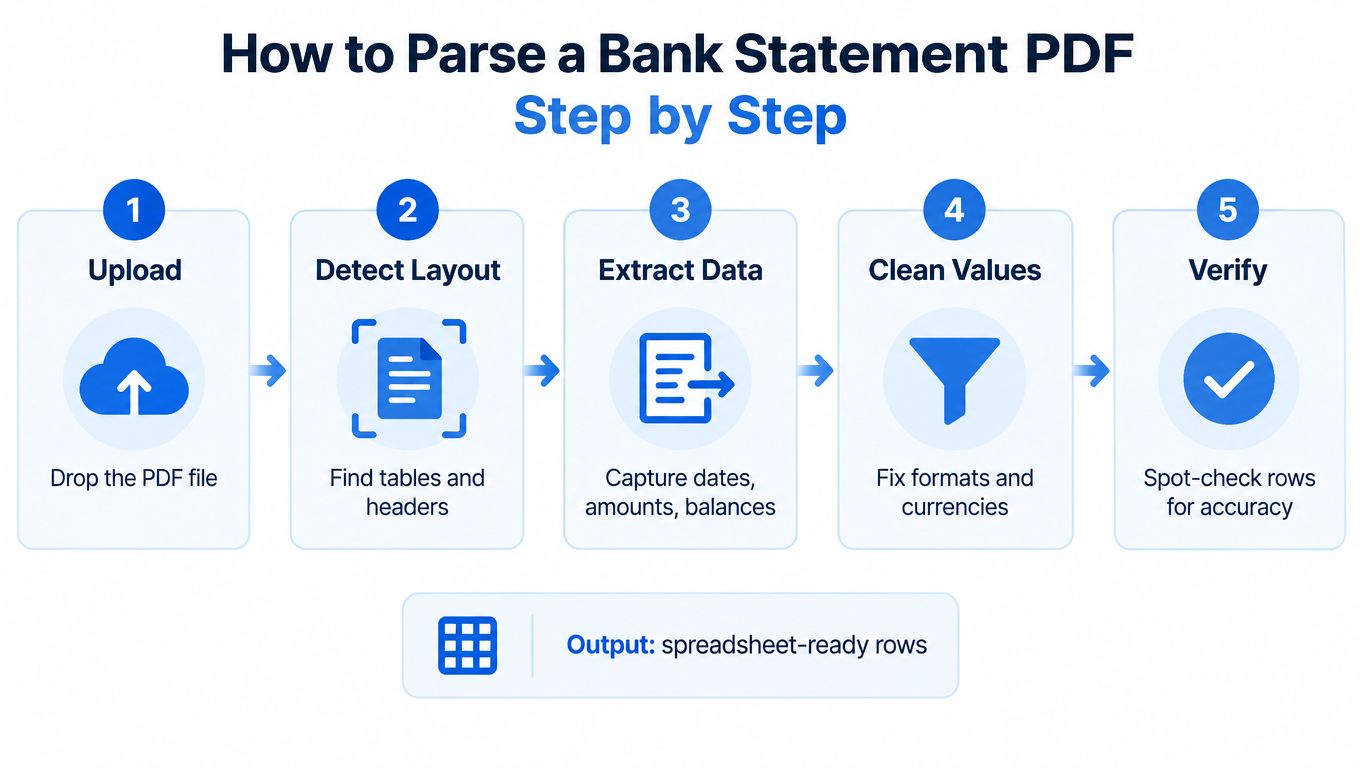
- How to Parse a Bank Statement PDF Step by Step
- Tools and Libraries Available for PDF Parsing
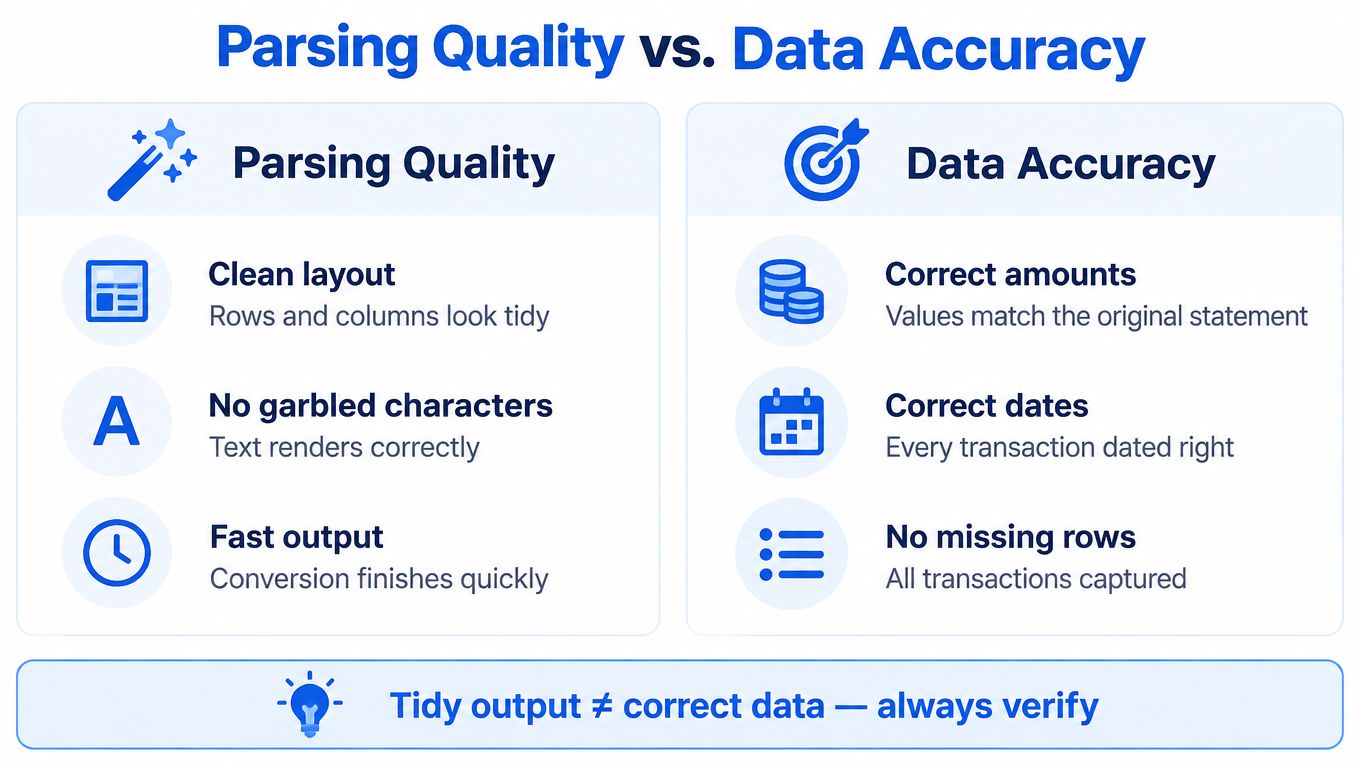
- Why Parsing Quality Is Not the Same as Data Accuracy
- Manual Data Entry vs Automated Parsing and the Real Cost Comparison
- Building a Reliable Parsing Workflow for Your Finance Team
Understanding What File Parsing Actually Means
A finance team starts with a PDF containing dates, transaction descriptions, withdrawals, deposits, and running balances. The page may look like a table to us, but the file might store characters as separate positioned objects. A parser has to identify those characters, infer their relationships, and rebuild them into rows that a spreadsheet can use.
In practical terms, parsing a file is the conversion of unstructured or visually arranged content into a structured representation. The process separates characters into tokens, checks those tokens against expected patterns, and transforms the result into usable fields. Those principles grew out of compiler development, including early compiler work associated with AUTOCODE and FORTRAN, and later formal parsing methods such as LL(k) parsing. The historical foundations are described in this scholarly account of compiler development and parsing.
What the parser must reconstruct
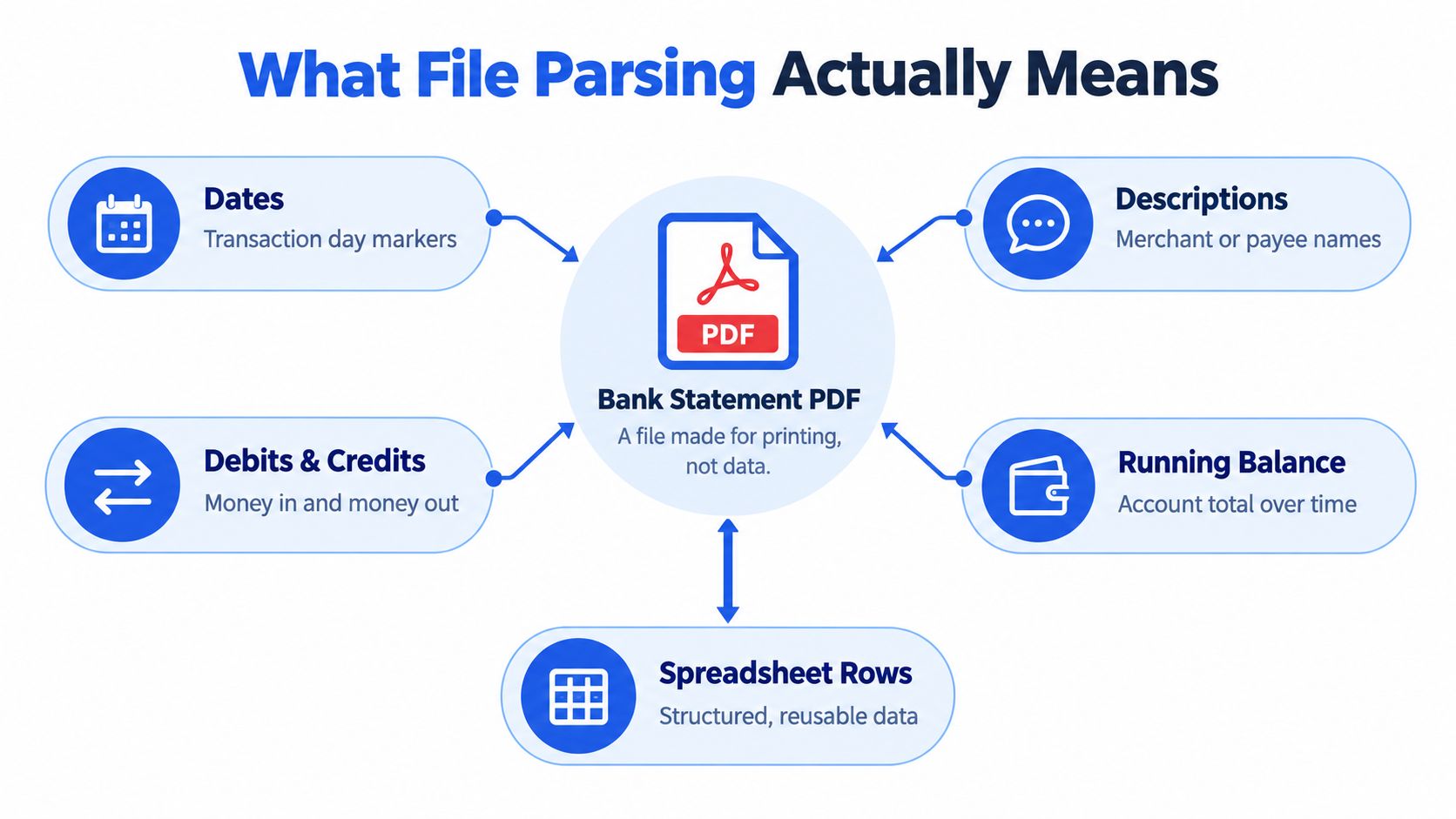
A bank statement parser normally tries to identify:
- Dates: The transaction date, posting date, or statement date.
- Descriptions: Merchant names, payees, references, and transaction notes.
- Debits and credits: Money leaving or entering the account, including the correct sign or column.
- Running balances: The account total after each transaction.
- Spreadsheet rows: A reusable record containing the fields above in consistent columns.
The distinction between extraction and accuracy matters. A parser may successfully capture every visible character but place a description with the wrong transaction, especially when the original PDF stores columns independently. Our explanation of what data parsing means provides the basic concept, but finance work requires an additional control layer.
Practical rule: Treat every converted row as a candidate accounting record until it passes validation.
The useful output isn't merely text copied from a page. It's a dataset we can sort, filter, reconcile, and review without losing the relationship between a transaction's date, description, amount, and balance.
Why Bank Statement PDFs Are Harder Than You Think
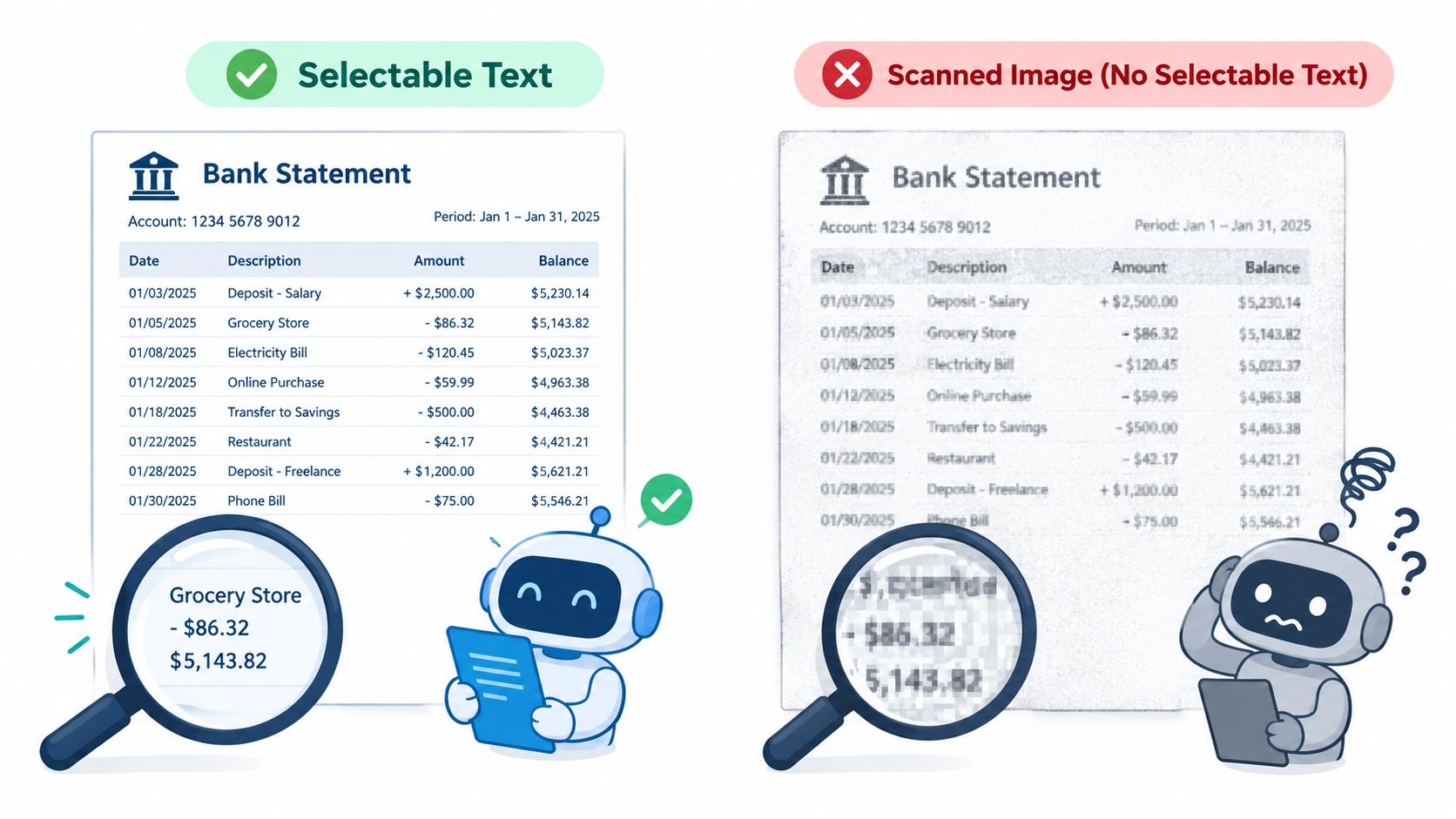
A digital PDF and a scanned PDF can look identical on screen while requiring completely different processing. A text-based statement may contain selectable characters, although those characters can still be arranged according to page coordinates rather than reading order. A scanned statement may contain only raster images, so ordinary text extraction has nothing meaningful to read.
That distinction determines the first technical step. Digital PDFs need layout-aware text extraction. Scanned PDFs need OCR before parsing can begin. A practical OCR pipeline rasterizes the page, locates text regions, recognizes characters, and preserves bounding boxes so the system can reconstruct dates, descriptions, amounts, and balances spatially. OCR output without coordinates is inadequate for dependable table reconstruction.
Why layout changes the result
PDFs describe drawing instructions, coordinates, fonts, and page geometry. They don't necessarily store a semantic table with a row object and a debit column object. Two columns that appear adjacent to us, such as debit and credit, may be stored as separate streams or returned in an order that doesn't match the page.
A production-quality approach should therefore:
- Capture token coordinates: Preserve each token's position rather than flattening the page immediately.
- Group lines spatially: Cluster tokens using a vertical tolerance so characters on the same visual line stay together.
- Infer columns: Look for repeated horizontal position bands across transaction rows.
- Test statement arithmetic: Check whether opening balance plus credits minus debits equals closing balance.
Research evaluating PDF extraction across 500,000 pages and approximately 1.5 million annotated content elements found meaningful differences among ten extraction tools. Another cross-document evaluation covered roughly 80,000 manually annotated pages, including financial reports, and found that performance varies by document category. Those findings support a straightforward operational conclusion: a parser that performs well on one statement layout may behave differently on another. The evidence is discussed in this evaluation of PDF extraction systems.
Password protection introduces a separate issue. A PDF may require a password to open, or it may allow viewing while restricting copying, printing, or text extraction. Adobe documents encryption options including AES-128 and AES-256, and explains that authorized access requires the correct password or decryption method. We should never assume that a statement visible in a viewer is automatically machine-readable.
How to Parse a Bank Statement PDF Step by Step
A dependable workflow treats conversion as a sequence of decisions, not a single upload button. Each stage can introduce a different class of error, so the review controls should match the stage that created the risk.
Start with the source file
1. Identify the representation. Open the PDF and test whether text can be selected. If selection returns meaningful characters, the file may support direct extraction. If the page behaves like an image, choose an OCR workflow instead.
2. Handle protection correctly. For a password-protected statement, provide the password through the authorized conversion workflow. Don't create an unprotected duplicate unless internal policy explicitly permits it. A password is sensitive authentication data, so it shouldn't appear in a filename, spreadsheet note, email subject, or shared handoff document.
3. Detect the layout. The parser needs to locate headers, transaction regions, page breaks, and repeated column positions. Statements with continuation pages require care because later pages may omit the account header or use abbreviated column labels.
4. Extract and normalize. Capture dates, descriptions, debits, credits, and balances. Then normalize locale-specific number formats, currency symbols, minus signs, and date formats without destroying the original values needed for review. Our guide to extracting data from PDF to Excel covers this conversion objective in practical terms.
5. Verify before posting. Compare the output with the source pages. Check transaction counts, dates, signs, unusual amounts, and the ending balance. Most importantly, verify opening balance + credits − debits = closing balance.
OCR needs an extra layer of caution. A NIST-cited evaluation reported 97.44% average word accuracy for original documents and 95.05% for copied documents. That difference corresponds to approximately 25 errors per 1,000 recognized words versus roughly 50 errors per 1,000 words, so a scanned or degraded statement can produce errors before the table parser even begins. The findings are summarized in this NIST-cited OCR evaluation.
A failed arithmetic check shouldn't be exported without notice. It should enter an exception queue for human review.
Tools and Libraries Available for PDF Parsing
The right tool depends on the file representation and the consequence of an error. Generic PDF text extractors can work well on straightforward digital statements, but they often struggle when visual order differs from storage order. OCR engines handle image-based pages, yet their output needs coordinates, confidence signals, and field-level checks.
Open-source libraries give technical teams control over the pipeline. A PDF text library can expose characters and coordinates. A table extraction library can infer rows and columns from lines or whitespace. An OCR engine can recognize rasterized pages. Spreadsheet libraries can write CSV or XLSX output and apply consistent number formats. The trade-off is maintenance. Finance teams must own layout exceptions, password handling, locale rules, regression testing, and review workflows.
Commercial services reduce that engineering burden, but they require careful evaluation. We should ask whether the service supports:
- Digital and scanned PDFs: Direct extraction and OCR should be selected according to the actual page representation.
- Password-protected files: The workflow should accept authorized passwords without encouraging users to remove protection manually.
- Coordinates and layout awareness: The system should preserve enough positional information to keep descriptions and amounts aligned.
- Batch processing: Bulk uploads matter when month-end creates repeated statement work.
- Spreadsheet-ready output: CSV or XLSX should retain usable dates, amounts, signs, and balances.
- Exception handling: Low-confidence fields and arithmetic mismatches should be visible rather than hidden.
- Data governance: We need clear answers about access, deletion, retention, and where temporary files are handled.
A useful comparison is software for OCR workflows, but we shouldn't select a product from feature labels alone. Test representative statements, including a clean digital file, a scanned page, a continuation page, and a password-protected document. Keep the sample set representative of the work we handle, not only the easiest format.
For teams using custom code, generated parsers can be convenient and maintainable, while specialized parsers can skip irrelevant fields and reduce intermediate transformations. The same trade-off appears in structured formats beyond PDFs. A faster parser may demand more careful maintenance when the source format changes.
Why Parsing Quality Is Not the Same as Data Accuracy
The most dangerous output is not an obvious failure. It's a workbook that opens cleanly, displays aligned columns, and contains an incorrect transaction. A blank result triggers investigation. A wrong amount can pass through several review steps because the file looks professional.
Parsing quality describes how well the system reads and organizes the source. Data accuracy asks whether the resulting values match the original statement and preserve accounting meaning. Those are related, but they aren't interchangeable.
The errors we need to catch
A scanned page can turn a zero into another character, drop a decimal point, or confuse a minus sign. A layout parser can associate an amount with the wrong description. A locale conversion can interpret separators incorrectly. None of these necessarily makes the spreadsheet look broken.
Use controls that test meaning rather than appearance:
- Reconcile the balances: Verify opening balance + credits − debits = closing balance.
- Compare row counts: Investigate missing or duplicated transactions against the source pages.
- Review signs: Confirm withdrawals and deposits appear in the correct fields and direction.
- Inspect dates: Check that every date follows the expected format and statement period.
- Test amounts: Look closely at decimal points, currency symbols, negative values, and unusually large figures.
- Route uncertainty: Send low-confidence OCR fields and arithmetic mismatches to human review.
A clean export is a format result. A reconciled export is an accounting result.
The PDF itself can create hidden ambiguity. A benchmark of PDF extraction tools found meaningful performance differences across tools and document categories, including financial reports. That's why a parser should be assessed against the layouts our team receives, not against a generic demonstration file.
Human review remains appropriate where the cost of a mistake exceeds the cost of checking. We don't need to retype every row, but we do need a controlled sample review and a reconciliation check before posting. The faster the extraction, the more important it becomes to ensure that speed hasn't removed the evidence trail needed for close.
Manual Data Entry vs Automated Parsing and the Real Cost Comparison
Manual entry appears safer because a person sees the source page and types each transaction. That advantage is limited. Repeated typing creates opportunities for transposed digits, skipped rows, inconsistent date formats, and incorrect signs. The reviewer may also become less attentive when entering long runs of similar transactions.
Automated parsing changes the risk rather than eliminating it. The system can process a statement consistently and produce spreadsheet-ready rows, but it may misread a character, infer the wrong column, or carry a layout assumption across pages. The correct comparison is therefore not “manual equals accurate, automated equals risky.” It's manual transcription versus automated extraction with review.
| Approach | What works | What fails without controls |
|---|---|---|
| Manual entry | Useful for a small number of unusual rows and direct source inspection | Slow repetition, inconsistent formatting, skipped or mistyped values |
| Direct PDF extraction | Efficient for clean text-based statements with stable layouts | Reading order can scramble columns and pair amounts with the wrong descriptions |
| OCR parsing | Makes scanned statements usable when text isn't available | Recognition errors can affect dates, amounts, decimal points, and signs |
| Automated parsing plus review | Combines repeatability with accounting judgment | Requires a defined exception process and balance reconciliation |
The hidden cost of manual work includes interruption, rework, and delayed close. The hidden cost of automation is false confidence. A tool that returns a file quickly can encourage teams to skip source comparison, especially when the output has polished headings and consistent formatting.
A sensible policy assigns work by exception. Let automation create the initial rows, then have a person review balance arithmetic, unusual values, low-confidence fields, and any page that produces a layout warning. Reserve full manual entry for documents that cannot be parsed reliably or for isolated exceptions where calibration would take longer than careful transcription.
Building a Reliable Parsing Workflow for Your Finance Team
A reliable workflow starts with a small control document, not a software purchase. Record which statement formats the team receives, which fields are required, how passwords are handled, who reviews exceptions, and what evidence must be retained for the close file.
Define acceptance criteria
Before processing a batch, agree that an output is usable only when:
- The account and period match: Confirm the statement identity and coverage.
- The required columns exist: Dates, descriptions, debits, credits, and balances should be present where the source provides them.
- Formats are consistent: Dates, currency values, decimal separators, and signs follow the team's accounting convention.
- The arithmetic works: Verify opening balance + credits − debits = closing balance.
- Exceptions are visible: Low-confidence fields, missing rows, duplicates, and mismatches are held for review.
Run a controlled test with representative files. Include digital, scanned, and password-protected statements, because a workflow that succeeds on selectable text may fail when OCR is required. Keep the original PDFs available for comparison, but minimize unnecessary copies in email, browser downloads, shared drives, and bookkeeping handoffs.
Treat governance as part of parsing
Bank statements contain financial identifiers, transaction histories, and personal information. Encryption in transit doesn't answer how long files remain available, who can access them, whether downloads expire, or whether deletion can be verified. Those questions belong in vendor due diligence and internal procedures.
The Privacy Rights Clearinghouse's 2025 data breach report records a financial-sector incident affecting 13.1 million people, which illustrates why financial-file handling deserves more attention than a generic upload policy. The report is available through the Privacy Rights Clearinghouse breach resources.
For an online conversion workflow, autobankstatement converts digital, scanned through OCR, and password-protected PDF bank statements into CSV or Excel/XLSX files. It supports bulk uploads and files up to 25 MB, offers a free guest preview before payment, provides registered users with 24-hour download access, and states that uploads are automatically deleted within 24 hours. Its listed plans are Starter at $15 per month for 400 pages, Professional at $30 per month for 1,000 pages, and Business at $50 per month for 4,000 pages, with annual discounts and custom enterprise limits. We should still confirm current terms before relying on any service for sensitive records.
Make the final control human and explicit. A reviewer should sign off on the source-to-output comparison, the balance equation, and every unresolved exception before the spreadsheet feeds bookkeeping, tax, lending, or reporting work.
Use autobankstatement to convert digital, scanned, or password-protected bank statement PDFs into CSV or Excel/XLSX rows, then apply the validation checks described above. Start with the free guest preview, review the output against the original statement, and choose a plan only when the workflow fits your month-end volume.
Convert your next statement in minutes
Upload a bank statement PDF — digital, scanned, or password-protected — preview the extracted table, and download clean CSV or Excel.