Bank Cutoff Statement Explained: Who Requests It and Why
Learn what a bank cutoff statement is, why auditors and lenders request one, how it differs from a regular statement, and how to reconcile it.
A bank cutoff statement is a bank-issued statement covering a short window right after a reporting or period-end date, and its purpose is to confirm which transactions belong to the period being closed. That window is commonly one to four weeks after the balance-sheet date, so a company with a December 31 year end may be asked for bank activity from January 1 through January 14, or through January 31, depending on what the engagement needs to prove.
Now the scene most bookkeepers meet in the second week of January. The ledger is closed on paper, the reconciliation balances to the penny, and then three things land on the desk at once. Two checks written in late December still haven't cleared, a deposit made at the counter on the 31st after the bank's daily deadline hasn't posted, and a card purchase your operations manager insists happened on December 29 shows a posting date of January 2.
None of those is a mistake. All three are timing, and timing is the one thing a cutoff statement exists to document. The document doesn't test whether your numbers are right. It tests whether they sit in the right period.
Table of Contents
- What a Bank Cutoff Statement Is
- Why Auditors, Controllers and Lenders Ask for One
- How It Differs From a Regular Bank Statement
- How Cutoff Dates Decide Which Transactions Belong
- Misconceptions and Retention Rules to Know
- Reconciling and Closing a Period With a Cutoff Statement
What a Bank Cutoff Statement Is
A cutoff statement is the bank's own record of a window that starts where your reporting period stops. Banks define that boundary as a cutoff date, and the rule is straightforward: activity included through the stated date appears in that statement, while anything after it rolls into the next cycle, as Financial Dictionary's entry on cutoff dates sets out.
Think about a shop till that closes at six in the evening. Everything rung up before six counts toward that day's takings, and everything after six belongs to tomorrow, even if the customer joined the queue at 5:58. A bank cutoff behaves the same way, except the closing time is rarely midnight on the 31st.
The question it settles Did this cash move before the line or after it? Everything else on the page is detail supporting that one answer.
Teams slip in a specific place. A bank whose cutoff falls on the 15th of each month may summarize activity from the 15th of one month through the 15th of the next, rather than following the calendar month. So the file you pull on the 3rd may not cover the period you closed, and the dates on page one will tell you.
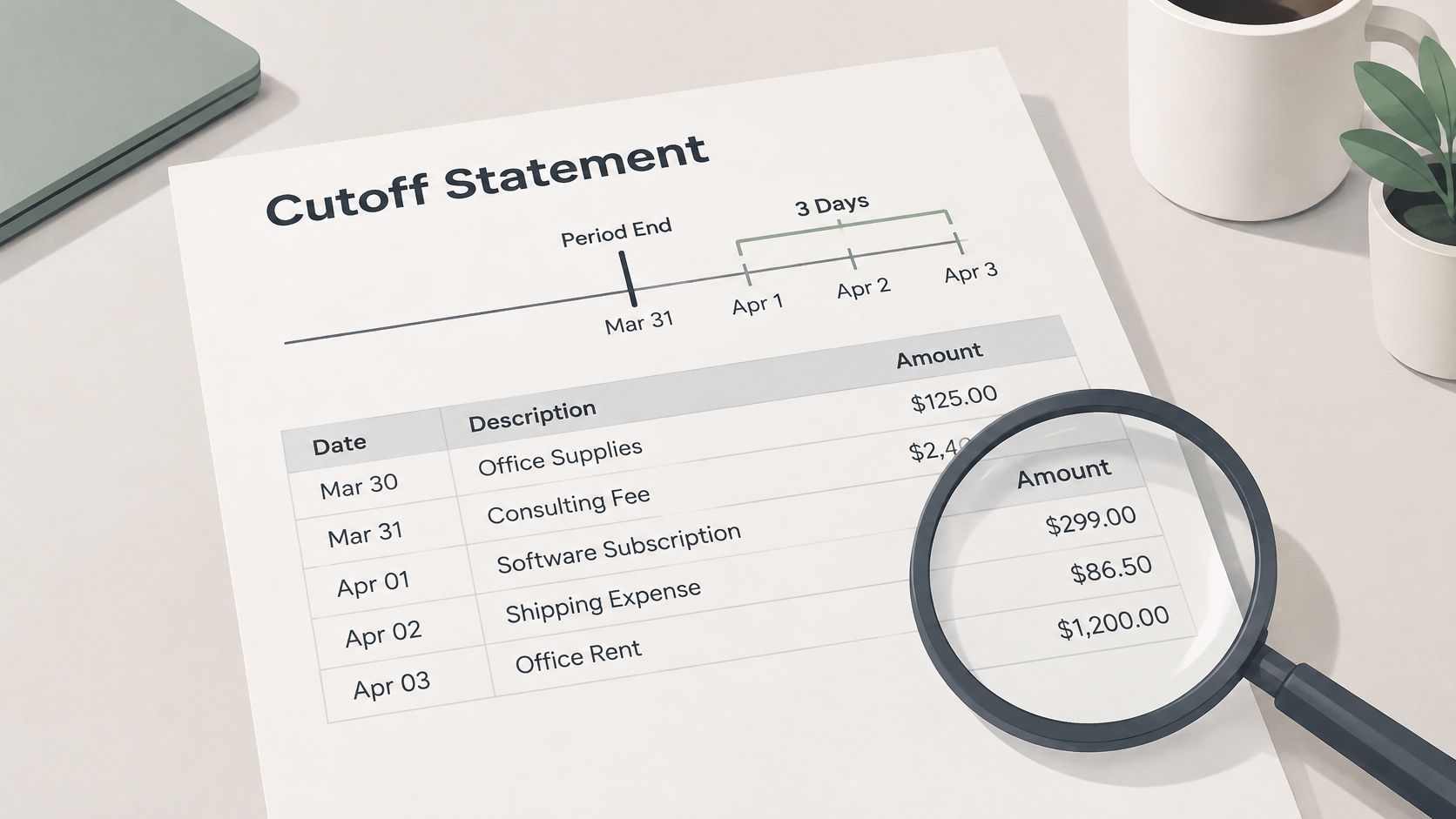
For accounting purposes the cutoff date works as a control point. The statement ending date and ending balance have to agree with the period being reconciled, while deposits, withdrawals, transfers and checks near the boundary each get looked at individually.
Run three checks before you touch a single transaction:
- The period-end date. Write down the date you are closing to, exactly as your ledger shows it, not the date you started the close.
- The bank's cutoff rule. Confirm the time of day, the time zone, and whether the cutoff shifts on weekends and holidays.
- The ending balance. Agree the statement's closing balance to your reconciliation before investigating anything else.
If those three disagree, the problem is upstream and no amount of item matching will repair it.
Why Auditors, Controllers and Lenders Ask for One
A bank cutoff statement is, first and foremost, an audit document. It covers a short period immediately after an organization's reporting date, and it exists to provide independent evidence about the transactions behind year-end reconciling items, especially deposits in transit and outstanding checks, according to CORAA's glossary entry on the cutoff bank statement.
The audit window in practice
A commonly used window is one to four weeks after the balance-sheet date. If your fiscal year ends on December 31, an auditor may request bank activity from January 1 through January 14, or through January 31, depending on the engagement and the items under investigation. The statement is requested directly from the bank rather than downloaded by the client, and it may include check images, which settle whether a check recorded before year-end cleared afterwards or was still outstanding.
That direct route is the point of the exercise. A statement the client prints and hands over proves nothing about the period boundary, because the client picked the dates. A statement the bank sends to the auditor proves the boundary itself.
| Requester | What they test |
|---|---|
| Auditor | Cash existence and completeness, and the reconciling items at year-end |
| Finance team at close | Deposits in transit and outstanding checks |
| Controller or reviewer | Whether cash movements were recorded in the correct period |
| Lender or underwriter | Recent cash activity beyond the monthly statement |
Across those four requesters, the same three questions get asked: does the cash exist, does the ledger capture all of it, and did each movement land in the correct accounting period. Completeness, existence and cutoff are why the document is worth requesting rather than reconstructing from your own records.
It has a narrow job A cutoff statement won't tell you whether a payment was legitimate. It tells you when the money moved, which is the question asked first.
How It Differs From a Regular Bank Statement
A regular statement is a routine record of what happened in an account. A cutoff statement is a targeted record built for one purpose, to test which transactions belong to a period you have already closed. On the page they can look identical. The difference is who asked for it and which window it covers.
| Feature | Regular monthly statement | Bank cutoff statement |
|---|---|---|
| Purpose | Routine record of account activity | Tests which transactions belong to a closed period |
| Who usually requests it | The account holder, downloaded online | An auditor, controller or lender, requested from the bank |
| Window covered | The usual statement cycle, which may not be the calendar month | A short window after the reporting date, set by the request |
| Check images | Varies by bank | May be included to show whether checks cleared or stayed outstanding |
| Main date question | Activity within the cycle | Items posted or cleared after the boundary, and where they belong |
| Typical use | Personal and routine bookkeeping review | Reconciling items at period end and testing cutoff |
Why the dates don't line up
Four dates can attach to the same transaction: the transaction date, the posting date, the settlement date and the value date. Treating them as interchangeable is how a deposit, check, fee or transfer lands in the wrong period, a distinction this guide to transaction dates versus posting dates walks through.
A check written on December 30 and cashed on January 6 is the clean example. At a December 31 year end it is an outstanding item in the December reconciliation, not a January payment, and no journal entry moves it. Your ledger recorded it on the 30th, the bank paid it on the 6th, and both records are correct.
Two habits prevent most of this trouble. Keep every date field the bank provides instead of collapsing them into one "date" column, and record the statement ending date exactly as the bank issued it rather than the day you downloaded the file.
Request the window, don't assume it If your auditor asks for January 1 through January 31, a statement covering December 16 through January 15 doesn't answer the question even though it overlaps it.
Once the ordinary cycle makes sense, comparing it with a targeted window gets easier, and our guide to monthly bank statements covers the routine version in detail.
How Cutoff Dates Decide Which Transactions Belong
A payment can leave your building before period end and still land on the next statement. Processing windows decide that outcome, and they vary by instrument, bank, jurisdiction and business day. Federal Reserve materials describe scheduled posting windows that include 8:30 a.m., 1:00 p.m., 5:00 p.m. and 5:30 p.m. Eastern Time, and transactions received after the relevant service close may be processed on the next business day, as the Federal Register notice on payment processing explains.
That turns the cutoff date into a per-transaction decision rule. For each item near the boundary, ask one question: did the bank record it inside the window, or only receive it? A transaction initiated before period end can appear in the next statement. Your record is right, the bank's record is right, and the two disagree about which period the item belongs to.
The timing matrix
| Item | Typical treatment | What to check |
|---|---|---|
| Check written before period end, not yet cleared | Outstanding item in the period it was written | Check number and clearing date on the later statements |
| Card purchase made before period end, posted after | Recorded by the posting date, with an accrual if it relates to the closing period | Purchase date against posting date |
| Deposit received after the bank's daily processing cutoff | Deposit in transit until it posts on the next business day | The bank's cutoff time and the account's time zone |
| Pending transaction | Usually absent from the PDF statement | Track it separately and don't force it into the period |
| Fee or interest posted at period end | Recorded in the period in which it posts | Statement summary and posting date |
| Reversal or duplicate entry | Investigate before adjusting anything | Trace it to the original transaction |
Two rows carry more weight than the rest. Force a pending or late-posting item into the closed period and you create an accrual that reverses badly, or a duplicate adjustment when the item finally posts. Leave it on a tracked list and the bridge between bank and ledger holds. Card settlements add their own lag, because a purchase made before month end can settle or post a few business days later. The same transaction may legitimately carry different dates in your accounting system, the bank's app and the PDF.
Document four facts for each account and most of the ambiguity disappears:
- Time zone of the account, because a 5:00 p.m. cutoff in one zone is 2:00 p.m. in another.
- Cutoff times the bank publishes, listed by payment type where the bank separates them.
- Weekends and holidays, when the next business day isn't the next calendar day.
- The status used for inclusion, meaning whether you count an item as posted only once the bank shows it posted.
For audit or year-end testing, keep the cutoff statement plus the subsequent statements or transaction reports covering the first several business days after period end. Then trace late-clearing items back to their support, and investigate unusual delays, duplicates or unexplained reversals instead of writing them off as timing.
Misconceptions and Retention Rules to Know
Four assumptions cause most of the damage at close.
- "The cutoff statement is just the last monthly statement." It usually isn't. A monthly statement covers a cycle the bank chose; a cutoff statement covers a window the auditor or lender named, and the two rarely coincide exactly.
- "If it matches the statement date, it belongs to the period." Matching a date is a starting point, not a conclusion. Forcing every transaction into the PDF period creates inaccurate accruals and duplicate adjustments, which is why pending items stay on a separate list.
- "A spreadsheet copy can replace the original." The bank-issued statement is the evidence. A conversion is a processing step, and the IRS holds electronic records to the same controls and retention guidelines as paper ones, as IRS Publication 583 states.
- "Every bank cuts off at the same time." Cutoff rules vary by bank, by payment type and by business day. Read the bank's schedule and assume nothing.
What to keep and for how long
Under Publication 583, an electronic storage system has to index, store, preserve, retrieve and reproduce records in a legible format, and it has to provide a complete and accurate record accessible to the IRS. That's why a temporary conversion workflow is not your permanent archive. Keep the source PDF alongside the converted data, review the extracted rows, and retain both under your normal recordkeeping rules.
The IRS also treats a legible bank account statement as acceptable evidence of a payment made through a bank account, and describes three years from a return's due date as the usual assessment period for a timely filed return, with longer periods in some circumstances, per IRS tax tips on financial recordkeeping. Our guide to how long to keep bank statements covers the retention side in more depth.
Three limits deserve a place in your notes. Bank cutoffs differ from institution to institution, and OCR output can carry recognition errors caused by image quality, unusual fonts, skew, stamps or tightly spaced columns, which is why the IRS procedures for OCR-based records processing treat recognition as a production step rather than a substitute for review.
Reconciling and Closing a Period With a Cutoff Statement
The work runs in a fixed order, and the order is what makes the result defensible. Skip a step and the later matches rest on a number nobody verified.
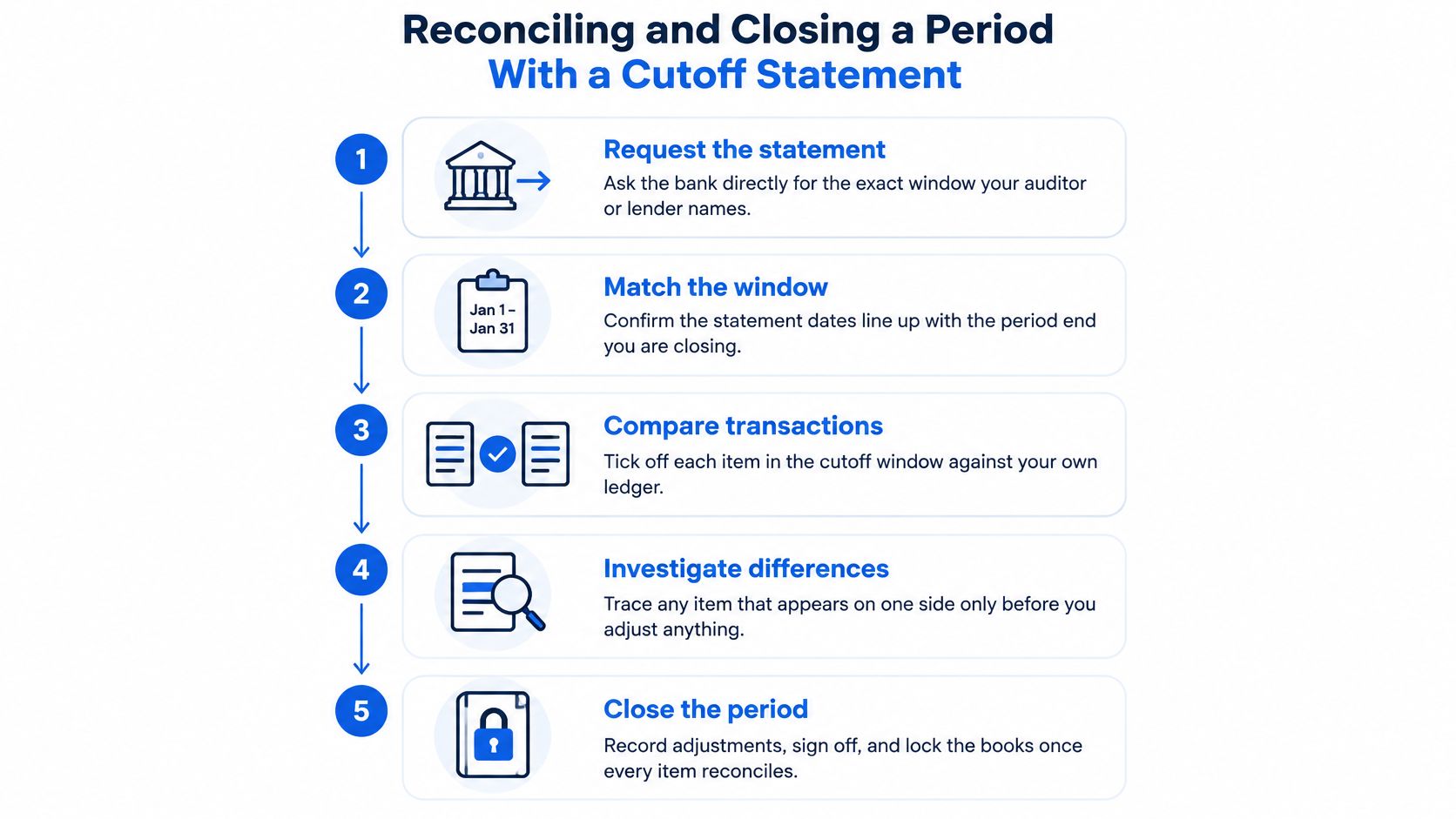
Request the statement from the bank. Ask directly for the window your auditor or lender named, commonly one to four weeks after period end. A request routed through the bank rather than your own download is what makes the evidence independent.
Match the window to the period. Confirm the ending date and ending balance belong to the period you're closing, and note the account's time zone and the bank's cutoff rule. A statement that ends on the wrong day manufactures differences that aren't real.
Prove the statement adds up. Opening balance plus credits minus debits has to equal the closing balance. When it doesn't, you have a missing page, a duplicated row or a truncated download, and every match after this point is unreliable.
List what you expect to be unmatched. Pull outstanding checks and deposits in transit from your ledger at period end. That list is your control total, not a guess about what might be missing.
Match each item to the later activity. Tick off every check and deposit against the cutoff statement and the subsequent statements, recording the clearing or posting date beside each one. Then work through the remaining close items with our month-end close checklist.
Investigate the leftovers. Fees, interest, reversals, duplicates and items that cross the boundary each get traced to support before any adjustment is booked. An item you can't explain is a question for the bank, never a plug figure.
Convert scanned and locked files carefully. For an image-only or password-protected PDF, run it through a converter. autobankstatement turns bank statement PDFs into CSV or Excel outputs and handles locked or scanned files. Then compare the rows against the statement image, because OCR can misread tight columns, and keep the original PDF as the record of what the bank issued.
Close the period only when every boundary item is matched or explained. If one check is still unaccounted for after the cutoff window, hold the period open, request the next statement and ask the bank about the item.
The close rule A closed period with an unexplained reconciling item is worse than a late one, because the item melts into next month's activity and nobody looks again.
Converting a stack of statements into rows you can review shouldn't consume the week you set aside for the close. autobankstatement turns PDF bank statements, including locked and scanned files, into CSV or Excel tables you can check line by line, with a free guest preview before any payment and automatic deletion of files after conversion. Upload your next cutoff statement at autobankstatement and confirm the rows agree with the bank's ending balance before you close the period.
Convert your next statement in minutes
Upload a bank statement PDF — digital, scanned, or password-protected — preview the extracted table, and download clean CSV or Excel.