
Month End Close Checklist: 8 Steps for a Clean 2026 Close
A practical month end close checklist: convert statements, validate balances, reconcile, resolve cutoff items, and sign off with records retained.

Most month-end closes don't run late because bank reconciliation is hard. They run late because a statement nobody checked on day one turns out to be missing a page on day three, and by then four people are waiting on it. The benchmark record supports that. APQC's close-cycle benchmark, drawn from more than 2,300 organizations, puts the median close at 6.4 calendar days, with top-quartile teams finishing in 4.8 days or fewer. SAPinsider's 2023 survey reported in that same data set found the average close still sat at 8 days.
A spread that wide isn't a difference in accounting difficulty. It's a difference in how well the work is sequenced and how early the inputs are proven whole. That's what this month-end close checklist is built to do.
It arranges the close so data problems reveal themselves on day one. Pull and convert every bank and card statement in one batch, validate that each file is complete, then reconcile, review cutoff, adjust, approve, and sign off. Each step below names the specific checks we apply, the traps that hide in plain sight, and what a finished step looks like. Every one of them is a step we run each period, in this order, because the order is what removes the waiting.
Table of Contents
- 1. Statement Collection and Batch Conversion
- 2. Statement Integrity Validation
- 3. Bank Reconciliation with Named Reconciling Items
- 4. Cutoff and Transaction Completeness Review
- 5. Credit Card and Clearing Account Reconciliation
- 6. Accruals and Prepaid Expense Adjustments
- 7. Journal Entry Review and Approval
- 8. Close Sign-Off and Records Retention
- The 8 close steps at a glance
- Run the Close in This Order Every Month
1. Statement Collection and Batch Conversion
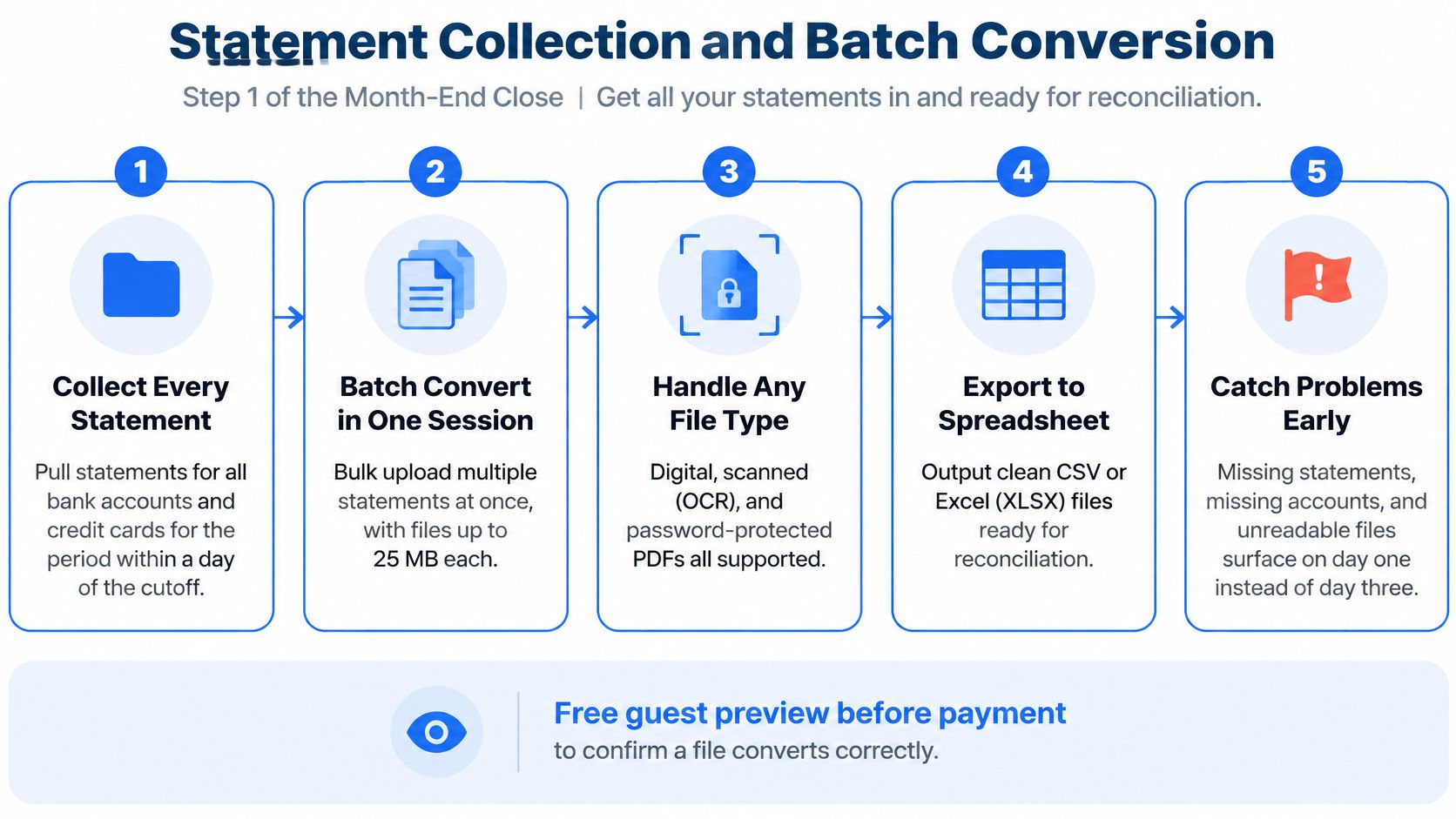
Statement conversion belongs first, or as close to first as the close calendar allows. Within a day of the period cutoff we pull every statement for the period, across every bank account and credit card, and convert the lot in one batch. Everything downstream consumes that same input: complete cash and card data in a format someone can work with.
Here's the flow from account list to validated spreadsheet.
The case for early conversion is blunt. SAPinsider's 2023 financial close transformation benchmark found that 82% of participants viewed dependence on manual processes in financial close and record-to-report activities as a significant issue. Statement intake is that dependence in its purest form. Batch it the day after cutoff and it leaves the critical path. Leave it as a mid-close chore and it stays on it.
What a batch actually catches
A finance team keeps a checklist of every bank and card account, pulls the period statements on the first business day, and converts them as one batch before anyone opens a reconciliation. An outsourced bookkeeper gets the same benefit from a different angle: the batch comes back one file short of the account list, which is how she discovers a credit card statement nobody downloaded. That costs a phone call on day one. Found on day three, it costs the deadline.
autobankstatement converts digital, scanned (via OCR), and password-protected PDF statements into CSV or Excel, in bulk, at up to 25 MB per file, with a free guest preview before you pay. If you're still copying tables by hand, converting bank statements to Excel is the step worth fixing first.
Practical rule: If the file count doesn't match the account count, stop. Find the missing statement before any reconciliation work starts.
- Keep a master account list: one row per bank and card account, ticked off as each statement converts.
- Enter passwords at upload only: store them in your organization's approved secrets manager, never in a note inside the folder.
- Test one file per new layout: run a preview on a single statement from any bank whose format you haven't converted before.
2. Statement Integrity Validation
The dangerous statement isn't the one that won't open. It's the one that opens, parses cleanly, and lost a page somewhere between the bank's download and your desk. Nothing about it looks wrong: totals are plausible, the transaction count looks ordinary. The giveaway is arithmetic.
Treat the balance chain as a reviewer control after conversion, before reconciliation. Recompute opening balance plus credits minus debits down the rows and into the closing figure. When the balance jumps between two consecutive transactions with no visible activity in between, a page is missing. When the chain closes exactly, the month is complete enough to hand downstream.
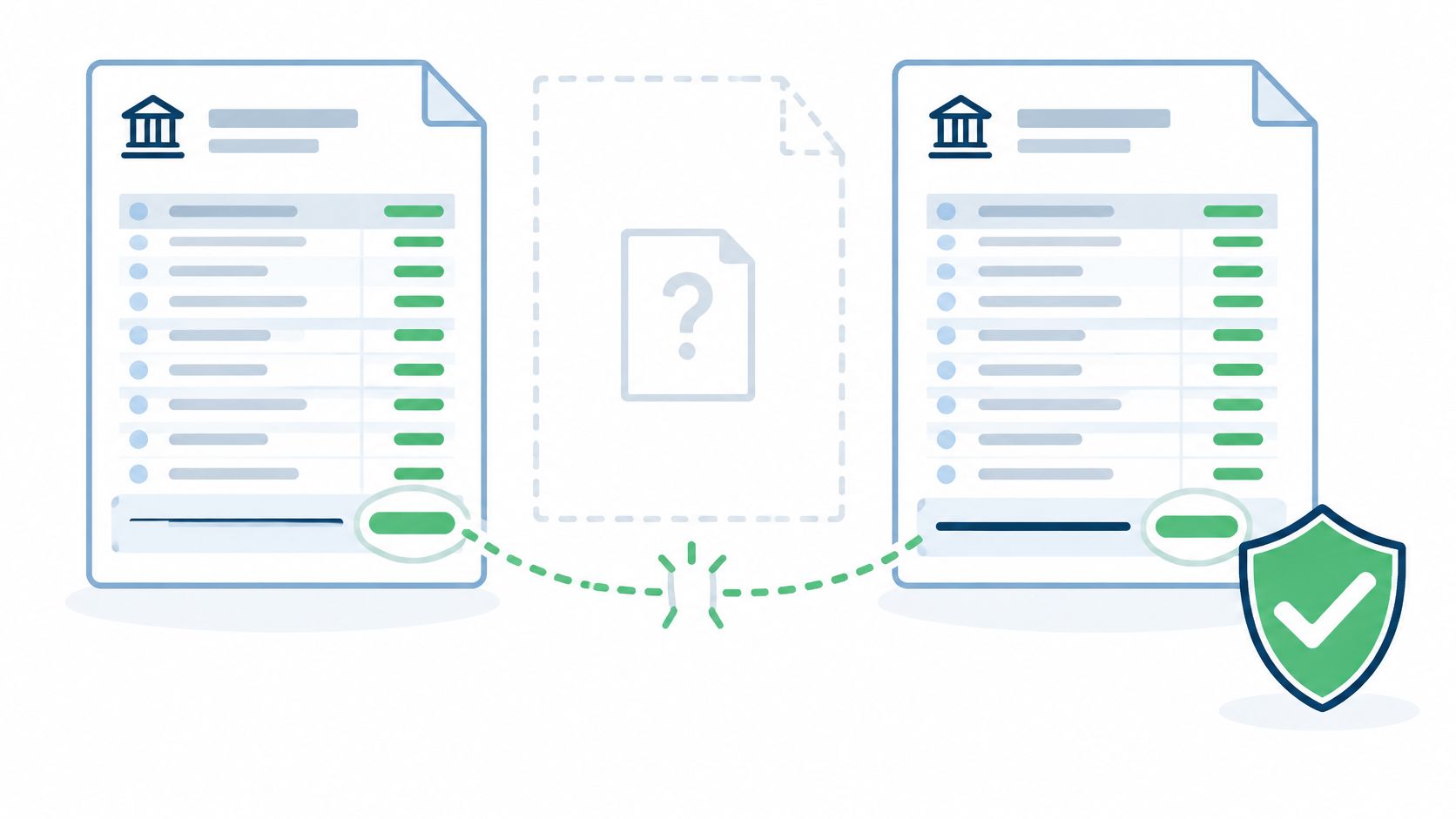
The check runs in two directions, and teams that trust clean-looking imports usually test only one.
- Missing pages: the running balance leaps forward with no supporting transactions, because the activity in between was on the sheet that didn't scan.
- Inflation by extra rows: "balance brought forward", page subtotals, and summary lines counted as transactions, overstating the month's activity.
- Opening balance drift: the statement's opening figure doesn't match last month's closing figure, which points to a carryover problem rather than a new one.
Opening-balance validation is a specific check, not a courtesy glance. Georgia's state audit guidance on bank reconciliations tells users to confirm that the beginning balance on the statement matches internal records, investigate adjustments or carryovers when they differ, then match deposits and withdrawals individually and recalculate the book balance before comparing to the statement's ending balance.
That work starts with a whole statement. A reconciliation exists to explain the difference between the bank's balance and the accounting records on a specified date, and the Department of Justice's bank reconciliation guide frames that difference as items needing explanation, not a plug number. Analysis built on a statement with a hole in it produces a tidy explanation of the wrong month.
A worked example
Say a converted statement shows the running balance moving from 4,210.55 to 9,870.10 between two adjacent rows with no transactions in between. That gap isn't a rounding quirk. Request the missing page from the bank, re-convert, and recheck the chain before the file goes anywhere near a reconciliation.
One question covers both traps: does the opening balance plus every credit, minus every debit, land exactly on the printed closing balance?
Compare page numbers in the converted file against the page count printed on the statement. Banks number their pages for exactly this reason. If the arithmetic closes but the page count doesn't, keep the file out of the close until the gap is explained.
3. Bank Reconciliation with Named Reconciling Items
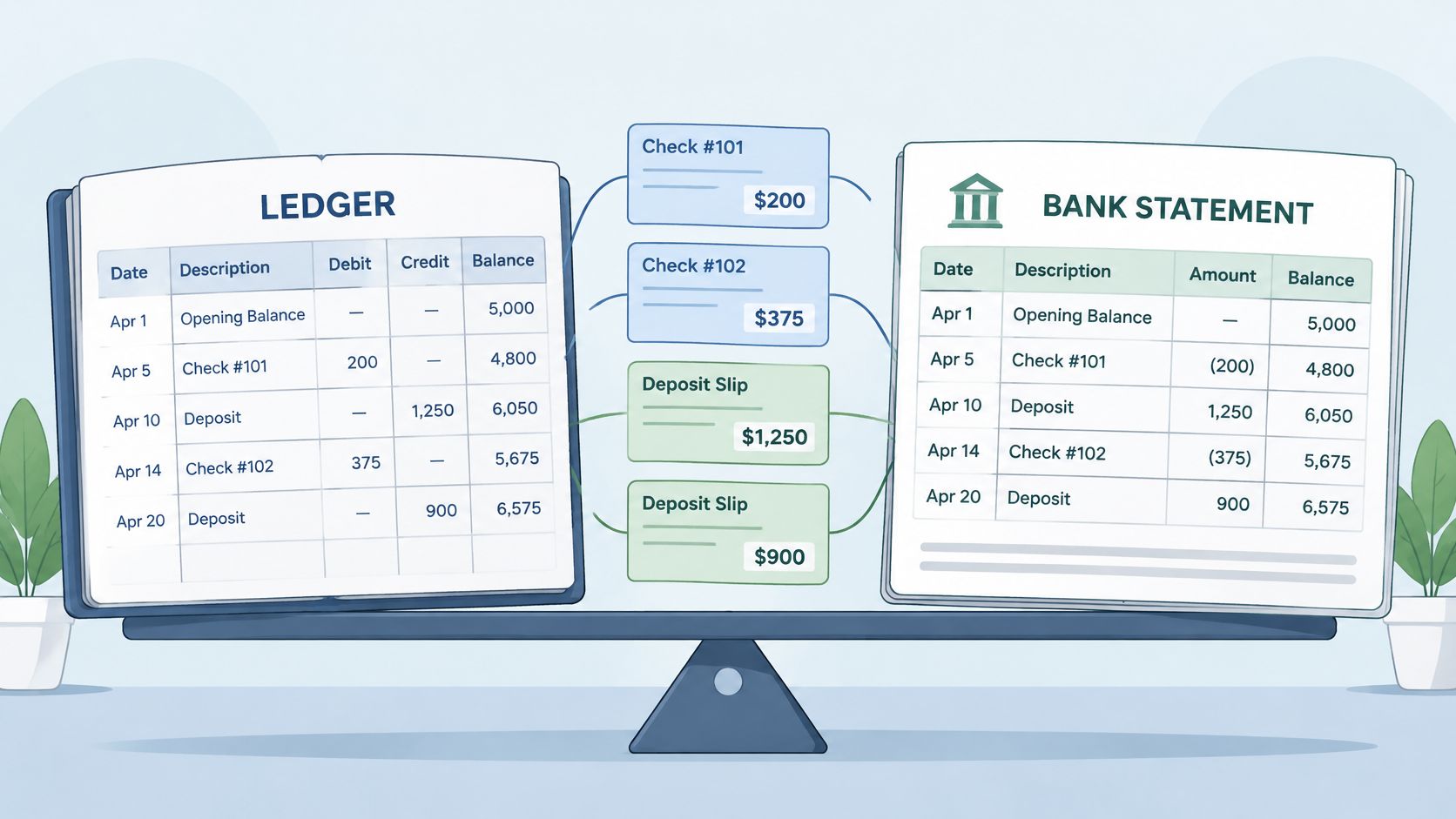
Bank reconciliation compares the cash balance in the general ledger with the balance on the bank statement and explains every difference between them. Many teams handle the first half well. The explanation is where discipline slips, because a single balancing figure will make a workpaper agree without telling anyone what happened.
Burlington's COSO-based account reconciliation procedure draws the line in the right place. It requires the month-end date, the statement ending balance, and the general ledger ending balance to be recorded, and it defines completion as the point where adjusted ledger and bank balances are equal and every reconciling item carries an adequate description. Equal and described. Not equal and plugged.
The extra care pays because reconciliation eats real hours. Cash reconciliation alone consumes an estimated 20 to 50 hours per month in the teams covered by CFO.com's reporting on why half of finance teams take a week to close. That's a lot of skilled work for a plug figure to undermine.
The three checks before we call it complete
- Anchor the endpoints. Opening and closing balances in the workpaper must match the printed statement exactly, not approximately, and the activity between them must walk from one to the other.
- Check completeness, not just totals. Compare transaction counts against the statement, and read the first and last two days of the month, where cutoff items go missing.
- Name every reconciling item. Each outstanding check and deposit in transit gets its own line with amount, expected clearing date, and owner.
What complete looks like: three outstanding checks listed by number, amount, and clearing date, all three clearing in the first week of the following month, and no unexplained line anywhere on the page.
A reviewer rejects any workpaper where the difference lands as one balancing figure, because that figure is a question nobody asked. Our guide to reconciling bank statements walks through the mechanics end to end. A converted spreadsheet earns its place here for a simple reason: formulas recalculate, so someone other than the preparer can test the work.
4. Cutoff and Transaction Completeness Review
Cutoff errors don't announce themselves. They surface a month later, when someone notices the same deposit twice or a bill that never appeared at all. We review the first and last two days of every period specifically, because that's where checks in transit, late deposits, and settlement timing differences live.
The principle is easiest to see in government procedure. The Texas Comptroller's month-end close procedure requires agencies to enter all monthly cash activity by the end of the month and applies a hard cash close after the last calendar day, so cash transactions dated after month end cannot post to the closed month while non-cash items such as accruals and encumbrances still can. The boundary is a date, not a mood.
Late inputs are the other half of cutoff, and that half is organizational rather than technical. Survey reporting summarized in the MNCPA's month-end close guide found that 56% of finance professionals identify cross-team dependencies as a close blocker. You can't schedule your way out of that. You can classify your way out of it.
Classify every task before the period ends
- Must have before soft close: bank statements, card statements, payroll registers, processor payouts. No estimate substitutes for these.
- Estimate permitted: a utility period spanning month end, a vendor invoice expected in the first week. Accrue it, then true it up against the actual.
- Post-close adjustment: anything arriving after the hard close, logged with a date, amount, and owner rather than absorbed without notice.
A worked example makes the boundary concrete. A deposit dated the last day of the month appears on the statement but sits in the ledger on the first day of the next month. The cutoff review moves it back where it belongs. A card payment made on the final day posts on the first business day, and the reviewer documents the timing difference instead of chasing it next month.
Write the rule down. The same cutoff treatment has to apply next month, or you've solved one close rather than fixed the process.
Recheck both boundary days after any late statement or late adjustment lands.
5. Credit Card and Clearing Account Reconciliation
Card statements rarely close on the last day of the month, which is exactly why they get deferred. A card with a 15th closing date needs its own reconciliation to the 15th, plus a separate listing of purchases between the statement date and month end. Skip that second part and the card balance agrees to a statement that does not cover the period you are closing.
Clearing accounts are the same problem under a different name. Payment processor accounts, payroll clearing accounts, and merchant settlement accounts should return to zero once everything clears. Any residual balance at period end is either a timing difference you can name or an error you have not found yet.
The delay is measurable. Planful's 2025 Global Finance Survey found that 37% of finance teams said account reconciliations took more than 6 days. Card and clearing accounts usually sit last in the queue, so they absorb the tail of that delay. Pace at the leading edge is faster: a 2025 survey of 103 CFOs and finance vice presidents reported that 62% could complete financial-close activities within nine days.
What to measure on each card and clearing account
- Percent reconciled by target date: one number per account, reviewed during close rather than after it.
- Unmatched transactions, count and value: look at exceptions before you look at totals.
- Aging of reconciling items: anything older than one cycle needs an owner, not a note.
- Extraction confidence: low-confidence rows, missing pages, and balance mismatches route to human review before posting.
Converting every card statement in the same batch as the bank statements keeps all of this on one timetable. Because conversion already happened in step one, the listing of purchases between the statement date and month end is a filtered export from clean transaction rows rather than a manual scan of a PDF. A worked example: a payroll clearing account shows a small residual balance, and the reconciliation traces it to a single pay run whose funding posted a day after the wages cleared. We name it as a timing difference on the schedule, confirm it zeroes out early in the next cycle, and move on. An unexplained residual gets the same treatment until someone explains it.
6. Accruals and Prepaid Expense Adjustments
Accruals and prepayments exist because cash timing and period timing are different things. A bill paid in advance is a prepaid asset to amortize. A service received but not yet invoiced is an accrual to record. The close's job is to put each one in the period where it belongs, not the period where the bank statement happens to show it.
Converted bank and card data is the most reliable prompt for that review, because it shows what moved. Scan the month's transactions for annual subscriptions paid in one go, insurance premiums, and deposits on services that stretch past month end. Those are the prepayments. Then scan for recurring charges that should have appeared and didn't, because the missing ones are usually the accruals.
Two schedules, kept current
- Prepaid schedule: original amount, amortization period, monthly charge, and remaining balance for each item.
- Accrual schedule: basis for the estimate, the reversal date, and the person who owns the true-up.
Say a software subscription renews annually and gets paid in a single card transaction in March. The March close records the full amount as a prepaid asset and amortizes one twelfth to expense, leaving the balance sitting on the schedule for the rest of the year. A utility period that ends two days after month end gets accrued on the usage period, not on the invoice date.
Materiality keeps this sane. Set a threshold below which items are aggregated rather than individually tracked, and write the threshold into the checklist so it doesn't get renegotiated every month by whoever is behind schedule.
Review the recurring charges first. A subscription that stopped appearing is either cancelled or misposted, and both need an answer before the period locks.
Document the basis for every accrual when you post it. Reconstructing that reasoning two months later, in front of an auditor, costs far more than writing one line now.
7. Journal Entry Review and Approval
Every adjustment the close produces ends up as a journal entry: accruals, reclassifications, depreciation, corrections found during reconciliation. The entry is where a defensible adjustment becomes an auditable one, and where an unsupported one becomes a finding.
The control that matters is separation of duties. The person who prepares an entry shouldn't be the only person who reviews it, and the approval should be recorded against the entry rather than remembered from a conversation. Each entry references the workpaper or source document that supports it, so a later reviewer can follow the line from the number back to the evidence.
A template that does the work for you
Build one journal entry template and refuse exceptions to it. Every entry carries a description, a support reference, the period, the preparer, the approver, and a reversal flag where relevant. That last field earns its place. A reversing accrual flagged at posting reverses automatically on the first day of the next period, which is one fewer manual entry and one fewer place for the books to drift.
A worked example: a staff accountant prepares a reconciliation adjustment, references it to the bank workpaper, and the controller approves it before posting. The entry, the workpaper, and the approval all sit in the same period folder. If a tax adviser asks in November why a balance moved in March, the answer takes two minutes instead of an afternoon.
Check that every entry balances before posting. It sounds trivial until an out-of-balance batch posts and someone spends a morning unpicking it.
Practical rule: spread reviews across the close window. If every approver is queued on the final day, the final day becomes the bottleneck and the close slides for a reason that had nothing to do with accounting.
8. Close Sign-Off and Records Retention
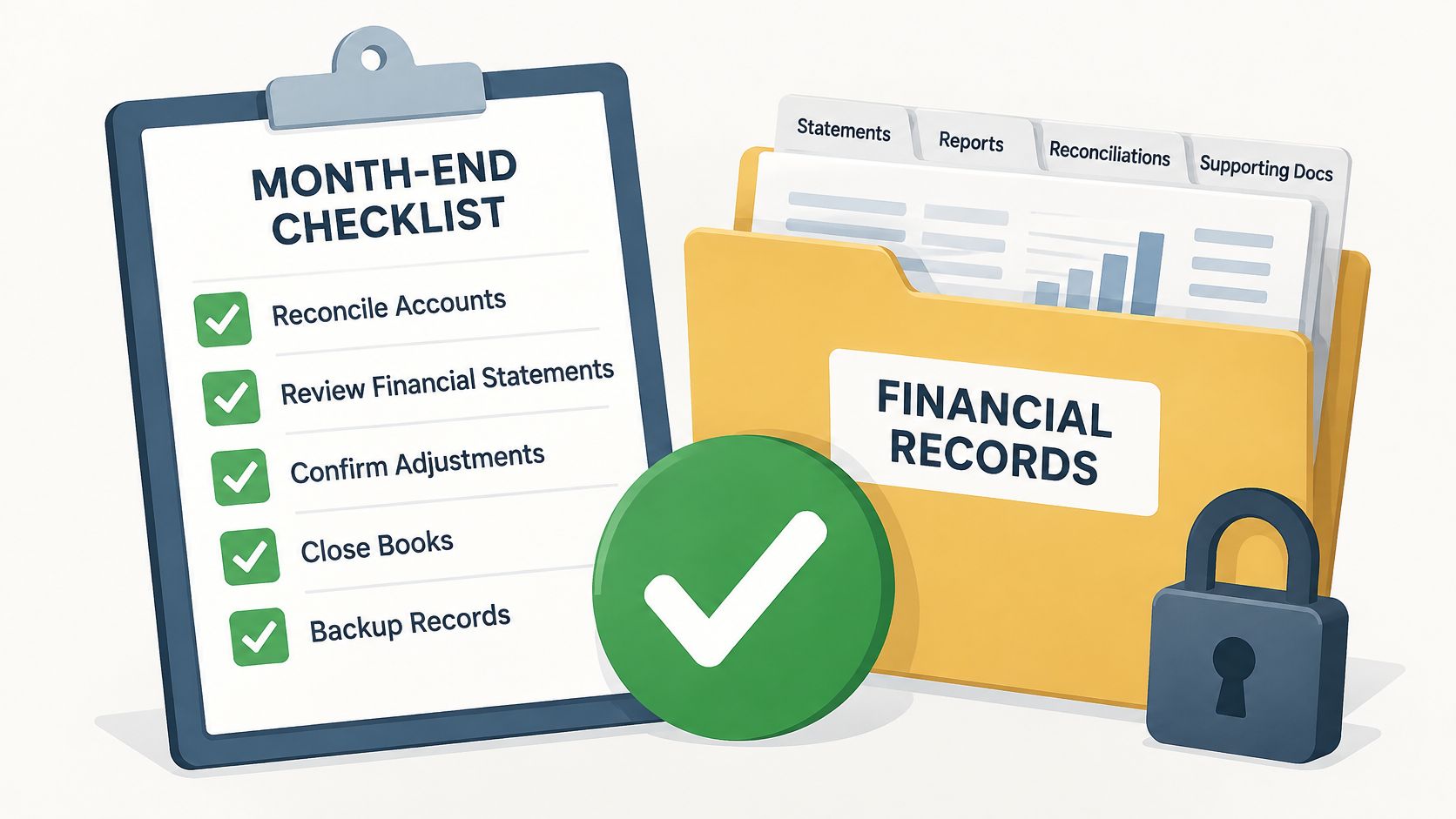
The close isn't finished when the numbers tie. It's finished when someone with authority has signed that they tie, the exceptions are documented, and the evidence is filed where a reviewer can find it next year.
Sign-off should record more than a signature. APQC's measure for close cycle time defines the KPI as the number of days a finance shared-services center takes to complete the monthly financial close, and its framework separates the interval from producing monthly flash reports to completing consolidated financial statements. That distinction is worth copying into your own workpaper: explicit start and finish timestamps, entity or ledger scope, trial balance status, consolidation completion, and every unresolved exception at the moment of sign-off.
What goes in the archive
- Source documents: the original statement PDFs, exactly as the bank issued them.
- Converted files: the CSV or Excel output used for reconciliation, so the conversion can be rechecked later.
- Workpapers and approvals: reconciliations, journal entries, and the recorded sign-off for each.
- The exception log: what was unresolved, who owns it, and when it cleared.
Keep the archive for the period your tax and legal obligations require. In the United States, IRS Publication 583, Starting a Business and Keeping Records, describes general record retention expectations for businesses. Confirm the specifics with your tax adviser, because entity type and jurisdiction change the answer.
Then there's the tooling side. Our uploads are deleted automatically after processing, and download access runs for 24 hours, so the window for saving what you need is short by design. Copy the converted file into your own records folder during that window. How long to keep bank statements covers the retention question in more detail.
The 8 close steps at a glance
| Step | Primary goal | Key verification | Timing in the close |
|---|---|---|---|
| Statement Collection and Batch Conversion | Collect and convert all bank and card statements | Check every expected account and confirm files are readable | First; within a day of period cutoff |
| Statement Integrity Validation | Confirm each converted statement is complete and consistent | Recalculate running balances; check for missing pages and non-transaction rows | Before reconciliation |
| Bank Reconciliation with Named Reconciling Items | Match the general ledger cash balance to the bank statement | Tie opening and closing balances, compare transaction counts, and list each reconciling item by name | After statement validation |
| Cutoff and Transaction Completeness Review | Capture transactions in the correct accounting period | Review boundary days, transaction counts, and period assignments | During reconciliation, focused on period-end dates |
| Credit Card and Clearing Account Reconciliation | Reconcile each card and clearing account to its statement | Identify payments in transit and pending settlements; explain the closing balance | Alongside bank reconciliation |
| Accruals and Prepaid Expense Adjustments | Record expenses and revenue in the period incurred or earned | Support accruals and prepayments with transaction records and schedules | After transaction review, before finalizing results |
| Journal Entry Review and Approval | Ensure close adjustments are supported and authorized | Check documentation, preparer-reviewer separation, and balanced debits and credits | After entries are prepared, before posting |
| Close Sign-Off and Records Retention | Confirm completion and preserve supporting records | Verify checklist sign-off, balanced reconciliations, and archived records | Final step, before the period is locked |
Run the Close in This Order Every Month
The checklist holds because the sequence holds. We convert every statement at the start of the close, prove each file is whole with the balance chain, reconcile with every difference named, review the boundary days, adjust, approve, and archive. Each step consumes what the one before it produced, so a weak input does not travel downstream disguised as progress.
A statement never downloaded, an account missing from the list, or a PDF that turns out to be a photo of a page is trivial on the first business day and expensive on the third. By then the reconciliation, accruals, and review are all waiting on the same file, and the close slips for reasons that have nothing to do with accounting judgment.
Three habits keep the schedule intact.
- Prove the input before you use it. Opening balance plus credits, minus debits, must land on the printed closing balance. If it does not, stop there.
- Name every difference. A reconciling item needs a description, an amount, and an expected clearing date. A single balancing figure is a guess with a decimal point.
- Write down the cutoff rule. If the treatment lives in one person's head, it changes the month that person takes a holiday.
The gap between a calm close and a slipping one usually comes from data arrival, not from harder debits and credits. When statements arrive complete and someone checks them before the work moves downstream, reviewers spend their time on real differences instead of broken files.
If statement conversion is still an evening of copying tables, fix that first, because every later step depends on it. autobankstatement converts digital, scanned, and password-protected PDF statements into CSV or Excel in one batch, with browser review and quick edits before download and a subscription option suited to regular bookkeeping, tax prep, and larger batches. Step one takes minutes instead of an evening, and the rest of the checklist stops waiting.
Put statement conversion on day one and let the rest of the close run on data you have already proved. autobankstatement turns your PDF bank statements into clean CSV or Excel tables in one batch, including scanned and password-protected files, with a free preview before you pay and original uploads deleted within 10 seconds after processing. Upload the month's statements on the first business day, verify the balance chain, and hand your team spreadsheets instead of a folder of PDFs.
Convert your next statement in minutes
Upload a bank statement PDF — digital, scanned, or password-protected — preview the extracted table, and download clean CSV or Excel.