Verification of Deposits Explained: What Lenders Check
Verification of deposits explained: what it proves, when lenders and businesses use it, and how bank statements support the review.
A clean spreadsheet converted from a client's PDF bank statement sits open on your screen. Every deposit and withdrawal lines up, the closing figure matches the printed page to the penny, and month-end looks done. Then the lender or auditor sends the file back asking for proof that the cash exists, belongs to the presenter, and stayed in the account long enough to count.
That gap trips up accounting teams and loan processors every week. Data extraction and evidence validation are two separate jobs. A spreadsheet can pass every arithmetic check and still fail to prove that funds are real or unencumbered, while a fast digital balance check can confirm an account is open yet strip away the transaction history needed to explain a sudden influx of cash.
Understanding how verification of deposits works prevents wasted back-and-forth during closings, audits, and monthly closes. When we know what each method proves and where it falls short, we collect the right record the first time.
Table of Contents
- What Verification of Deposits Confirms
- When Lenders and Businesses Ask for Deposit Verification
- What a Bank Statement Must Show to Support Review
- How to Check a Converted Statement Balance
- Timing Items That Explain Balance Differences
- Retention and Document Handling Rules
- Confirm the Balances Before You Rely on Them
What Verification of Deposits Confirms
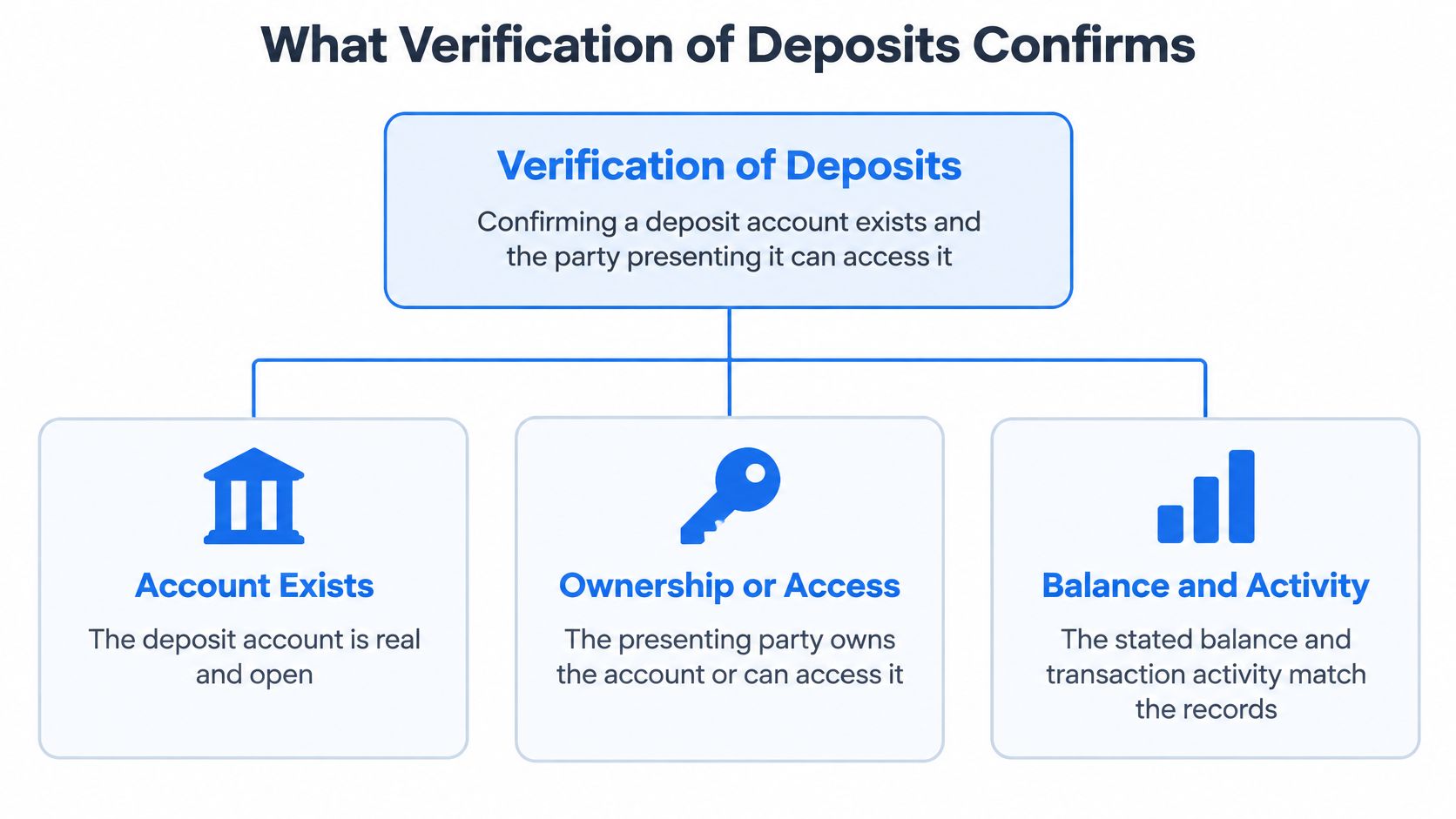
Verification of deposits is the process of confirming that a deposit account exists, that the party presenting it owns or can access it, and that its reported balance and transaction activity match institutional records. It isn't just proof that money sits in an account today. The exact question a reviewer needs answered dictates which verification method will hold up under scrutiny.
A payment operations team setting up ACH billing asks a very different question from an external auditor testing cash at year-end. One needs to know the customer controls the account; the other needs bank-direct proof of the balance and any restrictions on it. Comparing the four main methods side by side makes those boundaries clear.
| Method | What It Proves | Typical Limitation |
|---|---|---|
| Micro-deposit verification | Account is active and the claimant can access it | Generally two to three business days |
| Automated account validation | Account existence and access without deposit amounts | Verifies about 90% of domestic consumer accounts |
| Positive bank confirmation | Balance and status as reported directly by the bank | Requires the bank to respond directly to the verifier |
| Bank statement review | Activity and ending balance for a stated period | Covers only the period shown and needs arithmetic and transaction checks |
How Micro-Deposits Compare to Instant Checks
Micro-deposit verification remains the classic baseline for proving account ownership. According to Straddle's account validation documentation, a business sends one or two tiny deposits, typically below $0.05 each, to the customer's bank account, and the customer confirms the exact amounts to prove the account is active and accessible. Because the settlement cycle generally takes two to three business days, high-volume payment workflows increasingly rely on automated account-validation systems, which the same documentation notes can verify roughly 90% of domestic consumer accounts without requiring anyone to read back deposit figures.
Notice what neither micro-deposits nor instant ownership checks deliver: they don't show a 60-day history of deposits, withdrawals, or recurring obligations. When a landlord, counterparty, or lender wants written confirmation of account standing rather than just routing accuracy, teams often pair statement review with a bank letter confirming an account.
Match the verification method to the exact question on the checklist, not to the fastest turnaround available.
When Lenders and Businesses Ask for Deposit Verification
Picture a mortgage underwriter reviewing a buyer's file ten days before closing. The buyer sends a phone screenshot showing a healthy checking balance, hoping to clear the final asset condition. The underwriter rejects it immediately because a live balance screen can't show whether the money arrived yesterday from a credit card cash advance or sat steadily in savings for months.
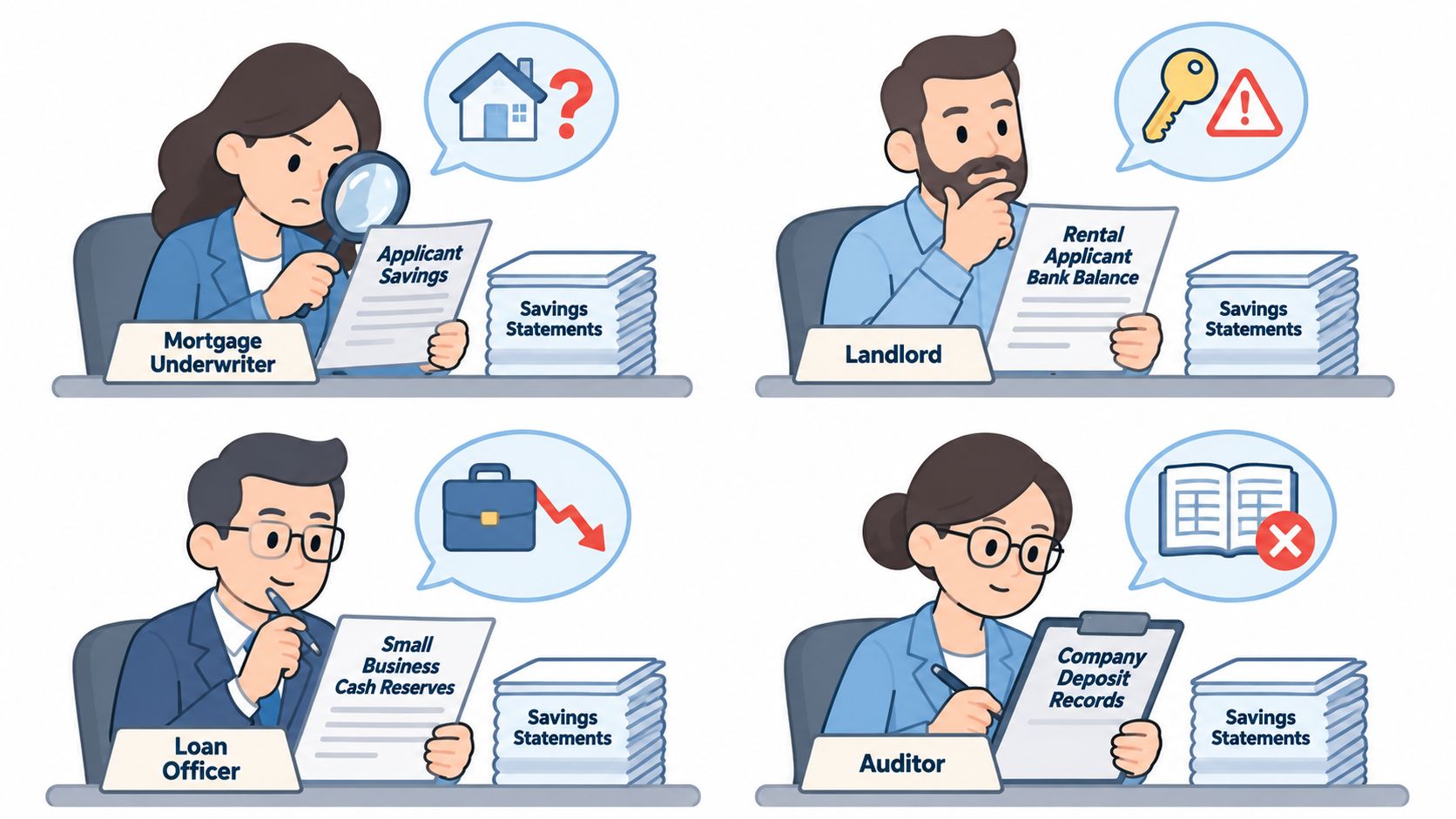
Deposit checks show up across five routine workflows, and each reviewer carries a distinct risk tolerance. What clears a bookkeeping close won't satisfy an external audit, and what clears payroll setup won't satisfy a loan committee.
Early Fraud Risk and Ongoing Account Checks
New account onboarding puts compliance teams on high alert because fraudulent activity clusters heavily in fresh accounts. In a study covering 70 million bank accounts across seven financial institutions published by Valid Advantage, more than 40% of all funds deposited through ATMs into accounts less than 30 days old were fraudulent. Yet account age alone can't clear an account either: the same research found that 37% of observed fraudulent checks were deposited into accounts older than one year, alongside 33% in newly opened accounts.
Payments operations teams face a narrower problem during direct deposit or recurring billing setup, where confirming account ownership and active status prevents misrouted payroll and returned ACH pulls. Bookkeepers hit deposit verification during month-end close, converting PDF statements into spreadsheets to reconcile bank activity against the general ledger.
Audit Confirmations and High-Risk Accounts
External auditors operate under stricter evidentiary standards because they can't rely solely on documents supplied by the client. Under FDIC examination guidance, positive confirmation is preferred for deposit accounts, meaning the bank must respond directly to the verifier and silence is never treated as agreement. Negative confirmation is generally reserved for situations where account volume and cost make positive confirmation impractical, and the guidance calls for heightened verification on large-balance, public-fund, dormant, pledged, overdrawn, recently closed dormant, and unusually active accounts, with bank replies reconciled back to retained duplicate requests.
| Trigger | Reviewer | Evidence That Answers It |
|---|---|---|
| Mortgage underwriting | Lender underwriter | Statement covering a defined period with deposits, withdrawals and ending balance |
| New account onboarding | Compliance or onboarding team | Account status, ownership and activity since opening |
| Direct deposit or recurring payment setup | Payments operations | Micro-deposit confirmation or automated account validation |
| Month-end reconciliation | Bookkeeper or accountant | Converted statement that passes the opening-plus-credits-minus-debits test |
| Audit or formal confirmation | External auditor | Direct response from the bank, matched to the original request |
Before pulling documents for a file, identify which trigger is in play. A single month's statement can satisfy a bookkeeper's close while failing an underwriter's asset review or an auditor's direct-confirmation rule.
What a Bank Statement Must Show to Support Review
Not every PDF exported from an online portal qualifies as usable deposit evidence. Under the Fannie Mae Selling Guide, bank statements or alternative asset records must identify both the financial institution and the borrower, specify the covered period, itemize all deposits and withdrawals, and state the ending balance. If a lender uses a third-party verification instead, the borrower must authorize it and the output must include the same information found on Form 1006 or standard statements.
Those fields exist because reviewers are trying to answer four concrete questions at once. First, who legally owns the account and has the right to draw on it? Second, how much cash is available right now? Third, are the funds seasoned, meaning they have been in the account long enough to indicate stability rather than a last-minute shuffle? Fourth, will the balance remain sufficient after closing costs or a scheduled business payment clears?
Why History Beats a Balance Snapshot
Say a borrower submits an account summary showing an ending balance of $25,000 for a home purchase. Without the transaction ledger, that number looks reassuring. Once the underwriter opens the full statement, however, an $18,000 deposit appears three days before the statement cutoff date. Now the reviewer has to trace that deposit to its origin (a documented asset sale, a gift letter, or an undisclosed loan that alters the debt-to-income ratio).
Document tampering raises the stakes further. Across Inscribe's document network in 2025, roughly 6% of all processed documents were flagged as fraudulent, and bank statements carried a fraud rate of about 6% to 7%. Reviewers who glance only at a top-line balance miss altered line items, missing pages, overdraft patterns, and circular transfers between related accounts.
Underwriting reality: Faster digital verification isn't automatically stronger verification if it drops the transaction history needed to explain where funds came from and whether they will stay.
The Privacy and Coverage Trade-Off in Open Banking
Connecting a bank account directly through open banking cuts down on PDF tampering, yet it introduces its own blind spots. The UK Financial Conduct Authority's 2025 open finance report points out that open-banking feeds can expose far more than a narrow deposit balance, including account numbers, credit and overdraft limits, turnover, standing orders, and scheduled transfers. Some applicants can't connect an institution because of bank coverage gaps, device limitations, or consent concerns.
Strong review workflows therefore apply least-privilege sharing where digital links are used and maintain a documented fallback path. When a submitted statement arrives incomplete, missing pages, cropped headers, or unitemized deposits, the reviewer should request the complete multi-page statement directly from the institution's portal or initiate a borrower-authorized verification form before approving the file.
How to Check a Converted Statement Balance
Once a PDF or scanned bank statement is converted into a CSV or Excel workbook, the very first job is proving that the extracted numbers faithfully reflect the source pages. A reconciliation template published by the New York City Comptroller's Office lays out the exact arithmetic structure: start with the prior month's ending bank balance as the opening balance, add total deposits and credits, subtract total withdrawals and debits, and verify that the calculated closing balance (expressed in the template as "8+9-10") matches the statement's printed ending balance.
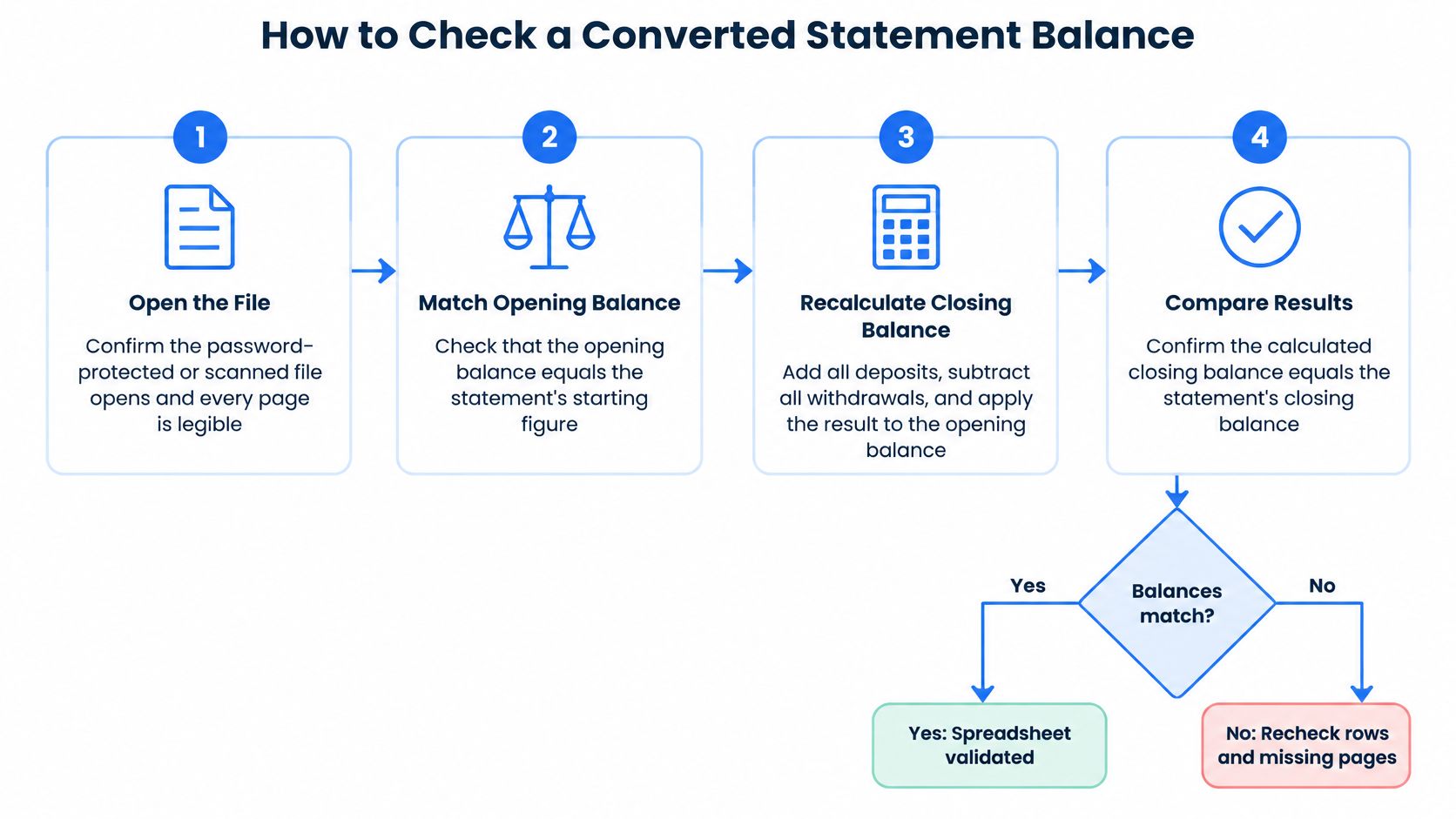
Running that check takes less than five minutes and catches broken conversions before bad numbers enter your general ledger or underwriting workbook. Follow these seven steps in order:
- Open and inspect the source PDF. Confirm any password-protected or scanned file opens cleanly and every page is crisp enough to read, because a skipped page or clipped margin ruins every sum downstream.
- Verify the opening balance. Check that the first balance row equals the prior period's ending balance, catching missing month gaps immediately.
- Total all credits and deposits. Sum every positive cash inflow in the spreadsheet, including interest, refunds, and incoming transfers.
- Total all debits and withdrawals. Sum checks, card charges, ACH outflows, wire transfers, and monthly bank fees in a separate column or formula so signs don't get muddled.
- Run the core balance equation. Calculate opening balance + credits - debits = closing balance using spreadsheet formulas rather than mental math.
- Compare against the printed closing balance. Place your calculated result directly beside the ending figure printed on the bank's summary block.
- Diagnose any variance systematically. If the figures disagree, hunt for an omitted or duplicated row, a reversed sign on a fee refund, an optical character recognition (OCR) misread such as an 8 read as a 3, or an incorrect starting balance.
Worked Balance Test With Illustrative Figures
Putting numbers into the formula shows how fast the completeness test surfaces problems. Suppose we convert a one-month operating statement and pull the summary totals into a quick check block:
| Line | Illustrative Check | Source on Statement |
|---|---|---|
| Opening balance | Starting balance carried forward | Prior period ending balance |
| Total credits | Sum of all converted deposits | Sum of deposits and other credits |
| Total debits | Sum of all converted withdrawals | Sum of withdrawals, checks, fees and other debits |
| Calculated closing | $4,679.75 | Opening balance plus credits minus debits |
| Statement closing balance | $4,679.75 | Ending balance printed on the statement |
Adding total credits to the opening balance and subtracting total debits lands cleanly on $4,679.75, matching the printed closing figure. Even when the difference is zero, don't assume every cell is spotless. Two offsetting errors can cancel each other out, and OCR can scramble a payee name or post date without altering the dollar column, so spot-check a handful of dates, descriptions, and amounts directly against the PDF.
When the closing numbers don't match, prioritize your troubleshooting before rerunning the file. Count the total pages first to confirm nothing dropped at a page break, then verify whether credits and debits landed in the right columns (a single reversed transaction causes a variance exactly twice its dollar value), and finally inspect blurry digits on scanned pages.
Timing Items That Explain Balance Differences
A converted spreadsheet can match the source PDF to the cent and still disagree with your company's accounting software. Many newer bookkeepers see that gap and assume the PDF parser dropped a line, or worse, tweak rows in the converted file to force the two totals together. Don't fall for that instinct.
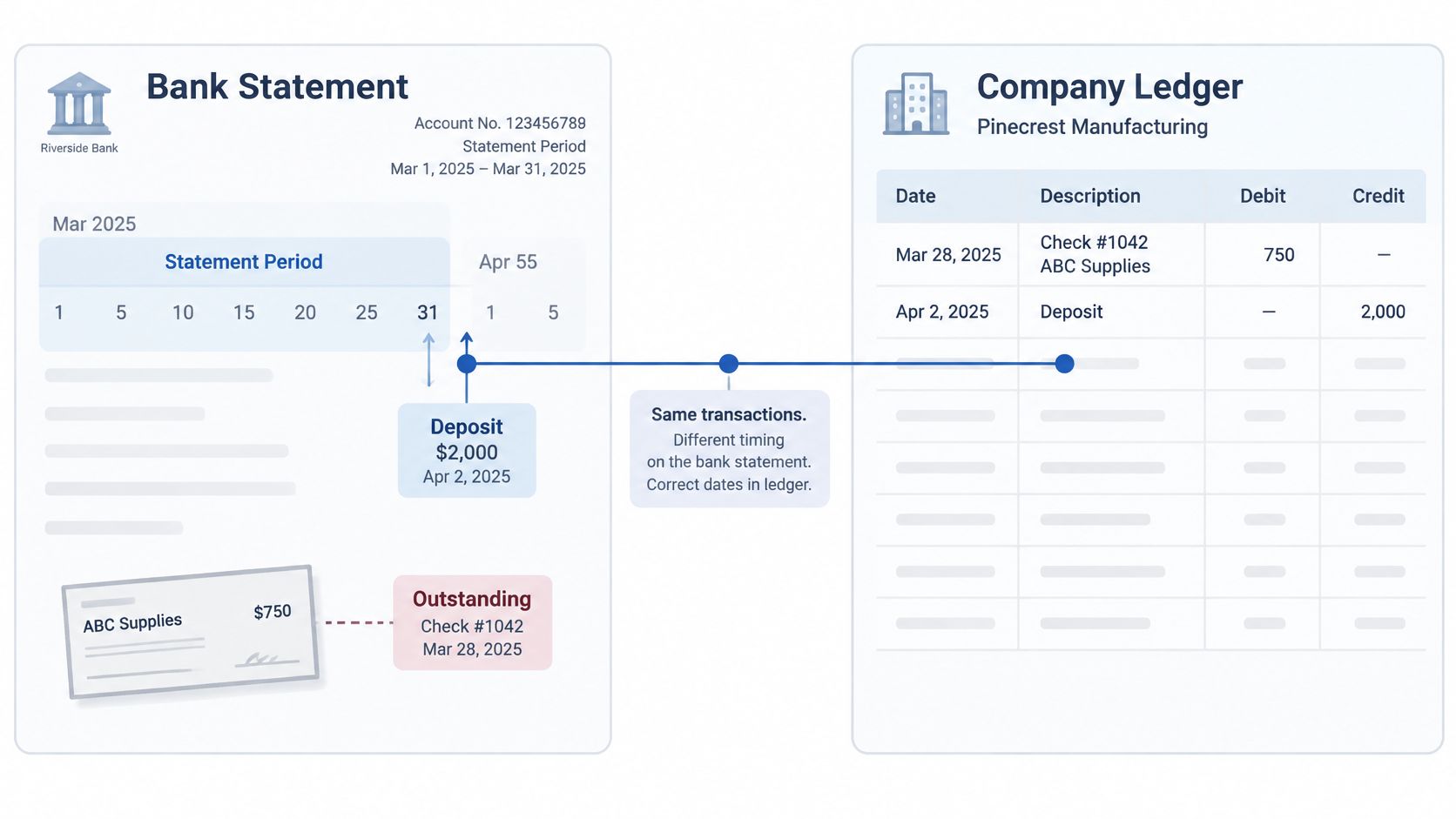
A bank statement only captures transactions that cleared the bank during the statement window. As Georgia's official consumer-banking guidance explains, a statement lists credits such as deposits alongside debits like checks, ATM withdrawals, card purchases, and fees within that period, while items recorded in your books near cutoff haven't necessarily cleared yet.
Three categories account for nearly every legitimate variance between an accurate bank export and your internal ledger:
- Deposits in transit: Customer checks or batch settlements recorded in your books on the final day of the month won't appear on the bank statement until the next business day, so we add them to the statement ending balance.
- Outstanding checks and pending debits: Vendor checks you mailed or payments you initiated before month-end remain open until the recipient's bank presents them; subtract these from the statement ending balance.
- Unrecorded bank items: Monthly service fees, wire charges, returned-item fees, or interest credits show up on the bank statement first and need to be booked in the ledger after verifying they're legitimate rather than masked by editing the bank export.
Walking Through the Adjusted Balance
Georgia's reconciliation formula translates straight into business bookkeeping: start with the statement ending balance, add outstanding deposits, and subtract outstanding checks to reach the adjusted cash balance that should equal your register.
Take a simple month-end example. Say the converted statement closes at $10,000, a $500 customer deposit went into the night drop after the bank's cutoff, and a $320 vendor check hasn't cleared yet. Starting with $10,000, adding $500, and subtracting $320 gives an adjusted balance of $10,180, which should align exactly with your internal cash register.
Reconciliation rule: Never edit extracted bank transactions just to make the statement match your books. Keep the bank table untouched and log every timing item on a separate reconciling schedule with its date, amount, and explanation.
Once all known timing items and bank fees are accounted for, any remaining gap signals a real posting mistake, a duplicate entry, or an unauthorized debit. Leave every unexplained difference open on the schedule until someone traces it back to a source receipt or bank inquiry.
Retention and Document Handling Rules
Converting a statement and storing it for compliance are two entirely different responsibilities. Temporary conversion workflows exist to turn static PDFs into workable tables; they aren't built to act as your permanent archive.
Federal rules draw a sharp line on how long financial institutions must keep deposit records. Under the FFIEC Bank Secrecy Act examination manual, banks generally must retain most covered records for at least five years in original, copy, reproduction, or electronic form, including statements, ledger cards, or other records showing every transaction in a deposit account, while customer-identification records are generally kept for five years after an account closes. Those rules bind banks rather than small businesses, so accounting firms, borrowers, and business owners still need to verify their own tax, audit, and lender retention timelines; we break down those timelines in our guide on how long you should keep your bank statements.
Controls for Preserving Accurate Files
Long-term PDF archiving also carries strict readability standards. Guidance from the U.S. National Archives and Records Administration specifies that permanent PDF records must not keep security restrictions such as user passwords or encryption that block opening, viewing, or printing, and that searchable OCR text must match the source document in both content and appearance. On the fraud-prevention side, OCC Bulletin 2019-37 emphasizes written policies, access restrictions, and dual controls to stop unauthorized edits, inappropriate overrides, and reporting manipulation.
Finance teams can translate those principles into four practical document-handling controls:
- Controlled archive storage: Save the original bank PDF, the converted CSV or XLSX file, and the final reconciliation workbook together in an access-controlled repository with one named owner, never treating a temporary online processor as your system of record.
- File reference and integrity tracking: Record a clear file reference or cryptographic hash for every original statement so reviewers can confirm months later that nobody altered the source document.
- Exception tracking and dual review: Document any parser or OCR corrections along with who resolved them, and require a second reviewer before approving manual overrides on material balances.
- Disciplined password handling: Enter statement passwords only at the moment of opening for conversion; keep passwords out of spreadsheet notes, shared folders, and team chat logs.
Wrap those habits into a written one-page retention schedule that lists each record type, its designated storage folder, the person responsible for filing it, and the review date when expired files can be safely purged.
Confirm the Balances Before You Rely on Them
A converted bank statement is ready to support underwriting, month-end reconciliation, or tax preparation only after it passes four verification checks. Treating raw spreadsheet output as finished evidence is how silent OCR errors and unverified balances slip into client files.
Run this final gate before signing off on any deposit record:
- Confirm method fit. Verify that the evidence matches the reviewer's actual question, whether that's account ownership, multi-month transaction history, or direct bank confirmation.
- Validate the arithmetic. Confirm that opening balance + credits - debits = closing balance matches the printed PDF total, and spot-check dates and descriptions on scanned statements using our workflow for checking bank statements.
- Check required statement fields. Make sure the source PDF clearly identifies the institution and account holder, spans the required dates, and itemizes every deposit and withdrawal.
- Separate timing items and archive the set. Record deposits in transit, outstanding checks, and open variances on a separate reconciling list, keep unexplained gaps open until traced, and store the original PDF, converted spreadsheet, and reconciliation sheet in controlled storage right away because uploaded working files auto-delete within 24 hours.
For teams converting statements regularly, autobankstatement converts digital, scanned (via OCR), and password-protected PDF bank statements into clean CSV or Excel (XLSX) files, handling bulk uploads and files up to 25 MB while letting users enter a password if a file is locked. After upload, transactions are pulled into clear rows so we can review the table in the browser and make quick edits before downloading, with a free guest preview available before payment, 24-hour download access for registered accounts, and automatic file deletion within 24 hours. Ongoing plans include Starter at $15/mo (400 pages), Professional at $30/mo (1,000 pages), and Business at $50/mo (4,000 pages), plus annual discounts and custom enterprise limits. Even with fast conversion, treat every exported table as a working copy until it clears the balance test and statement completeness checks.
If your team spends hours rekeying locked or scanned bank PDFs before reconciliation and deposit reviews even begin, autobankstatement turns those statements into clean CSV and Excel spreadsheets you can inspect in your browser before downloading. Try a free guest preview on your next statement batch, verify the opening-to-closing math in minutes, and keep your review workflow moving without manual copy-paste.
Convert your next statement in minutes
Upload a bank statement PDF — digital, scanned, or password-protected — preview the extracted table, and download clean CSV or Excel.