Whats a PO? How Purchase Orders Differ from Invoices
Whats a PO? Learn what a purchase order is, why finance teams rely on it, and how it differs from an invoice across the buy-to-pay workflow.
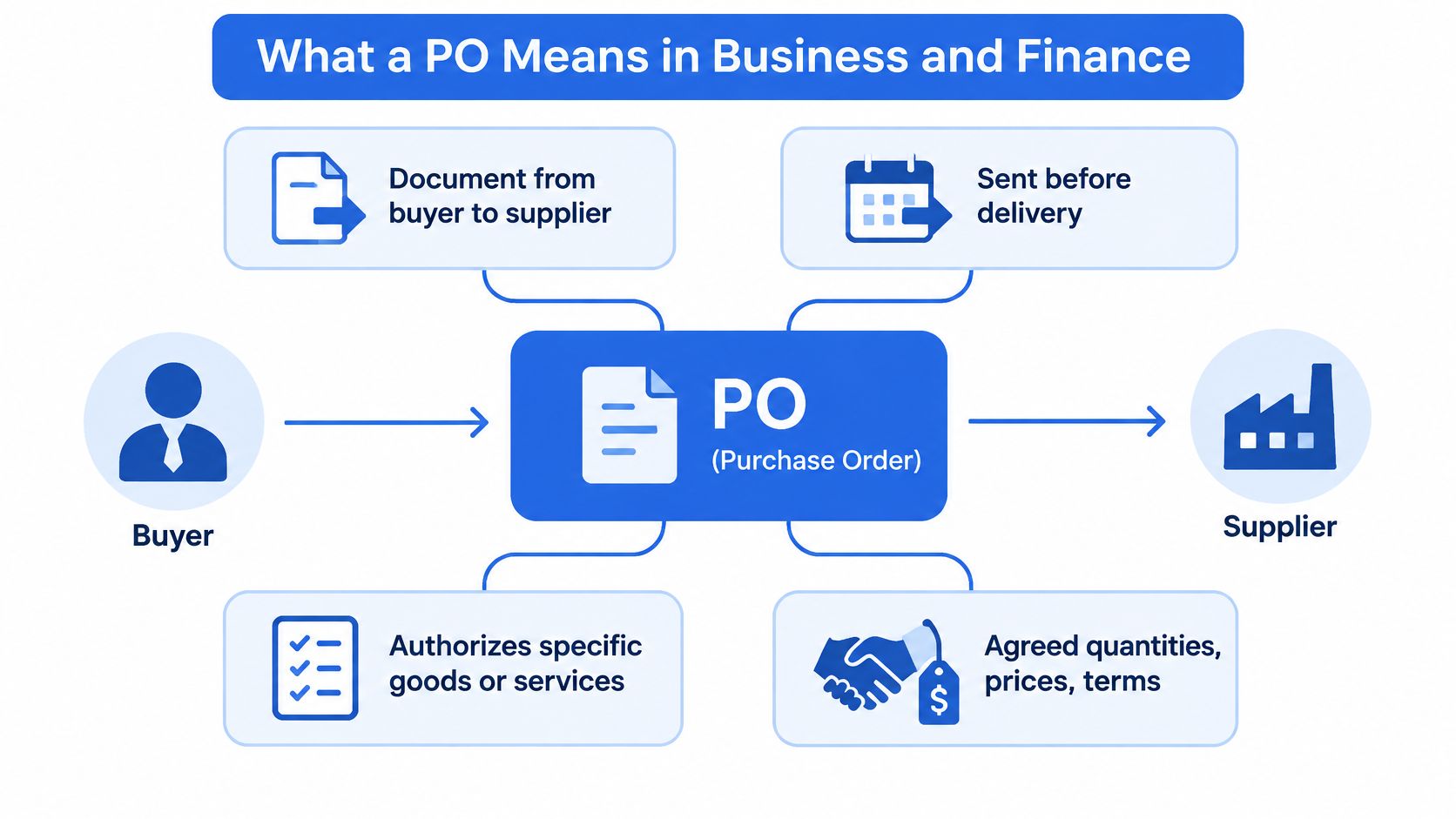
A PO, or purchase order, is a buyer-issued document sent to a supplier before delivery to authorize specific goods or services at agreed quantities, prices and terms. It's a commitment to buy, never proof of payment. Ten office chairs at $100 each put a $1,000 commitment on paper, and the bank balance stays untouched until the chairs arrive, the invoice is checked and the payment clears.
The folder marked "paid" usually holds a mix of paperwork: a supplier invoice, a delivery note, a printout of a PO with a signature on it, and three months of bank statements. At year end somebody asks which of those documents proves the money left the account. The PO can't answer that. It never could.
That mix-up decides how you file, how you reconcile and how fast you can answer an auditor. So we'll separate three documents that people treat as one: the order, the bill and the payment.
Table of Contents
- What a PO Means in Business and Finance
- Purchase Order vs Invoice at a Glance
- The Office-Chairs Example from Order to Payment
- What Goes on a Purchase Order
- What a PO Proves and What It Does Not
- Make Every Supplier Payment Easy to Reconcile
What a PO Means in Business and Finance
A PO is a promise, not a payment. The buyer writes it before anything ships, and it names what, how many, at what price and delivered by when.
In business and procurement, PO most commonly means purchase order: a formal document a buyer issues to a supplier to request goods or services under specified terms, as Wise's guide to purchase order definitions sets out. It typically identifies the items or services, quantities, prices, delivery requirements, payment terms and a unique reference number.
The mechanics are simple. The buyer creates the PO against an approved need, and the supplier accepts it or comes back with changes on price, quantity or timing. Once accepted, a PO can become legally binding, though the exact legal effect depends on the governing contract and jurisdiction. Its foundational job is to turn an informal intention to buy into a documented commercial commitment that delivery records and invoices can be matched against.
Here's how the parts fit together on one page.
Which meaning of PO are you reading
- Purchase order: the finance, procurement and accounting meaning. Any PO on an invoice, a payment reference, an approval request or a supplier email is almost certainly this one.
- Post office or PO Box: mailing and addressing contexts, including the box number in a business address.
- Postal order, petty officer, pilot officer: dictionary senses of the abbreviation, none of which belong in a ledger.
- Pre-order: retail and e-commerce usage, as when a product page offers a pre-order.
Context settles it in a second. A document with quantities, unit prices and an approval signature is a purchase order. A line in an address block is a mailbox. A bank statement description containing the letters PO, however, proves none of the above on its own.
The reason the purchasing meaning dominates is what the document enables: budget authorization, approval controls and an audit trail that connects the order to the receipt and the invoice. When people ask what's a PO worth keeping, that trail is the answer.
Purchase Order vs Invoice at a Glance
Put the two documents side by side and most of the confusion disappears.
| Aspect | Purchase Order | Invoice |
|---|---|---|
| Created by | Buyer | Supplier |
| Created when | Before delivery, when the purchase is approved | After delivery or an agreed billing milestone |
| Core message | We intend to buy these items at these terms | Pay us for what was delivered or billed |
| Money moved? | No | No, it requests payment |
| What it proves | Authorization and committed spend | The amount billed, not the payment |
| Accounting role | Authorization and commitment record | Accounts-payable liability once validated |
| Number trail | PO number quoted on the invoice | Invoice number plus the PO it references |
Who writes each one
A purchase order comes from the organization spending the money. An invoice comes from the organization that wants to be paid. That single fact explains why the two rarely agree word for word: different authors, different records, different purposes.
Which one arrives first
The PO exists while the goods are still in the supplier's warehouse, when the quantity or price can still be changed. The invoice arrives after delivery or after an agreed billing milestone, so it can describe what turned up.
Authorization versus a request for money
One document commits funds. The other asks for them. Neither means money moved, and neither is a receipt, which is the assumption that sends purchase orders into the "paid" pile.
The accounting treatment splits at the same point. A PO represents an approved purchasing commitment or authorization to spend, not proof that a liability is due or that payment has occurred, while an invoice is the supplier's formal claim for payment and becomes the basis for recording an accounts payable obligation once delivery and agreed terms are validated, as WebToffee's comparison of purchase orders and invoices explains.
The invoice should quote the PO number it relates to. Knowing what belongs on an invoice makes that habit stick, and it's what lets a payable clerk trace a bill back to an approval instead of a vague memory.
The Office-Chairs Example from Order to Payment
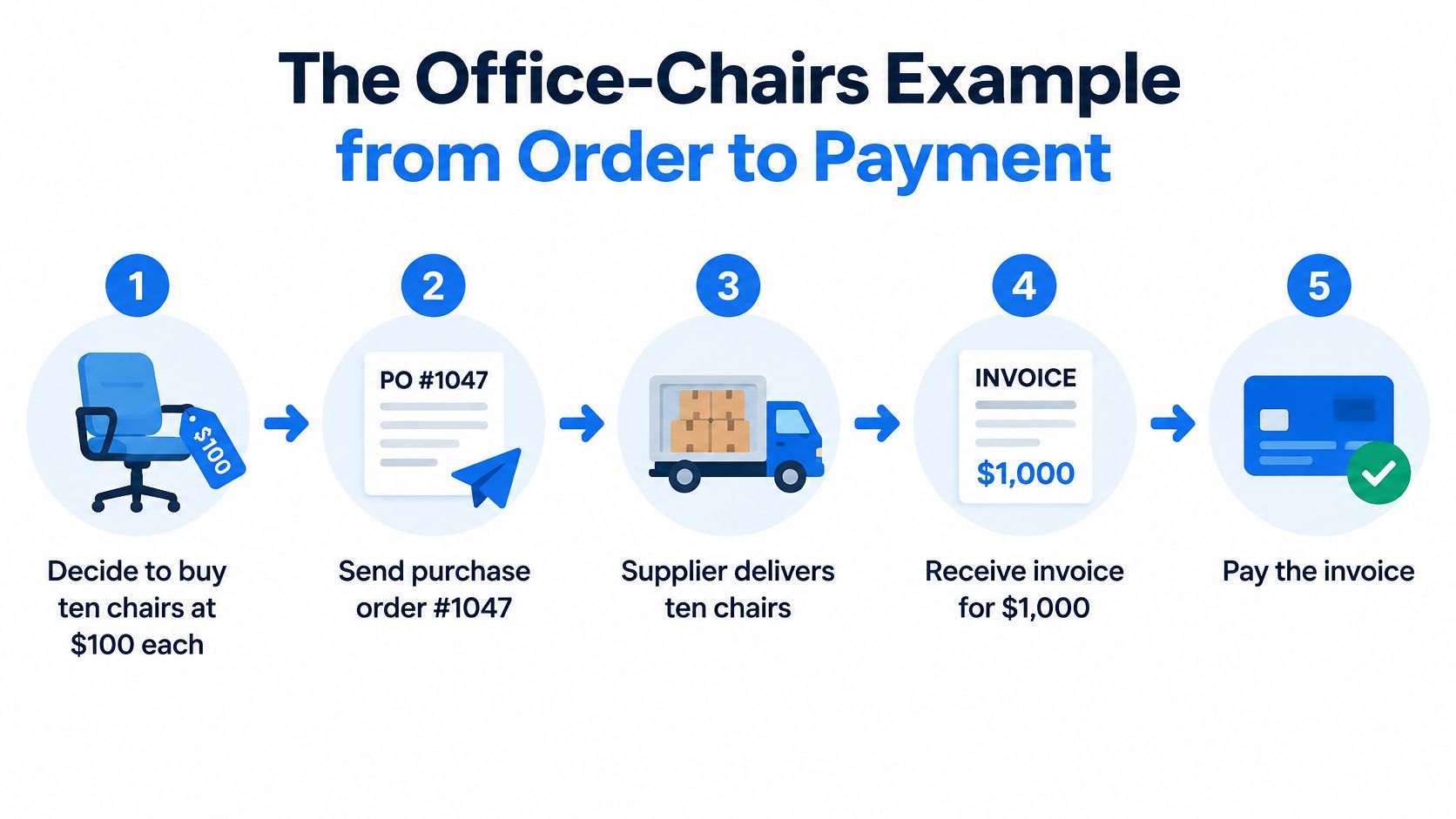
Say a business needs seating for a new office. It decides to buy ten chairs at $100 each and sends the supplier purchase order #1047.
A purchase order is created by the buyer before delivery to authorize and define a planned purchase, stating the supplier, item descriptions, quantities, agreed prices, delivery details and expected delivery date, per the Wise comparison of purchase orders and invoices. PO #1047 records the intended order and total expected spend of $1,000. No money has moved, and the supplier hasn't yet submitted a payment claim.
The supplier delivers and bills
Ten chairs arrive. The supplier then issues an invoice that references PO #1047 and carries its own invoice number, payment terms, due date and amount owed. This is the seller's document, created after delivery, and it says one thing: now pay us. Still no money has moved.
Finance checks, then pays
Accounts payable pulls up the PO, the receiving record and the invoice, then releases the payment. The only evidence that the payment happened is the $1,000 debit line that appears on the bank statement days later. That line may carry the PO number in its description if whoever sent the payment typed it into the reference field.
Three documents, three jobs. The PO authorizes, the invoice requests, the statement line proves.
The PO number is the thread stitched through all three. It sits on the order, on the invoice and, when the payment is made properly, inside the bank statement description where a search can find it. Without that thread you're matching a payment to a purchase on amount and supplier name alone, which fails the moment two orders look alike.
What Goes on a Purchase Order
A purchase order is a formal buyer-to-supplier instruction specifying the required goods or services, quantities, prices, delivery timing and commercial terms, according to SAP's documentation on purchase order processing. It sits at the start of the procure-to-pay workflow: an approved requisition becomes a PO, the supplier fulfils it, and accounts payable checks the invoice against it.
Read one closely and the fields sort into four groups, and each group does a different job. Some identify the order, some price it, some schedule it, and one records who allowed it.
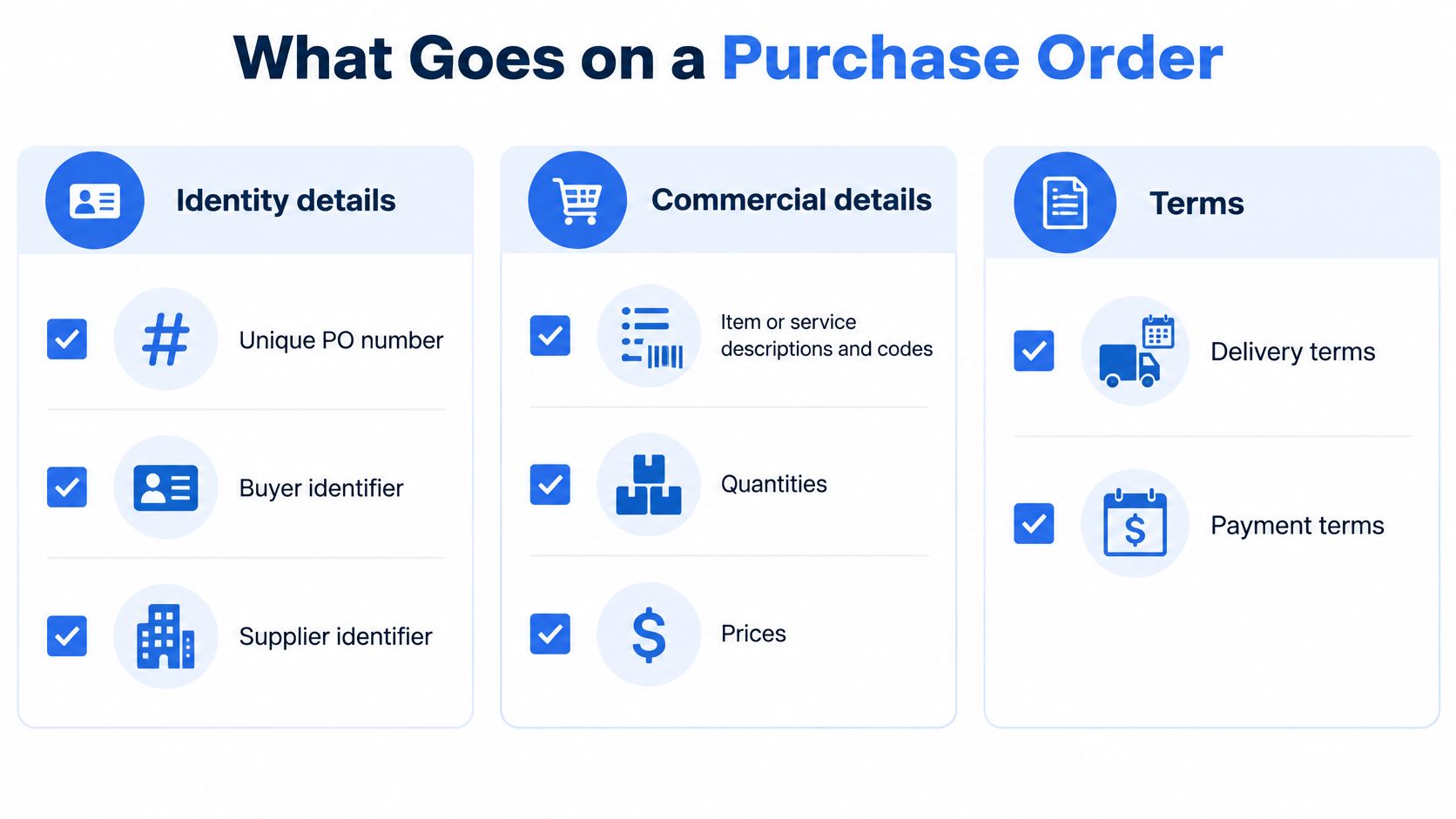
The four field groups that carry the control
- Identity details: a unique PO number plus buyer and supplier identifiers. The number is what every later document quotes back, so a single search can pull up the whole transaction.
- Commercial details: item or service descriptions and codes, quantities, unit prices, currency and tax treatment. Fixing these details before issue prevents many avoidable invoice disputes.
- Execution details: delivery address, shipping terms, expected delivery date and payment terms. These set the timetable that receiving and accounts payable work against.
- Approval status: the record that an authorized person signed off before spend was committed. This field enforces budget control and keeps ordering and approving in different hands.
The five checks before you commit spend
- PO number exists and is unique to this order.
- Supplier identifier matches the vendor record you'll pay.
- Item or service code, quantity and unit price are stated, not left to the invoice.
- Tax treatment and delivery terms are specified.
- Approval status shows sign-off from someone with the authority to give it.
Run those checks and the PO goes out complete enough to be matched against whatever comes back. A field left blank does not disappear. It resurfaces as a question on the invoice or a mismatch at payment, when fixing it costs a phone call instead of a keystroke.
What a PO Proves and What It Does Not
A purchase order shows an item, a price, a date and a signature, so it gets filed with the receipts as proof the money was spent. It proves the opposite end of the transaction. A PO records intent and authorization to buy before any money moved, and plenty of them are later cancelled, changed or partly fulfilled. An invoice proves you were billed. Only the statement line proves you paid.
Accounts payable teams use matching to stop those three claims from drifting apart. Microsoft's accounts payable training module sets out the routine:
- Two-way matching compares the PO with the supplier invoice, checking whether item descriptions, quantities and prices agree.
- Three-way matching adds the receiving report or goods-received record, so the team verifies not only what was ordered and billed but also what was received.
- Payment on agreement releases funds only when the invoice quantity and price match the PO within your tolerances and the received quantity supports what's being billed.
Match, then release. If the three documents disagree, the payment waits. Changing the PO to fit the invoice is how control failures get buried.
Here's the chairs test. PO #1047 asks for ten chairs at $100 each, but the receiving record shows eight chairs. Or the invoice charges $120 per chair against a $100 order. In either case payment should generally be held unless an authorized change explains the difference.
When the match fails
Real purchases produce mismatches that aren't fraud. A partial delivery lands in two shipments. The supplier substitutes a comparable model. Freight sits on the invoice but not the PO, or tax is calculated differently. A foreign supplier bills in another currency. A recurring service bills monthly against an annual PO, or a blanket PO is drawn down release by release.
Isolate timing and tax differences, investigate substitutions and short deliveries, and put unresolved discrepancies on hold rather than adjusting without review. The workflow matters more than the software: approve the purchase, issue the PO, record receipt, take in the invoice, compare, resolve, then authorize payment.
Matching is a necessary control, not a complete one. Document compliance can coexist with wider internal-control weaknesses, which is why segregation of duties and periodic risk review sit alongside it. For a fuller walkthrough of the mechanics, see how a three-way match works in practice.
Make Every Supplier Payment Easy to Reconcile
Everything above collapses into one habit: never send a supplier payment with an empty reference field. Type the PO number or the invoice number into the transfer reference, because that text survives all the way into the bank statement description line. Convert the statement to a spreadsheet and matching the payment to its purchase becomes a search of one column.
A PO creates an audit trail exactly this way, connecting the original purchasing decision to later receiving and payment records, as Bill's guide to purchase orders describes. The PO number should be carried onto the supplier invoice so accounts payable can trace a billed amount back to an approved request. Where the documents disagree, investigate before payment rather than changing the PO or accepting the invoice.
Matching on amount alone is fragile. Two suppliers can be owed the same sum in the same week, and statement descriptions often truncate supplier names or replace them with a payment processor's name. A unique number in the reference beats both.
One habit, repeated. The reference field costs you eight seconds and saves an hour at month end.
The monthly routine
- Put a PO number on every order, even small ones, so nothing needs reconstructing later.
- Require it on every supplier invoice before the bill enters the approval queue.
- Carry it into the payment reference on every transfer, without exception.
- Convert each bank statement PDF to CSV or Excel so the description column is searchable.
- Verify the arithmetic: opening balance plus credits minus debits must equal the closing balance.
- Search the description column to tie every payment back to its PO, then flag anything that won't tie.
Step four is the one we handle. We convert digital, scanned (via OCR) and password-protected PDF statements into CSV or Excel/XLSX, accept files up to 25 MB each with bulk upload, and offer a free guest preview before you pay. Password-protected files no longer stall the process.
Keep the whole chain, the PO, the invoice and the statement, and let the PO number tie it together. That's the difference between a folder of paper and a set of records you can defend. For the closing side of the same ledger, our guide to calculating your accounts payable balance shows how those validated invoices roll up.
When month end arrives, the purchase orders and invoices in your files only tell half the story until the bank statements confirm the rest. Autobankstatement converts digital, scanned and password-protected PDF statements into CSV or Excel/XLSX files, up to 25 MB each with bulk upload, and you can preview a conversion free before paying, so the PO numbers in your payment references become searchable rows you can reconcile in minutes. Visit autobankstatement and turn your next statement run into a reconciliation you can tie out.
Convert your next statement in minutes
Upload a bank statement PDF — digital, scanned, or password-protected — preview the extracted table, and download clean CSV or Excel.